An LCD mounted inside a Roland synthesizer

Reverse-Engineering A Display Protocol To Repair A Roland Synthesizer

Repairing electronic devices isn’t as hard as it used to be. Thanks to the internet, it’s easy to find datasheets and application notes for any standard component inside your gadget, and once you’ve found the faulty one, you simply buy a replacement from one of a million web shops — assuming you don’t end up with a fake, of course. When it comes to non-standard components, however, things get more difficult, as [dpeddi] found out when a friend asked him for help in repairing a Roland Juno-G synthesizer with a broken display.

The main issue here was the fact that the display in question was a custom design, with no replacement or documentation available. The only thing [dpeddi] could figure out from the service manual was the basic pinout, which showed a parallel interface with two lines labelled “chip select” — an indication that the display contained two separate controllers. But the exact protocol and data format was not documented, so [dpeddi] brought out his logic analyzer to try and decode the signals generated by the synthesizer.

After a bit of trial and error, he was able to figure out the protocol: it looked like the display contained two KS0713-type LCD controllers, each controlling one half of the screen. Finding a compatible replacement was still proving difficult, so [dpeddi] decided instead to decode the original signals using a microcontroller and show the picture on a modern LCD driven by SPI. After some intial experiments with an ESP32, it turned out that the task of reading two reasonably fast parallel buses and driving an even faster serial one was a bit too much for the ESP, so [dpeddi] upgraded to a Raspberry Pi Pico. This worked a treat, and thanks to a 3D-printed mounting bracket, the new display also fit snugly inside the Roland’s case.

The Pico’s code is available on [dpeddi]’s GitHub page, so if you’ve also got a dodgy display in your Juno-G you can simply download it and use it to plug in a brand-new display. However, the method of reverse-engineering an existing display protocol and translating it to that of a new one is pretty universal and should come in handy when working with any type of electronic device: say, a vintage calculator or multimeter, or even another synthesizer.


An acrylic map of the state of Lagos. Each region is lit a different color by LEDs shining on the acrylic panels. The colors coorespond to the air quality index key which is lit in cooresponding colors to the value.

Hackaday Prize 2022: This Interactive Air Quality Map Makes The Invisible Visible

Air quality can have a big impact on your health, but it isn’t always something you can see. [Ahmed Oyenuga] wanted to make air quality something more tangible and developed an Interactive Air Quality Map.

Using addressable LEDs and acrylic panels, [Oyenuga]’s map lights up different regions of his state (Lagos) with colors that correspond to qualitative values of the air quality readings. The color key on the edge of the map becomes a readout when you touch a specific region of the map.

Most of the map’s functionality is handled by an Arduino WiFi 1010, but the capacitive touch is running on a custom board [Oyenuga] designed with an ATSAMD21J17. [Oyenuga] is getting air quality data via a DesignSpark Environmental Sensor Development Kit (ESDK) and then uses reverse geocoding to take the GPS data and turn it into a location the map will understand.

If you’re interested in different options for monitoring air quality that could feed into a map like this, why don’t you check out this LoRa Air Quality Monitor or even a Mobile Air Quality Monitor.

Continue reading “Hackaday Prize 2022: This Interactive Air Quality Map Makes The Invisible Visible”

Don’t Miss The Philadelphia Maker Faire This Weekend

For readers in the American Northeast that are looking for something to do this weekend, may we humbly suggest a day trip to attend the 2022 Philadelphia Maker Faire on Saturday, October 15th. After taking the last two years off due to COVID-19, the event has moved to the Independence Seaport Museum for its grand return, and is sure to attract plenty of hackers and makers who are eager to show off their pandemic projects.

Of course, the nature of these events is that you never really know what you’re going to see until you actually get there. But just browsing the list of confirmed projects that will have dedicated tables set up, we can tell there’s some very interesting stuff on tap — from fighting robots and hologram printers, to plasma physics and electric hydrofoils. While the deadline to submit projects for official inclusion has long since passed, we can tell you from experience that’s not going to stop folks from showing up with their own gadgets to show off to the captive audience. Especially if they’re of the wearable variety; it’s not really a Maker Faire unless somebody is wearing something that’s blinking.

Olympia and Becuna

Naturally the Faire itself is obviously the main event, but don’t forget that the Independence Seaport Museum itself is worth checking out while you’re there. You can tour the 130-year-old USS Olympia, as well as the USS Becuna, one of the last surviving WWII Balao-class submarines.

While the community might never truly recover from the loss of the flagship Maker Faires in New York and California, we do take some comfort in knowing that smaller regional shows like this one have been growing over the last few several years. They’re not only a great way to connect with like-minded folks in your area, but can help you connect with maker-friendly vendors and organizations which you might otherwise be unaware of.

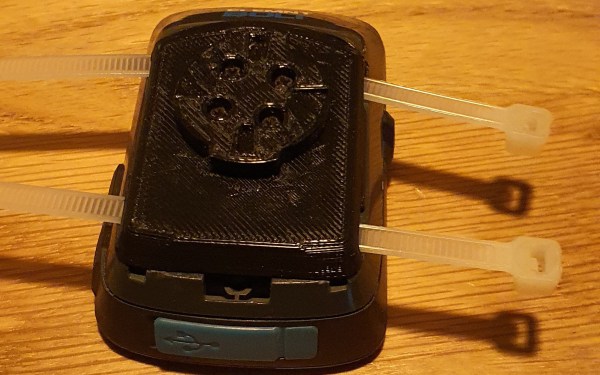
A bike computer sits on a wooden background. The back of the bike computer has a 3D printed attachment with two white translucent zip ties running through the back.

Repairing A Bike GPS With 3D Printing

We love hacks that keep gadgets out of the trash heap, and [Brieuc du Maugouër] has us covered with this 3D printable replacement mount he designed for his bike GPS.

One of the most frustrating ways a gadget can fail is when a small, but critical part of the device fails. [du Maugouër] combined a 3D printed back and four M2x6mm screws to make a robust new mount to replace the broken OEM mount on his handlebar-mounted GPS. Slots for zip tie mounting are included in case the replacement mount breaks before yet another replacement can be printed. Apparently [du Maugouër] agrees with Chief O’Brien that “in a crunch, I wouldn’t like to be caught without a second backup.” [Youtube]

It’s exciting that we’re finally in a time when 3D printed replacement parts are living up to their potential. This would be a lot easier if more manufacturers posted 3D printed design files instead of getting them pulled from 3D file platforms, but makers will find a way regardless of OEM approval.

We’ve covered a lot of bike hacks over the years including DIY Bike Computers and GPS Trackers. Do you have a project that keeps something from becoming trash or might save the world another way? There’s still time to enter the Save the World Wildcard round of the Hackaday Prize (closes October 16th).

Ugliest Airplane Ever Built Predicted The Future

The airplane that many called “the flying barrel” is also widely considered the ugliest plane ever built. However, [Dark Skies] in the video you can see below argues that the Stipa-Caproni was the direct predecessor of the turbofan engine. Either way, it is an interesting and unique part of aviation history.

The plane was built in the days when inventors were experimenting with many different ways to improve aircraft utility and performance. In this case, the inventor built an “intubated propellor” which used a prop to draw air through a venturi tube in an effort to improve engine efficiency. The 570kg vehicle had a wingspan of just over 14 meters and was a bit more than 6 meters long. It could reach about 72 knots and climb to over 3 km.

Continue reading “Ugliest Airplane Ever Built Predicted The Future”

24 Hours Of Le Airplanes

There’s no more famous road endurance race than the 24 Hours of Le Mans, where teams compete to see how far they can drive in a single 24-hour window. The race presents unique challenges not found in other types of racing. While RC airplanes may not have a similar race, [Daniel] a.k.a. [rctestflight] created a similar challenge for himself by attempting to fly an RC airplane non-stop for as long as he could, and a whole host of interesting situations cropped up before and during flight.

In order for an RC plane to fly for an entire day, it essentially needs to be solar powered. A large amount of strategy goes into a design of this sort. For one, the wing shape needs to be efficient in flight but not reduce the amount of area available for solar panels. For another, the start time of the flight needs to be balanced against the position of the sun in the sky. With these variables more or less fixed, [Daniel] began his flight.

It started off well enough, with the plane in an autonomous “return to home” mode which allowed it to continually circle overhead without direct human control. But after taking a break to fly it in FPV mode, [Daniel] noticed that the voltage on his battery was extremely high. It turned out that the solar charge controller wasn’t operating as expected and was shunting a large amount of solar energy directly into the battery. He landed and immediately removed the “spicy pillow” to avoid any sort of nonlinear event. With a new battery in the plane he began the flight again.

Even after all of that, [Daniel] still had some issues stemming from the aerodynamic nature of this plane specifically. There were some issues with wind, and with the flight controller not recognizing the correct “home” position, but all in all it seems like a fun day of flying a plane. If your idea of “fun” is sitting around and occasionally looking up for eight and a half hours. For more of [Daniel]’s long-term autonomous piloting, be sure to take a look at his solar tugboat as well.

Continue reading “24 Hours Of Le Airplanes”

Hackaday Podcast 186: Weighing Cats, Slamming VU Meters, Slimmer Skimmers, And Clean Air On The Cheap

Hackaday Editor-in-Chief Elliot Williams took time out from Supercon planning to join Staff Writer Dan Maloney for a look through the hacking week that was. We always try to keep things light, but it’s hard sometimes, especially when we have to talk about wars past and present and the ordnance they leave behind. It’s also not a lot of fun to talk about a continent-wide radio outage thanks to our angry Sun, nor is learning that a wafer-thin card skimmer could be lurking in your ATM machine.

But then again, we did manage to have some fun by weighing cats to make sure they’re properly fed, and making music by pegging VU meters. We also saw how to use PCBs to make a beautiful yet functional circuit sculpture, clean up indoor air on a budget, and move microns with hardware store parts. And we also got to celebrate a ray of international hope by looking back on the year that taught us much of what we know about the Earth.

Check out the links below if you want to follow along, and as always, tell us what you think about this episode in the comments!

Direct download here!

Continue reading “Hackaday Podcast 186: Weighing Cats, Slamming VU Meters, Slimmer Skimmers, And Clean Air On The Cheap”