
Hackaday 10th Anniversary: Wrap-up

A little more than a month ago we saw the 10 year anniversary of the first Hackaday post ever, and last week we had a little get together in Pasadena to celebrate the occasion. Everyone had a great time, building tiny line-following robots and LiPo chargers, listening to some great talks, and in the evening we all had a lot of fun emptying some kegs. We couldn’t ask for a better crowd, and we thank everyone who came (and those of you who watched everything on the livestream) for participating.

As far as specific people go, we need to thank [charliex], [arko] and everyone else from Null Space Labs for helping out with the weird rotary encoder two-player version of Duck Hunt. The folks from Crashspace were also there, helping out and lending a steady hand and hot soldering iron during the workshops. Shoutouts also go to [datagram] and [jon king] for running the lockpicking workshop, and [Todd Black] deserves a mention for his lithium battery charger workshop. All the speakers deserve to be mentioned again, and you can check out a playlist of their talks below:
Continue reading “Hackaday 10th Anniversary: Wrap-up”

camera dolly

Timelapse Photography On An Android-Powered Dolly

If you’re heading off on a trip to Alaska, you need to make sure you have plenty of supplies on hand for the wilderness that awaits. If you’re [Bryce], that supply list includes some interesting photography equipment, including a camera dolly that he made to take time-lapse video of the fantastic scenery.

On the hardware side, the dolly carries the camera on a rail that is set up on a slant. The camera starts on one side and moves up and towards the otherside which creates a unique effect in the time-lapse. The rig is driven by a stepper motor, and rides on some pretty fancy bearings. The two cameras [Bryce] plans to use are a Canon T2i and a EOS-M which sit on the top from a tripod.

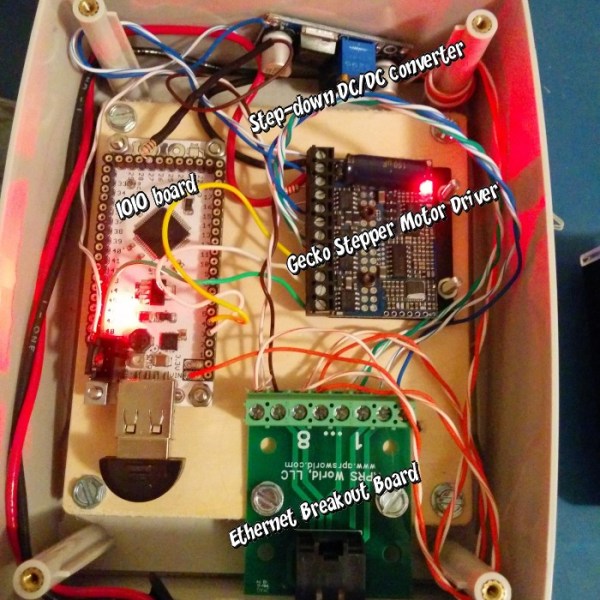
The software and electronics side is interesting as well. Instead of the usual Arduino, [Bryce] opted for controlling the rig through Android and a IOIO board. This gives the project a lot of options for communications, including Bluetooth. The whole thing is powered by a 19V battery pack. If you’re looking for something a little simpler, you might want to check out the egg timer for time lapse! Check out the video of [Bryce]’s rig in action after the break.

Continue reading “Timelapse Photography On An Android-Powered Dolly”

Home Automation

Home Automation With A Custom Wireless Sensor Network

We’re no strangers to home automation projects around here, but it’s not often that you see one described in this much detail. [Paul] designed a custom home automation system with four teammates for an undergraduate thesis project.

The system is broken into two main components; the server and the peripherals. The team designed their peripherals from early prototypes of an upcoming ArduIMU v4 measurement unit. They removed all of the default sensors to keep costs down and reduce assembly time. The units can them be hooked up to various peripherals such as temperature sensors, mains relays, RGB color strips, etc.

The central management of the system is performed using a web-based user interface. The web server runs on Java, and interacts with the peripherals wirelessly. Basic messages can be sent back and forth to either read the state of the peripherals or to change the state. As far as the user is concerned, these messages appear as simple triggers and actions. This makes it very simple to program the peripherals using if, then, else logic.

The main project page is a very brief summary of what appears to be a very well documented project. The team has made available their 182 page final report (pdf), which goes into the nitty-gritty details of the project. Also, be sure to watch the demonstration video below. Continue reading “Home Automation With A Custom Wireless Sensor Network”

DIY Optoisolator

MacGyvered Optoisolator Is A Great Introduction

Sometimes the best way to learn about a technology is to just build something yourself. That’s what [Dan] did with his DIY optoisolator. The purpose of an optoisolator is to allow two electrical systems to communicate with each other without being electrically connected. Many times this is done to prevent noise from one circuit from bleeding over into another.

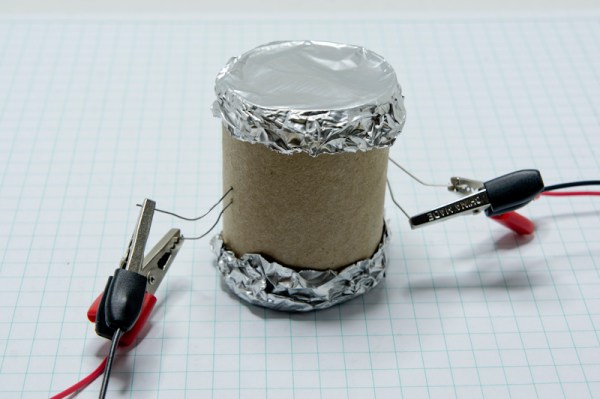
[Dan] built his incredibly simple optoisolator using just a toilet paper tube, some aluminum foil, an LED, and a photo cell. The electrical components are mounted inside of the tube and the ends of the tube are sealed with foil. That’s all there is to it. To test the circuit, he configured an Arduino to send PWM signals to the LED inside the tube at various pulse widths. He then measured the resistance on the other side and graphed the resulting data. The result is a curve that shows the LED affects the sensor pretty drastically at first, but then gets less and less effective as the frequency of the signal increases.

[Dan] then had some more fun with his project by testing it on a simple temperature controller circuit. An Arduino reads a temperature sensor and if the temperature rises above a certain value, it turns on a fan to cool the sensor off again. [Dan] first graphed the sensor data with no fan hooked up. He only used ambient air to cool things down. The resulting graph is a pretty smooth curve. Next he hooked the fan up and tried again. This time the graph went all kinds of crazy. Every time the fan turned on, it created a bunch of electrical noise that prevented the Arduino from getting an accurate analog reading of the temperature sensor.

The third test was to remove the motor circuit and move it to its own bread board. The only thing connecting the Arduino circuit to the fan was a wire for the PWM signal and also a common ground. This smoothed out the graph but it was still a bit… lumpy. The final test was to isolate the fan circuit from the temperature sensor and see if it helped the situation. [Dan] hooked up his optoisolator and tried again. This time the graph was nice and smooth, just like the original graph.

While this technology is certainly not new or exciting, it’s always great to see someone learning by doing. What’s more is [Dan] has made all of his schematics and code readily available so others can try the same experiment and learn it for themselves.

Ask Hackaday: Who Is Going To Build This Pneumatic Transmission Thing?

fluid_transmission

Disney research is doing what they do best, building really cool stuff for Disney and telling the rest of the world how cool they are. This time, it’s a very low friction fluid transmission device designed for animatronics.

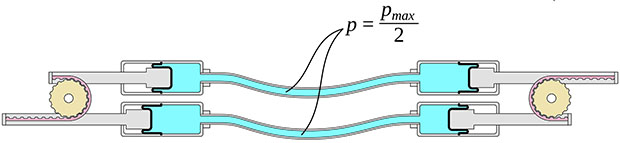
From testing a few toy robotic arms, we can say without a doubt that servos and motors are not the way to go if you’re designing robots and animatronics that need lifelike motion. To fix this, a few researchers at Disney Pittsburgh have turned to pneumatics and hydraulics, where one joint is controlled by two sets of pistons. It’s extremely similar to the pneumatic LEGO, but more precise and much more lifelike.

The system uses a pair of cylinders on each joint of a robot. Disney is using a rolling diaphragm to seal the working fluid in its tubes and cylinders. This is an extremely low-friction device without any shakiness or jitters found with simple o-ring pneumatics and hydraulics.

The system is backdriveable, meaning one robotic arm can control another, and the other way around. Since we’re dealing with hydraulics, the cylinders (and robotic/animatronic devices) don’t need to be the same size; a small device could easily control a larger copy of itself, and vice versa.

The devices are fairly simple, with gears, toothed belts, and bits of plastic between them. The only unique part of these robots is the rolling diaphragm, and we have no idea where to source this. It looks like it would be great for some robotics or an Iron Man-esque mech suit, but being able to source the components will be a challenge.

You can check out the videos of these devices below, and if you have any idea on how to build your own, leave a note in the comments.

Continue reading “Ask Hackaday: Who Is Going To Build This Pneumatic Transmission Thing?”

10th Anniversary Trinket Pro Now In The Hackaday Store

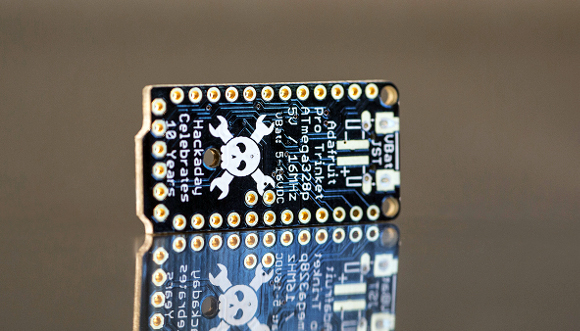
Black solder mask and proudly sporting the Jolly Wrencher? The 10th Anniversary Trinket Pro boards just hit the Hackaday Store.

These were actually the suggestion of [Phil Torrone]. He founded Hackaday way back in 2004 and is now CEO of Adafruit Industries. Shortly after I asked him to record a remembrance of his time at Hackaday for the anniversary party he suggested these boards (normally blue and missing our logo) as a limited-edition for the event. It took just two weeks for them to crank out 585 of them.

I’m most likely biased for many reasons. Obviously I like putting the skull and wrenches on everything, and black solder mask is just cool. I also adore the ATmega328 (my 8-bit go-to chip for prototyping) and am especially fond of this form factor as it makes for super simple on-the-go firmware coding.

Once we sell 560 of them they will never return. We’re betting that Adafruit will have an even better minuscule breakout board for our 25th Anniversary. Do you think quantum computing will have trickled down to the single-chip prototyping stage by then?

Update: We’ve updated shipping rates on the store. Orders over $25 in the USA now have free shipping. International shipping is free for orders over $50. We will continue to try and reduce shipping rates as much as possible. We’re new to this so stay tuned!

A Mobile Radio Power Controller

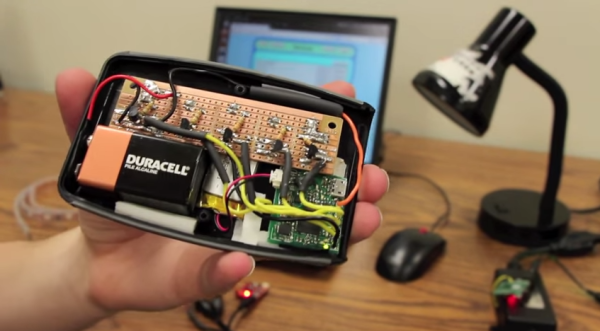
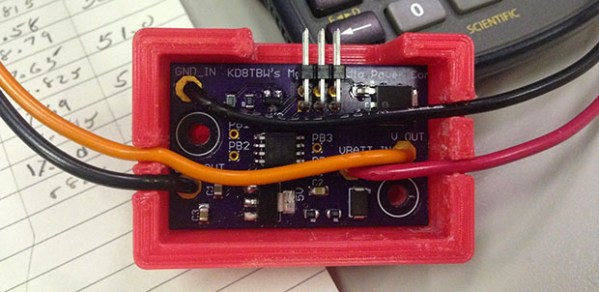
[Pete], a.k.a. [KD8TBW] wanted to install his Yaesu radio in his car. From experience, he knew that having a radio in a car inevitable led to leaving it on once in a while, and this time, he wanted a device that would turn his rig on and off when the key was in the ignition. He ended up building a mobile radio power converter. It takes the 12V from the car when the alternator is running, and shuts everything off when the engine has stopped.

The Yaesu radio in question – an FT-8800 does have an automatic power off feature, but this is a terrible way of doing things. There is no way to turn the radio back on, and the radio must be left in a non-scanning mode.

In what he hopes to be his last design in EagleCAD, [Pete] whipped up a board featuring an ATtiny85 that measures the voltage in the car; when it’s ~14V, the alternator is working, and the radio can be switched on. When it drops to ~12V, it’s time to turn the radio off. It’s a great project, and with the 3D printed case, it can easily be shoved inside the console. Video below.

Continue reading “A Mobile Radio Power Controller”