Firmware Factory: Bit Fields Vs Shift And Mask

Working with embedded systems usually involves writing code which will interface with hardware. This often means working on the register level. It doesn’t matter if we’re talking about a UART, an analog to digital converter, an LCD controller, or some other gizmo. Sooner or later, you’re going to have to break out the datasheets and figure out how to talk to an external device. To succeed at this you must become a master of bit manipulation.

Hardware designers don’t like wasting space, so modes, settings and other small pieces of information are often stored as packed bits. Our processors usually access things a byte (or a word) at a time, so what is the best way to handle this? Like so many other topics in software engineering, there are multiple ways to skin this cat. In C (and its derivatives) there are two major options: shift and mask, and bit fields.

Continue reading “Firmware Factory: Bit Fields Vs Shift And Mask”

Learning Verilog For FPGAs: Hardware At Last!

Getting into FPGA design isn’t a monolithic experience. You have to figure out a toolchain, learn how to think in hardware during the design, and translate that into working Verliog. The end goal is getting your work onto an actual piece of hardware, and that’s what this post is all about.

In the previous pair of installments in this series, you built a simple Verilog demonstration consisting of an adder and a few flip flop-based circuits. The simulations work, so now it is time to put the design into a real FPGA and see if it works in the real world. The FPGA board we’ll use is the Lattice iCEstick, an inexpensive ($22) board that fits into a USB socket.

Like most vendors, Lattice lets you download free tools that will work with the iCEstick. I had planned to use them. I didn’t. If you don’t want to hear me rant about the tools, feel free to skip down to the next heading.

Continue reading “Learning Verilog For FPGAs: Hardware At Last!”

You Own Your MRI Brainscan; Do Something Interesting With It

The most complicated and fascinating gadget you will ever own is your brain. Why not pay tribute to this wonder by creating a 3D scale model that you can print yourself? If you have had a full-head MRI scan, it is simple to take this data and create a 3D model that you can print out on any 3D printer. Here’s how to print your brain.

To begin, you are going to need an MRI scan. Unfortunately, the low-field MRI that [Peter Jansen] is working on won’t quite cut it (yet): you’ll have to get the pros to do it. The type of scan also matters, because we want a scan that focusses in on the brain itself, not the bits around it. What type you get depends on what your doctor wants to know, as the radiologist can run a lot of different scans and analysis of the data to show different types of tissue. After looking through the scans that I got, I settled on one that was labelled eB1000i(BRAIN) With and Without Contrast. To a radiologist, that information means a lot, telling you what type of scan it is, and that it was done with a contrast agent, a metal dye that is injected to make water-rich tissues (like my brain) more visible. The number refers to something called the diffusion weighting, which helps the doctor look for swelling that can indicate things like strokes, tumors, etc. There’s a good guide to some of the jargon here.

Continue reading “You Own Your MRI Brainscan; Do Something Interesting With It”

Learning Verilog For FPGAs: Flip Flops

Last time I talked about how to create an adder in Verilog with an eye to putting it into a Lattice iCEstick board. The adder is a combinatorial circuit and didn’t use a clock. This time, we’ll finish the demo design and add two clocked elements: a latch that remembers if the adder has ever generated a carry and also some counters to divide the 12 MHz clock down to a half-second pulse to blink some of the onboard LEDs.

Why Clocks?

Clocks are an important part of practical digital design. Suppose you have a two input AND gate. Then imagine both inputs go from zero to one, which should take the output from zero to one, also. On paper, that seems reasonable, but in real life, the two signals might not arrive at the same time. So there’s some small period of time where the output is “wrong.” For a single gate, this probably isn’t a big deal since the delay is probably minuscule. But the errors will add up and in a more complex circuit it would be easy to get glitches while the inputs to combinatorial gates change with different delays.

Continue reading “Learning Verilog For FPGAs: Flip Flops”

Learning Verilog For FPGAs: The Tools And Building An Adder

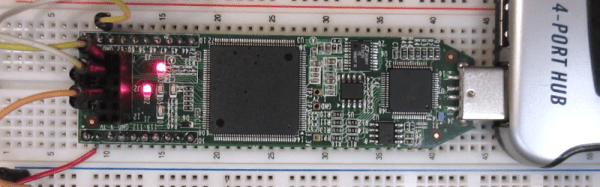
Over the last year we’ve had several posts about the Lattice Semiconductor iCEstick which is shown below. The board looks like an overgrown USB stick with no case, but it is really an FPGA development board. The specs are modest and there is a limited amount of I/O, but the price (about $22, depending on where you shop) is right. I’ve wanted to do a Verilog walk through video series for awhile, and decided this would be the right target platform. You can experiment with a real FPGA without breaking the bank.

In reality, you can learn a lot about FPGAs without ever using real hardware. As you’ll see, a lot of FPGA development occurs with simulated FPGAs that run on your PC. But if you are like me, blinking a virtual LED just isn’t as exciting as making a real one glow. However, for the first two examples I cover you don’t need any hardware beyond your computer. If you want to get ready, you can order an iCEstick and maybe it’ll arrive before Part III of this series if published.

Continue reading “Learning Verilog For FPGAs: The Tools And Building An Adder”

Embed With Elliot: The Volatile Keyword

Last time on Embed with Elliot we covered the static keyword, which you can use while declaring a variable or function to increase the duration of the variable without enlarging the scope as you would with a global variable. This piqued the curiosity of a couple of our readers, and we thought we’d run over another (sometimes misunderstood) variable declaration option, namely the volatile keyword.

On its face, volatile is very simple. You use it to tell the compiler that the declared variable can change without notice, and this changes the way that the compiler optimizes with respect to this variable. In big-computer programming, you almost never end up using volatile in C. But in the embedded world, we end up using volatile in one trivial and two very important circumstances, so it’s worth taking a look.

Continue reading “Embed With Elliot: The Volatile Keyword”

Becoming A State Machine Design Mastermind

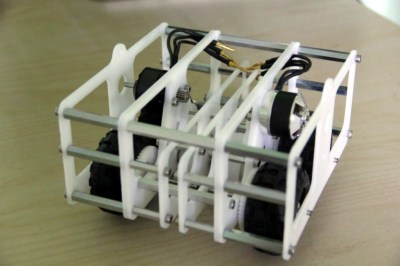
Imagine a robot with an all-around bump sensor. The response to the bump sensor activating depends on the previous state of the robot. If it had been going forward, a bump will send it backwards and vice versa. This robot exhibits behavior that is easy to model as a state machine. That is, the outputs of the machine (motor drive) depend not only on the inputs (the bump sensor) but also on the current state of the machine (going forward or backward).

As state machines go, that’s not an especially complicated one. Many state machines have lots of states with complex conditions. For example, consider a phone switchboard. The reaction to a phone going off hook depends on the state of the line. If the state is ringing, picking up the phone makes a connection. If the state is idle, the phone gets a dial tone. The switchboard also has to have states for timeouts, connection failures, three way calling, and more.

If you master state machines your design and debug cycles will both move along faster. Part of this is understanding and part is knowing about the tools you can choose to use. I’ll cover both below.

Continue reading “Becoming A State Machine Design Mastermind”