Taking Photos With Scotch Tape Instead Of A Lens

Typically, when we want to take images, we use an image sensor paired with some sort of lens assembly to make a picture that’s sharply in focus. However, [okooptics] is here to show us there’s another way—using Scotch tape in place of a typical lens element.

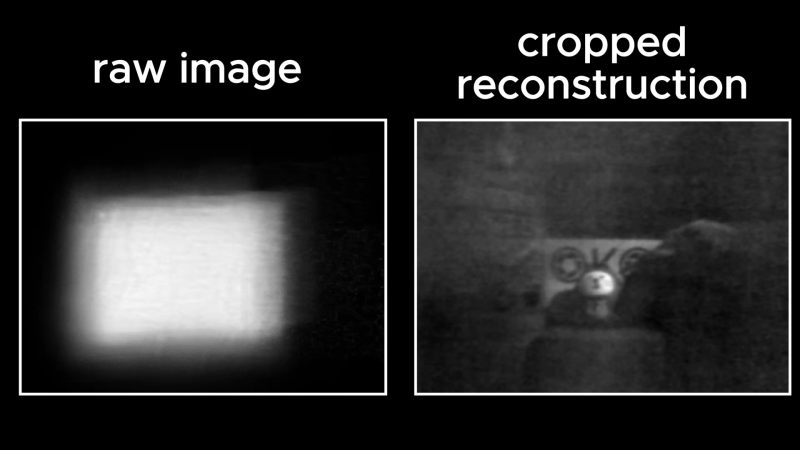
If you just put Scotch tape over an image sensor without a lens, you’ll just get a blurry image, whatever you point it at. With the right algorithms, though, it’s possible to recover an image from that mess, using special “lensless imaging” techniques. In particular, [okooptics] shows how to recreate the so-called coded aperture techniques which were previously demonstrated in [Laura Waller]’s DiffuserCam paper.

It’s complicated stuff, but the video does a great job of breaking down the optics into understandable chunks. Armed with a Raspberry Pi HQ camera covered in a small amount of Scotch and electrical tape, [okooptics] is able to reconstruct a viable image from what initially looks like a blurry mess of nothingness, with the aid of the right deconvolution maths. It’s all about understanding the point spread function of the tape versus a regular lens, and figuring out how to fight off noise when reconstructing the image.

We’ve featured previous work from [okooptics] before, too, like this impressive demonstration of light transport and reconstruction. Video after the break.

Continue reading “Taking Photos With Scotch Tape Instead Of A Lens”
The Raspberry Pi As A Studio Camera

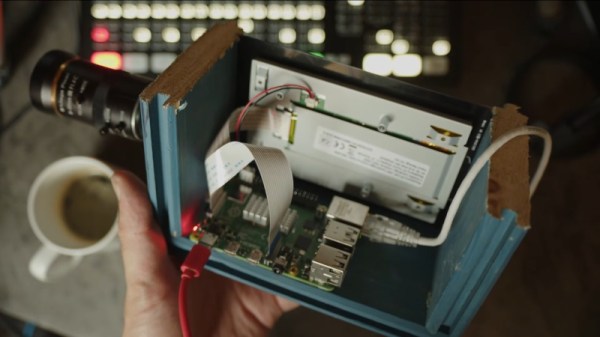
The Raspberry Pi has brought digital camera experimentation within the reach of everybody, with its combination of an accessible computing platform and some almost-decent camera sensors. If there’s a flaw in the Pi as a camera though, it lies in the software, which can be slow and frustrating to use. [Martijn Braam] is here with an interesting project that might yield some useful results in this direction, he’s making a Raspberry Pi studio camera.

His camera hardware is very straightforward, a Pi 5 and touchscreen with the HD camera module in a rough but serviceable wooden box. The interesting part comes in the software, in which he’s written a low-latency GUI over an HDMI output camera application. It’s designed to plug into video mixing hardware, and one of the HDMI outputs carries the GUI while the other carries the unadulterated video. We can see this used to great effect with for example OBS Studio. It’s for now a work in progress as you can see in the video below the break, but we expect that it can only get better.

The video below exposes the obvious flaw in many Pi camera setups, that the available lenses don’t match the quality of the sensor, in that good glass ain’t cheap. But we think it’s one to watch, and could provide competition for CinePi.

Continue reading “The Raspberry Pi As A Studio Camera”

A Computer That Fits Inside A Camera Lens

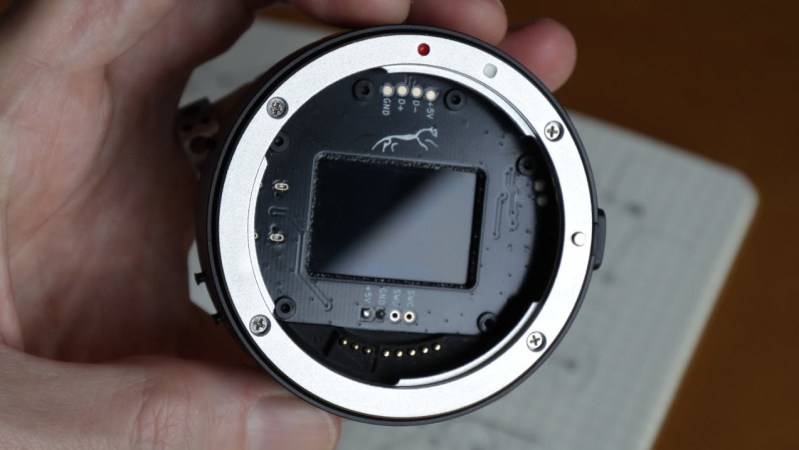
For a long while, digital single-lens reflex (DSLR) cameras were the king of the castle for professional and amateur photography. They brought large sensors, interchangeable lenses, and professional-level viewfinders to the digital world at approachable prices, and then cemented their lead when they started being used to create video as well. They’re experiencing a bit of a decline now, though, as mirrorless cameras start to dominate, and with that comes some unique opportunities. To attach a lens meant for a DSLR to a mirrorless camera, an adapter housing must be used, and [Ancient] found a way to squeeze a computer and a programmable aperture into this tiny space.

The programmable aperture is based on an LCD screen from an old cell phone. LCD screens are generally transparent until their pixels are switched, and in most uses as displays a backer is put in place so someone can make out what is on the screen. [Ancient] is removing this backer, though, allowing the LCD to be completely transparent when switched off. The screen is placed inside this lens adapter housing in the middle of a PCB where a small computer is also placed. The computer controls the LCD via a set of buttons on the outside of the housing, allowing the photographer to use this screen as a programmable aperture.

The LCD-as-aperture has a number of interesting uses that would be impossible with a standard iris aperture. Not only can it function as a standard iris aperture, but it can do things like cycle through different areas of the image in sequence, open up arbitrary parts or close off others, and a number of other unique options. It’s worth checking out the video below, as [Ancient] demonstrates many of these effects towards the end. We’ve seen some of these effects before, although those were in lenses that were mechanically controlled instead.

Continue reading “A Computer That Fits Inside A Camera Lens”

Storing Image Data As Analog Audio

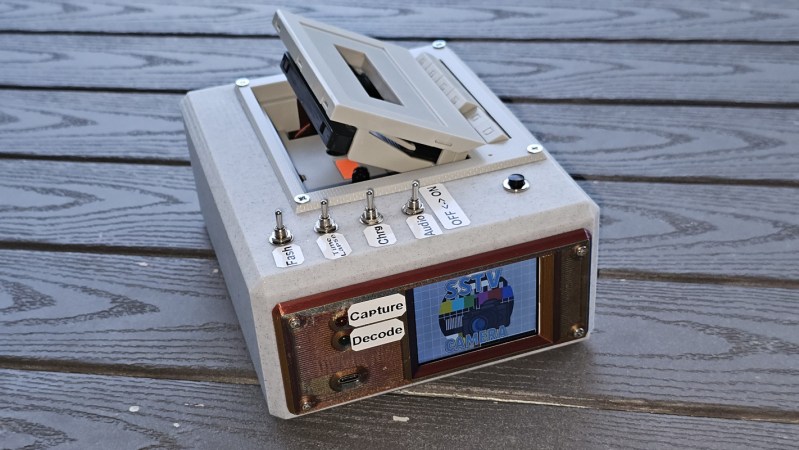
Ham radio operators may be familiar with slow-scan television (SSTV) where an image is sent out over the airwaves to be received, decoded, and displayed on a computer monitor by other radio operators. It’s a niche mode that isn’t as popular as modern digital modes like FT8, but it still has its proponents. SSTV isn’t only confined to the radio, though. [BLANCHARD Jordan] used this encoding method to store digital images on a cassette tape in a custom-built tape deck for future playback and viewing.

The self-contained device first uses an ESP32 and its associated camera module to take a picture, with a screen that shows the current view of the camera as the picture is being taken. In this way it’s fairly similar to any semi-modern digital camera. From there, though, it starts to diverge from a typical digital camera. The digital image is converted first to analog and then stored as audio on a standard cassette tape, which is included in the module in lieu of something like an SD card.

To view the saved images, the tape is played back and the audio signal captured by an RP2040. It employs a number of methods to ensure that the reconstructed image is faithful to the original, but the final image displays the classic SSTV look that these images tend to have as a result of the analog media. As a bonus feature, the camera can use a serial connection to another computer to offload this final processing step.

We’ve been seeing a number of digital-to-analog projects lately, and whether that’s as a result of nostalgia for the 80s and 90s, as pushback against an increasingly invasive digital world, or simply an ongoing trend in the maker space, we’re here for it. Some of our favorites are this tape deck that streams from a Bluetooth source, applying that classic cassette sound, and this musical instrument which uses a cassette tape to generate all of its sounds.

Kodak MC3: Everything But A Phone In 2001

One of the constants in consumer electronics is that designers will try to put as many features into a single device as possible, whether it’s a Walkman with a radio tuner or a new class of devices that crams a photo and video camera in the same enclosure as a music player. At the time that the Kodak MC3 was released this made it a rather unique device, with it in hindsight being basically a smartphone without the phone, as [Tech Tangents] aptly notes in his recent video on the device.

Six years before Apple’s iPhone would be announced, and eight years before the first iPod with a video camera, the Kodak MC3 was in many respects bleeding edge technology targeted straight at tech enthusiasts. For less than $300 you got VGA-quality images, CompactFlash storage, and MP3 playback capability. The videos it produced were 320×240 resolution, h.263 encoded MOVs with a maximum length of 4 seconds at 20 FPS, or 4 minutes with a 64 MB CF card.

The unit that [Tech Tangents] got used came with a 128 MB CF card, but couldn’t use a 2 GB CF card, which is a shame. The screen on it got a lot of flak for not not having a backlight, but this was common for the era, as were the poor viewing angles. Ditto for the poor video quality, as anyone who invested in consumer digital cameras in the early 2000s can attest to. In that respect this Kodak device was probably a bit too ambitious with its features for the era, maybe to compensate for it completely missing the boat on the rise of digital camera technology around the time.

Continue reading “Kodak MC3: Everything But A Phone In 2001”

The Surprising Hackability Of A Knock-Off Chinese Toy Camera

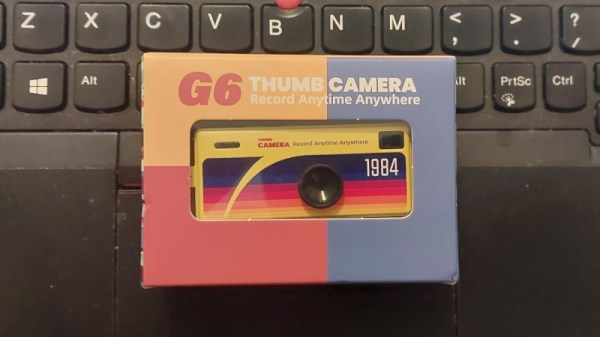
My colleague Lewin on the other side of the world has recently bought himself a new camera. It’s a very cute little thing, a Kodak Charmera, the latest badge-engineered device to carry the venerable photography company’s name. It’s a keyring camera, not much bigger than my thumb, and packing a few-megapixel sensor and a little fixed-focus camera module. They’re all the rage and thus always sold out, so when I saw something similar on AliExpress for just under a tenner I was curious enough to drop in an order. How bad could it be?

A Blatant-Knock-Off With Interesting Internals

My G6 Thumb Camera arrived a few days later, as straightforward a copy of a branded product as I have seen, and while it’s by any measure not a high quality camera, I am pleasantly surprised how bad it isn’t. I’ve received a three megapixel camera with image and movie quality that’s far better than that of the kids toy cameras I’ve played with before at a similar price, and that’s something I find amazing. This isn’t a review of a cheap camera, instead it’s an investigation of what goes into a camera like this one. How can they make a camera that’s almost useful, for under a tenner? Continue reading “The Surprising Hackability Of A Knock-Off Chinese Toy Camera”

Ask Hackaday: How Do You Digitize Your Documents?

Like many of you, I have a hard time getting rid of stuff. I’ve got boxes and boxes of weirdo bits and bobs, and piles of devices that I’ll eventually get around to stripping down into even more bits and bobs. Despite regular purges — I try to bring a car-load of crap treasure to local hackerspaces and meetups at least a couple times a year — the pile only continues to grow.

But the problem isn’t limited to hardware components. There’s all sorts of things that the logical part of me understands I’ll almost certainly never need, and yet I can’t bring myself to dispose of. One of those things just so happens to be documents. Anything printed is fair game. Could be the notes from my last appointment with the doctor, or fliers for events I attended years ago. Doesn’t matter, the stacks keep building up until I end up cramming it all into a box and start the whole process starts over again.

I’ve largely convinced myself that the perennial accumulation of electronic bric-à-brac is an occupational hazard, and have come to terms with it. But I think there’s a good chance of moving the needle on the document situation, and if that involves a bit of high-tech overengineering, even better. As such, I’ve spent the last couple of weeks investigating digitizing the documents that have information worth retaining so that the originals can be sent along to Valhalla in my fire pit.

The following represents some of my observations thus far, in the hopes that others going down a similar path may find them useful. But what I’m really interested in is hearing from the Hackaday community. Surely I’m not the only one trying to save some storage space by turn piles of papers into ones and zeros.

Continue reading “Ask Hackaday: How Do You Digitize Your Documents?”