Irrigation is a fairly crude practice. Sure, there are timers, and rain sensors, but all in all we’re basically dumping water on the ground and guessing at the right amount. [Reinier van der Lee] wanted a better way to ensure the plants in his vineyard are getting the right amount of water. And this is Goldilocks’ version of “right”, not too little but also not too much. Southern California is in an extreme/exceptional drought. Water costs a lot of money, but it is also scarce and conservation has a wider impact than merely the bottom line.
His solution is the Vinduino project. It’s a set of moisture sensors that work in conjunction with a handheld device to measure the effect of irrigation. Multiple moisture sensors are buried at different depths: near the surface, at root level, and below root level. This lets you know when the water is getting to the root system, and when it has penetrated further than needed. The project was recognized as the Best Product in the 2015 Hackaday Prize, and [Reinier] presented the project during his talk at the Hackaday SuperConference. Check out the video of that talk below, and join us after the break for a look at the development of this impressive product.
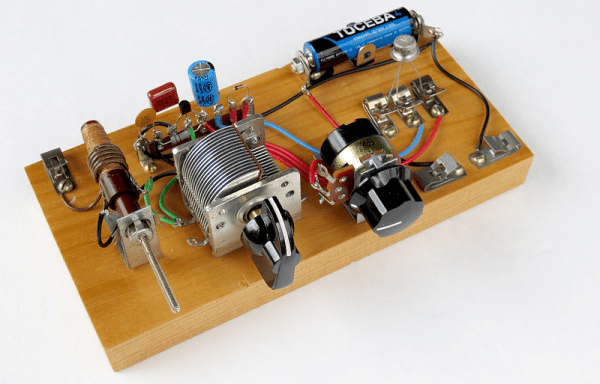
I was surfing the web looking for interesting projects the other day when I ran into [SkyKing’s] exquisite transistor demodulator radio builds. He mentioned that they were “Alfred P. Morgan-style” and that brought back a flood of memories about a man who introduced a whole generation to electronics and radio.
[Morgan] was born in 1889 and in the early part of the twentieth century, he was excited to build and fly an airplane. Apparently, there wasn’t a successful flight. However, he eventually succeeded and wrote his first book: “How to Build a 20-foot Bi-Plane Glider.” In 1910, he and a partner formed the Adams Morgan company to distribute radio construction kits. We probably wouldn’t remember [Morgan] for his airplanes, but we do recognize him for his work with radio.
By 1913, he published a book “The Boy Electrician” which covered the fundamentals of electricity and magnetism (at a time when these subjects were far more mysterious than they are today). [Morgan] predicted the hacker in the preface to the 1947 edition. After describing how a boy was frustrated that his model train automated to the point that he had nothing actually to do, [Morgan] observed:
The prime instinct of almost any boy at play is to make and to create. He will make things of such materials as he has at hand, and use the whole force of dream and fancy to create something out of nothing.
Of course, we know this applies to girls too, but [Morgan] wrote this in 1913, so you have to fill in the blanks. I think we can all identify with that sentiment, though.
What’s it like to build a run of 100 prototypes in your basement? Get a first-hand account as [Zach Fredin] discusses his development and production of NeuroBytes. The system is a set of electronic models that represent neurons. Connecting them together into different networks helps to teach about how the human nervous system works. It’s a wonderful concept, and was recognized as a finalist for Best Product in the 2015 Hackaday Prize. More recently, [Zach] tells us it has been granted Recommended Status for a Phase I SBIR National Science Foundation grant. Looks like [Zach’s] new job is all NeuroBytes and is well funded. Congratulations!
Check out [Zach Fredin’s] talk from the 2015 Hackaday SuperConference, then join us after the break to dig further into the details of the project.
Motors are everywhere; DC motors, AC motors, steppers, and a host of others. In this article, I’m going to look beyond these common devices and search out more esoteric and unusual electronic actuators that might just find a place in one of your projects. In any case, their mechanisms are interesting in their own right! Join me after the break for a survey of piezo, magnetostrictive, magnetorheological, voice coils, galvonometers, and other devices. I’d love to hear about your favorite actuators and motors too, so please comment below!
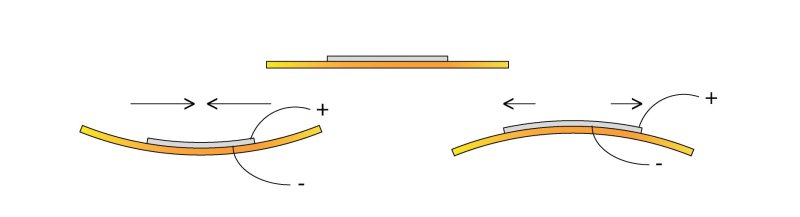
Piezoelectric materials sometimes seem magic. Apply a voltage to a piezoelectric material and it will move, as simple as that. The catch of course is that it doesn’t move very much. The piezoelectric device you’re probably most familiar with is the humble buzzer. You’d usually drive these with less than 10 volts. While a buzzer will produce a clearly audible sound you can’t really see it flexing (as it does shown above).
To gauge the motion of a buzzer I recently attempted to drive one with a 150 volt piezo driver, this resulted in a total deflection of around 0.1mm. Not very much by normal standards!
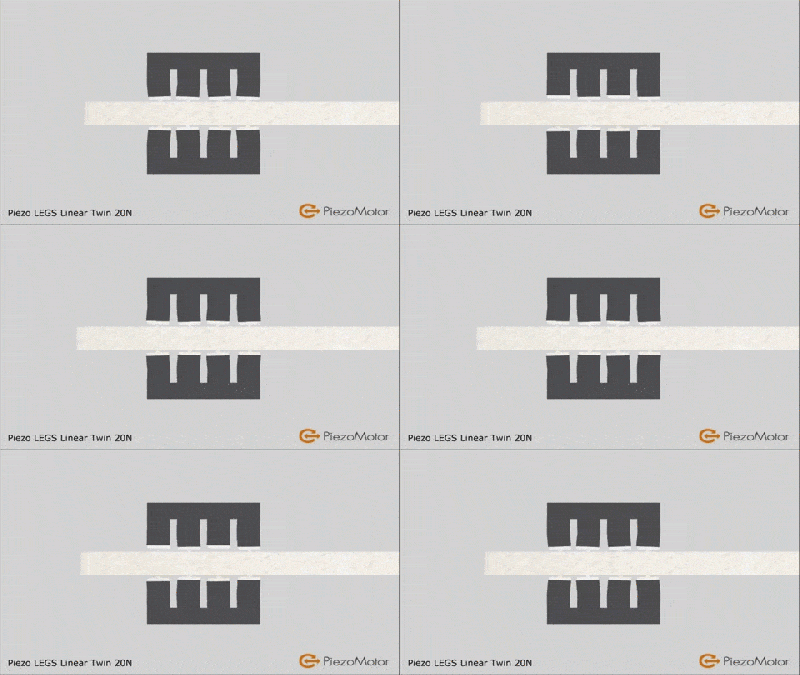
The PiezoMotor LEGS actuator “walks” along a rod, pushing it as it goes.
For some applications however resolution is of primary interest rather than range of travel. It is here that piezo actuators really shine. The poster-boy application of piezo actuators is perhaps the scanning probe microscope. These often require sub-nanometer accuracy (less than 1000th of 1000th of 1 millimeter) in order to visualize individual atoms. Piezo stacks are ideal here (though hackers have also used cheap buzzers!).
Sometimes though you need high precision over a larger range of travel. There are a number of piezo configurations that allow this. Notably Inchworm, “LEGS”, and slip-stick actuators.
The PiezoMotor LEGS actuator is shown to the above. As noted, Piezos only produce small (generally sub-millimeter) motion. Rather than using this motion directly, LEGS uses this motion to “walk” along a rod, pushing it back and forth. The rod is therefore moved, in tiny nanometer steps. However, piezos can move quickly (flexing thousands of times a second). And the LEGS (and similar Inchworm actuator) allows relatively quick, high force, and high resolution motion.
The tablecloth trick (yes this one’s fake, the kid is ok don’t worry. :))
Another type of long travel piezo actuator uses the “stick-slip phenomenon”. This is much like the tablecloth magic trick shown above. If you pull the cloth slowly there will be significant friction between the cloth and this crockery and they will be dragged along with the cloth. Pull it quickly and there will be less friction and the crockery will remain in place.
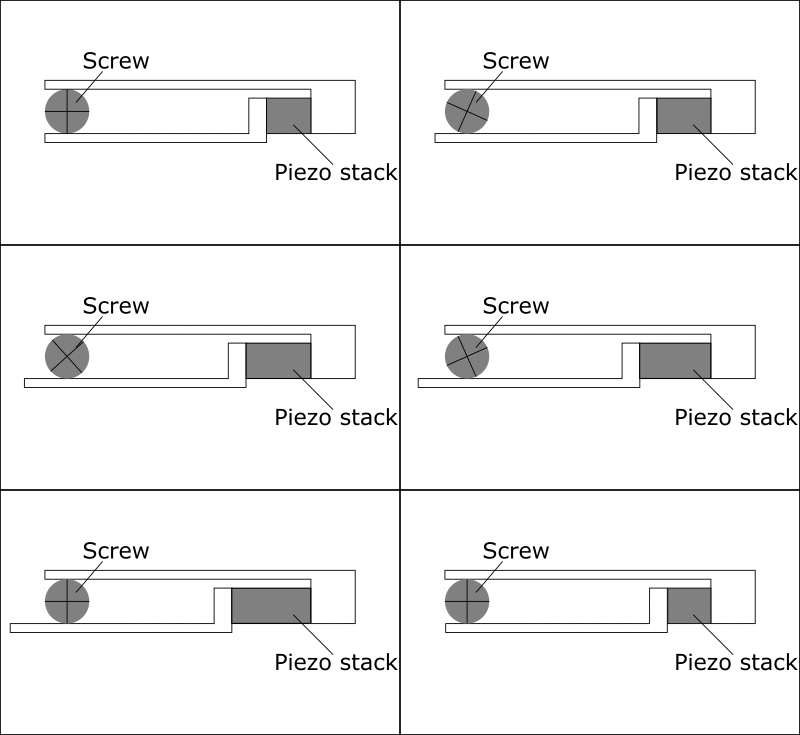
This difference between static and dynamic friction is exploited in stick-slip actuators. The basic mechanism is shown in the figure below.
Motion caused by a stick-slip motor
When extending slowing a jaw rotates a screw, but if the piezo stack is compressed quickly the screw will not return. The screw can therefore be made to rotate. By inverting the process (extending quickly, then compressing slowly) the process is reversed and the screw is turned in the opposite direction. The neat thing about this configuration is that it retains much of the piezo’s original precision. Picomotors have resolutions of around 30 nanometer over a huge range of travel, typically 25mm, they’re typically used for optical focusing and alignment and can be picked up on eBay for 100 dollars or so. Oh and they can also be used to make music. Favorites include Stairway to Heaven, and not 1 but 2 versions of Still Alive (from Portal). Obligatory Imperial March demonstration is embedded here:
There are numerous other piezo configurations, but typically they are used to provide high force, high precision motion. I document a few more over on my blog.
Magnetostrictive actuators
Magnetostriction is the tendency of a material to change shape under a magnetic field. We’ve been talking about magnetostriction quite a lot lately. However much like piezos it can also be used for high precision motion. Unlike piezos they require relatively low voltages for operation and have found niche applications.
Magnetorheological motion
Magnetorheological (MR) fluids are pretty awesome! Much like ferrofluids, MR fluids respond to changes in magnetic field strength. However, unlike ferrofluids it’s their viscosity that changes.
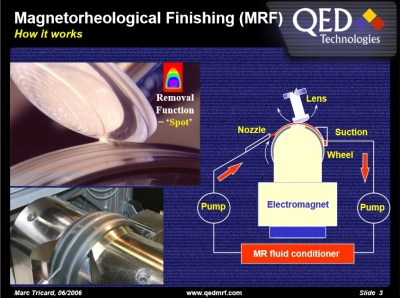
This novel characteristic has found applications in a number of areas. In particularly the finishing of precise mirrors and lens used in semiconductor and astronomical applications. This method uses an electromagnet to change the viscosity of the slurry used to polish mirrors, removing imperfections. The Hubble telescope’s highly accurate mirrors were apparently finished using this technique (though hopefully not that mirror). You can purchase MR fluid in small quantities for a few hundred dollars.
Electrostatic motors
While magnetic motors operate through the attraction and repulsion of magnetic fields, electrostatic motors exploit the attraction and repulsion of electric change to produce motion. Electrostatic forces are orders or magnitude smaller that magnetic ones. However they do have niche applications. One such application is MEMS motors, tiny (often less than 0.01mm) sized nanofabricated motors. At these scales electromagnetic coils would be too large and specific power (power per unit volume) is more important than the magnitude of the overall force.
Voice coils and Galvanometers
The voice coil is your basic electromagnet. They’re commonly used in speakers, where an electromagnet in the cone reacts against a fixed magnet to produce motion. However voice coil like configurations are used for precise motion control elsewhere (for example to focus the lens of an optical drive, or position the read head of a hard disc drive). One of the cooler applications however is the mirror galvanometer. As the name implies the device was originally used to measure small currents. A current through a coil moved a rod to which a mirror was attached. A beam of light reflect off the mirror and on to a wall effectively created a very long pointer, amplifying the signal.
These days ammeters are far more sensitive of course, but the mirror galvanometer has found more entertaining applications:
High speed laser “galvos” are used to position a laser beam producing awesome light shows. Modern systems can position a laser beam at kilohertz speeds, rendering startling images. These systems are effectively high speed vector graphic like line drawing systems, resulting in a number of interesting algorithmic challenges. Marcan’s OpenLase framework provides a host of tools for solving these challenges effectively, and is well worth checking out.
In this article I’ve tried to highlight some interesting and lesser known techniques for creating motion in electronic systems. Most of these have niche scientific, industrial or artistic applications. But I hope they also also offer inspiration as you work on your own hacks! If you have a favorite, lesser known actuator or motor please comment below!
In 2003, nothing could stop AMD. This was a company that moved from a semiconductor company based around second-sourcing Intel designs in the 1980s to a Fortune 500 company a mere fifteen years later. AMD was on fire, and with almost a 50% market share of desktop CPUs, it was a true challenger to Intel’s throne.
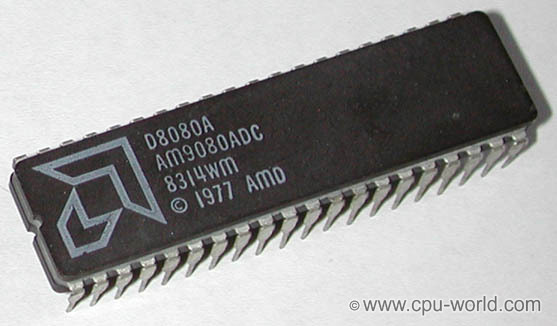
AMD began its corporate history like dozens of other semiconductor companies: second sourcing dozens of other designs from dozens of other companies. The first AMD chip, sold in 1970, was just a four-bit shift register. From there, AMD began producing 1024-bit static RAMs, ever more complex integrated circuits, and in 1974 released the Am9080, a reverse-engineered version of the Intel 8080.
AMD had the beginnings of something great. The company was founded by [Jerry Sanders], electrical engineer at Fairchild Semiconductor. At the time [Sanders] left Fairchild in 1969, [Gordon Moore] and [Robert Noyce], also former Fairchild employees, had formed Intel a year before.
While AMD and Intel shared a common heritage, history bears that only one company would become the king of semiconductors. Twenty years after these companies were founded they would find themselves in a bitter rivalry, and thirty years after their beginnings, they would each see their fortunes change. For a short time, AMD would overtake Intel as the king of CPUs, only to stumble again and again to a market share of ten to twenty percent. It only takes excellent engineering to succeed, but how did AMD fail? The answer is Intel. Through illegal practices and ethically questionable engineering decisions, Intel would succeed to be the current leader of the semiconductor world.
The man leaned over his creation, carefully assembling the tiny pieces. This was the hardest part, placing a thin silver plated diaphragm over the internal chamber. The diaphragm had to be strong enough to support itself, yet flexible enough to be affected by the slightest sound. One false move, and the device would be ruined. To fail meant a return to the road work detail, quite possibly a death sentence. Finally, the job was done. The man leaned back to admire his work.
The man in this semi-fictional vignette was Lev Sergeyevich Termen, better known in the western world as Léon Theremin. You know Theremin for the musical instrument which bears his name. In the spy business though, he is known as the creator of one of the most successful clandestine listening devices ever used against the American government.
For those who prefer the smell of solder smoke to lines of code then you may be a hardware engineer. What you should consider is how to land a job at a startup, how to work fast, be a team player, keep an open mind, and be organized. Joining a startup will be the greatest challenge of your career. You can do it! Be a hardware engineer at a startup and change the world.






 This novel characteristic has found applications in a number of areas. In particularly the finishing of precise mirrors and lens used in semiconductor and astronomical applications. This method uses an electromagnet to change the viscosity of the slurry used to polish mirrors, removing imperfections. The Hubble telescope’s highly accurate mirrors were apparently finished using this technique (though hopefully not