Slow 3.5″ Raspberry Pi LCD Hacked To 40 MHz With ESP8266

As microcontrollers become more and more common, we see more ways to get a lot of performance out of one chip. A great example of this was the ESP8266 which was originally seen as a cheap WiFi card but has since blossomed into its own dev platform thanks to the horsepower hidden within. To that end, [Martin] is trying to push the now-ubiquitous WiFi chip even further by rolling out his own LCD driver for it from scratch.

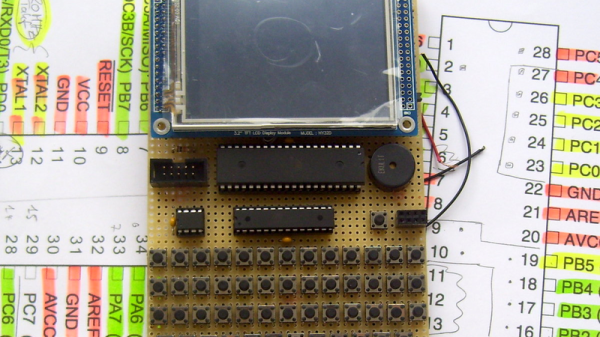
The display of choice is the KeDei LCD 3.5″ module which was originally intended for use with a Raspberry Pi. [Martin] points out that this display isn’t optimized for speed, but after everything is said and done he has its clock line running at 40 MHz. To get this kind of speeds from the LCD, he depopulates the first shift register and adds his own fast-propagation circuit to establish a more-traditional serial addressing mode. With use of a WLCD driver that [Martin] also wrote, it is now relatively easy to draw on the screen very quickly with an ESP module. Check it out in the video below.

If you’re looking for your own tiny, cheap, fast display, this is one cool way to do it but we would suggest spinning a carrier board for both the ESP and the added circuitry. We’re looking forward to future projects which puts devices like these inside of really tiny magic mirrors, or uses them in other places where a small graphical display would be handy.

Continue reading “Slow 3.5″ Raspberry Pi LCD Hacked To 40 MHz With ESP8266”

PoisonTap Makes Raspberry Pi Zero Exploit Locked Computers

[Samy Kamkar], leet haxor extraordinaire, has taken a treasure trove of exploits and backdoors and turned it into a simple hardware device that hijacks all network traffic, enables remote access, and does it all while a machine is locked. It’s PoisonTap, and it’s based on the Raspberry Pi Zero for all that awesome tech blog cred we crave so much.

PoisonTap takes a Raspberry Pi Zero and configures it as a USB Gadget, emulating a network device. When this Pi-come-USB-to-Ethernet adapter is plugged into a computer (even a locked one), the computer sends out a DHCP request, and PoisonTap responds by telling the machine the entire IPv4 space is part of the Pi’s local network. All Internet traffic on the locked computer is then sent over PoisonTap, and if a browser is running on the locked computer, all requests are sent to this tiny exploit device.

With all network access going through PoisonTap, cookies are siphoned off, and the browser cache is poisoned with an exploit providing a WebSocket to the outside world. Even after PoisonTap is unplugged, an attacker can remotely send commands to the target computer and force the browser to execute JavaScript. From there, it’s all pretty much over.

Of course, any device designed to plug into a USB port and run a few exploits has a few limitations. PoisonTap only works if a browser is running. PoisonTap does not work on HTTPS cookies with the Secure cookie flag set. PoisonTap does not work if you have filled your USB ports with epoxy. There are a thousand limitations to PoisonTap, all of which probably don’t apply if you take PoisonTap into any office, plug it into a computer, and walk away. That is, after all, the point of this exploit.

As with all ub3r-1337 pen testing tools, we expect to see a version of PoisonTap for sale next August in the vendor area of DEF CON. Don’t buy it. A Raspberry Pi Zero costs $5, a USB OTG cable less than that, and all the code is available on Github. If you buy a device like PoisonTap, you are too technically illiterate to use it.

[Samy] has a demonstration of PoisonTap in the video below.

Continue reading “PoisonTap Makes Raspberry Pi Zero Exploit Locked Computers”

How To Control Your Instruments From A Computer: It’s Easier Than You Think

There was a time when instruments sporting a GPIB connector (General Purpose Interface Bus) for computer control on their back panels were expensive and exotic devices, unlikely to be found on the bench of a hardware hacker. Your employer or university would have had them, but you’d have been more likely to own an all-analogue bench that would have been familiar to your parents’ generation.

A GPIB/IEEE488 plug. Alkamid [CC BY-SA 3.], via Wikimedia Commons
A GPIB/IEEE488 plug. Alkamid [CC BY-SA 3.], via Wikimedia Commons.
The affordable instruments in front of you today may not have a physical GPIB port, but the chances are they will have a USB port or even Ethernet over which you can exert the same control. The manufacturer will provide some software to allow you to use it, but if it doesn’t cost anything you’ll be lucky if it is either any good, or available for a platform other than Microsoft Windows.

So there you are, with an instrument that speaks a fully documented protocol through a physical interface you have plenty of spare sockets for, but if you’re a Linux user and especially if you don’t have an x86 processor, you’re a bit out of luck on the software front. Surely there must be a way to make your computer talk to it!

Let’s give it a try — I’ll be using a Linux machine and a popular brand of oscilloscope but the technique is widely applicable.

Continue reading “How To Control Your Instruments From A Computer: It’s Easier Than You Think”

Put An Honest Face On Alexa With This HAL 9000 Build

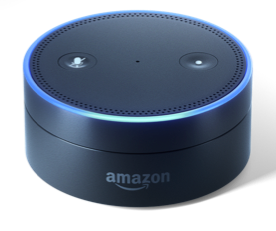
Amazon put out a version of Alexa’s software that  could run on Raspberry Pi. Adafruit sold a big scary red button. For, [Keith Elliott] the project ahead was an obvious conclusion.

The Raspberry Pi version of Alexa’s software was lagging behind the release version. You had to press a button to input a command, which really steals a lot of the joy out of a creepy voice controlled robot listening to you putz around the house. Now, it can wake on command.

Since this sold him on finally adding Amazon’s ever watching witch eye to his home, he decided he would give it appropriately sinister clothes. These were 3D printed from files based on Adafruit’s guide. He ended up with a fairly convincing facade.

The inside is kind of melancholy. A lone Raspberry Pi 3 is held company by a microphone and audio amplifier. These are pretty much all that’s needed to make you home automated shopping experience dreams come true. Video after the break.

Continue reading “Put An Honest Face On Alexa With This HAL 9000 Build”

A Linux Exploit That Uses 6502 Code

With ubiquitous desktop computing now several decades old, anyone creating an operating system distribution now faces a backwards compatibility problem. Each upgrade brings its own set of new features, but it must maintain compatibility with the features of the previous versions or risk alienating users. If you are a critic of Microsoft products for their bloat, this is one of the factors behind that particular issue.

As well as a problem of compatibility, this extra software overhead creates one of security. A piece of code descended from a DOS word processor of the 1980s for example was not originally created with any idea that it might one day be hiding in a library on a machine visible to the entire world by the Internet. Our subject today is a good example, just such a vulnerability hiding in an old piece of code whose purpose is to maintain an obscure piece of backward compatibility. [Chris Evans] has demonstrated a vulnerability in an Ubuntu version by playing an NES music file that contains exploit code emulated by the player on a virtual 6502 processor.

The NES Sound Format is a music file standard that packages Nintendo game music for playback. It contains a scripting language, and it is this that is used to trigger the vulnerability. When you open an NSF file on the affected Ubuntu system it finds its way via your music player and the gstreamer multimedia framework to libgstnsf.so, a gstreamer plugin for playing NSF files.

Rather unbelievably, his plugin works by emulating a real 6502 as found in a NES to derive the musical output, and it is somewhere here that the vulnerability exists. So not only do we have layer upon layer of backward compatibility to play an obscure music file format, there is also a software emulation of some 8-bit silicon from the 1970s. [Chris] comments “Is that cool or what?“, and while we agree that a 6502 emulator buried in a modern distro is cool, we can’t help thinking something’s been lost along the way.

A proof-of-concept is provided for Ubuntu 12.04. It’s an older version, but he points out that while he thinks the most recent releases should not contain exactly the same vulnerability, it certainly exists in more than one still-supported version. There’s also a worrying twist in that due to the vagaries of Ubuntu’s file manager it auto-opens when its folder is accessed from the GUI. The year 2000 called, they want their auto-opening Windows ME worms back.

Sadly we suspect the 6502 lurking in this music player can’t be put to more general-purpose use. If you manage it, please do share it with us! But if emulated 6502s are your thing, take a look at this 150MHz 6502 co-processor for an Acorn BBC Micro that someone made using a Raspberry Pi.

[via r/hacking]

6502 image, Dirk Oppelt, (CC BY-SA 3.0) via Wikimedia Commons.

The Little Mechanism That Made Precise Time-keeping Possible

There are few things to which we pay as much attention as the passage of time. We don’t want to be late for work, or a date. Even more importantly, we don’t want to age and die. Good time keeping is an all important human activity, and we started to worry about it as soon as we abandoned our hunter-gatherer lifestyle and agriculture and commerce emerged.

By de:Benutzer:Flyout - own work, http://de.wikipedia.org/wiki/Bild:Kerzenuhr.jpg, CC BY-SA 3.0, https://commons.wikimedia.org/w/index.php?curid=1783765
A candle clock

Measuring time needs two things: a repetitive process to mark equal increments of time, and a way of tracking and displaying the result. The first timekeeping devices relied of course on the movement of the sun. Ancient Egyptians, around 3500 BC, built obelisks that, by casting a shadow on the ground at different positions, gave an approximate idea of the time. Next came the use of some medium that was consumed at a regular pace: candle, incense, water and sand clocks are examples. A great advancement came with the advent of the mechanical clock, and here is where the escapement mechanism appears.

Continue reading “The Little Mechanism That Made Precise Time-keeping Possible”

Make Water Bridges With High Voltages

It’s generally a bad idea to mix high voltage electricity and water, but interesting things happen if you do. This video from [RWGResearch] shows one of them: water bridging. If you have two water sources (such as two beakers full of very highly distilled water) with a high voltage between them, the voltage can create a gravity defying bridge that flows between them.

The experiment starts with the pouring spouts from two beakers nearly touching each other. Water fills the beakers right up to the spout, but it’s the application of electricity that pulls the bridge between the positive and negative beakers. With care, this technique can create a bridge of up to 2cm (about 0.8 inches). [RWGResearch] shows that he is able to create a bridge of about a centimeter with a 5KV voltage, but which only carries a few milliamps.

What forces are at play here isn’t exactly clear, but one recent paper speculates that it’s down to a combination of the dielectric force caused by the differing charges of parts of water molecules and the surface tension of the water. Whatever it is, it is fascinating and makes for a neat trick.

Want to make your own contribution to the scientific body of knowledge? Prove or disprove the speculation mentioned in the Wikipeadia article: is this possible because of an H3O2 lattice formed by the high voltage? How would you formulate a test for this?

Continue reading “Make Water Bridges With High Voltages”