This excellent content from the Hackaday writing crew highlights recurring topics and popular series like Linux-Fu, 3D-Printering, Hackaday Links, This Week in Security, Inputs of Interest, Profiles in Science, Retrotechtacular, Ask Hackaday, Teardowns, Reviews, and many more.
If there is one instrument that makes an electronic engineer’s bench, it is the oscilloscope. The ability to track voltages in the time domain and measure their period and amplitude is one akin to a light in the darkness, it turns a mere tinkerer with circuits into one in command of them. Straightforward add-on circuits can transform a basic oscilloscope into a curve tracer, frequency response display, and much more, and modern oscilloscopes offer a dizzying array of useful measurement features unimaginable to engineers only a few years ago. And I need your help to pick a new one.
Practically any combination of motor and gearbox can be mathematically arranged to fit all sorts of problems. You could lift a crane with a pager motor, it just might take a few hundred years. However, figuring out exactly what ratio you need can feel bit backwards the first time you have to do it.
A gear is nothing more than a clever way to make two circles rotate in concert with each other as if they were perfectly joined at their circumferences. Rather than relying on the friction between two rotating disks in contact, the designer instead relies on the strength of a gear tooth as the factor limiting the amount of torque that can be applied to the gear.
Everything is in gearing is neatly proportional. As long as your point of reference is correct, and some other stuff. Uh, it gets easier with practice.
Now as my physics professors taught me to do, let’s skip the semantics and spare ourselves some pedantics. Let us assume that all gears have a constant velocity when you’ve averaged it all out. Sure there is a perceptible difference between a perfect involute and a primitive lantern gear, but for the sake of discussion it doesn’t matter at all. Especially if you’re just going to 3D print the thing. Let’s say that they’re sitting on perfect bearings and friction isn’t a thing unless we make it so. Also we’ll go ahead and make them perfectly aligned, depthed, and toleranced.
Typically, a gearbox is used for two things. You have a smaller torque that you’d like to make into a bigger one or you have one rotational velocity that you’d like to exchange for another. Typically torque is represented with a capital or lowercase Tau (Ττ) and rotational velocity likes to have a lowercase omega (ω). It also doesn’t matter at all; it just makes your equations look cooler.
Now a lot of tutorials like to start with the idea of rolling a smaller circle against a bigger one. If the smaller circle is a third as large as the big one, it will take three rotations of the small circle to make the big one rotate twice. However, it is my opinion that thinking it in terms of the force applied allows a designer to think about the gearing more effectively.
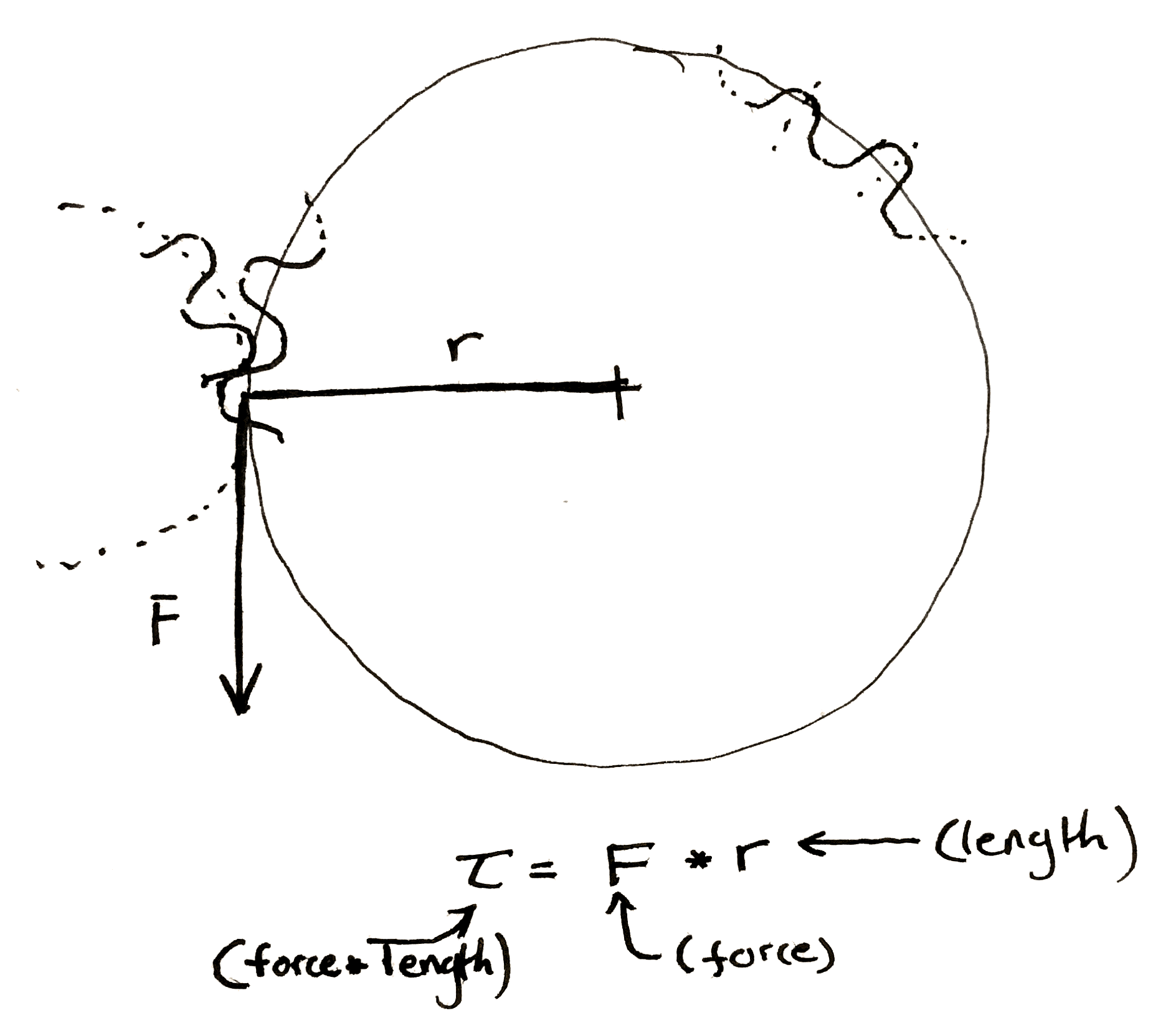
If the friction between the two surfaces of the circle is perfect, then any force applied tangentially to one of the circles will result in a perfectly perpendicular and equal force to the other circle at the point of contact between the two. Midway through writing the preceding sentence I began to understand why textbooks are so abstruse, so I also drew a picture. This results in two equations.
Now, when you have a force perpendicular to the line drawn to describe the radius, the equation for torque becomes really simple.
Multiply the length of the “lever arm”, “radius”, etc. by the force to get the preceding equations. Make sure to include the units.
You should end up force-unit * length-unit. Since I usually work in smaller gears I like to use N * mm. American websites typically use oz-in to rate motors. It is technically ozf-in (ounce-force), but the US customary system has a fetish for obtuseness.
We can make some observations. The smaller gear always sees less torque at its center. This initially seemed a bit counter-intuitive to me. If I’m using a cheater bar to turn a bolt the longer I make the bar the more torque I can put on the bolt. So if I touch the outside of a really large gear I should be seeing a ton of torque at the center of a small gear rotating along with it. However, as we mentioned before, any torque applied on the outside of the larger gear is seen equal and tangential on the smaller. It’s as if you’re touching the outside of the small gear. The torque has to be smaller.
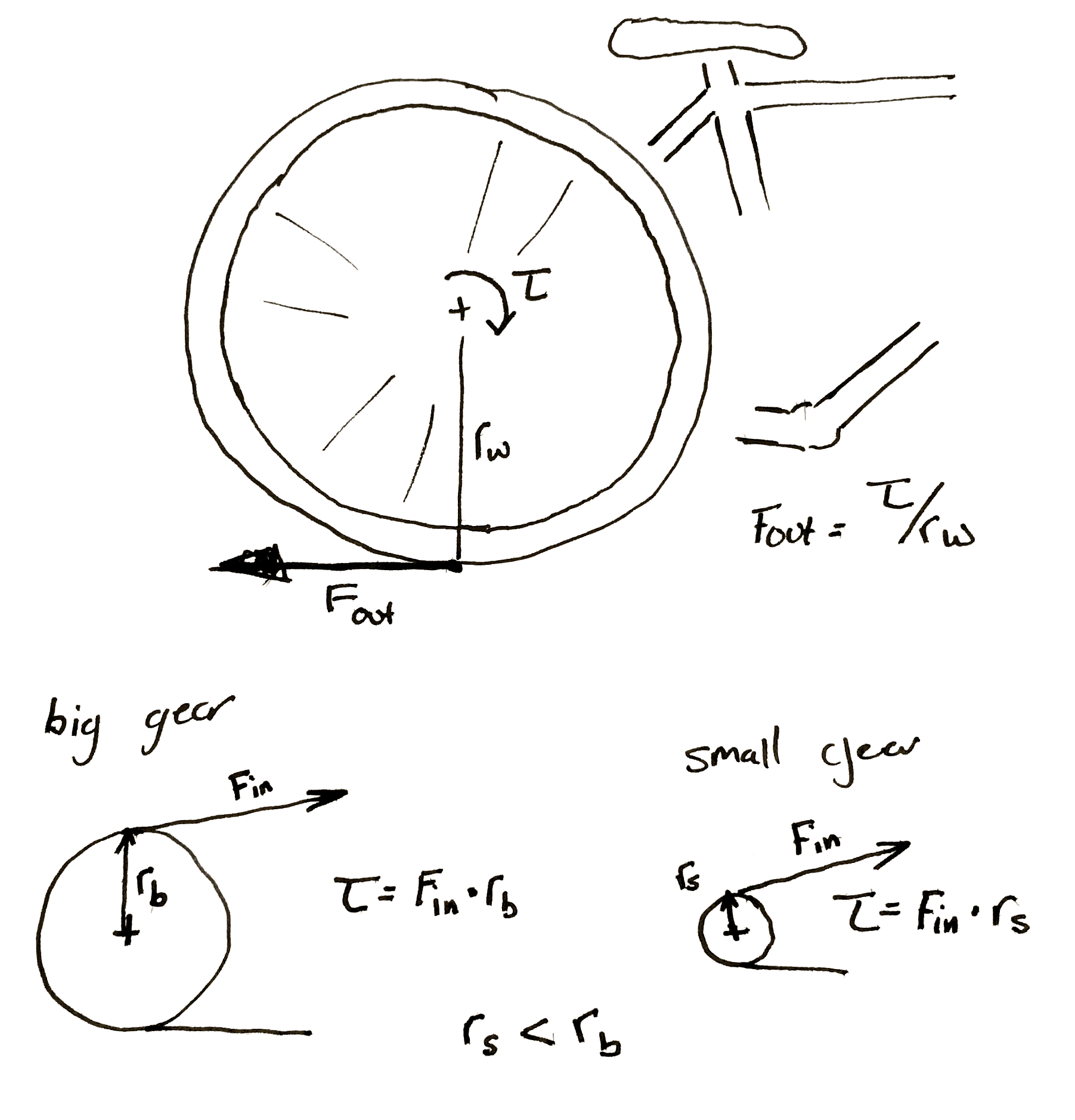
This is why you have to pedal so much harder when the rear sprocket on a bicycle gets smaller. Each time you make the sprocket smaller you shrink the torque input into the wheel. If the perpendicular output where the wheel hits the ground is <input from the small gear> / <radius of the wheel> then it’s obvious why this happens.
Hopefully my diagram doesn’t win a prize for awfulness. Then again, an award is an award. Remember that the bicycle wheel and its input gear are rigidly attached to each other.
It’s also important to note that any time you increase the torque, the speed of the gears slow by the same proportion. If you need 60 N*m out of a motor that can give 20 N*m and you use a 3:1 gearbox to do it. If the motor previously ran at 30 rpm it’s now running at 10 rpm.
Let’s jump right into an example. Let’s say you want to make a device that automatically lifts your window blinds. You’ve got some junk and a 3D printer.
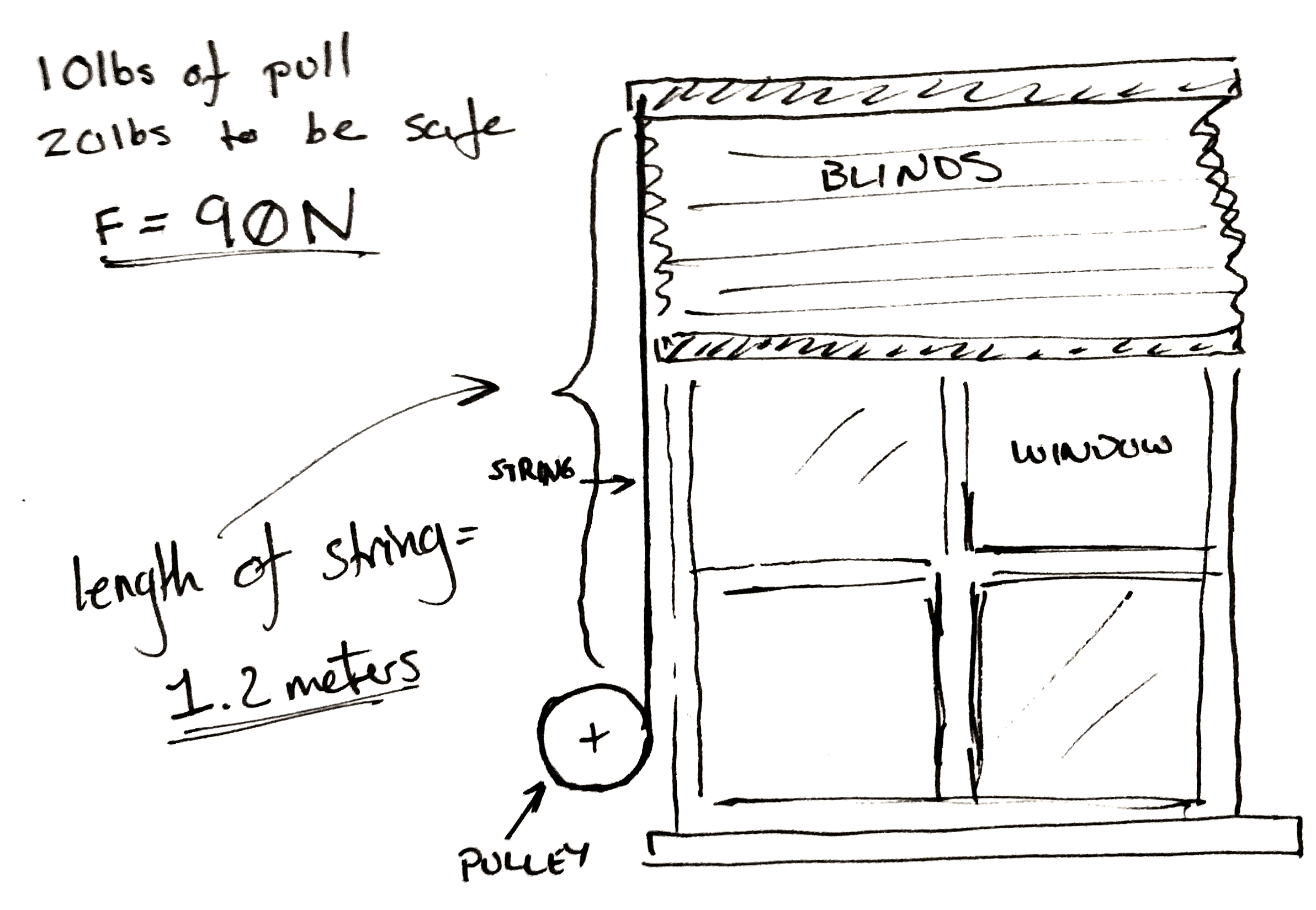
The problem set-up.
Now you’ve taken a spring scale and pulled until the shutter moves and you know you need 10 lbs. of pull to get the blinds to pull up. To make it easy on yourself you multiply this number by two so you know you need exactly 20 lbs of force to pull the curtain up. Then to make it really easy on yourself convert it all to Newtons. It’s approximately 90 N.
Now you don’t really care how fast the blinds pull up, but you go ahead and pull them up yourself. You get the feeling that the blinds won’t appreciate being lifted faster than the whole range in two seconds. You personally don’t care if takes ten seconds to, but you’d like it not to take too long.
You also measure the length of string pulled out to raise the blinds. It’s 1.2 meters.
A classic.
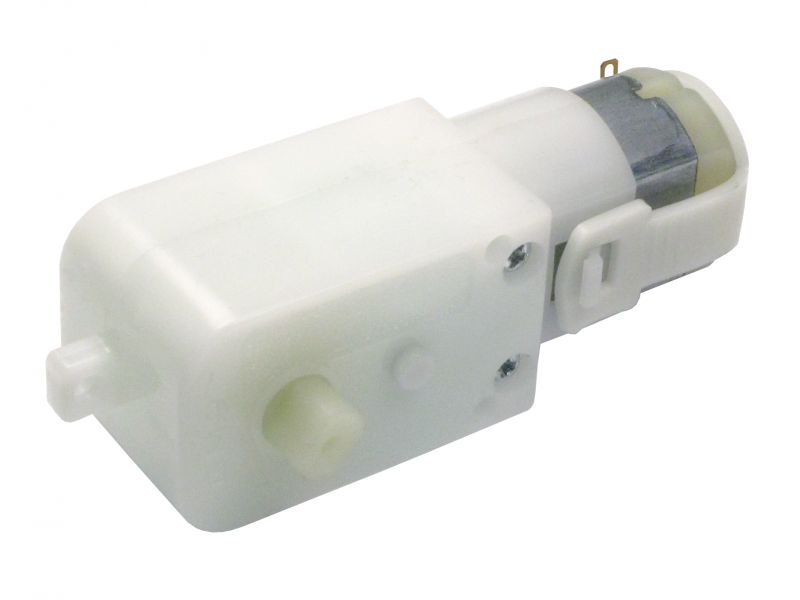
Lastly, you only have one spare power supply and a matching motor left in your entire laboratory after you followed the advice in a Hackaday article. Cursing the day the author was born, you sullenly write down the last specifications. You’ve got one of those cheap GM9 gear motors. 5 V, 66 rpm, and 300 N*mm. You damn him as you think fondly of your mountain of windshield washer motors and 80 lb server rack power supplies that you tossed out.
To start with, you do some experiments with a pulley. You arbitrarily pick, 3D print, and find that a 100 mm in diameter pulley seems to wind it up nicely by hand. By the end of the winding the outside diameter of the string is 110 mm. So you use the torque equations above. You find that at the end of the rotation, if you attach the motor directly, there is only 5.45 N of force being applied to the string. Not nearly enough.
Hrm..
So, since you know everything is more or less proportional, you divide 90 N / 5.45 N, and arrive at an answer of 17. So, at a minimum for every turn of the pulley you need 17 turns of the motor to get the torque needed.
That would be okay, but it messes with our other specification. At a 17:1 ratio, it will take our 66 rpm motor pretty close to a minute to wind the blinds up.
Damn.
This is a moment for some pondering. Make a coffee. Maybe go write a relaxing comment to a Hackaday writer listing their various flaws, perceived and true, in excruciating detail.
What if you wound the string up on a closet rod? Those are only about 30 mm in diameter. You take a bit of rod and wind it up. It seems to work and since it’s wider the string only ends up adding 5 mm to the final diameter. You rework the calculation and find that in this case you only need a ratio of 6! Yes.
Now some of you who have done this before are likely gnashing your teeth, or more likely already down in the comments. Unfortunately it’s all proportional. While you only need a ratio of 6:1 now, nearly a third. You also need to rotate the pulley approximately three times as much to pull the same length of cord.
Sometimes you can’t win. In this case the only solution is to order a new motor. You look online for a bit and realize that one of the 12 V motors you threw away last week would work perfectly for this. You wouldn’t even need a gear box. You could attach it straight to the pulley. You look around your perfectly clean and orderly garage and feel empty.
However, just for fun you build a 6:1 gearbox anyway. It’s a hack after all.
Cover photo of the hilariously complicated Do Nothing Machine credit to the Joe Martin Foundation.
There is a chain of trust in every modern computing device that starts with the code you write yourself, and extends backwards through whatever frameworks you’re using, whatever OS you’re using, whatever drivers you’re using, and ultimately whatever BIOS, UEFI, Secure Boot, or firmware you’re running. With an Intel processor, this chain of trust extends to the Intel Management Engine, a system running independent of the CPU that has access to the network, USB ports, and everything else in the computer.
Needless to say, this chain of trust is untenable. Any attempt to audit every line of code running in a computer will only be met with frustration. There is no modern Intel-based computer that is completely open source, and no computer that can be verified as secure. AMD is just as bad, and recent attempts to create an open computing platform have met with frustration. [Bunnie]’s Novena laptop gets close, but like any engineering task, designing the Novena was an exercise in compromise. You can get around modern BIOSes, coreboot still uses binary blobs, and Libreboot will not be discussed on Hackaday for the time being. There is no modern, completely open, completely secure computing platform. They’re all untrustworthy.
The Talos Secure Workstation, from Raptor Engineering, an an upcoming Crowd Supply campaign is the answer to the untrustworthiness of modern computing. The Talos is an effort to create the world’s first libre workstation. It’s an ATX-compatible motherboard that is fully auditable, from schematics to firmware, without any binary blobs.
No Star Trek until May, 2017, at which time you’ll have to pay $5/month to watch it with ads. In the meantime, this is phenomenal and was shut down by Paramount and CBS last year ostensibly because Star Trek: Discovery will be based around the same events.
Tempest in a teacup. That’s how you cleverly introduce the world’s smallest MAME cabinet. This project on Adafruit features a Pi Zero, a 96×64 pixel color OLED display, a few buttons, a tiny joystick, and a frame made out of protoboard. It’s tiny — the height of this cabinet just under two wavelengths of the radiation corresponding to the transition between the two hyperfine levels of the ground state of the cesium 133 atom. Being based on the Pi Zero, it’s a capable arcade cabinet, although we would struggle to find a continuous rotation pot small enough to play Tempest the way it should be played. Check out the video.
[Graham] sent an interesting observation in on the tip line. It’s an election year in the US, and that can mean only one thing. It’s coroplast season. Coroplast is that strange material used for political signage, famous for its light weight, being waterproof, and reasonably strong, depending on how you bend it. There is a severe lack of coroplast builds, but if you have some be sure to send them in.
The usual arguments for drones involve remote sensing, inspection, and generally flying around for a very long time. Quadcopters don’t do this, but fixed wings can. Over on DIYDrones, [moglos] just flew 425km on a single charge. The airframe is a 3 meter Vigilant C1 V tail, using the stock 300kV motor. The battery is a bunch of Panasonic 18650 cells arranged in 6S 9P configuration for 30600mAh. The all-up weight is 5.7kg. This is significant, and we’re seeing the first glimmer of useful tasks like pipeline monitoring, search and rescue, and mapping being done with drones. It is, however, less than half the range a C172 can fly, but batteries are always getting better. Gas goes further because it gets lighter as you fly.
No. No they’re not. But let’s talk about it anyway.
The endless trenches of digital worlds are filled with hardcore gamers from all walks of life. They can be found exploring post-apocalyptic Boston in Fallout 4, and commanding Sgt. Recker through a war-torn landscape in Battlefield 4 for hours on end. Their portal into these vast digital worlds come via some sort of computer system.
What type of computer system used is a point of contention between many gamers, and is typically divided between console versus PC. I will not dare to drag you into the captious arguments between the two, but instead we will focus on something that has something in common with our world — how does a previously non-technical console enthusiast cross over and build a gaming PC?
Many hackers have built computers from scratch and [Adam Fabio] just covered a bunch of custom laptop builds this morning. People with such skills can easily build a high-end gaming PC. But what about people without such skills? Can a console gamer with no technical background build a high-end PC gaming system?
Inspiration for this article came after reading something [Emanuel Maiberg] published over the summer on Motherboard. Why someone writing for a publication called Motherboard would have trouble building a gaming rig is beyond me. Certainly I think his starting assumptions are questionable. He asserts that you need an unreasonable amount of time and money to attempt one of these projects. But gaming rigs can be purchased fully-assembled — those that build them are doing it out of passion.
The question is this: How far should engineers go to make a technical product easier to use for a non-technical person? If I order an engine for a hot rod, it can be assumed that I know to hook up the gas line without specifically being told to do so. After all, a person who’s going to put an engine in a hot rod probably knows a thing or two about engines.
I think that building a desktop PC has never been easier. We’ve now had 30 years of evolution to help weed out the “slow learners” when it comes to manufacturers. The Internet is a lot easier to use for answers than it used to be, and we have faster means of connecting with communities of experts than ever before.
That said, the neighborhood computer store is beginning to go the way of the dodo. There is an entire generation of “mobile-first” users who will give you a blank stare if you start talking about “desktop computing”. And familiarity with the fact that computer customization is even possible is beginning to fade; if all you’ve ever used are tablets and smartphones “upgrade” and “customization” are software terms, not hardware possibilities.
So we turn it over to you. Are gaming PCs hard to build? Have engineering practices and design choices made it easier than it used to be to get into it? What do you think is happening with the average skill level for working with computers now compared to when you had to open the case to add a modem to your machine? Let us know what you think in the comments below.
In the old days of the 1970’s, the only way to get your own computer was to build one from scratch. Thanks to an army of hackers like [Woz], PC’s are no commodity objects that can be bought for a couple of hundred dollars. The magic of building your own still is there though – especially when we’re talking about portable machines. Laptops, notebooks, netbooks take quite a bit of skill to assemble. Stuffing a keyboard, screen, and battery into a small clamshell case takes a bit of planning. Our last look at DIY laptops was exactly 100 Hacklets ago, so it’s time for a refresh. This week we’re checking out some of the best DIY laptops and portable computers on Hackaday.io!
We start with [Sahas Dinesh Chitlange] and Pi-Berry Laptop. [Sahas] found just the right mix of simple and elegant with this build. A Raspberry Pi 2 is the brains of the operation. The Pi sits in a case built from a mix of MDF and regular wood. The display is a 10.1″ HDMI LCD. The keyboard was pulled from a tablet case. Power was easy — a USB power bank provides enough for 4-5 hours of runtime. [Sahas] covered his laptop in Italian leather for a polished look. He planned out his parts layout well enough that the power-hungry Pi stays cool without a fan.
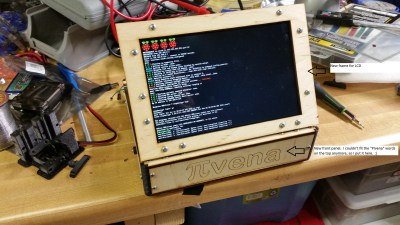
Next up is [Tim] with PIvena. [Tim] took his inspriation from [Bunnie Huang’s] Novena open laptop. Rather than roll his own ARM board, [Tim] went with a Raspberry Pi. His original design was for the Raspberry Pi model B. Last time we looked at PIvena, the model B+ was still pretty new. As we hoped, [Tim] modified his design to accept the new Pi layouts. This means it will physically work with the B+, Pi 2, and Pi 3 boards. [Tim] didn’t stop there though. He also upgraded from an 800 x 480 LCD to an 1200 x 800 LCD. He managed to do that while keeping the same bolt pattern on the travel cover. Nice work [Tim]!
Next we have [KnivD] with ELLO 2M. The most striking thing about ELLO 2M is the construction. The entire laptop is made from 6 PCBs which sandwich all the other parts. The keyboard is PCB material with keys routed out. The processor is a Microchip PIC32MX470-120. Software is loaded from one of 3 microSD cards. The 7 inch touchscreen LCD and 4500 mAh LiPo battery are nestled in between PCB layers. A true hacker, [KnivD] included a generous pin grid for debugging add-on circuits. The whole setup looks great with white silkscreen. As [Mark Sherman] mentioned in the comments, this machine reminds us of a modern-day TRS-80 Model 100.
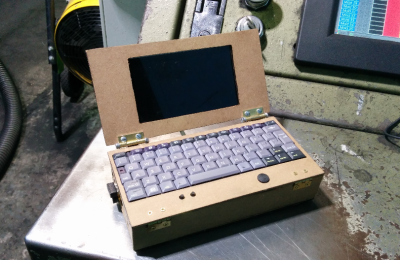
Finally we have [pdrift86] with Mini rpi2 laptop. Palmtop might be a better name for this. [pdrift86] took his inspiration (and his keyboard) from the old HP Jornada Personal Digital Assistant (PDA). The housing is Masonite, cut from a clipboard. A Raspberry Pi 2 hides inside, along with a 4 cell 18650 Li-Ion battery. The screen is a 5″ LCD with a composite input. The display isn’t a touchscreen, so a Playstation Portable analog stick is on-board, and will eventually be connected for mouse control. [pdrift86] even managed to sneak the Pi camera on the back of his machine, so it can take pictures cellphone style.
The front of the Soviet jet train on a monument in Tver, Russia. By Eskimozzz [PD], via Wikimedia Commons.It started with one of those odd links that pop up from time to time on Hacker News: “The strange and now sadly abandoned Soviet Jet Train from the 1970s“. Pictures of a dilapidated railcar with a pair of jet engines in nacelles above its cab, forlorn in a rusty siding in the Russian winter. Reading a little further on the subject revealed a forgotten facet of the rivalry between Russians and Americans at the height of the Cold War, and became an engrossing trawl through Wikipedia entries, rail enthusiast websites, and YouTube videos.















![The front of the Soviet jet train on a monument in Tver, Russia. By Eskimozzz [PD], via Wikimedia Commons.](https://hackaday.com/wp-content/uploads/2016/09/576px-d181d182d0b5d0bbd0b0.jpg)









