Roll Your Own 64GB SD Card From An EMMC Chip

It’s well-known that buying Flash storage devices from cheap online retailers is fraught with danger. Stories abound of multi-gigabyte drives that turn out to be multi-megabyte ones engineered to falsely report their capacity. So when [Jason Gin] found a source of 64GB Toshiba eMMC chips for only $6 per device he bought a few, but was prepared for disappointment.

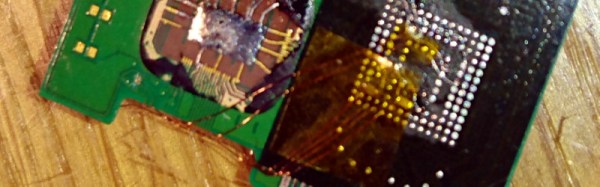
To test them, he decided to use an SD card interface. There are minor differences between eMMC and SD, but the interfaces are electrically the same and in most cases an SD controller will happily do business with an eMMC. It was not however an easy task to connect the two — these eMMCs were in BGA packages, hardly the easiest ones to work with. He resorted to dead-bug soldering the relevant interface wires to SD lines, and connecting up his computer.

His first attempt was something of a failure, wiring the chip to the PCB of a cheap USB-to-SD adaptor. This did not put him off though, he followed it up by cracking open a very old 2GB SD card that contained a PCB instead of being potted, and soldering his eMMC in place of its Flash and controller. This even fit in the original SD housing, and met with success when plugged into more reliable SD card readers. He was thus able to confirm the capacity of his chips.

His blog post is worth a read for more than just the very fine soldering involved. He takes us through some of the intricacies of SD interfacing, as well as talking at length about the decoupling and termination required to make a reliable connection. We particularly like his use of an area of unconnected BGA balls as prototyping space for decouplers.

If you marvel at the exceptional dexterity required for hand BGA work, we’ve a couple of other treats for you. There is this TI infra-red sensor BGA soldered to a piece of stripboard, and this wafer-level chip package soldered to an SOIC prototyping board.

IPhone NVMe Chip Reversed With Custom Breakout Boards

Ever so slowly, the main storage in our computers has been moving from spinning disks, to SSDs over SATA, to Flash drives connected to a PCI something or other. The latest technology is NVMe — Non-Volitile Memory Express — a horribly named technology that puts a memory controller right on the chip. Intel has a PCI-based NVMe drive out, Samsung recently released an M.2 NVMe drive, and the iPhone 6S and 6S Plus are built around this storage technology.

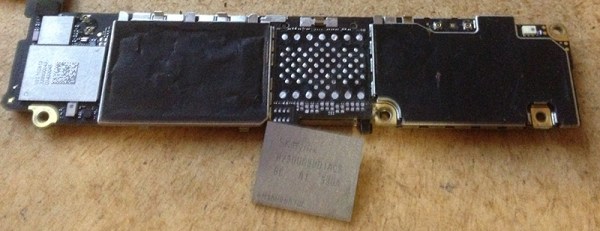
New chips demand a reverse engineering session, and that’s exactly what [Ramtin Amin] did (Internet Archive). He took a few of these chips out of an iPhone, created a board that will read them, and managed to analyze the firmware.

Any reverse engineering will begin with desoldering the chip. This is easy enough, with the real trick being getting it working again outside whatever system it was removed from. For this, [Ramtin] built his own PCIe card with a ZIF socket. This socket was custom-made, but the good news is you can buy one from ITEAD. Yes, it is expensive — that’s what you get with a custom-made ZIF socket.

With the chip extracted, a custom PCIe card, and a bit of work with the NVMe implementation for Linux, [Ramtin] had just about everything working. Eventually, he was able to dump the entire file system on the chip, allowing anyone to theoretically back up the data on their iPhone or MacBook Air. Of course, and especially for the iPhone, this data is encrypted. It’s not possible to clone an iPhone using this method, but it is a remarkably deep dive into the hardware that makes our storage tick.

My Life In The Connector Zoo

“The great thing about standards is that there are so many to choose from.” Truer words were never spoken, and this goes double for the hobbyist world of hardware hacking. It seems that every module, every company, and every individual hacker has a favorite way of putting the same pins in a row.

We have an entire drawer full of adapters that just go from one pinout to another, or one programmer to many different target boards. We’ll be the first to admit that it’s often our own darn fault — we decided to swap the reset and ground lines because it was convenient for one design, and now we have two adapters. But imagine a world where there was only a handful of distinct pinouts — that drawer would be only half full and many projects would simply snap together. “You may say I’m a dreamer…”

This article is about connectors and standards. We’ll try not to whine and complain, although we will editorialize. We’re going to work through some of the design tradeoffs and requirements, and maybe you’ll even find that there’s already a standard pinout that’s “close enough” for your next project. And if you’ve got a frequently used pinout or use case that we’ve missed, we encourage you to share the connector pinouts in the comments, along with its pros and cons. Let’s see if we can’t make sense of this mess.

Continue reading “My Life In The Connector Zoo”

Wii U RetroPie Console Looks Gorgeous

What to do with your broken gaming consoles? Gut it and turn it into a different gaming console! Sudomod forum user [banjokazooie] has concocted his own RetroPie console from the husk of a WiiU controller — an ingenious demonstration of how one can recycle hardware to a perfectly suited purpose.

[banjokazooie] actually used an original shell for this build, but if you happen to have a broken controller around — or know someone who does — this is a great use for it. A Raspberry Pi 3 is the brains of this operation (not counting [banjokazooie]), and it features a 6.5″ HDMI display, a Teensy 2.0 setup for the inputs, a headphone jack with automatic speaker disconnection, dual 3400 mAh batteries, an external SD card slot, and a lot of hard work on the power supply circuit — although [banjokazooie] reports that the hardest part was cutting to size a custom PCB to mount it all on. The original plan was to see if the idea was possible, and after a three month effort, it appears to work beautifully.

Continue reading “Wii U RetroPie Console Looks Gorgeous”

Building Transistors With Transistors

Since the 1940s when the first transistor was created, transistors have evolved from ornery blocks of germanium wrangled into basic amplifiers into thousands and thousands of different devices made of all kinds of material that make any number of electrical applications possible, cheap, and reliable. MOSFETs can come in at least four types: P- or N-channel, and enhancement or depletion mode. They also bear different power ratings. And some varieties are more loved than others; for instance, depletion-mode, N-channel power MOSFETs are comparatively scarce. [DeepSOIC] was trying to find one before he decided to make his own by hacking a more readily available enhancement-mode transistor.

For those not intimately familiar with semiconductor physics, the difference between these two modes is essentially the difference between a relay that is normally closed and one that’s normally open. Enhancement-mode transistors are “normally off” and are easy to obtain and (for most of us) useful for almost all applications. On the other hand, if you need a “normally on” transistor, you will need to source a depletion mode transistor. [DeepSOIC] was able to create a depletion mode transistor by “torturing” the transistor to effectively retrain the semiconductor junctions in the device.

If you’re interested in semiconductors and how transistors work on an atomic level, [DeepSOIC]’s project will keep you on the edge of your seat. On the other hand, if you’re new to the field and looking to get a more basic understanding, look no further than these DIY diodes.

Not Quite 101 Uses For An ATX Power Supply

The PC power supply has been a standard of the junk box for the last couple of decades, and will probably continue to be for the foreseeable future. A product that is often built to a very high standard and which will give years of faithful service, yet which has a life of only a few years as the PC of which it is a part becomes obsolete. Over the decades it has evolved from the original PC and AT into ATX, supplying an ever-expanding range of voltage rails at increasing power levels. There have been multiple different revisions of the ATX power supply standard over the years, but they all share the same basic form factor.

So a pile of ATX supplies will probably feature in the lives of quite a few readers. Most of them will probably be old and obsolete versions of little use with today’s motherboards, so there they sit. Not small enough to ignore, yet Too Good To Throw Away. We’re going to take a look at them, try to work out what useful parts they contain, and see a few projects using them. Maybe this will provide some inspiration if you’re one of those readers with a pile of them seeking a purpose.

Continue reading “Not Quite 101 Uses For An ATX Power Supply”

RadarCat Gives Computers A Sense Of Touch

So far, humans have had the edge in the ability to identify objects by touch. but not for long. Using Google’s Project Soli, a miniature radar that detects the subtlest of gesture inputs, the [St. Andrews Computer Human Interaction group (SACHI)] at the University of St. Andrews have developed a new platform, named RadarCat, that uses the chip to identify materials, as if by touch.

Realizing that different materials return unique radar signals to the chip, the [SACHI] team combined it with their recognition software and machine learning processes that enables RadarCat to identify a range of materials with accuracy in real time! It can also display additional information about the object, such as nutritional information in the case of food, or product information for consumer electronics. The video displays how RadarCat has already learned an impressive range of materials, and even specific body parts. Can Skynet be far behind?

Continue reading “RadarCat Gives Computers A Sense Of Touch”