DIY Graphene Putty Makes Super Sensitive Sensor

It is sort of an electronics rule 34 that if something occurs, someone needs to sense it. [Bblorgggg], for reasons that aren’t immediately obvious, needs to sense ants moving over trees. No kidding. How are you going to do that? His answer was to use graphene.

Actually, his super sensitive sensors mix graphene in Silly Putty, an unlikely combination that he tried after reading (on Hackaday, no less) about similar experiments at Trinity College resulting in Gputty. The Gputty was highly sensitive to pressure, and so it appears is his DIY version called Goophene. At Trinity they claimed to be able to record the footsteps of a spider, so detecting ant stomping didn’t seem too far-fetched. You can see a video of the result, below.

Continue reading “DIY Graphene Putty Makes Super Sensitive Sensor”

Easier End-User Setup For ESP32 Projects

As hackers, we occasionally forget that not everyone is enamored with the same nerdy minutia that we are. Configuring hardware by changing some lines in the code and compiling a new firmware doesn’t sound like that big of a deal to those of us who’ve been around the block a few times, but might as well be ancient Sanskrit to the average person. As long as your projects are for personal use this isn’t really a concern, but what if you plan on distributing the code for a project or perhaps even selling finished products? Shipping it out with hard-coded variables simply isn’t an option.

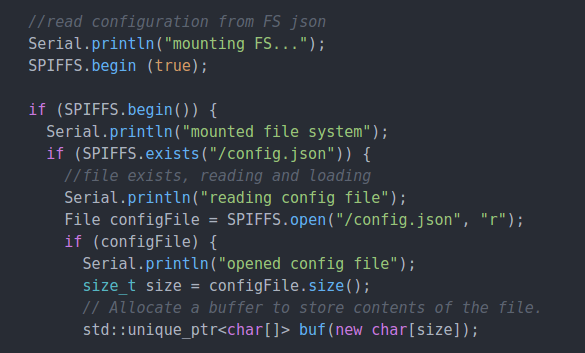
Code for loading configuration file from SPIFFS

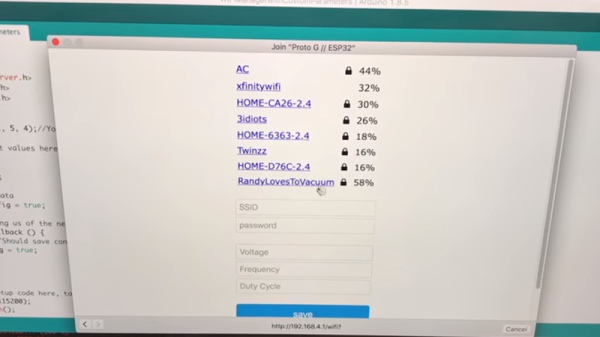
In a recent video, [Proto G] shows a clever way to use WiFiManager to make configuring your ESP32 project easier for end-users. Not only can you use the captive portal system to configure the ESP32’s WiFi against a nearby access point, but it can allow users to enter in configuration data which can be picked up in your code by using SPI Flash File System (SPIFSS).

With the setup demonstrated in the video below by [Proto G], you don’t need anything more exotic than a web browser to configure the device. The end user simply searches for the device’s WiFi network, connects to it, and is presented with an easy to understand dialog which has them select a WiFi network to configure against along with some fields to enter in custom variables. All this information is then stored to a file on the SPI flash. When the ESP32 reboots, it reads the configuration from the saved file and applies the requested settings.

This is very similar to how many consumer devices are now configured, and even the less technically-inclined recipients of such a device should be able to work through the setup with a bit of hand-holding. If you plan on handing one of your ESP32 projects to John Q. Public, this is the kind of configuration you should be aiming for.

We’ve covered using WiFiManager to make ESP32 projects easier to manage, but the addition of arbitrary variables to the captive portal opens up a lot of possibilities. Just the kind of thing you need when you start considering the leap to commercial product.

Continue reading “Easier End-User Setup For ESP32 Projects”

Reverse Engineering The TEC-06 Battery Tester

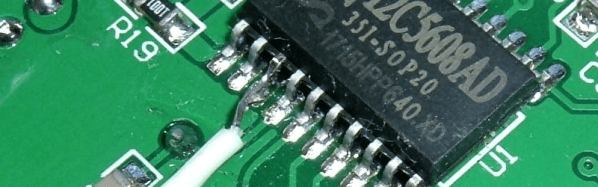
[Syonyk] read that you could solder a few wires to a TEC-06 battery capacity tester, connect it to a TTL serial adapter, and it would interface with some Windows software via a serial port. You can buy it already enabled for serial, but since he had the non-connected version, he was interested in trying it. Not only did it work, but he took the time to reverse engineer the protocol and made a detailed write up about his findings and how he attacked the problem.

Around here, we never need an excuse to reverse engineer anything. But [Synonyk] mentions that he didn’t like using Windows-only software from China. If he wants it on Linux, or if Windows compatibility breaks with a new version, or if the software has spyware in it, he wants to be able to continue using the device. Of course, he also admits — and we get it — that he just enjoys doing it, too.

Continue reading “Reverse Engineering The TEC-06 Battery Tester”

ESP8266 Beacon Announces Your Arrival

It used to be people were happy enough to just have to push a button in their car and have the garage door open. But pushing a button means you have to use your hands, like it’s a baby toy or something. We’re living in the 21st century, surely there must be a better way! Well, if you’ve got a home automation system setup and a spare ESP8266 laying around, [aderusha] may have your solution with MQTTCarPresence.

The theory of operation here is very clever. The ESP8266 is powered via the in-dash USB port, which turns on and off with the engine. When the engine is started, the ESP8266 is powered up and immediately connects to the WiFi network and pushes an MQTT message to Home Assistant. When Home Assistant gets the notification that the ESP8266 has connected, it opens the garage door.

When [aderusha] drives out of the garage and away from the house, the ESP8266 loses connection to the network, and Home Assistant closes the door. The same principle works when he comes home: as the car approaches the house it connects to the network and the garage door opens, and when the engine is shut off in the garage, the door closes again.

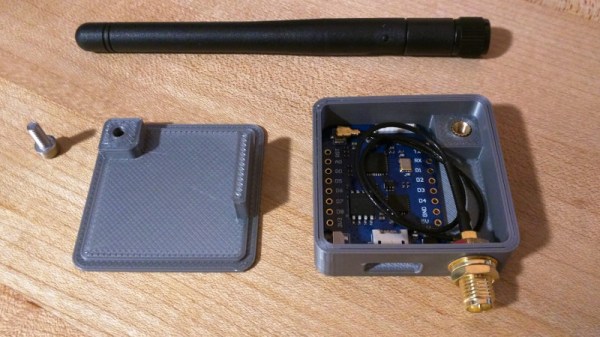
The hardware side of the setup is really just a WeMos D1 mini Pro board, though he’s added an external antenna to make sure the signal gets picked up when the vehicle is rolling up. He’s also designed a very slick 3D printed case to keep it all together in a neat little package.

We’ve covered automated entry systems based on the ESP8266 before, though usually the ESP stays at home. Be sure to check out the awesome series [Elliot Williams] has on the wonders of MQTT if you’re looking to setup your own automation system.

Tricked-out Barbecue Will Make You Do A Spit Take

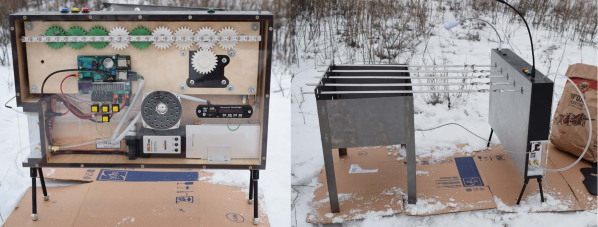
[Strn] and his friends love to barbecue no matter what it’s like outside. But something always seems to interrupt the fun: either it’s time to get up and turn the meat, or the music stops because somebody’s phone ran out of juice, or darkness falls and there aren’t enough flashlights or charged-up phones. He had the idea to build the Swiss Army knife of barbecues, a portable powerhouse that solves all of these problems and more (translated).

Most importantly, the E-Mangal rotates the skewers for even cooking. It does this with a 3D-printed worm gear system driven by the heater flap actuator from a car. After 25 minutes of slow rotation, a voice announces that it’s time to eat. [Strn] and friends will never hurt for music options between the pre-loaded tracks, Bluetooth audio, FM antenna, USB, and SD options running through a 3W amp. Two USB lights illuminate nighttime barbecuing, and the 10 Ah battery can do it all and keep everyone’s phone charged. For safety’s sake, [Strn] included a half-liter water tank to extinguish the coals via jet stream. Everything is run by a PIC18F, and it can be controlled at the box or through a simple web interface.

We love the look of this barbecue controller almost as much as the functionality. The sturdy stance of those short, angled legs give it a mid-century appliance feel, and seeing all the guts on display is always a plus. Grab a turkey leg and take the tour after the break.

The E-Mangal has a thermocouple in the coal box to measure the temperature, but there’s no direct control. If you’re more interested in temperature options than entertainment, here’s a project that micromanages everything on the grill.

Continue reading “Tricked-out Barbecue Will Make You Do A Spit Take”

Microsoft Gets Hacker Friendly

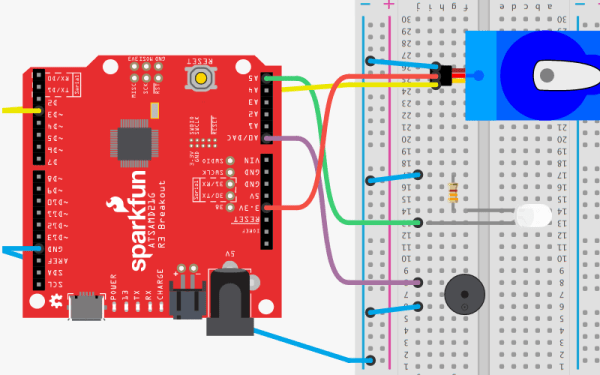
You don’t often hear hackers say a lot of good things about Microsoft. Sure, you might use Windows, especially if you have one of those embarrassing day jobs. But at night in a hacker’s secret lab, you are likely to find something that looks more like Unix, even if it has a penguin, a piece of fruit, or even a green robot on the label. But we’ll give Microsoft credit. Their new MakeCode site will be a great boon for educators, students, and anyone who wants to learn how to code. What’s more is they are joined by a lot of familiar hacker faces including AdaFruit, Sparkfun, and Seeed Studios.

The idea is to have tutorials and if that was all there was to it, this would be a short post. But what is really entertaining about the site is that there are web-based emulators for all the hardware so you can actually do the projects in your browser with no extra hardware. You can also do your own projects from scratch.

Continue reading “Microsoft Gets Hacker Friendly”

Improvising An EPROM Eraser

Back in the old days, when we were still twiddling bits with magnetized needles, changing the data on an EPROM wasn’t as simple as shoving it in a programmer. These memory chips were erased with UV light shining through a quartz window onto a silicon die. At the time, there were neat little blacklights in a box sold to erase these chips. There’s little need for these chip erasers now, so how do you erase and program a chip these days? Build your own chip eraser using components that would have blown minds back in the 70s.

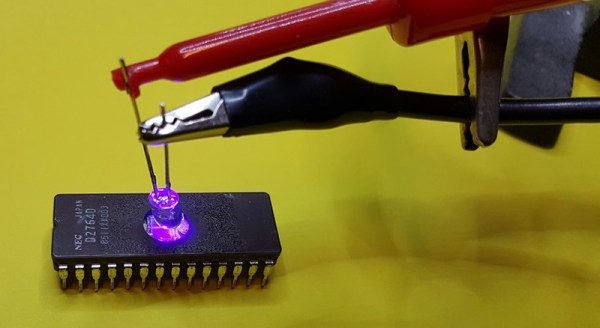
[Charles] got his hands on an old 2764 EPROM for a project, but this chip had a problem — there was still data on it. Fortunately, old electronics are highly resistant to abuse, so he pulled out the obvious equipment to erase this chip, a 300 watt tanning lamp. This almost burnt down the house, and after a second round of erasing of six hours under the lamp, there were still unerased bits.

Our ability to generate UV light has improved dramatically over the last fifty years, and [Charles] remembered he had an assortment of LEDs, including a few tiny 5mW UV LEDs. Can five milliwatts do what three hundred watts couldn’t? Yes; the LED had the right frequency to flip a bit, and erasing an EPROM is a function of intensity and time. All you really need to do is shine a LED onto a chip for a few hours.

With this vintage chip erased, [Charles] slapped together an EPROM programmer — with a programming voltage of 21V — out of an ATMega and a bench power supply. It eventually worked, allowing [Charles]’ project, a vintage liquid crystal display, to have the right data using vintage-correct parts.