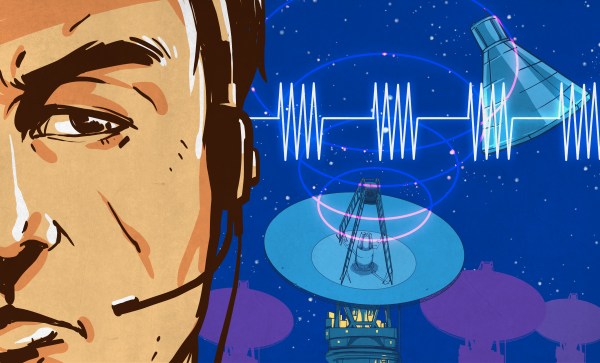
When you think of who invented the induction motor, Nikola Tesla and Galileo Ferraris should come to mind. Though that could be a case of the squeaky wheel being the one that gets the grease. Those two were the ones who fought it out just when the infrastructure for these motors was being developed. Then again, Tesla played a huge part in inventing much of the technology behind that infrastructure.
Although they claimed to have invented it independently, nothing’s ever invented in a vacuum, and there was an interesting progression of both little guys and giants that came before them; Charles Babbage was surprisingly one of those giants. So let’s start at the beginning, and work our way to Tesla and Ferraris.
If you ever watch a spy movie, you’ve doubtlessly seen some nameless tech character sweep a room for bugs using some kind of detector and either declare it clean or find the hidden microphone in the lamp. Of course, as a hacker, you have to start thinking about how that would work. If you had a bug that transmits all the time, that’s easy. The lamp probably shouldn’t be emitting RF energy all the time, so that’s easy to detect and a dead give away. But what if the bug were more sophisticated? Maybe it wakes up every hour and beams its data home. Or perhaps it records to memory and doesn’t transmit anything. What then?
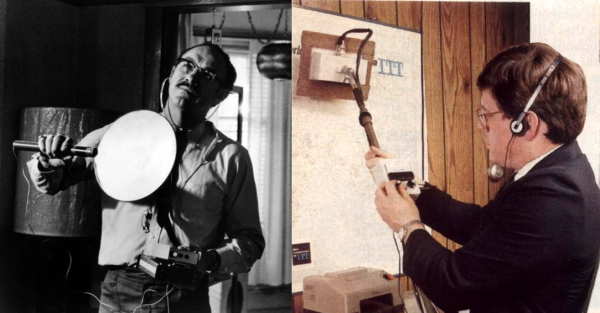
High-end bug detectors have another technique they use that claims to be able to find active device junctions. These are called Nonlinear Junction Detectors (NLJD). Spy agencies in the United States, Russian and China have been known to use them and prisons employ them to find cell phones. Their claim to fame is the device doesn’t have to be turned on for detection to occur. You can see a video of a commercial NLJD, below
We are especially pleased to welcome Michael Ossmann as a speaker. He presented an RF design workshop at the 2014 Superconference which was sold out, standing room only, and still turned away dozens of people before becoming a hit on the Internet. This year he takes the stage with colleague Dominic Spill as they focus on infrared communications and the uses and abuses of such.
Dr. Christal Gordon threw down an incredible talk on biologically inspired sensors last year and we suspect she will outdo herself this year. Her talk will cover the fanciest of cutting-edge sensors and the trade-offs of selecting the new hotness for your designs. Coming out of this you will know when to go with a suite of tried and true components and when to make the leap to new tech.
Several of this year’s Hackaday Prize Judges will be on hand and presenting talks. In addition to Christal Gordon and Danielle Applestone (announced as a speaker last week), we’re thrilled to have Anouk Wipprecht — internationally known for her work in fashion and engineering, pushing the boundaries of how technology can interface with humans — as a speaker. Nadya Peek from the Center for Bits and Atoms who spoke at Supercon in 2016 with a harrowing tale of an impromptu engineering challenge in Shenzhen has confirmed that she will speak this year.
The ever-popular Sprite_TM will be at Supercon. He has a reputation for bringing the house down with fantastic presentations, be it the Tamagochi Matrix or the Tiniest Game Boy. And we are proud to present the Art Director for Hackaday — Joe Kim will be speaking about the curious connection between art and technology and how developments in one push the other forward.
Ever wonder about the air you’re breathing in the house or at work. So does Natalia Mykhaylova whose work begins to monitor and catalog that information. She will discuss the state of our HVAC systems and what it looks like to bring them into the information age.
Below you’ll find the confirmed speakers we’re announcing today. We’ll have more, as well as a list of confirmed talks next week. Get your ticket now, they will sell out.
The other day I saw a plastic part that was so beautiful that I had to look twice to realize it hadn’t been cast — and no, it didn’t come out of a Stratysys or anything, just a 3D printer that probably cost $1,500. It struck me that someone who had paid an artisan to make a mold and cast that part might end up spending the same amount as that 3D printer. It also struck me that the little guys are starting to catch up with the big guys.
Haz Bridgeport, Will Mill
Sometimes it’s just a matter of getting a hold of the equipment. If you need a Bridgeport mill for your project, and you don’t have one, you have to pay for someone else to make the thing — no matter how simple. You’re paying for the operator’s education and expertise, as well as helping pay for the maintenance and support of the hardware and the shop it’s housed in.
I once worked in a packaging shop, and around 2004 we got in a prototype to use in developing the product box. This prototype was 3D printed and I was told it cost $12,000 to make. For the era it was mind blowing. The part itself was simplistic and few folks on Thingiverse circa 2017 would be impressed; the print quality was roughly on par with a Makerbot Cupcake. But because the company didn’t have a 3D printer, they had to pay someone who owned one a ton of cash to make the thing they wanted.
Unparalleled Access to Formerly Professional-Only Tools
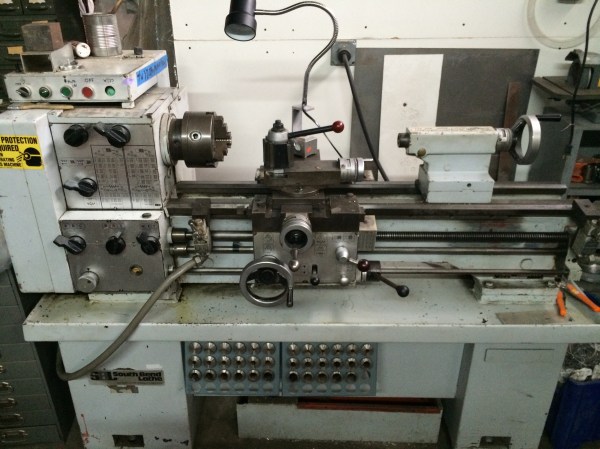
But access to high end tools has never been easier. Hackerspaces and tool libraries alone have revolutionized what it means to have access to those machines. There are four or five Bridgeports (or similar vertical mills) at my hackerspace and I believe they were all donated. For the cost of membership, plus the time to get trained in and checked out, you can mill that part for cheap. Repeat with above-average 3D printers, CNC mills, vinyl cutters, lasers. The space’s South Bend lathe (pictured) is another example of the stuff most people don’t have in their basement shops. This group ownership model may not necessarily grant you the same gear as the pros, but sometimes it’s pretty close. Continue reading “The Narrowing Gap Between Amateur And Professional Fabrication”→
The Mars Climate Orbiter was a spacecraft launched in the closing years of the 1990s, whose job was to have been to study the Martian atmosphere and serve as a communications relay point for a series of other surface missions. It is famous not for its mission achieving these goals, but for the manner of its premature destruction as its orbital insertion brought it too close to the planet’s atmosphere and destroyed it.
The ill-fated Mars Climate Orbiter craft. NASA [Public domain].The cause of the spacecraft entering the atmosphere rather than orbiting the planet was found in a subsequent investigation to be a very simple one. Simplifying matters to an extent, a private contractor supplied a subsystem which delivered a reading whose units were in the imperial system, to another subsystem expecting units in the SI, or metric system. The resulting huge discrepancy caused the craft to steer towards the surface of the planet rather than the intended orbit, and caused the mission to come to a premature end. Billions of dollars lost, substantially red faces among the engineers responsible.
This unit cock-up gave metric-using engineers the world over a brief chance to feel smug, as well as if they were being honest a chance to reflect on their good fortune at it not having happened on their watch. We will all at some time or another have made an error with respect to our unit calculations, even though in most cases it’s more likely to have involved a simple loss of a factor of ten, and not with respect to a billion dollar piece of space hardware.
But it also touches on one of those fundamental divides in the world between the metric and imperial systems. It’s a divide that brings together threads of age politics, geography, nationalism, and personal choice, and though it may be somewhere angels fear to tread (we’ve seen it get quite heated before to the tune of 885+ comments), it provides a fascinating subject for anyone with an interest in engineering culture.
So far in this brief series on in-band signaling, we looked at two of the common methods of providing control signals along with the main content of a transmission: DTMF for Touch-Tone dialing, and coded-squelch systems for two-way radio. For this installment, we’ll look at something that far fewer people have ever used, but almost everyone has heard: Quindar tones.
In hacker circles, the “Internet of Things” is often the object of derision. Do we really need the IoT toaster? But there’s one phrase that — while not new — is really starting to annoy me in its current incarnation: AI or Artificial Intelligence.
The problem isn’t the phrase itself. It used to mean a collection of techniques used to make a computer look like it was smart enough to, say, play a game or hold a simulated conversation. Of course, in the movies it means HAL9000. Lately, though, companies have been overselling the concept and otherwise normal people are taking the bait.
The Alexa Effect
Not to pick on Amazon, but all of the home assistants like Alexa and Google Now tout themselves as AI. By the most classic definition, that’s true. AI techniques include matching natural language to predefined templates. That’s really all these devices are doing today. Granted the neural nets that allow for great speech recognition and reproduction are impressive. But they aren’t true intelligence nor are they even necessarily direct analogs of a human brain.





![The ill-fated Mars Climate Orbiter craft. NASA [Public domain].](https://hackaday.com/wp-content/uploads/2017/09/mars_climate_orbiter_2.jpg)