DIY ESP32 Video Doorbell Locks Out Big Brother

There’s no question that being able to see who’s at your front door from your computer or mobile device is convenient, which is why the market is currently flooded with video doorbells. Unfortunately, it’s not always clear who else has access to the images these devices capture. Organizations such as the Electronic Frontier Foundation have argued that by installing one of these Internet-connected cameras on their front door, consumers are unwittingly contributing to a mass surveillance system that could easily be turned against them.

Luckily, there’s a solution. As [Sebastian] shows in his latest project, you can build your own video doorbell that replicates the features of the commercial offerings while ensuring you’re the only one who has access to the data by leveraging open source, community developed projects such as ESPHome and Home Assistant. At the same time, modern manufacturing techniques like desktop 3D printing and low-cost PCB fabrication mean your DIY doorbell doesn’t have to look like you made it yourself.

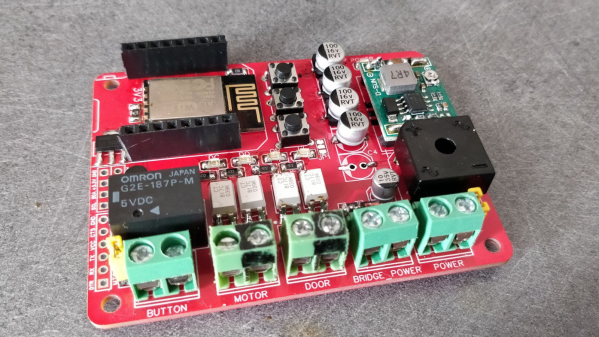
The project starts with a custom PCB that combines the ESP32, a camera module, a capacitive touch sensor, a relay to optionally trigger an electronic door lock, and a DC-DC converter that will let you power the device from a wide range of input voltages. The board even has a spot where you can solder on an additional 8 MB of external PSRAM for the ESP32, which will enable the chip to capture higher resolution video.

The electronics are housed in a minimalistic 3D printed enclosure that would fit right in alongside similar gadgets from the likes of Ring and Arlo; especially if you have access to a CNC and can cut the front panel out of acrylic. The lighted touch sensor looks phenomenal, and really gives the device a professional feel. That said, it doesn’t look like the case would last very long if exposed to harsh weather and there are some obvious physical security issues with this approach. But to be fair, we’ve seen the same problem with commercial hardware.

Naturally with a project like this, the hardware is only half of the story. It takes a considerable amount of software poking and prodding to get things like mobile device notifications working, and as a special added annoyance, the process is different depending on which MegaCorp produced the OS your gadget is running. [Sebastian] has documented the bulk of the process in the video after the break, but the finer points will likely need some adjustment depending on how you want to set things up.

This is an exceptionally impressive project for sure, but if the whole slick futuristic look isn’t your style, you could always opt to go with the DIY video door bell that looks like it came from an alternate reality version of 1986.

Continue reading “DIY ESP32 Video Doorbell Locks Out Big Brother”

An Open Source IR Gateway Based On The ESP8266

The market is absolutely inundated with smart gadgets, with everything from coffee makers to TVs advertising that they support the latest and greatest in home automation platforms. Don’t worry about how many of those platforms and services will still up up and running in the next few years, the thing will probably stop working before then anyway. No sense worrying about the details in a disposable world.

Of course, not all of us are so quick to dump working hardware in the name of the latest consumer trend. Which is why [Viktor] has developed an open source infrared gateway that can connect your “dumb” devices to the latest flash in the pan backend service with nothing more than a software update. Though even modern smart TVs still include IR remotes, so there’s nothing stopping you from using it with newer gear if you don’t trust like the built-in implementation.

The hardware here is really quite simple, essentially boiling down to a few IR LEDs and an IR receiver hanging off the GPIO ports of an ESP8266. While the receiver isn’t strictly necessary, it does allow [Viktor] to rapidly implement new IR codes. He just points the existing remote at the board, hits a button, and the decoded command gets sent out over MQTT where he can easily snap it up.

[Viktor] has done the hard work of creating the PCB design and testing out different IR LEDs to find the ones with the best performance. But if you wanted to just throw something together in a weekend, you should be able to get his firmware running with little more than a bare ESP and a random IR LED salvaged from an old remote. But don’t be surprised if you get hooked on the concept and end up rolling your own home automation system.

Electric Window Mechanism Into A Electric Screen Door

In many parts of the world leaving open a door or window is a good way to get a house full of bugs. Remembering to close doors behind them can be surprisingly hard for members of the human race, so the [DuctTape Mechanic] used the components from a car’s electric window to automate his sliding screen door.

After the excess pieces were cut off the rail, the motor and rail were mounted on top of the door frame. A long bolt is attached to the moving plate on the rail, which pushes on the pack of the door to close it. After closing, the mechanism returns to its open position, allowing the door to be opened by hand again. The motor is controlled by an Arduino running a very simple sketch, which senses if the door is closed with a microswitch and starts a 10 second countdown once opened. Two relays are used to create an H-bridge circuit to drive the motor in both directions.

It doesn’t look like there is any provision to detect if it is obstructed. A simple solution could be to make the push rod spring-loaded, so it can slide over the door if there is excessive resistance.

If you only want to let certain creatures into your house, we have no shortage of automated pet door for your hacking pleasure.

Continue reading “Electric Window Mechanism Into A Electric Screen Door”

Garbage Can Takes Itself Out

Home automation is a fine goal but typically remains confined to lights, blinds, and other things that are relatively stationary and/or electrical in nature. There is a challenge there to be certain, but to really step up your home automation game you’ll need to think outside the box. This automated garbage can that can take itself out, for example, has all the home automation street cred you’d ever need.

The garbage can moves itself by means of a scooter wheel which has a hub motor inside and is powered by a lithium battery, but the real genius of this project is the electronics controlling everything. A Raspberry Pi Zero W is at the center of the build which controls the motor via a driver board and also receives instructions on when to wheel the garbage can out to the curb from an Nvidia Jetson board. That board is needed because the creator, [Ahad Cove], didn’t want to be bothered to tell his garbage can to take itself out or even schedule it. He instead used machine learning to detect when the garbage truck was headed down the street and instruct the garbage can to roll itself out then.

The only other thing to tie this build together was to get the garage door to open automatically for the garbage can. Luckily, [Ahad]’s garage door opener was already equipped with WiFi and had an available app, unbeknownst to him, which made this a surprisingly easy part of the build. If you have a more rudimentary garage door opener, though, there are plenty of options available to get it on the internets.

Continue reading “Garbage Can Takes Itself Out”

Automation With A New Twist

Turning on a lightbulb has never been easier. You can do it from your mobile. Voice activation through home assistants is robust. Wall switches even play nicely with the above methods. It was only a matter of time before someone decided to make it fun, if you consider a Rubik’s cube enjoyable. [Alastair Aitchison] at Playful Technology demonstrated that it is possible to trigger a relay when you match all the colors. Video also after the break.

The cube does little to obfuscate game data, so in this scope, it sends unencrypted transmissions. An ESP32 with [Alastair]’s Arduino code, can track each movement, and recognize a solved state. In the video, he solves the puzzle, and an actuator releases a balloon. He talks about some other cool things this could do, like home automation or a puzzle room, which is in his wheelhouse judging by the rest of his YouTube channel.

We would love to see different actions perform remote tasks. Twisting the top could set a timer for 1-2-3-4-5 minutes, while the bottom would change the bedroom lights from red-orange-yellow-green-blue-violet. Solving the puzzle should result in a barrage of NERF darts or maybe keep housemates from cranking the A/C on a whim.

Continue reading “Automation With A New Twist”

Simple MP3 Player Hides Home Automation Brilliance

Like bubble wrap or the corkscrew, plenty of everyday objects have lost almost all ties to their original purpose. It could be that the original product had no market but was able to find one in an unexpected place, or simply that the original use case disappeared. We think that this MP3 player for children might arrive at a similar fate as a home automation controller thanks to a recent project by [Sebastian].

The MP3 player is known as a Jooki and works by using small figurines (and a few buttons) to control the device. Different figurines cause the MP3 player to change playlists, for example, but it turns out that the device is capable of communicating over MQTT. This means that [Sebastian] was able to use the MQTT messages from the Jooki to do all kinds of things beyond its intended use with openHAB, an open-source home automation system, such as dimming the lights and closing the blinds when he puts his son to bed.

This platform has considerable potential for hacking thanks to the lightweight communications system it uses under the hood. The Jooki is a little pricey, but if you happen to have one around, it’s an impressive tool that can go well beyond its original intended use.

Home Automation Covers Everything

When starting out on a project, it’s accepted best practice to try to avoid feature creep. Of course, we can’t all say that we follow this guideline completely every time. In fact, sometimes it can get away from us, and in rare situations it might actually turn out pretty well. That appears to be what happened with [superczar]’s home automation project which now covers basically everything possible in home automation.

The build started in 2013, so we assume that features have been added periodically and that the system wasn’t designed and built all in one furious weekend. Either way, though, it covers a lot: lights, switches, media players in several rooms, includes sensors and logging for temperature, smoke, fire, and power, supports a number of cameras, the doorbell, and the locks. It also includes voice control for most of the systems.

That’s an impressive list, but what really drew our attention to this project is that it used to be based on domoticz, but that community has waned over the years and [superczar] had kept his system patched together with self-built scripts. An accidental upgrade recently broke the entire setup, so rather than rebuild everything a migration was made to home-assistant, an open-source platform that has a more active community. We’ve seen plenty of projects around here that use it as a platform, for ceiling fans, custom remotes, and doorbells.

Thanks to [pradeepmur] for the tip!