Espresso maker with added nixie flair

AI Powered Coffee Maker Knows A Bit Too Much About You

People keep warning that Skynet and the great robot uprising is not that far away, what with all this recent AI and machine-learning malarky getting all the attention lately. But we think going straight for a terminator robot army is not a very smart approach, not least due to a lack of subtlety. We think that it’s a much better bet to take over the world one home appliance at a time, and this AI Powered coffee maker might just well be part of that master plan.
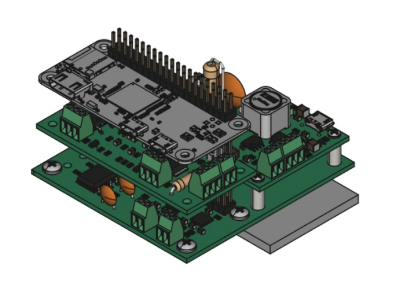
Raspberry Pi Zero sitting atop the custom nixie tube driver PCB
PCB stackup with Pi Zero sat atop the driver / PSU PCBs

[Mark Smith] has taken a standard semi-auto espresso maker and jazzed it up a bit, with a sweet bar graph nixie tube the only obvious addition, at least from the front of the unit. Inside, a Raspberry Pi Zero sits atop his own nixie tube hat and associated power supply. The whole assembly is dropped into a 3D printed case and lives snuggled up to the water pump.

The Pi is running a web application written with the excellent Flask framework, and also an additional control application written in python. This allows the user to connect to the machine via Ethernet and see its status. The smarts are in the form of a simple self-grading machine learning algorithm, that takes a time series as an input (in this case when you take your shots of espresso) and after a few weeks of data, is able to make a reasonable prediction as to when you might want it in the future. It then automatically heats up in time for you to use the machine, when you usually do, then cools back down to save energy. No more pointless wandering around to see if the machine is hot enough yet – as you can just check the web page and see from the comfort of your desk.

But that’s not all [Mark] has done. He also improved the temperature control of the water boiler, and added an interlock that prevents the machine from producing a shot until the water temperature is just so. Water level is indicated by the glorious bar graph nixie tube, which also serves a few other user indication duties when appropriate. All in all a pretty sweet build, but we do add a word of caution: If your toaster starts making an unreasonable number of offers of toasted teacakes, give it a wide berth.
Spaghetti Detective Users Boiled By Security Gaffe

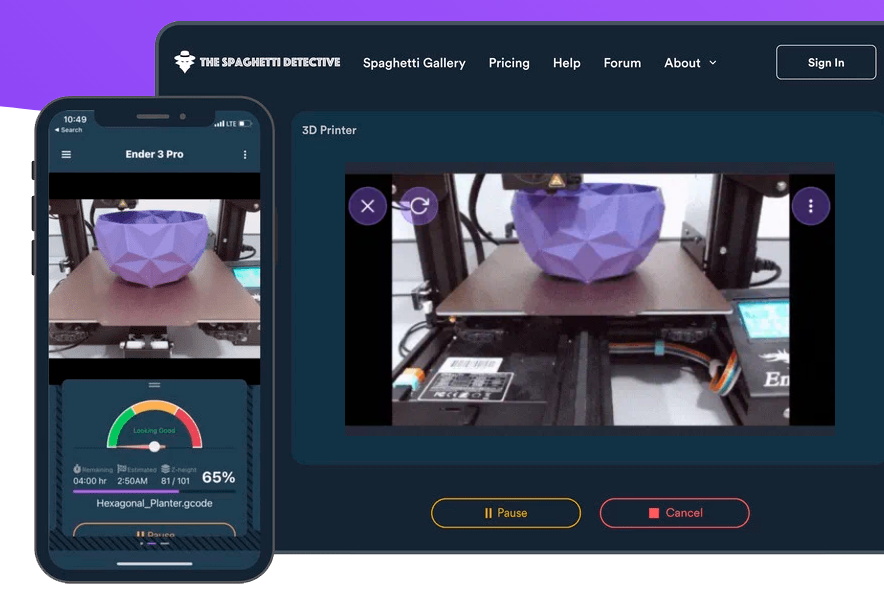
For readers that might not spend their free time watching spools of PLA slowly unwind, The Spaghetti Detective (TSD) is an open source project that aims to use computer vision and machine learning to identify when a 3D print has failed and resulted in a pile of plastic “spaghetti” on the build plate. Once users have installed the OctoPrint plugin, they need to point it to either a self-hosted server that’s running on a relatively powerful machine, or TSD’s paid cloud service that handles all the AI heavy lifting for a monthly fee.

Unfortunately, 73 of those cloud customers ended up getting a bit more than they bargained for when a configuration flub allowed strangers to take control of their printers. In a frank blog post, TSD founder Kenneth Jiang owns up to the August 19th mistake and explains exactly what happened, who was impacted, and how changes to the server-side code should prevent similar issues going forward.

Screenshot from TSD web interface
TSD allows users to remotely manage and monitor their printers.

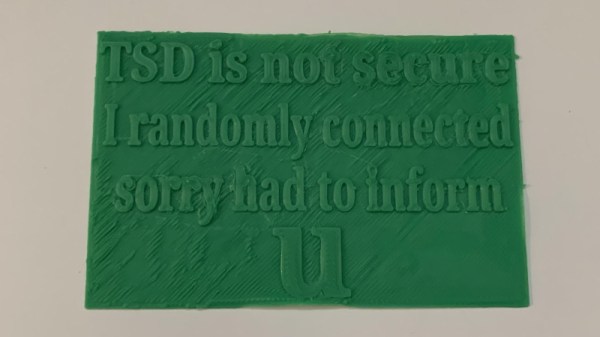
For the record, it appears no permanent damage was done, and everyone who was potentially impacted by this issue has been notified. There was a fairly narrow window of opportunity for anyone to stumble upon the issue in the first place, meaning any bad actors would have had to be particularly quick on their keyboards to come up with some nefarious plot to sabotage any printers connected to TSD. That said, one user took to Reddit to show off the physical warning their printer spit out; the apparent handiwork of a fellow customer that discovered the glitch on their own.

According to Jiang, the issue stemmed from how TSD associates printers and users. When the server sees multiple connections coming from the same public IP, it’s assumed they’re physically connected to the same local network. This allows the server to link the OctoPrint plugin running on a Raspberry Pi to the user’s phone or computer. But on the night in question, an incorrectly configured load-balancing system stopped passing the source IP addresses to the server. This made TSD believe all of the printers and users who connected during this time period were on the same LAN, allowing anyone to connect with whatever machine they wished.

Changed TSD code from GitHub
New code pushed to the TSD repository limits how many devices can be associated with a single IP.

The mix-up only lasted about six hours, and so far, only the one user has actually reported their printer being remotely controlled by an outside party. After fixing the load-balancing configuration, the team also pushed an update to the TSD code which puts a cap on how many printers the server will associate with a given IP address. This seems like a reasonable enough precaution, though it’s not immediately obvious how this change would impact users who wish to add multiple printers to their account at the same time, such as in the case of a print farm.

While no doubt an embarrassing misstep for the team at The Spaghetti Detective, we can at least appreciate how swiftly they dealt with the issue and their transparency in bringing the flaw to light. This is also an excellent example of how open source allows the community to independently evaluate the fixes applied by the developer in response to a discovered flaw. Jiang says the team will be launching a full security audit of their own as well, so expect more changes getting pushed to the repository in the near future.

We were impressed with TSD when we first covered it back in 2019, and glad to see the project has flourished since we last checked in. Trust is difficult to gain and easy to lose, but we hope the team’s handling of this issue shows they’re on top of things and willing to do right by their community even if it means getting some egg on their face from time to time.

GitHub Copilot And The Unfulfilled Promises Of An Artificial Intelligence Future

In late June of 2021, GitHub launched a ‘technical preview’ of what they termed GitHub Copilot, described as an ‘AI pair programmer which helps you write better code’. Quite predictably, responses to this announcement varied from glee at the glorious arrival of our code-generating AI overlords, to dismay and predictions of doom and gloom as before long companies would be firing software developers en-masse.

As is usually the case with such controversial topics, neither of these extremes are even remotely close to the truth. In fact, the OpenAI Codex machine learning model which underlies GitHub’s Copilot is derived from OpenAI’s GPT-3 natural language model,  and features many of the same stumbles and gaffes which GTP-3 has. So if Codex and with it Copilot isn’t everything it’s cracked up to be, what is the big deal, and why show it at all?

Continue reading “GitHub Copilot And The Unfulfilled Promises Of An Artificial Intelligence Future”

Ostrich Robot Machine-Learns Itself To 5K

Ever since humanity has grasped the idea of a robot, we’ve wanted to imagine them into walking humanoid form. But making a robot walk like a human is not an easy task, and even the best of them end up with the somewhat shuffling gait of a Honda Asimo rather than the graceful poise of a balerina. Only in recent years have walking robots appeared to come of age, and then not by mimicking the human gait but something more akin to a bird.

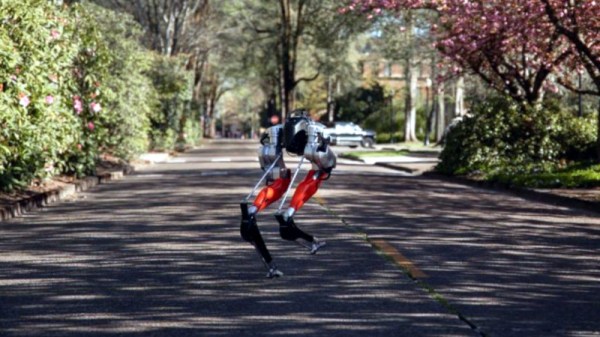
We’ve seen it in the Boston Dynamics models, and also now in a self-balancing two-legged robot developed at Oregon State University that has demonstrated its abilities by completing an unaided 5 km run having used its machine learning skills to teach itself to run from scratch. It’s believed to be the first time a robot has achieved such a feat without first being programmed for the specific task.

The university’s PR piece envisages a time in which walking robots of this type have become commonplace, and when humans interact with them on a daily basis. We can certainly see that they could perform a huge number of autonomous outdoor tasks that perhaps a wheeled robot might find to be difficult, so maybe they have a bright future. Decide for yourself, after watching the video below the break.

Continue reading “Ostrich Robot Machine-Learns Itself To 5K”

Recognising Bird Sounds With A Microcontroller

Machine learning is an incredible tool for conservation research, especially for scenarios like long term observation, and sifting through massive amounts of data. While the average Hackaday reader might not be able to take part in data gathering in an isolated wilderness somewhere, we are all surrounded by bird life. Using an Arduino Nano 33 BLE Sense and an online machine learning tool, a team made up of [Errol Joshua], [Ajith KJ], [Mahesh Nayak], and [Supriya Nickam] demonstrate how to set up an automated bird call classifier.

The Arduino Nano 33 BLE Sense  is a fully featured little dev board that features the very capable NRF52840 microcontroller with Bluetooth Low Energy, and a variety of onboard sensors, including a microphone. Training a machine learning model might seem daunting to many people, but online services like Edge Impulse makes the process very beginner-friendly. Once you start training your own models for specific applications, you quickly learn that building and maintaining a high quality dataset is often the most time-consuming part of machine learning. Fortunately for this use case, a massive online library of bird calls from all over the world is available on Xeno-Canto. This can be augmented with background noise from the area where the device will be deployed to reduce false-positives. Edge Impulse will train the model using the provided dataset, and generate a library that can be used on the Arduino with one of the provided sample sketches to log and send the collected data to a server. Then comes the never ending process of iteratively testing and improving the recognition model. Edge Impulse is also compatible with more powerful devices such as the Raspberry Pi and Jetson Nano if you want more intensive machine learning models.

We’ve also seen the exact same setup get used for smart baby monitor. If you want to learn more, be sure to watch at [Shawn Hymel]’s talk from the 2020 Remoticon about machine learning on microcontrollers. Continue reading “Recognising Bird Sounds With A Microcontroller”

Smart Camera Based On Google Coral

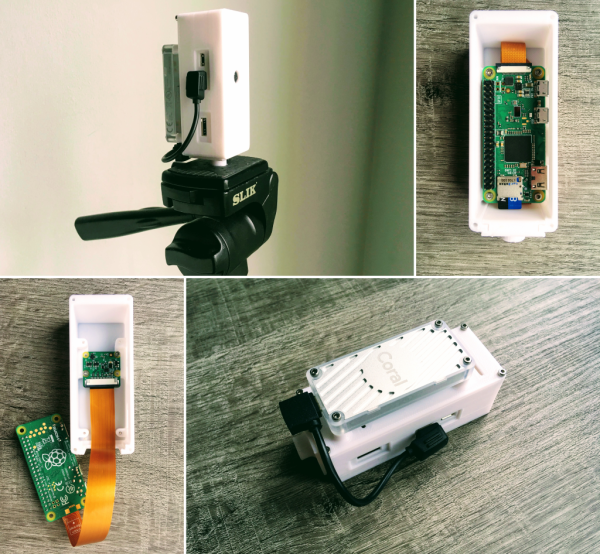
As machine learning and artificial intelligence becomes more widespread, so do the number of platforms available for anyone looking to experiment with the technology. Much like the single board computer revolution of the last ten years, we’re currently seeing a similar revolution with the number of platforms available for machine learning. One of those is Google Coral, a set of hardware specifically designed to take advantage of this new technology. It’s missing support to work with certain hardware though, so [Ricardo] set out to get one working with a Raspberry Pi Zero with this smart camera build based around Google Coral.

The project uses a Google Coral Edge TPU with a USB accelerator as the basis for the machine learning. A complete image for the Pi Zero is available which sets most of the system up right away including headless operation and includes a host of machine learning software such as OpenCV and pytesseract. By pairing a camera to the Edge TPU and the Raspberry Pi, [Ricardo] demonstrates many of its machine learning capabilities with several example projects such as an automatic license plate detector and even a mode which can recognize whether or not a face mask is being worn, and even how correctly it is being worn.

For those who want to get into machine learning and artificial intelligence, this is a great introductory project since the cost to entry is so low using these pieces of hardware. All of the project code and examples are available on [Ricardo]’s GitHub page too. We could even imagine his license plate recognition software being used to augment this license plate reader which uses a much more powerful camera.

Teaching A Machine To Be Worse At A Video Game Than You Are

Is it really cheating if the aimbot you’ve built plays the game worse than you do?

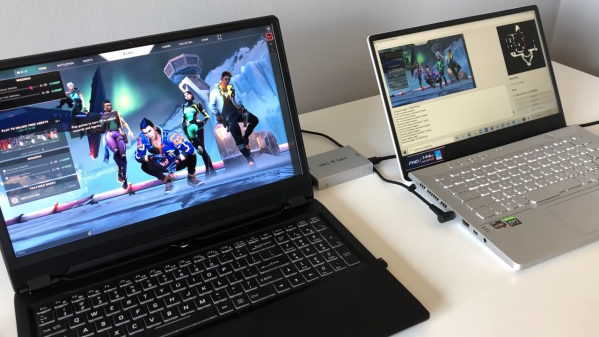
We vote no, and while we take a dim view on cheating in general, there are still some interesting hacks in this AI-powered bot for Valorant. This is a first-person shooter, team-based game that has a lot of action and a Counter-Strike vibe. As [River] points out, most cheat-bots have direct access to the memory of the computer which is playing the game, which gives it an unfair advantage over human players, who have to visually process the game field and make their moves in meatspace. To make the Valorant-bot more of a challenge, he decided to feed video of the game from one computer to another over an HDMI-to-USB capture device.

The second machine has a YOLOv5 model which was trained against two hours of gameplay, enough to identify friend from foe — most of the time. Navigation around the map was done by analyzing the game’s on-screen minimap with OpenCV and doing some rudimentary path-finding. Actually controlling the player on the game machine was particularly hacky; rather than rely on an API to send keyboard sequences, [River] used a wireless mouse dongle on the game machine and a USB transmitter on the second machine.

The results are — iffy, to say the least. The system tends to get the player stuck in corners, and doesn’t recognize enemies that pop up at close range. The former is a function of the low-res minimap, while the latter has to do with the training data set — most human players engage enemies at distance, so there’s a dearth of “bad breath range” encounters to train to. Still, we’re impressed that it’s possible to train a machine to play a complex FPS game at all, let alone this well.