Cornell Students Have Your Back

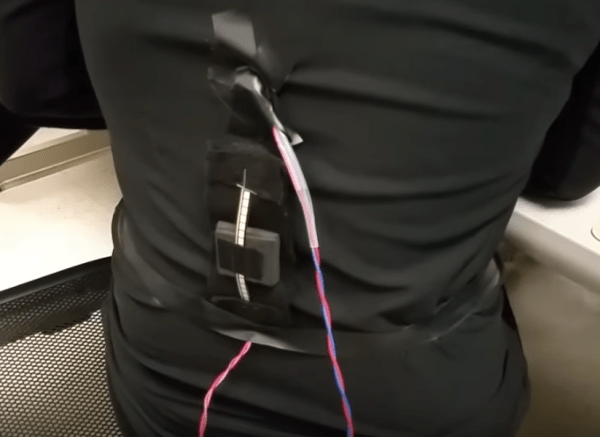
Back problems are some of the most common injuries among office workers and other jobs of a white-collar nature. These are injuries that develop over a long period of time and are often caused by poor posture or bad ergonomics. Some of the electrical engineering students at Cornell recognized this problem and used their senior design project to address this issue. [Rohit Jha], [Amanda Pustis], and [Erissa Irani] designed and built a posture correcting device that alerts the wearer whenever their spine isn’t in the ideal position.

The device fits into a tight-fitting shirt. The sensor itself is a flex sensor from Sparkfun which can detect deflections. This data is then read by a PIC32 microcontroller. Feedback for the wearer is done by a vibration motor and a TFT display with a push button. Of course, they didn’t just wire everything up and call it a day; there was a lot of biology research that went into this. The students worked to determine the most ideal posture for a typical person, the best place to put the sensor, and the best type of feedback to send out for a comfortable user experience.

We’re always excited to see the senior design projects from university students. They often push the boundaries of conventional thinking, and that’s exactly the skill that next generation of engineers will need. Be sure to check out the video of the project below, and if you want to see more of this semester’s other projects, we have you covered there tooContinue reading “Cornell Students Have Your Back”
Tiny Tunes On An ATtiny13

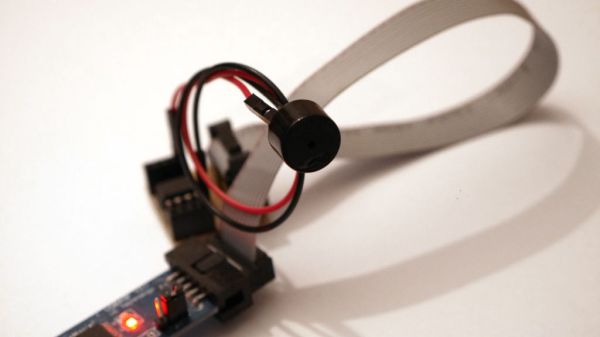
When you take a microcontroller class in university, one of the early labs they have you drudge through on your way to, promised, mastery over all things embedded, is a tiny music generator.

It’s a more challenging lab than one would expect. It takes understanding the clock of the microcontroller and its sometimes temperamental nature. It takes a clear mental picture of interrupts, and is likely one of the first experiences a burgeoning designer will have worrying about the execution time of one of their loops. Also tables, data structures, and more. It even requires them to go out of their comfort zone a learn about an unrelated field, a challenge often faced in practicing engineering.

Luckily [Łukasz Podkalicki] has done a great job of documenting the adventure. He’s got everything from the schematic and code to the PWM traces on the oscilloscope.

It’s also worth mentioning that he’s got a few other really nice tutorials for the ATtiny13 microcontroller on his blog. A tiny party light generator and a IR receiver among them.

Only One Button? No Problem!

Sometimes less is more. This is especially true when dealing with microcontrollers with limited I/O pins. Even if you have lots of I/O, sometimes you are need to pack a lot into a little space. [Hugatry] was inspired by the simple interface found on a lot of flashlights: one button. Push it and it turns on. Push it again, and it switches modes. You cycle through the modes until you finally turn it back off. One button provides mutliple functions. The question is how can you use a power switch as an I/O device? After all, when you turn the power off, the microprocessor stops operating, right?

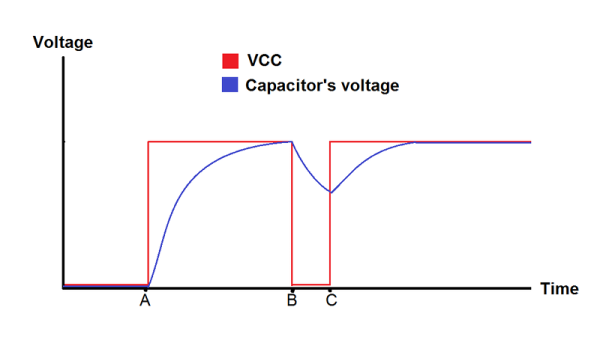
[Hugatry’s] answer is quite simple. He connects a resistor/capacitor network to an I/O pin (or multiple pins). When the processor turns on initially, the pin will read low and the capacitor will charge up. If you turn the power off, the CPU voltage will fall rapidly to zero, but the voltage on the capacitor will discharge slower. If you wait long enough and turn the power on, there’s no difference from that first power on event. But if you turn the power on quickly, the capacitor voltage will still be high enough to read as a logic one.

What that means is that the processor as part of its start up can detect that it was recently turned off and take some action. If it remembers the previous state in nonvolatile memory, you can have the code cycle through multiple states, just like a flashlight. You can see a video of the setup, below.

Continue reading “Only One Button? No Problem!”

How Hot Is Your Faucet? What Color Is The Water?

How hot is the water coming out of your tap? Knowing that the water in their apartment gets “crazy hot,” redditor [AEvans28] opted to whip up a visual water temperature display to warn them off when things get a bit spicy.

This neat little device is sequestered away inside an Altoids mint tin — an oft-used, multi-purpose case for makers. Inside sits an ATtiny85 microcontroller  — re-calibrated using an Arduino UNO to a more household temperature scale ranging from dark blue to flashing red — with additional room for a switch, while the 10k ohm NTC thermristor and RGB LED are functionally strapped to the kitchen faucet using electrical tape. The setup is responsive and clearly shows how quickly [AEvans28]’s water heats up.

Continue reading “How Hot Is Your Faucet? What Color Is The Water?”

Minimal Computer And Operating System: One Button, One LED

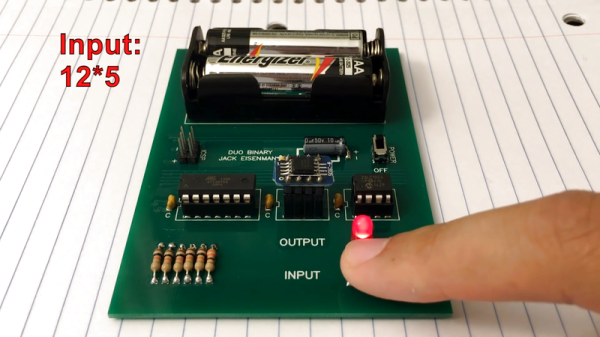
DUO BINARY is a very, very small computer system in every possible sense. It runs on an ATtiny84, which has even got “tiny” in its name. The user interface is a single button for data entry and a single LED for feedback, making this binary keyboard look frivolously over-complicated. It uses a devilish chimera of Morse code and a truncated ASCII to enter data, and the LED blinks the same back at you.

We’re guessing that [Jack Eisenmann] is the only person in the world who can control this thing, and you can watch him doing so in the video embedded below. Continue reading “Minimal Computer And Operating System: One Button, One LED”

Filtering Noisy Data With An Arduino

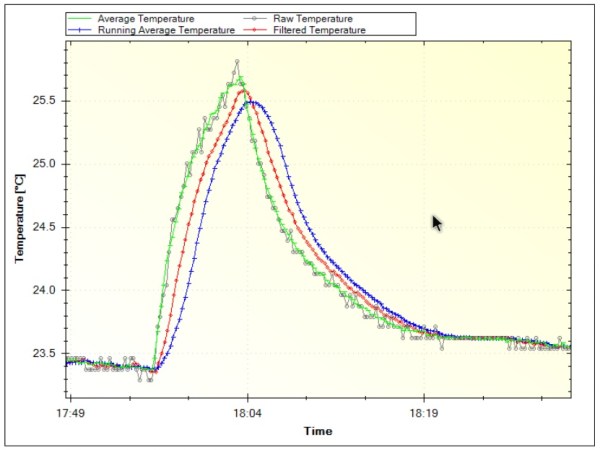
One of the first frustrating situations a beginning microcontroller programmer will come across is the issue of debouncing switches. Microcontrollers are faster than switches, and the switch has yet to be built that can change state in zero time like they can on paper. This hurdle is easily overcome, but soon we are all faced with another issue: filtering noise from an analog signal. Luckily [Paul Martinsen] has put together a primer of three different ways to use an Arduino to filter signals.

The first (and fastest, simplest, etc.) way to filter an analog signal is to sample a bunch of times and then average all of the samples together. This will eliminate most outliers and chatter without losing much of the information. From there, the tutorial moves on to programming a running average to help increase the sample time (but consume much more memory). Finally, [Paul] takes a look at exponential filters, which are recursive, use less memory, and can be tweaked to respond to changes in different ways.

[Paul] discusses all of the perks and downsides of each method and provides examples for each as well. It’s worth checking out, whether you’re a seasoned veteran who might glean some nuance or you’re a beginner who hasn’t even encountered this problem yet. And if you’re still working on debouncing a digital input, we have you covered there, too.

Electroshock Timer Will Speed Up Every Game Of Settlers Of Catan

The fun of playing Settlers of Catan is only matched by the desire to punch your friend when their turn drags on with endless deliberating. [Alpha Phoenix] has solved that quandary of inefficient play by building the Settlers of Catan: Electroshock Therapy Expansion.

[Alpha Phoenix] is holding back on the details of the device to forestall someone trying this at home and injuring themselves or others, but there’s plenty to glean from his breakdown of how the device works. An Adafruit Trinket microcontroller connects to a single pole 12 throw switch — modified from a double pole six throw rotary switch — to select up to six different players (with the other six positions alternated in as pause spaces) and the shocks are delivered through a simple electrode made from a wire hot glued to HDPE plastic from a milk jug. The power supply is capable of delivering up to 1100V, but the actual output is much less than that, thanks to its built-in impedance of about 2.5M Ohms, as well as added resistance by [Alpha Phoenix].

To define what constitutes a ‘long turn,’ the Trinket calculates the mean of up to the first 100 turn lengths (instead of a static timer to accommodate for the relative skills of the players in each game) and zaps any offending player — and then repeatedly at a set time afterwards — to remind them that they need to pick up the pace.

Continue reading “Electroshock Timer Will Speed Up Every Game Of Settlers Of Catan”