Controllable Bristlebot

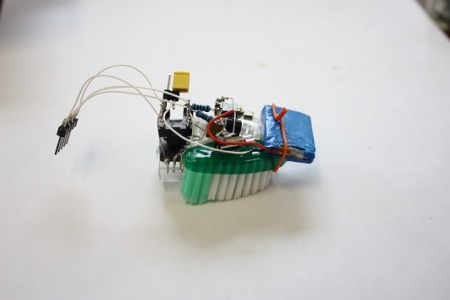
[sprite_tm], whose projects we have covered in the past, took the popular bristlebot to an extreme and created a controllable version. A bristlebot consists of a small vibrating motor mounted with a battery on the head of a toothbrush. These micro-robots buzz around randomly, and he attempted to tame them. He used a platform of twin bristlebots and added an optical sensor from a laser mouse and an ATtiny13. The optical sensor is used to determine the relative motion of the robot, so that the motors can be adjusted accordingly. He also has a video of the bot using the sensor to find a mark on the floor and stay within bounds. Although it isn’t as accurate, it acts like a traditional line-following robot.
Continue reading “Controllable Bristlebot”

DS Optical Mouse Camera

[youtube=http://www.youtube.com/watch?v=TOlQrVFjNJs]

[Raguaviva] shows us in this video how he’s using an optical mouse as a low quality camera for his DS. This seems like a pretty cool hack, but we’re at a loss to think of a good use for it. As he gets to the end of the video, he seems to also have trouble thinking of a good use for it. Do you guys have any ideas?

Mouse For Your PSP

[youtube=http://www.youtube.com/watch?v=oEwhgJ9XzHQ]

[TokyoDrift] has added mouse support to his PSP. He’s using a microcontroller to interpret for the PSP, through the serial port. You can see in the video above that this provides a functional mouse control, especially useful for first person shooter style games. He’s got lots of details as well as schematics available in the forum posts. We’ve seen other controllers added to the PSP, but this is the first time we’ve seen a mouse.

[via engadget]

Ultra Mouse Modification

mouse

When traveling with a laptop, we often find that the list of peripherals that we have to attach can get pretty long. Especially if it is an older laptop without wireless built in. [Dawning] has taken steps to consolidate some of his peripherals(registration required)by cramming a USB hub and a wireless card into his mouse.

He started by dismantling a USB hub. After placing the board in the mouse to see how it fit, he realized that he was going to have to reduce the size. To do this, he removed the USB slots themselves. This forces him to wire things directly to the board, but saves a ton of space. Next, he took the guts from a USB wireless adapter and wired them up. The decorative LED in the mouse was then moved to the wireless card. This way he could see light flicker with his network traffic. At this point, that’s all he’s added, though there’s still plenty of space for other items. He notes that he’ll probably add some storage or a CF reader. The only problem he has encountered is that his mouse tends to get warm during use. What peripherals would you put in there?

Update: [Dawning] let us know that he didn’t actually remove the LED from its original location. He connected a wire from the wireless adapter that causes the LED to short when traffic is going through. Also, there’s a video which you can now see after the break.

Continue reading “Ultra Mouse Modification”

Orbita Mouse

[youtube=http://www.youtube.com/watch?v=5qCwlw9DO7g]

The Orbita mouse seems to be finally coming to production. After watching that video, it seems that the mouse could be quite nice actually. We’ve seen several people build jog wheels for their computer and others try to make scrolling more ergonomic, and this product seems to add both decently.  Well, it could probably be more ergonomic, but it is a start. At less than $100 it isn’t cost prohibitive either. The question is, have any of you built an alternative? Using a puck shaped device seems like it could get bothersome on the hand, how would you improve the design?

[via Engadget]

Full Fabric Soft Switches

soft_switch

When we created our backpack strap WiFi detector for Engadget, we embedded soft switches to control the device. They used two sheets of aluminum foil separated by a layer of foam with holes punched in it. [Plusea] has taken a similar approach but has replaced the aluminum foil with conductive fabric. The end result is a set of three soft buttons that can be easily washed. Have a look at the video of it in action below. Check out the followup project that uses the buttons to replace a scroll wheel. Continue reading “Full Fabric Soft Switches”

Improved Jog Wheel


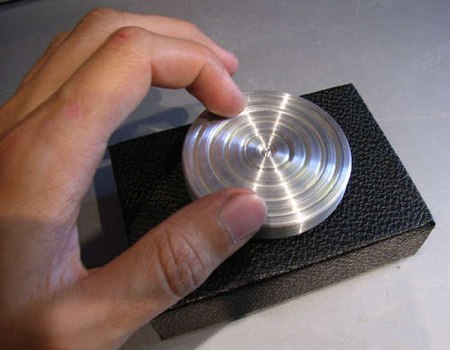
Taking a cue from the jog wheel we posted last week, [42ndOddity] has built an improved version. The design is based around a solid state rotary encoder instead of an optical encoder. The rotary encoder is far easier to attach and position properly. The knob is milled from scrap aluminum-it was a copier foot. To make the motion smooth, it’s sitting in a bearing from the same copier.