photograph of custom PCB assembly of NE555-based electronic dice

NE555-Based Electronic Dice

It has become a bit of a running joke in the Hackaday community to suggest that a project could or should have been done with a 555 timer. [Tim] has rather taken this to heart with his latest Electronic Dice project, which uses three of the venerable devices.

If three seems like a lot of 555s to make an electronic die, then it may be worth considering that the last time we shared his project he was using 22 of them! Since then, [Tim] has been busy optimising his design, whilst keeping within the constraints of an old-school through-hole soldering kit.

Maybe the most surprising thing about this project is the purpose to which the NE555 devices are pressed. Rather than using them for their famous oscillation properties, they are in actual fact just being used as Schmitt Triggers to clean up the three-phase ring oscillator that is constructed from discrete transistors and passives.

scope trace of the electronic dice ring oscillator
Simulation trace of the three-phase ring oscillator before Scmitt Trigger stages

The ring oscillator cleverly produces three phase-shifted square waves such that a binary combination of the three phases offers six unique states. Six being the perfect number for a dice throw, all that then remains is to figure out which LEDs need to be switched on in which state and wire them up accordingly.

To “roll” the dice, a push-button powers up the oscillator, and stops it again when it is released, displaying the random end-state on the LEDs.

It can be fun to see what can be done using old technology, and educational to try to optimise a design down to the fewest parts possible.

[Tim]’s earlier project is here if you want to see how the design has evolved. The documentation on both of these iterations is excellent and well worth a read.

Continue reading “NE555-Based Electronic Dice”

Taking (Good) Pictures Of PCBs

Snapping pictures is not technically difficult with modern technology, but taking good photographs is another matter. There are a number of things that a photographer needs to account for in order to get the best possible results, and if the subject matter isn’t particularly photogenic to start with it makes the task just a little more difficult. As anyone who’s posted something for sale online can attest, taking pictures of everyday objects can present its own challenges even to seasoned photographers. [Martijn Braam] has a few tricks up his sleeve for pictures like this in his efforts to photograph various circuit boards.

[Martijn] has been updating the images on Hackerboards, an online image reference for single-board computers and other PCBs, and he demands quality in his uploads. To get good pictures of the PCBs, he starts with ample lighting in the form of two wirelessly-controlled flashes in softboxes. He’s also using a high quality macro lens with low distortion, but the real work goes into making sure the image is sharp and the PCBs have well-defined edges. He’s using a Python script to take two pictures with his camera, and some automation in ImageMagic to composite the two images together.

While we’re not all taking pictures of PCBs, it’s a great way of demonstrating the ways that a workflow can be automated in surprising ways, not to mention the proper ways of lighting a photography subject. There are some other excellent ways of lighting subjects that we’ve seen, too, including using broken LCD monitors, or you can take some of these principles to your workspace with this arch lighting system.

Aesthetic PCB Design Tips For Improved Functionality

Those of us hardware types that spend a lot of time designing PCBs will often look at other peoples’ designs with interest, and in some cases, considerable admiration. Some of their boards just look so good. But are aesthetics important? After all, for most products, the delicate electronic components on that PCB are tucked safely inside a protective enclosure. But, as [Phil’s Lab] explains, aesthetic PCB designs can lead to functional improvements, such that better-looking designs are also better performing, in terms of manufacturability (and therefore yield), electromagnetic compatibility (EMC), and several other factors that can be important.

First off, making a PCB easy to read and using sane placement of components and connections will speed up debugging by reducing errors. Keeping a consistent and not too-tight placement grid can give the pick and place machine an easier task, and reduce solder issues during reflow. But there are also more serious concerns, such as the enforcement of design partitionings — such as keeping analog circuits together and away from noisy power and digital areas — which can make the difference between functioning within specification, and failure.

The video goes into a few other interesting tips, one highlight is using a ground-tied PCB perimeter zone, with wavelength-of-interest via stitching. This will reduce EMC side emissions from the power plane, but also if you select an appropriate surface finish, and keep the solder mask open, you’ve got a free, full perimeter contact to ground your scope probe. Oh, and it looks good too.

Hackaday is no stranger to beautiful artistic PCBs, like the work of [Saar Drimer] and many others. But if one PCB doesn’t cut it for your needs, there’s always the ‘Oreo’ construction to consider.

Continue reading “Aesthetic PCB Design Tips For Improved Functionality”

Racing Cars On A PCB

Carl Friedrich Gauss was, to put it mildly, a polymath responsible for a large percentage of the things we take for granted in the modern world. As a physicist and mathematician he pioneered several fields of study including within the field of magnetism. But since he died decades before the first car was built, it’s unlikely he could have imagined this creation, a magnetic slot-car race track called the Gauss Speedway by [Jeff McBride], which bears the name of the famous scientist.

The Gauss Speedway takes its inspiration from a recent development in robotics, where many small robots can travel around a large area with the help of circuit traces integrated into their operating area. With the right current applied to these traces, magnetic fields are generated which propel the robots. [Jeff] wanted to build something similar, integrated into a printed circuit board directly, and came up with the slot car idea. The small cars have tiny magnets in them which interact with the traces in the PCB, allowing the cars to move with high precision around the track. He did abandon the traditional slot car controller in favor of a push-button style one directly on the PCB too, which means everything is completely integrated.

While this was more of a demonstration or proof-of-concept, some of the features of this style of robot can be seen in this video, which shows them moving extremely rapidly with high precision, on uneven surfaces, or even up walls. Magnetic robots like these are seeing quite a renaissance, and we’ve even seen some that use magnetism to shape-shift.

Continue reading “Racing Cars On A PCB”

Rubber Stamping Your Way To Custom PCBs

Many of us now outsource PCB production to board houses overseas, which offer high-quality boards with increasingly impressive turnaround times. You might still brew up your own PCB, though, and a reader found this great old hack from [William Hare] that might be worth a look.

Forget toner transfer or marker pens — this build is all about speed. [William] decided to use a rubber stamp to quickly transfer ink to a copper board that can then be etched to produce a PCB. It’s simple and straightforward enough. We’ve used the same technique for silkscreen and pad art, but never as an etch resist.

The trick is to make several rubber stamps with different circuit elements, though. The genius part is that you can then assemble a PCB by simply stamping down the various circuit components you need. The boards will still need to be drilled if you’re working with through-hole parts, but tipster [Shri] notes that the technique is super useful for producing single-sided surface mount boards.

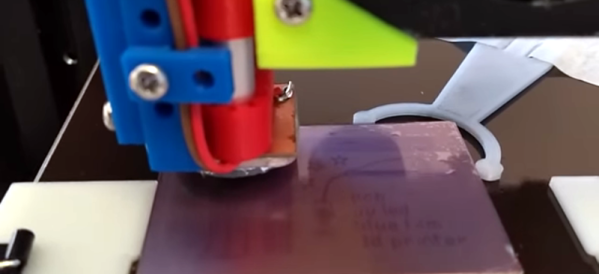
We’ve seen some other unique methods to producing PCBs at home, such as using a 3D printer to help out. If you’ve got your own innovative homebrew PCB hacks, be sure to drop us a line!

Thanks [Shri Hari Ram] for the tip!

PCB-Filled Dream Desk Will Only Get Cooler With Age

We all have one. Maybe you’re sitting at it now, or just wishing you were — that perfect desk. You know the one — a place for everything and everything in its place, ample acreage, specialized storage, and top-notch looks. Oh, and blinkenlights. Can’t forget those.

It took four months of hard work, but [Build XYZ]’s dream desk has been finely fabricated into fruition. There’s a lot to unpack with this build, which you can appreciate after the break, but it all started with a donated up/down desk from Progressive Desk. After building the base and putting it through its body weight-driven paces, [Build XYZ] set about making the perfect top, which, as you can see, highlights an assortment of PCBs by encasing them for eternity in resin.

But don’t let your admiration stop there, because the woodworking is just as much a part of the show. In addition to the functional blinkenlights that notify [BuildXYZ] when it’s time to stop working for the day or just take a break, there’s a working wireless charger hiding among the FR4. We can’t wait to look back on this desk in 20 years or so and we also can’t wait to see how PCBs will change over the next 20 years.

This tightly-produced video is a fascinating look into the process of forever immortalizing things in resin. So much resin, in fact, that [Build XYZ] came up a gallon short during the pour and had to wait an excruciatingly long time before more resin showed up. Seeing as how you totally can’t tell at all in the final build, we have maximum respect for [Build XYZ]’s inclusion of this part in the first place, which serves as a warning to the rest of us.

Continue reading “PCB-Filled Dream Desk Will Only Get Cooler With Age”

Shot of CubeTouch, a six sided cube built out of PCBs with each of the top PCB allowing for diffusion of the LEDs on the inside to shine through

Keyboard Shortcuts At The Touch Of A Planetary Cube

[Noteolvides] creates the CubeTouch, a cube made of six PCBs soldered together that creates a functional and interactive piece of art through its inlaid LEDs and capacitive touch sensors.

The device itself is connected through a USB-C connector that powers the device and allows it to send custom keyboard shortcuts, depending on which face is touched.

Finger touching the top of a CubeTouch device

The CubeTouch is illuminated on the inside with six WS2812 LEDs that take advantage of the diffusion properties of the underlying FR4 material to shine through the PCBs. The central microprocessor is a CH552 that has native USB support and is Arduino compatible. Each “planet” on the the five outward facing sides acts as a capacitive touch sensor that can be programmed to produce a custom key combination.

Assembling the device involves soldering the connections at two joints for each edge connecting the faces.

We’re no strangers to building enclosures from FR4, nor are we strangers to merging art and functionality. The CubeTouch offers a further exploration of these ideas in a sweet package.

The CubeTouch is Open Source Hardware Certified with all documentation, source code and other relevant digital artifacts available under a libre/free license.

Continue reading “Keyboard Shortcuts At The Touch Of A Planetary Cube”