Robotic Fish Swarm Together Using Cameras And LEDs

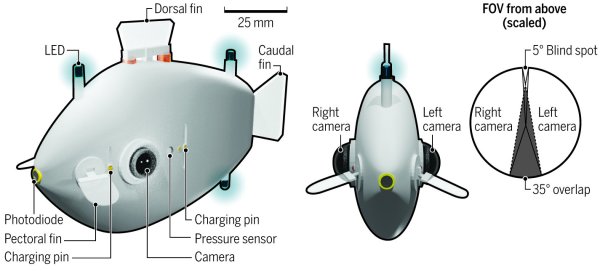
Robotics has advanced in leaps and bounds over the past few decades, but in terms of decentralized coordination in robot swarms, they far behind biological swarms. Researchers from Harvard University’s Weiss Institute are working to close the gap, and have developed Blueswarm, a school of robotic fish that can exhibit swarm behavior without external centralized control.

In real fish schools, the movement of an individual fish depends on those around it. To allow each robotic fish to estimate the position of its neighbors, they are equipped with a set of 3 blue LEDs, and a camera on each side of the body. Four oscillating fins, inspired by reef fish, provide 3D control. The actuator for the fins is simply a pivoting magnet inside a coil being fed an alternating current. The onboard computer of each fish is a Raspberry Pi W, and the cameras are Raspberry Pi Camera modules with wide-angle lenses. Using the position information calculated from the cameras, the school can coordinate its movements to spread out, group together, swim in a circle, or find an object and then converge on it. The full academic article is available for free if you are interested in the details.

Communication with light is dependent on the clarity of the medium it’s traveling through, in this case, water — and conditions can quickly become a limiting factor. Submarines have faced the same challenge for a long time. Two current alternative solutions are ELF radio and sound, which are both covered in [Lewin Day]’s excellent article on underwater communications.

Continue reading “Robotic Fish Swarm Together Using Cameras And LEDs”

Cheap All-Sky Camera Is Easy As Pi

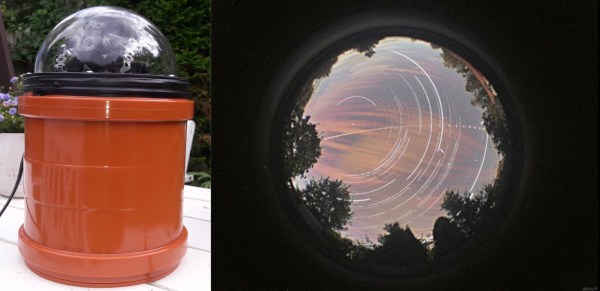
Combining a Raspberry Pi HQ camera and a waterproof housing, [jippo12] made an all-sky, all-Pi meteorite tracking camera on the cheap, and it takes fantastic photos of the heavens. It’s even got its own YouTube channel. Inside there’s a Raspberry Pi 4 plus an HQ camera to take the pictures. But there’s also a system in place to keep everything warm and working properly. It uses a Raspberry Pi 3+, a temperature sensor, and a relay control HAT to pump pixies through a couple of 10 W resistors, making just enough heat to warm up the dome to keep it from fogging.

A few years ago, we reported that NASA was tracking meteorites (or fireballs, if you prefer) with a distributed network of all-sky cameras — cameras with 360° views of the night sky. Soon after, we found out that the French were doing something quite similar with their FRIPON network. We pondered how cool it would be to have a hacker network of these things, but zut alors! Have you seen the prices of these things?  Nice hack, [jippo12]!

Rather do things the old fashioned way? Dust off that DSLR, fire up that printer, and check out OpenAstroTracker.

Bullet Time On A Budget With The Raspberry Pi

Bullet time became the hottest new cinema effect after it burst on the scene in The Matrix (1999). Back then, the cutting edge special effects required serious hardware and serious processing power to do the job. These days, of course, things have moved along somewhat. [Eric Paré] is no stranger to a high-end setup, but wanted to see what could be done at the lower end of the market. (Video, embedded below.)

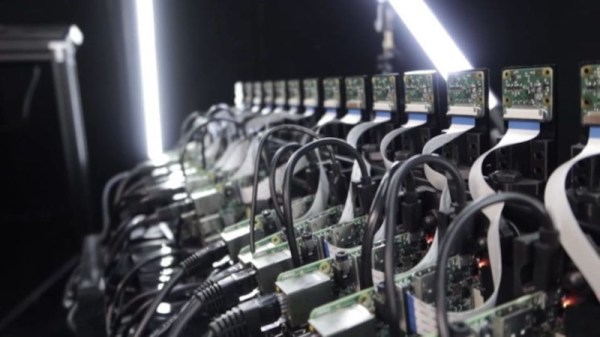
Rather then relying on a bank of expensive DSLRs, [Eric] decided to try building a bullet-time camera rig out of 15 Raspberry Pis, and the standard Raspberry Pi Camera. Whereas just one camera in one of his professional setups may cost well over $1000, this entire rig was likely built for less than that in its entirety.

Initial results were jerky and unappealing, but [Eric] persevered. One of the biggest problems was inaccuracy in the camera assemblies, as they were stuck on with thermal paste. With some custom mods and tweaks, [Eric] was eventually able to get things to a passable state. It also has the benefit, compared to a DSLR rig, that the cameras can be mounted much more closely together due to their small size.

Work is already underway to upgrade the rig to the new Raspberry Pi HQ Camera, which we’ve discussed before.

Continue reading “Bullet Time On A Budget With The Raspberry Pi”

Hackaday Podcast 066: The Audio Overdub Episode; Tape Loop Scratcher, Typewriter Simulator, And Relay Adder

Hackaday editors Elliot Williams and Mike Szczys stomp through a forest full of highly evolved hardware hacks. This week seems particularly plump with audio-related projects, like the thwack-tackular soldenoid typewriter simulator. But it’s the tape-loop scratcher that steals our hearts; an instrument that’s kind of two-turntables-and-a-microphone meets melloman. We hear the clicks of 10-bit numbers falling into place in a delightful adder, and follow it up with the beeps and sweeps of a smartphone-based metal detector.

Take a look at the links below if you want to follow along, and as always, tell us what you think about this episode in the comments!

Direct download (60 MB or so.)

Continue reading “Hackaday Podcast 066: The Audio Overdub Episode; Tape Loop Scratcher, Typewriter Simulator, And Relay Adder”

New Part Day: Raspberry Pi Camera Gets Serious With 12 Megapixels & Proper Lenses

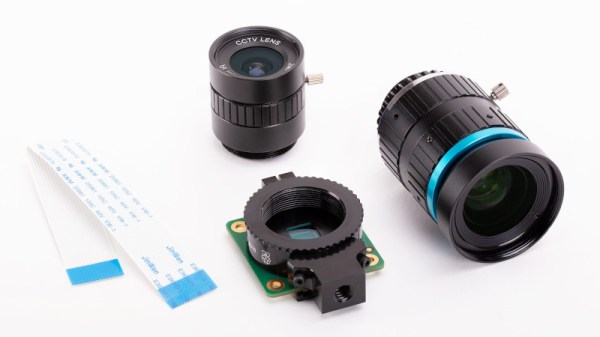
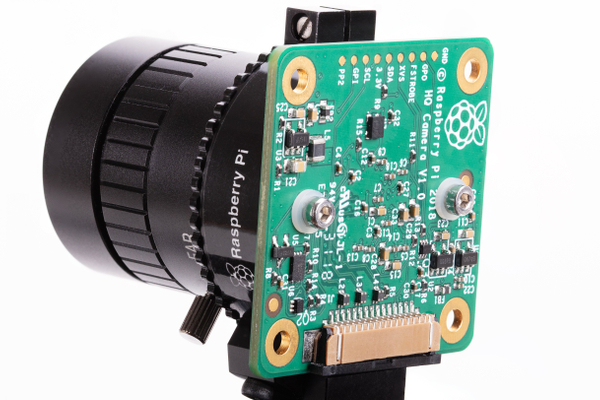
The Raspberry Pi Foundation have slipped out a new product, a $50 camera module with a larger sensor that increases the resolution from the 8 megapixels of its predecessor to a Sony IMX477R stacked, back-illuminated 12.3 megapixel sensor, and most interestingly adds a mounting ring for a C mount lens (the kind used with CCTV equipment) in place of the tiny fixed focus lenses of past Pi cameras. In addition there is a standard threaded tripod mount on the module, and an adapter ring for CS mount lens types. The camera cannot be used without a lens, but there are a few options available when ordering, like 16mm telephoto or 6mm wide angle lenses, if you do not already have a suitable lens on hand.

It’s an exciting move for photography experimenters, because for the first time it offers an affordable way into building custom cameras with both a higher quality sensor and a comprehensive selection of interchangeable lenses. We can imagine that the astronomers and microscopists among us will be enthusiastic about this development, as will those building automated wildlife cameras. For us though the excitement comes in the prospect of building decent quality cameras with custom form factors that break away from the conventional, because aside from a period when consumer digital cameras were in their infancy they have stuck rigidly to the same form factor dictated by a 35mm film canister. It’s clear that this module will be made into many different projects, and we are looking forward to featuring them.

At the time of writing the camera is sold out from all the usual suppliers, which follows the trend for Raspberry Pi products on their launch day. We didn’t manage to snag one, but perhaps with such an expensive module it’s best to step back for a moment and consider the project it will become part of rather than risking it joining the unfinished pile. While waiting for stock then perhaps the next best thing is to 3D print a C mount adapter for your existing Pi camera, or maybe even hook it up to a full-sized SLR lens.

Getting 1000 FPS Out Of The Raspberry Pi Camera

The Raspberry Pi camera has become a de facto standard for many maker projects, making things like object recognition and remote streaming a breeze. However, the Sony IMX219 camera module used is capable of much more, and [Gaurav Singh] set out to unlock its capabilities.

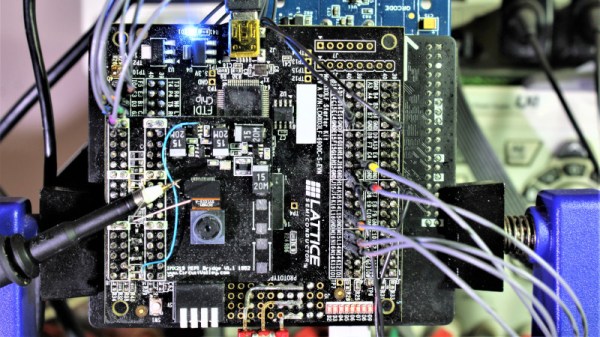
After investigating the IMX219 datasheet, it became clear that it could work at higher bandwidths when configured to use all four of its MIPI CSI lanes. In the Raspberry Pi module, only two MIPI lanes are used, limiting the camera’s framerate. Instead, [Gaurav] developed a custom IMX219 breakout module allowing the camera to be connected to an FPGA using all four lanes for greater throughput.

With this in place, it became possible to use the camera at framerates up to 1,000 fps. This was achieved by wiring the IMX219 direct to an FPGA and then to a USB 3.0 interface to a host computer, rather than using the original Raspberry Pi interface. While 1,000 fps is only available at a low resolution of 640 x 80, it’s also possible to shoot at 60 fps at 1080p, and even 15 fps at 3280 x 2464.

While it’s probably outside the realm of performance required for the average user, [Gaurav] ably demonstrates that there’s often capability left on the table if you really need it. Resources are available on Github for those eager to delve deeper. We’ve seen others use advanced techniques to up the frame rate of the IMX219, too. Video after the break.

Continue reading “Getting 1000 FPS Out Of The Raspberry Pi Camera”

Robotic Skin Sees When (and How) You’re Touching It

Cameras are getting less and less conspicuous. Now they’re hiding under the skin of robots.

A team of researchers from ETH Zurich in Switzerland have recently created a multi-camera optical tactile sensor that is able to monitor the space around it based on contact force distribution. The sensor uses a stack up involving a camera, LEDs, and three layers of silicone to optically detect any disturbance of the skin.

The scheme is modular and in this example uses four cameras but can be scaled up from there. During manufacture, the camera and LED circuit boards are placed and a layer of firm silicone is poured to about 5 mm in thickness. Next a 2 mm layer doped with spherical particles is poured before the final 1.5 mm layer of black silicone is poured. The cameras track the particles as they move and use the information to infer the deformation of the material and the force applied to it. The sensor is also able to reconstruct the forces causing the deformation and create a contact force distribution. The demo uses fairly inexpensive cameras — Raspberry Pi cameras monitored by an NVIDIA Jetson Nano Developer Kit — that in total provide about 65,000 pixels of resolution.

Apart from just providing more information about the forces applied to a surface, the sensor also has a larger contact surface and is thinner than other camera-based systems since it doesn’t require the use of reflective components. It regularly recalibrates itself based on a convolutional neural network pre-trained with data from three cameras and updated with data from all four cameras. Possible future applications include soft robotics, improving touch-based sensing with the aid of computer vision algorithms.

While self-aware robotic skins may not be on the market quite so soon, this certainly opens the possibility for robots that can detect when too much force is being applied to their structures — the machine equivalent sensation to pain.

Continue reading “Robotic Skin Sees When (and How) You’re Touching It”