PoisonTap Makes Raspberry Pi Zero Exploit Locked Computers

[Samy Kamkar], leet haxor extraordinaire, has taken a treasure trove of exploits and backdoors and turned it into a simple hardware device that hijacks all network traffic, enables remote access, and does it all while a machine is locked. It’s PoisonTap, and it’s based on the Raspberry Pi Zero for all that awesome tech blog cred we crave so much.

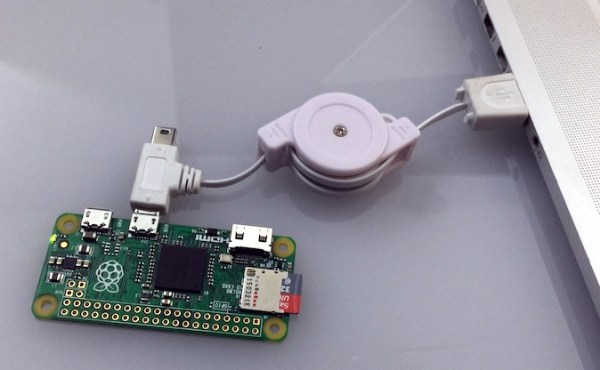
PoisonTap takes a Raspberry Pi Zero and configures it as a USB Gadget, emulating a network device. When this Pi-come-USB-to-Ethernet adapter is plugged into a computer (even a locked one), the computer sends out a DHCP request, and PoisonTap responds by telling the machine the entire IPv4 space is part of the Pi’s local network. All Internet traffic on the locked computer is then sent over PoisonTap, and if a browser is running on the locked computer, all requests are sent to this tiny exploit device.

With all network access going through PoisonTap, cookies are siphoned off, and the browser cache is poisoned with an exploit providing a WebSocket to the outside world. Even after PoisonTap is unplugged, an attacker can remotely send commands to the target computer and force the browser to execute JavaScript. From there, it’s all pretty much over.

Of course, any device designed to plug into a USB port and run a few exploits has a few limitations. PoisonTap only works if a browser is running. PoisonTap does not work on HTTPS cookies with the Secure cookie flag set. PoisonTap does not work if you have filled your USB ports with epoxy. There are a thousand limitations to PoisonTap, all of which probably don’t apply if you take PoisonTap into any office, plug it into a computer, and walk away. That is, after all, the point of this exploit.

As with all ub3r-1337 pen testing tools, we expect to see a version of PoisonTap for sale next August in the vendor area of DEF CON. Don’t buy it. A Raspberry Pi Zero costs $5, a USB OTG cable less than that, and all the code is available on Github. If you buy a device like PoisonTap, you are too technically illiterate to use it.

[Samy] has a demonstration of PoisonTap in the video below.

Continue reading “PoisonTap Makes Raspberry Pi Zero Exploit Locked Computers”

Pi Zero Transforms To Game Boy

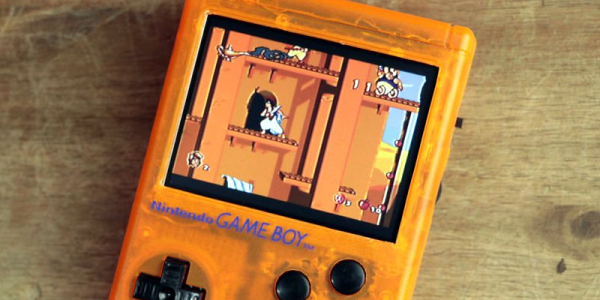
[GreatScott] bought a Game Boy case. Normally, you’d assume you wanted this to repair a damaged Game Boy, but in this case [GreatScott] used a Pi Zero and some 3D printing to build a game system into the tiny box. You can see some videos, below.

Two interesting parts of the project are the source of the LCD display (a rearview camera screen) and the selection of batteries. Lithium ion batteries are all the rage. But if you watch the news, you know there are some safety issues with using the batteries, especially if you use them improperly. [GreatScott] decided to go with nickel metal hydride cells which still need a protection circuit, but are typically less of a danger than the newer technology cells.

Continue reading “Pi Zero Transforms To Game Boy”

Hackaday Links Column Banner

Hackaday Links: November 6, 2016

Here’s a life protip for you: get really, really good at one video game. Not all of them; you only want to be good – top 10% at least – at one video game. For me, that’s Galaga. It’s a great arcade game, and now it’s IoT. [justin] has been working on publishing high scores from a Galaga board to the Internet. The electronics are actually pretty simple – just a latch on a memory address, and an ESP8266 for comms.

On with the mergers and acquisitions! Lattice has been sold to Canyon Bridge, a Chinese private equity firm, for $1.3 Billion. Readers of Hackaday should know Lattice as the creators of the iCE40 FPGA platform, famously the target of the only Open Source FPGA toolchain.

The Internet of Chocolate Chip Cookies. Yes, it’s a Kickstarter for a cookie machine, because buying a tube of pre-made cookie dough is too hard. There is one quote I would like to point out in this Kickstarter: “Carbon Fiber Convection Heating Element (1300W) is more energy-efficient than traditional electric elements and heats up instantly.” Can someone please explain how a heating element can be more efficient? What does that mean? Aren’t all resistive heating elements 100% efficient by default? Or are they 0% efficient? The Internet of Cookies broke my brain.

The USB Rubber Ducky is a thumb-drive sized device that, when plugged into a computer, presents itself as a USB HID keyboard, opens up a CLI, inputs a few commands, and could potentially do evil stuff. The USB Rubber Ducky costs $45, a Raspberry Pi Zero and a USB connector costs $6. [tim] built his own USB Rubber Ducky, and the results are great.

Pi Zero Powered Skateboard

There’s something to be said for whizzing around town on your own automatic personal transport. It’s even better when you’ve built it yourself. That’s just what [The Raspberry Pi Guy] did – built a Wiimote controlled, Raspberry Pi Zero powered skateboard and whizzed around Cambridge to show it off.

It’s a fairly simple build – skateboard, battery, motor and mount, controller, Wiimote and Pi Zero. The Raspberry Pi controls the motor controller which in turn controls the motor speed. The Python code that [The Raspberry Pi Guy] wrote comes in at around a hundred lines and manages the motor controller and the Bluetooth connection to the Wiimote, which is used to control the board’s speed while the user controls the steering. [The Raspberry Pi Guy] says he’s gotten up to 30 km/h on the skateboard, which, given a powerful enough motor and a non-bumpy surface isn’t hard to believe.

It may seem a bit of overkill, running a bit of Python on a Raspberry Pi to run a motor (others have done it with something simpler) but it’s a fun project nonetheless. [The Raspberry Pi Guy] describes where he got the parts to put the skateboard together and has released the Python code on his GitHub page.

Continue reading “Pi Zero Powered Skateboard”

Icehat on a Raspberry Pi Zero

Give Your RPi A Cool FPGA Hat

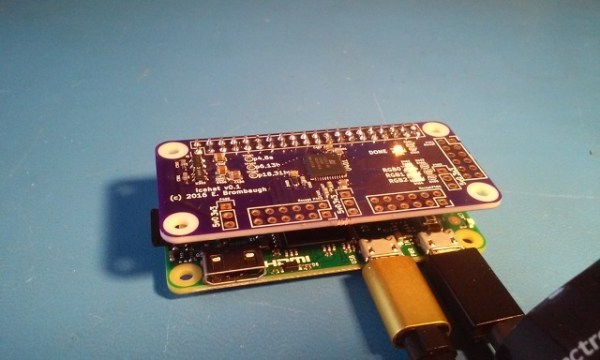
Need additional, custom IO for your Raspberry Pi? Adding an FPGA is a logical way to expand your IO, and allow for high speed digital interfaces. [Eric Brombaugh]’s Icehat adds a Lattice iCE5LP4K-SG48 FPGA in a package that fits neatly on top of the Raspberry Pi Zero. It also provides a few LEDs and Digilent compatible PMOD connectors for adding peripherals. The FPGA costs about six bucks, so this is one cheap FPGA board.

The FPGA has one time programmable memory, but can also be programmed over SPI. This allows the host Pi to flash the FGPA with the latest bitstream at boot. Sadly, this particular device is not supported by the open source Icestorm toolchain. Instead, you’ll need Lattice’s iCEcube2 design software. Fortunately, this chip is supported by the free license.

Icehat is an open source hardware design, but also includes a software application for flashing a bitstream to the FPGA from the Pi and an example application to get you started. All the relevant sources can be found on Github, and the PCB is available on OSHPark.

While this isn’t the first pairing of a Raspberry Pi and FPGA we’ve seen, it is quite possibly the smallest, and can be built by hand at a low cost.

Emulating A GameBoy Advance Inside Of A Gameboy Advance

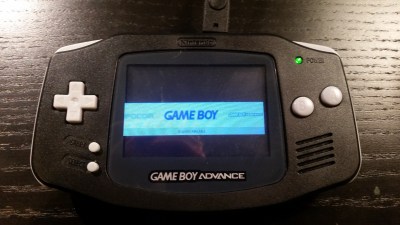
[Ryzee119]’s GBA might not look so different at first glance. The screen is way better than you remember, but that may just be your memory playing tricks on you. The sound comes out of the speakers. It feels the right weight. It runs off AA batteries. Heck, even the buttons feel right.

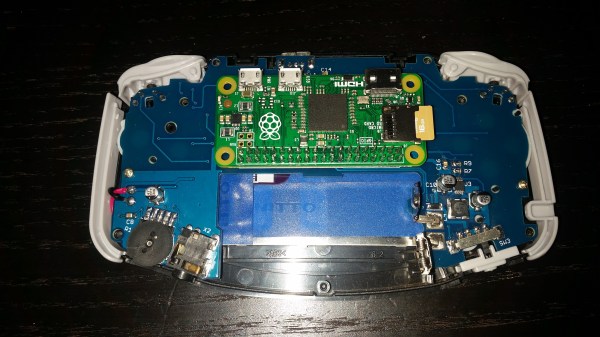
emulating-gba-inside-gbaIt’s not until you notice that it really shouldn’t be playing any games without a cartridge inserted that you know something is not right in the Mushroom Kingdom. When you look inside you see the edge of a Raspberry Pi Zero instead of the card edge connector you expected.
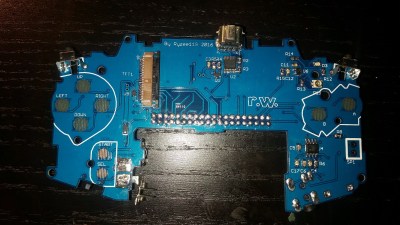


It took a lot of work for [Ryzee119] to convert a dead, water damaged, GBA to a thriving emulation station based around a Pi Zero. The first step was desolder the components he couldn’t find anywhere else. The LR buttons, the potentiometer, and even the headphone jack. The famously hard to see screen, of course, had to go.  It was replaced by a nice TFT. Also, the original speaker was too corroded from the water and he sourced a replacement.

Custom replacement PCB

Next he took a good photo of the GBA’s circuit board. We wonder if he used the scanner method mentioned in the comments of this article? He spent a lot of time in Dassault’s DraftSight, a 2D CAD program, outlining the board. Then, after thoroughly verifying the size of the board for the Nth time he imported the outlines to EagleCAD.

He managed to cram quite a bit onto the board while remaining inside the GBA’s original envelope. The switches, potentiometer, and jack went back to their original locations. Impressively, he made his own pad traces for the A, B, and D-Pad buttons. The mod even handles slowly decreasing battery voltages better than the original.

In the end it all snaps together nicely. He’s configured it to boot into the emulator right at start-up. If you’d like one for yourself, all his files are open source. 

Raspberry Pi Zero As A USB Stick

The Raspberry Pi Zero is small enough that it could almost be mistaken for a USB gadget, rather than a standalone computer. Maybe that was the inspiration that drove [Novaspirit] to completely “donglify” his Zero.

This is a great convenience hack if you’ve got a Zero just kicking around. With minimal soldering, he converted the Zero’s onboard female USB jacks into a male USB plug. From there on out, it’s all software, and the video (embedded below) takes you through all the steps on Windows.

Continue reading “Raspberry Pi Zero As A USB Stick”