Easier End-User Setup For ESP32 Projects

As hackers, we occasionally forget that not everyone is enamored with the same nerdy minutia that we are. Configuring hardware by changing some lines in the code and compiling a new firmware doesn’t sound like that big of a deal to those of us who’ve been around the block a few times, but might as well be ancient Sanskrit to the average person. As long as your projects are for personal use this isn’t really a concern, but what if you plan on distributing the code for a project or perhaps even selling finished products? Shipping it out with hard-coded variables simply isn’t an option.

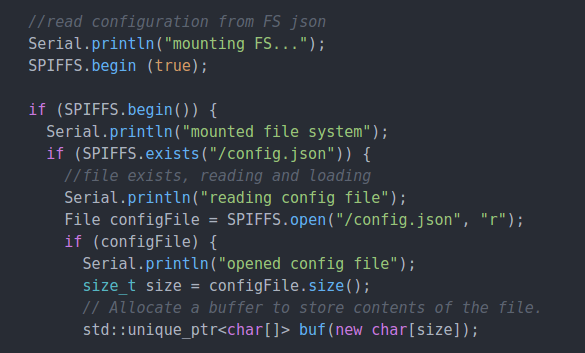
Code for loading configuration file from SPIFFS

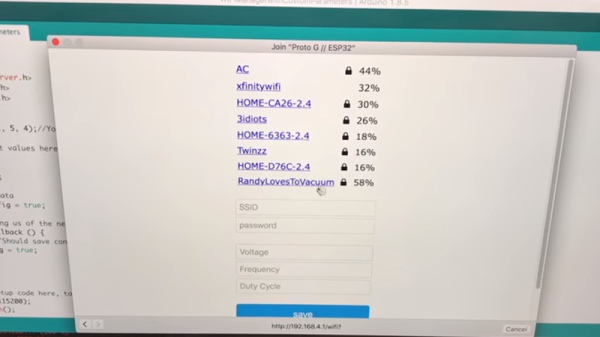
In a recent video, [Proto G] shows a clever way to use WiFiManager to make configuring your ESP32 project easier for end-users. Not only can you use the captive portal system to configure the ESP32’s WiFi against a nearby access point, but it can allow users to enter in configuration data which can be picked up in your code by using SPI Flash File System (SPIFSS).

With the setup demonstrated in the video below by [Proto G], you don’t need anything more exotic than a web browser to configure the device. The end user simply searches for the device’s WiFi network, connects to it, and is presented with an easy to understand dialog which has them select a WiFi network to configure against along with some fields to enter in custom variables. All this information is then stored to a file on the SPI flash. When the ESP32 reboots, it reads the configuration from the saved file and applies the requested settings.

This is very similar to how many consumer devices are now configured, and even the less technically-inclined recipients of such a device should be able to work through the setup with a bit of hand-holding. If you plan on handing one of your ESP32 projects to John Q. Public, this is the kind of configuration you should be aiming for.

We’ve covered using WiFiManager to make ESP32 projects easier to manage, but the addition of arbitrary variables to the captive portal opens up a lot of possibilities. Just the kind of thing you need when you start considering the leap to commercial product.

Continue reading “Easier End-User Setup For ESP32 Projects”

WiFi Alliance Announces Upcoming Fixes To WPA2

Last October, before Intel’s Management Engine was completely broken and the Spectre and Meltdown exploits drove Intel’s security profile further into the ground, we had a problem with wireless networking. WPA2 was cracked with KRACK, the Key Reinstallation Attack. The sky isn’t falling quite yet, but the fact remains that the best WiFi security currently available isn’t very secure at all.

This week, at the Consumer Electronics Show in Las Vegas, the WiFi Alliance announced they would introduce security enhancements in 2018. While it’s not said in the press release if this is a reaction to KRACK, the smart money says yes, this is indeed a reaction to KRACK.

Four new capabilities are outlined in the upcoming release of WPA3 this year. One feature will be protection for users who do not choose complex passwords. A second feature will simplify the process of configuring security on devices that have no display, ostensibly like that little button on your router that you’ve never pressed. The third feature will ‘strengthen user privacy in open networks’, while the fourth, the one we really care about, will add a 192-bit security suite which will, ‘further protect WiFi networks with higher security requirements’.

While most devices currently in service should have a patch for KRACK by now, there will always be thousands of unpatched devices, because, really, who is in charge of the router at your local coffee shop? We’re not sure about the timing of the WiFi Alliance’s announcement of upcoming security improvements: coming during CES when the entirety of the tech press is gawking at manned quadcopters and an endless variety of voice assistants. But we have to say better late than never.

The WiFi Repeater You Probably Have On Your Bench

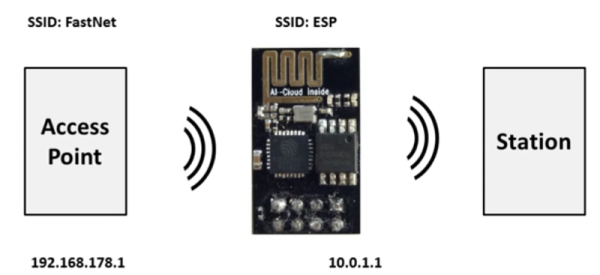
Few things are as frustrating as a WiFi signal that drops in and out. On a public network it is bad enough but at home? Even if you can live with it, your cohabitants will certainly impune your technical abilities if they don’t have solid WiFi.  One solution is a WiFi repeater. You can buy one, of course. But you can also make one out of an ESP8266 and some code from GitHub. There is also a video about the project, below.

[Martin Ger’s] code implements NAT, so it isn’t a true WiFi repeater, but more of a bridge or router. Of course, that means performance isn’t stellar, but tests show it can sustain about 5 Mbps, which isn’t bad for a little board that costs a couple of bucks. There is a limit of 8 clients, but that’s more than enough for a lot of cases. Even if you don’t want to use it as a router, it has a mesh mode that could be a basis for some interesting projects all by itself.

Continue reading “The WiFi Repeater You Probably Have On Your Bench”

The Internet Of Non-Electronic Things

The bill of materials for even the simplest IoT project is likely to include some kind of microcontroller with some kind of wireless module. But could the BOM for a useful IoT thing someday list only a single item? Quite possibly, if these electronics-less 3D-printed IoT devices are any indication.

While you may think that the silicon-free devices described in a paper (PDF link) by University of Washington students [Vikram Iyer] and [Justin Chan] stand no chance of getting online, they’ve actually built an array of useful IoT things, including an Amazon Dash-like button. The key to their system is backscatter, which modulates incident RF waves to encode data for a receiver. Some of the backscatter systems we’ve featured include a soil sensor network using commercial FM broadcasts and hybrid printable sensors using LoRa as the carrier. But both of these require at least some electronics, and consequently some kind of power. [Chan] and [Iyer] used conductive filament to print antennas that can be mechanically switched by rotating gears. Data can be encoded by the speed of the alternating reflection and absorption of the incident WiFi signals, or cams can encode data for buttons and similar widgets.

It’s a surprisingly simple system, and although the devices shown might need some mechanical tune-ups, the proof of concept has a lot of potential. Flowmeters, level sensors, alarm systems — what kind of sensors would you print? Sound off below.

Continue reading “The Internet Of Non-Electronic Things”

Minimizing ESP8266 Battery Drain

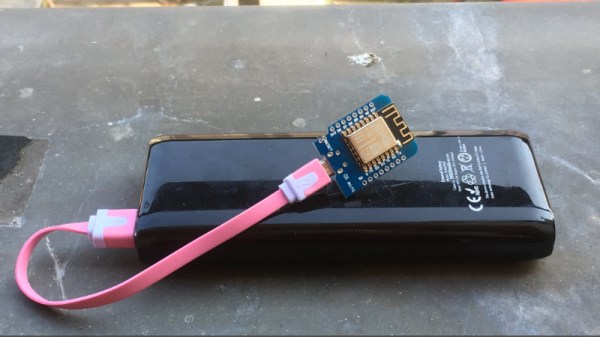
[Alex Jensen] wanted to build a battery-powered weather station, using an ESP8266 breakout board to connect to WiFi. However, [Alex]’s research revealed that the ESP chip uses around 70mA per hour when the radio is on — meaning that he’d have to change batteries a lot more than he wanted to. He really wanted a low power rig such that he’d only have to change batteries every 2 years on a pair of AAs.

The two considerations would be, how often does the ESP get powered up for data transmissions — and how often the weather station’s ATtiny85 takes sensor readings. Waking up the ESP from sleep mode takes about 16mA — plus, once awake it takes about 3 seconds to reconnect, precious time at 70mA. However, by using a static IP address he was able to pare that down to half a second, with one more second to do the actual data transmission. In addition to the hourly WiFi connection, the Tiny85 must be powered, though its relatively modest 1.5mA per hour doesn’t amount to much, even with the chip awake for 36 hours during the year. All told, the various components came to around 500 mAh per year, so using a pair of AA batteries should keep the rig going for years.

We’re intrigued by stories of hackers eking out every last drop of power to make their projects work. We’ve posted about ESPs low-power mode before, and what can be more low-power than a watch running off a coin cell?

Mad Eye For The WiFi

In the Harry Potter universe, Professor Moody was, perhaps unfairly, given the nickname Mad Eye for the prosthetic eye he wore. His eye remains a challenge for technically-minded cosplayers aiming to recreate the look and feel of this unique piece of headgear. [cyborgworkshop] had already mastered the basic eye, but wanted to take things further.

The original build relied on a sub-micro servo to move the eyeball. This was done at random as an attempt to simulate the eye’s behaviour in the books and films. However, wanting more, [cyborgworkshop] decided to make the eye more reactive to its surrounding environment. Using the Adafruit Huzzah, a breakout board for the ESP8266, code was whipped up to detect the number of WiFi access points in the area. The more access points, the more frequent and erratic the movement of the eye. Occasional slower periods of movement are coded in before the eye resumes its wild darting once more, depending on just how saturated the local WiFi environment is.

It’s a great twist on the project, and [cyborgworkshop] has provided more details on the initial build, too. If you think you’re having déja vu, check out this build using recycled parts.

3D Printed WiFi Reflectors Custom Designed For The Building

Are you a wizard at antenna design? Chances are you’ve never even given it a try, but this tool could change that. Most home-made WiFi signal boosting antenna plans around the Internet share one feature: they are directional antennas or reflectors. But WiPrint is a tool for designing custom WiFi reflectors that map to the specific application.

If we want to increase the signal strength in two or three different locations the traditional solution is an omnidirectional antenna. The problem is, although a good omnidirectional antenna increases the signal power in those locations we want, it also increases the signal power where we don’t want.

A team of researchers led by Dartmouth College created WiPrint to allow users to input a floor plan, the location of the WiFi access point and a desired signal map into the system. The software uses an optimization algorithm to produce a custom reflector shape for that floor plan. The reflector can then be fabricated and placed next to the access point antenna to reflect and concentrate the signal in the specified area, while decreasing signal strength outside of it. The best thing is: you can actually 3D print the reflector and just glue tin foil on it!

The results show that optimized reflectors can weaken or enhance signals in target areas by up to 10 or 6 dB, respectively, and resulting in throughput changes by up to -63.3% or 55.1%. That is not the only advantage, as the researchers point out:

Our approach provides four benefits. First, it provides strong physical security by limiting the physical reach of wireless signals, hence creating a virtual wall for wireless signals. Second, it relies on a low-cost ($35), reproducible 3D reflector, which can be easily replaced upon substantial changes in the environment or coverage requirement. Third, it offers an easily accessible and easy-to-configure solution to non-expert users. Users only need to specify coverage requirements and a coarse environment model, with which our system computes a reflector shape tailored to the built environment. Finally, it is applicable to commodity low-end Wi-Fi APs without directional or multiple antennas.

The sad part is that, for now, no software is available. The study and results have just been presented at ACM’s BuildSys 2017. It would be great to see something like this open-sourced. Meanwhile, this is further proof that [Brian Benchoff] knew what he was doing when he told you to use duct tape for superior WiFi range.