Resurrecting Capcom’s Kabuki

About a dozen old Capcom arcade titles were designed to run on a custom CPU. It was called the Kabuki, and although most of the core was a standard Z80, a significant portion of the die was dedicated to security. The problem back then was arcade board clones, and when the power was removed from a Kabuki CPU, the memory contents of this security setup were lost, the game wouldn’t play, and 20 years later, people writing emulators were tearing their hair out.

Now that these games are decades old, the on-chip security for the Kabuki CPU is a problem for those who have taken up the task of preserving these old games. However, now these CPUs can be decuicided, programming the chip and placing them in an arcade board without losing their memory contents.

Earlier we saw [ArcadeHacker] a.k.a. [Eduardo]’s efforts to resurrect these old CPUs. He was able to run new code on the Kabuki, but to run the original, unmodified ROMs that came in these arcade games required hardware. Now [ArcadeHacker] has it.

The setup consists of a chip clip that clamps over the Kabuki CPU. With a little bit of Arduino code, the security keys for original, unmodified ROMs can be flashed, put into the arcade board (where the contents of the memory are backed up by a battery), and the clip released. [ArcadeHacker] figures this is how each arcade board was programmed in the factory.

If you’re looking for an in-depth technical description of how to program a Kabuki, [ArcadeHacker] has an incredibly detailed PDF right here.


Continue reading “Resurrecting Capcom’s Kabuki”

Long Exposure Thermal Photography

For apparently inexplicable reasons, the price of thermal imaging cameras has been dropping precipitously over the last few years, but there are still cool things you can do with infrared temperature sensors.

A few years ago – and while he was still writing for us – [Jeremy] came across an absurdly clever thermal imaging camera. Instead of expensive silicon, this thermal camera uses a flashlight with an RGB LED, a cheap IR temperature sensor, and a camera set up to take long exposures. By shining this flashlight/IR sensor around a dark room, a camera with a wide-open shutter can record color-coded thermal images of just about anything.

Since then, an interesting product appeared on the market. It’s the Black & Decker TLD100 Thermal Leak Detector, and it’s basically an infrared thermometer and LED flashlight stuffed into one neat package. In other words, it’s the exact same thing we saw two years ago. We’d like to thank at least one Black & Decker engineer for their readership.

[Jeremy] took this cheap, off-the-shelf leak detector and did what anyone would do after realizing where the idea behind it came from. He set up his camera, turned off the lights, and opened the shutter of his camera. The results, like the original post, don’t offer the same thermal resolution as a real thermal camera. That doesn’t mean it’s still not a great idea, though.

Rendering Fractals With Just HTML And CSS

What’s better than spending hours and hours with CSS
trying to get images and text to center properly? Not [Jim], but he did notice that
CSS3 was a very powerful language. He wondered about building Tetris, a Turing Machine, or rendering fractals purely in CSS and HTML. The jury is still out if a Turing machine is possible, but he did manage to generate some simple fractals using just CSS and HTML, no JavaScript required.

Most fractals are recursive, and CSS rules can be applied to HTML objects that have already have rules applied to them. It’s not quite recursion, because there’s no way to dynamically generate HTML with CSS. However, with just a few tags, [Jim] can generate one level of a Pythagoras Tree. This method requires placing tags in the HTML for every level of the tree, greatly limiting the cool factor. That’s easily remedied by a few CTRL+Cs and CTRL+Vs.

The same technique can be used to render a Koch snowflake – seen on this page. Yes, it’s all HTML and CSS, without JavaScript. Why? Because he can, and that’s good enough for us.

Using RC Transmitters With Flight Simulators

It’s winter, and that means terrible weather and very few days where flying RC planes and helicopters is tolerable. [sjtrny] has been spending the season with RC flight simulators for some practice time. He had been using an old Xbox 360 controller, but that was really unsuitable for proper RC simulation – a much better solution would be to use his normal RC transmitter as a computer peripheral.

The usual way of using an RC transmitter with a computer is to buy a USB simulator adapter that emulates a USB game pad through a port on the transmitter. Buying one of these adapters would mean a week of waiting for shipping, so [sjtrny] did the logical thing and made his own.

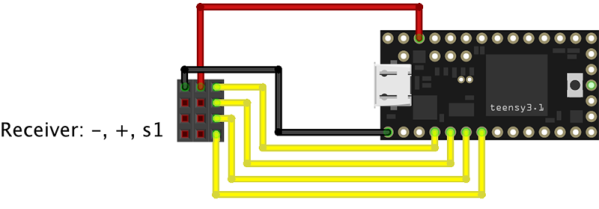
Normally, a USB simulator adapter plugs in to a 3.5mm jack on the transmitter used for a ‘buddy box’, but [sjtrny] had an extra receiver sitting around. Since a receiver simply outputs signals to servos, this provides a vastly simpler interface for an Arduino to listen in on. After connecting the rudder, elevator, aileron, and throttle signals on the receiver to an Arduino, a simple bit of code and the UnoJoy library allows any Arduino and RC receiver to become a USB joystick.

[sjtrny] went through a second iteration of hardware for this project with a Teensy 3.1. This version has higher resolution on the joystick axes, and the layout of the code isn’t slightly terrible. It’s a great project for all the RC pilots out there that can’t get a break in the weather, and is also a great use for a spare receiver you might have sitting around.

The Proper Use For A Gameboy Advance Carrying Case

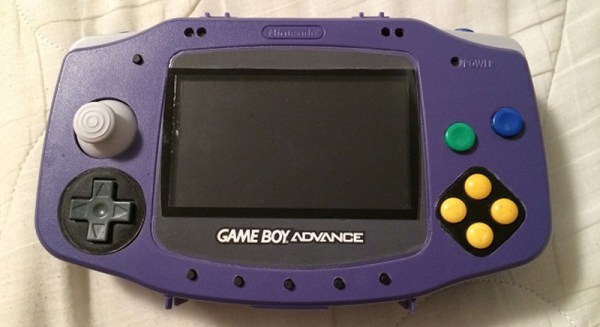
About a decade ago, Nintendo released a Game Boy Advance carrying case in the shape of a Game Boy Advance. It was the obvious answer to the original brick Game Boy carrying case every eight year old had in 1990. This jumbo-sized Game Boy Advance case also makes a really good platform for a console mod, which is exactly what [frostefires] got when he put an N64 in one.

This isn’t the first time we’ve seen this bit of old Nintendo paraphernalia used to house an N64. A few years ago, [Hailrazer] used the same GBA carrying case as the body of an N64 build. There were a few shortcomings in that build, most importantly the removal of the D pad.  [frostedfires]’ build fixes this oversight.

Inside the GBA enclosure is a 4.3 inch screen, a replacement Gamecube joystick, an SNES D pad, and of course the entire N64 circuit board with a few modifications.

[frostedfires] entered this into a ‘Shark Tank’-ish  competition at school, and this build was so impressive he won first place. Link to the full build thread here.

ANUBIS, A Natural User Bot Interface System

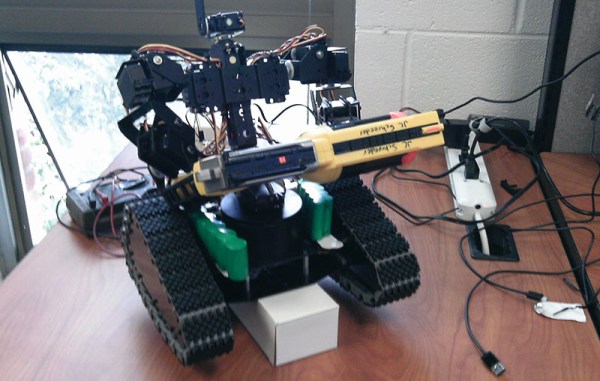
[Matt], [Andrew], [Noah], and [Tim] have a pretty interesting build for their capstone project at Ohio Northern University. They’re using a Microsoft Kinect, and a Leap Motion to create a natural user interface for controlling humanoid robots.

The robot the team is using for this project is a tracked humanoid robot they’ve affectionately come to call Johnny Five.  Johnny takes commands from a computer, Kinect, and Leap motion to move the chassis, arm, and gripper around in a way that’s somewhat natural, and surely a lot easier than controlling a humanoid robot with a keyboard.

The team has also released all their software onto Github under an open source license. You can grab that over on the Gits, or take a look at some of the pics and videos from the Columbus Mini Maker Faire.

Hackaday Links Column Banner

Hackaday Links: January 25, 2015

Misumi is doing something pretty interesting with their huge catalog of aluminum extrusions, rods, bolts, and nuts. They’re putting up BOMs for 3D printers. If you’ve ever built a printer with instructions you’ve somehow found on the RepRap wiki, you know how much of a pain it is to go through McMaster or Misumi to find the right parts. Right now they have three builds, one with linear guides, one with a linear shaft, and one with V-wheels.

So you’re finally looking at those fancy SLA or powder printers. If you’re printing an objet d’arte like the Stanford bunny or the Utah teapot and don’t want to waste material, you’re obviously going to print a thin shell of material. That thin shell isn’t very strong, so how do you infill it? Spheres, of course. By importing an object into Meshmixer, you can build a 3D honeycomb inside a printed object. Just be sure to put a hole in the bottom to let the extra resin or powder out.

Remember that episode of The Simpsons where Homer invented an automatic hammer? It’s been reinvented using a custom aluminum linkage, a freaking huge battery, and a solenoid. Next up is the makeup shotgun, and a reclining toilet.

[Jan] built a digitally controlled analog synth. We’ve seen a few of his FM synths VA synths built from an LPC-810 ARM chip before, but this is the first one that could reasonably be called an analog synth. He’s using a digital filter based on the Cypress PSoC-4.

The hip thing to do with 3D printers is low-poly Pokemon. I don’t know how it started, it’s just what the kids are doing these days. Those of us who were around for Gen 1 the first time it was released should notice a huge oversight by the entire 3D printing and Pokemon communities when it comes to low-poly Pokemon. I have corrected this oversight. I’ll work on a pure OpenSCAD model (thus ‘made completely out of programming code’) when I’m sufficiently bored.

*cough**bullshit* A camera that can see through walls *cough**bullshit* Seriously, what do you make of this?