A Repeater For WWVB

For those living in the continental US who, for whatever reason, don’t have access to an NTP server or a GPS device, the next best way to make sure the correct time is known is with the WWVB radio signal. Transmitting out of Colorado, the 60-bit 1 Hz signal reaches all 48 states in the low-frequency band and is a great way to get a clock within a few hundred nanoseconds of the official time. But in high noise situations, particularly on the coasts or in populated areas these radio-based clocks might miss some of the updates. To keep that from happening [Mike] built a repeater for this radio signal.

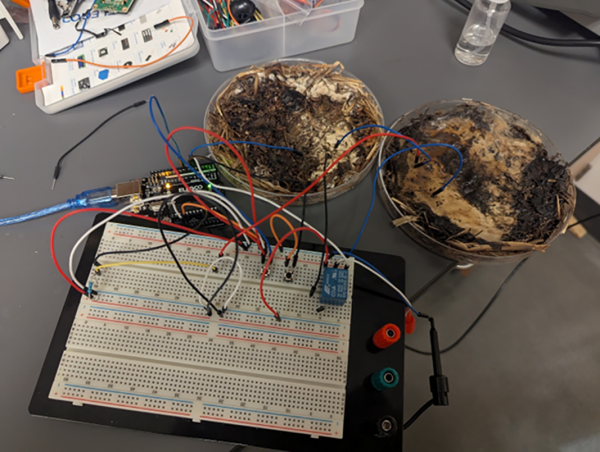
The repeater works by offloading most of the radio components to an Arduino. The microcontroller listens to the WWVB signal and re-transmits it at a lower power to the immediate area, in this case no further than a few inches away or enough to synchronize a few wristwatches. But it has a much better antenna for listening to WWVB so this eliminates the (admittedly uncommon) problem of [Mike]’s watches not synchronizing at least once per day. WWVB broadcasts a PWM signal which is easy for an Arduino to duplicate, but this one needed help from a DRV8833 amplifier to generate a meaningfully strong radio signal.

Although there have been other similar projects oriented around the WWVB signal, [Mike]’s goal for this was to improve the range of these projects so it could sync more than a single timekeeping device at a time as well as using parts which are more readily available and which have a higher ease of use. We’d say he’s done a pretty good job here, and his build instructions cover almost everything even the most beginner breadboarders would need to know to duplicate it on their own.

Real-Time Beamforming With Software-Defined Radio

It is perhaps humanity’s most defining trait that we are always striving to build things better, stronger, faster, or bigger than that which came before. Taller skyscrapers, longer bridges, and computers with more processors, all advance thanks to this relentless persistence.

In the world of radio, we might assume that a better signal simply means adding more power, but performance can also improve by adding more antennas. Not only do more antennas increase gain but they can also be electronically steered, and [MAKA] demonstrates how to do this with a software-defined radio (SDR) phased array.

The project comes to us in two parts. In the first part, two ADALM-Pluto SDR modules are used, with one set to transmit and the other to receive. The transmitting SDR has two channels, one of which has the phase angle of the transmitted radio wave fixed while the other is swept from -180° to 180°. These two waves will interfere with each other at various points along this sweep, with one providing much higher gain to the receiver. This information is all provided to the user via a GUI.

The second part works a bit like the first, but in reverse. By using the two antennas as receivers instead of transmitters, the phased array can calculate the precise angle of arrival of a particular radio wave, allowing the user to pinpoint the direction it is being transmitted from. These principles form the basis of things like phased array radar, and if you’d like more visual representations of how these systems work take a look at this post from a few years ago.

Continue reading “Real-Time Beamforming With Software-Defined Radio”

The Tape Speed Keyboard

For those who experienced any part of the 1960s, even if it’s just experiencing the music from that era here in the future, the sound of the Mellotron is immediately recognizable. The Moody Blues were famous for using the tape-based instrument, and the Beatles and David Bowie produced hits with it as well. It’s haunting sounds are still highly prized today, but the complexity, cost, and maintenance requirement for the tape loops and other moving parts can put many musicians off from owning one. But [Japhy Riddle] has built an instrument without these downsides called the Tape Speed Keyboard.

Unlike the Mellotron which used a tape loop for each of its keys, the Tape Speed Keyboard uses only a single cassette tape. As the name implies, it changes the pitch of the sound by modulating the speed of the single tape housed in its own tape deck. The keyboard itself started off life as a Casio MT-35 but since this is a completely analog instrument, it was rewired so each key is connected to a potentiometer whose output voltage is tuned to a specific tape speed. [Japhy] reports that this is similar to tuning an analog piano and the process can be equally temperamental.

With everything electronic working, [Japhy] turned to making this a more acceptable musical instrument. Predictably, turning the motor on and off for each key press came with a bit of delay, causing the sound to come out goofy and muddy. To solve this problem he changed the design to make the tape play continuously rather than start and stop for a key press, and then modified other keys to be on-off switches for sound output. Since cassette tapes have two sides, he can also play either of two sounds in this way.

With the final polish on, the Tape Speed Keyboard is able to produce completely unique compositions that separate it from even the venerable Mellotron. Be sure to check out the video linked below to hear its sound. There have been plenty of other musical projects based around tape decks as well, including this one inspired by the original Mellotron and this tape deck-based guitar effects pedal.

Thanks to [splashbun] for the tip!

Continue reading “The Tape Speed Keyboard”

Open-Source, Flexible E-Reader

Although the most popular e-reader by far is the Kindle, some argue that its primary use isn’t even as an e-reader at all but rather as a storefront for one of the world’s richest companies. For those who want user-focused consumer electronics instead, we’ll often reach for something more untethered, like an off-brand ebook that’s nothing more than an Android tablet with an e-paper display or even a jailbroken Kindle freed from the chains of Amazon. But as our 555 enthusiast community continually points out, even these are overkill for reading books. Enter the ZEReader.

The ZEReader started out as a bachelor’s engineering thesis project by [Anna-Lena Marx], whose goal was an open-source, microcontroller-based e-reader instead of the Linux or Android ones most commonly available. She’s based the firmware around the Zephyr Real-Time Operating System, which is an RTOS geared towards embedded devices. With this as a backbone, it’s trivially easy to implement the e-reader on different microcontrollers as well as use a wide variety of screens. Although the firmware is a work-in-progress, it’s already mature enough to support all of the basics of an e-reader, such as reading .epub files, navigating through the book, and saving progress. It even includes basic HTML parsing.

Continue reading “Open-Source, Flexible E-Reader”

Legally Distinct Space Invaders Display WiFi Info

In the early 00s there was a tiny moment before the widespread adoption of mobile broadband, after the adoption of home WiFi, and yet before the widespread use of encryption. For this brief time a unique practice arose called wardriving — where people would drive around, document, and use these open wireless networks.

Although the pursuit has diminished with the rise of mobile broadband and WPA encryption, there are still a few use cases for the types of hardware a wardriver would have used. [arduinocelentano] recently built a Wi-Fi strength monitor in this style but with a unique theme.

Continue reading “Legally Distinct Space Invaders Display WiFi Info”

Skateboard Wheels Add Capabilities To Plasma Cutter

Although firmly entrenched in the cultural zeitgeist now, the skateboard wasn’t always a staple of popular culture. It had a pretty rocky start as surfers jankily attached roller skating hardware to wooden planks searching for wave-riding experiences on land. From those rough beginnings it still took decades of innovation until Rodney Mullen adapted the ollie for flatground skating before the sport really took off. Skateboard hardware is quite elegant now too; the way leaning turns the board due to the shape of the trucks is immediately intuitive for even the most beginner riders, and bearing technology is so high-quality and inexpensive now that skateboard hardware is a go-to parts bin grab for plenty of other projects like this plasma cutter modification.

[The Fabrication Series]’s plasma cutter is mounted to a CNC machine, allowing for many complex cuts in much less time than it would take to do by hand. But cutting tubes is a more complicated endeavor for a machine like this. This is where the skateboard hardware comes in: by fabricating two custom pivoting arms each with two skateboard wheels that push down on a tube to hold it in place, the CNC machine can roll the tube along the table in a precise way as the plasma cutter works through it.

Of course, cutting a moving part is a little more complicated for the CNC machine than cutting a fixed piece of sheet metal, so [The Fabrication Series] walks us through a few ways of cutting pipe for various purposes, including miters and notches. The first step is to build a model of the pipes, in this case using Onshape, and then converting the 3D model of the pipes into a sheet metal model that the CNC machine can use. It does take a few cuts on the machine to fine-tune the cuts, but in no time the machine is effortlessly cutting complex shapes into the pipe. Don’t have a plasma cutter at all? You can always build your own from scratch.

Thanks to [JohnU] and [paulvdh] for the tip!

Continue reading “Skateboard Wheels Add Capabilities To Plasma Cutter”

Commodore 64 On New FPGA

When it comes to getting retro hardware running again, there are many approaches. On one hand, the easiest path could be to emulate the hardware on something modern, using nothing but software to bring it back to life. On the other, many prefer to restore the original hardware itself and make sure everything is exactly as it was when it was new. A middle way exists, though, thanks to the widespread adoption of FPGAs which allow for programmable hardware emulation and [Jo] has come up with a new implementation of the Commodore 64 by taking this path.

The project is called the VIC64-T9K and is meant as a proof-of-concept that can run the Commodore 64’s VIC-II video chip alongside a 6502 CPU on the inexpensive Tang Nano 9k FPGA. Taking inspiration from the C64_MiSTer project, another FPGA implementation of the C64 based on the DE10-Nano FPGA, it doesn’t implement everything an original Commodore system would have had, but it does provide most of the core hardware needed to run a system. The project supports HDMI video with a custom kernel, and [Jo] has used it to get a few demos running including sprite animations.

Built with a mix of Verilog and VHDL, it was designed as a learning tool for [Jo] to experiment with the retro hardware, and also brings a more affordable FPGA board to the table for Commodore enthusiasts. If you’re in the market for something with more of the original look and feel of the Commodore 64, though, this project uses the original case and keyboard while still using an FPGA recreation for the core of the computer.