Auto Strummer Can Plectrum The Whole Flat-Strumming Spectrum

Playing the guitar requires speed, strength, and dexterity in both hands. Depending on your mobility level, rocking out with your axe might be impossible unless you could somehow hold down the strings and have a robot do the strumming for you.
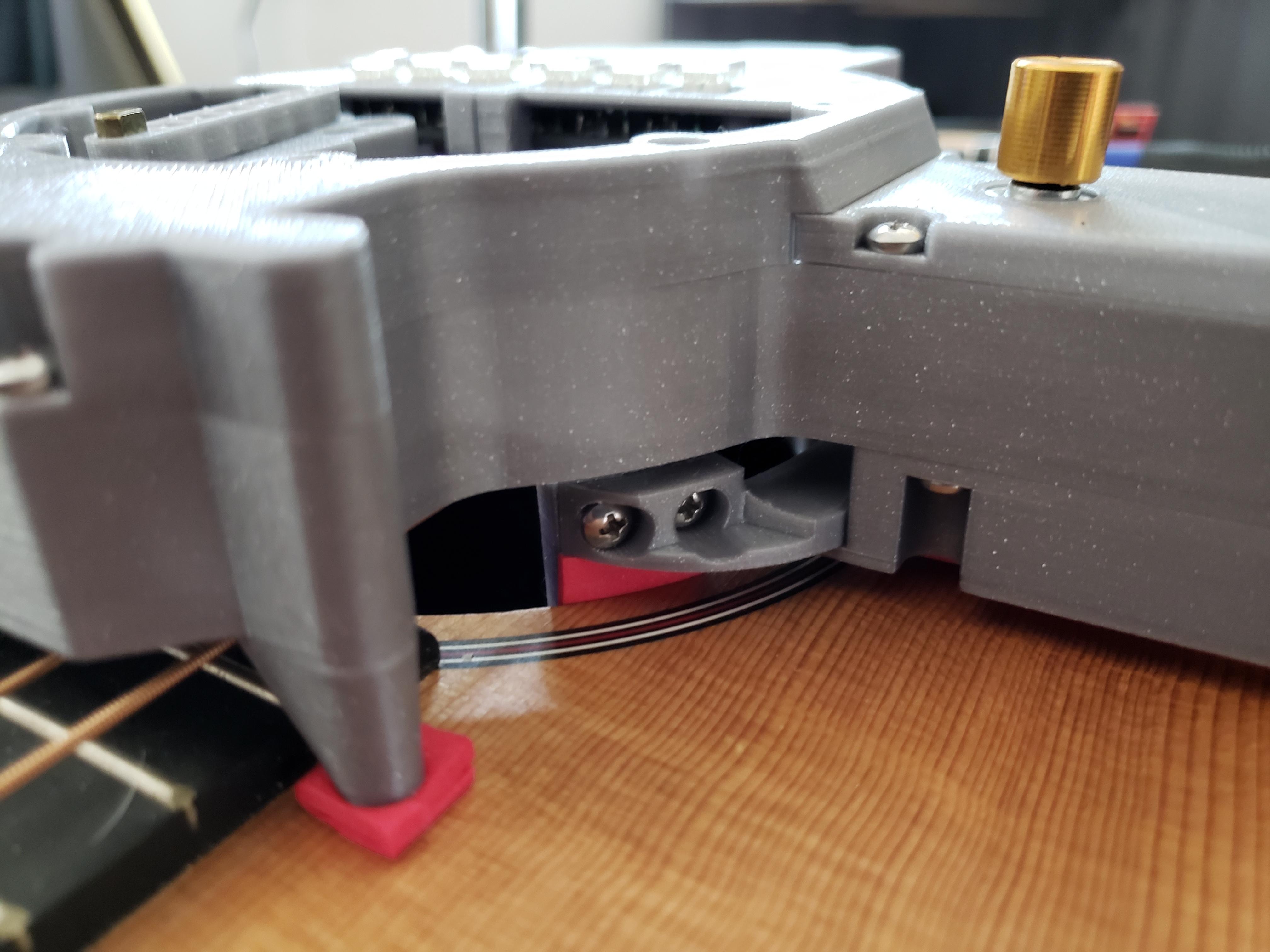
[Jacob Stambaugh]’s Auto Strummer uses six lighted buttons to tell the hidden internal pick which string(s) to strum, which it does with the help of an Arduino Pro Mini and a stepper motor. If two or more buttons are pressed, all the strings between the outermost pair selected will be strummed. That little golden knob near the top is a pot that controls the strumming tempo.

[Jacob]’s impressive 3D-printed enclosure attaches to the guitar with a pair of spring-loaded clamps that grasp the edge of the sound hole. But don’t fret — there’s plenty of foam padding under every point that touches the soundboard.

We were worried that the enclosure would block or muffle the sound, even though it sits about an inch above the hole. But as you can hear in the video after the break, that doesn’t seem to be the case — it sounds fantastic.

Never touched a real guitar, but love to play Guitar Hero? There’s a robot for that, too.

Continue reading “Auto Strummer Can Plectrum The Whole Flat-Strumming Spectrum”
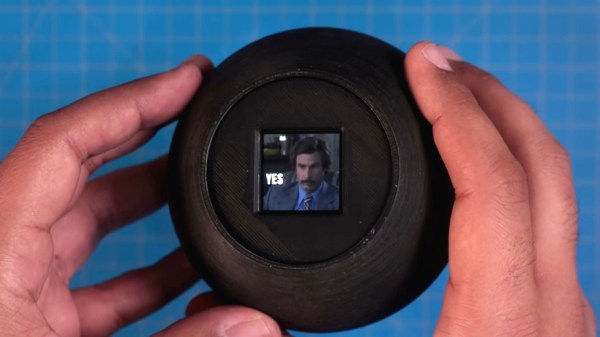
Shake Up Your Magic 8-Ball With GIFs

When you need quick answers to life’s burning yes or no questions, most reasonable people reach for a Magic 8-Ball. But since we all have most of those answers memorized at this point, has the Magic 8-Ball sunk to a cliche and become less useful in the present day? Signs point to yes. Yeah, maybe.

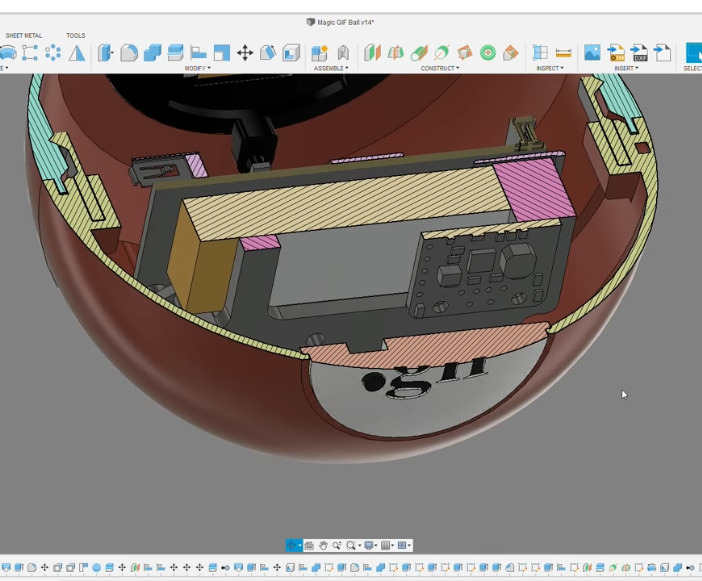
Not to worry, because [DJ Harrigan] has given the Magic 8-Ball a modern makeover by redesigning it to serve up suitable GIFs instead. Inside that beautifully-engineered snap-together shell lives a Raspberry Pi 3, and it displays the GIFs on a 240 x 240 IPS LCD screen. [DJ] wanted to use a round screen, but couldn’t find one with a good enough refresh rate. Maybe someday. We love this build either way.

Our favorite part is probably the power button, which is incorporated as the period in the ‘.gif’ logo. Although it takes a bit longer to get this 8-Ball ready to answer questions, it’s worth the wait. And besides, the splash screen is nice.

Once it’s booted up and ready to go, you still have to shake it — for this, [DJ] used a simple DIY spring-based tilt switch. Check out the demo and build video after the break. If you want to build one for yourself, the files are up on the project site.

Need decision-making support on the go? This Magic 8-Ball business card should fit in your wallet.

Continue reading “Shake Up Your Magic 8-Ball With GIFs”

Hacker Spends A Few Cycles Upgrading An Under-Desk Bike

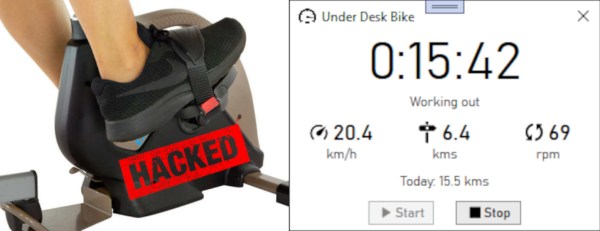
Pandemic got you way behind on your exercise goals? Us too. But not [codaris] who bought an under-desk bike to get in a bit of cycling while banging away on the keyboard. The only bad thing about this bike is the accompanying app — it’s all-around weak and requires too many steps just to get to peddlin’. It pays to know thyself, and [codaris] knows that this will be a major de-motivator and made a desktop app that does it all, including/starting up as soon as the pedals start spinning.

[codaris] built a Windows application that displays workout data in real time and then saves the stats in a SQLite database after the pedaling stops. It took a fair amount of work to get there, logging the Bluetooth traffic during a ride and comparing that with Wireshark output from a live session to decode the communication between the bike and the app. Turns out there are six commands total, and [codaris] really only needs three — Connect, Start Workout, and Continue Workout.

The app displays the elapsed workout time, speed, distance traveled, and the current RPM. We love that it starts logging and displaying data as soon as [codaris] starts pedaling, because that would be a major goal for us, too.

There’s more than one way to hack a bike. [codaris] was inspired by [ptx2]’s excellent work to un-brick a much more expensive bike with a Raspberry Pi.

Thanks for the tip, [Jhart99]!

Julius Sumner Miller Made Physics Fun For Everyone

Let’s face it — for the average person, math and formulas are not the most attractive side of physics. The fun is in the hands-on learning, the lab work, the live action demonstrations of Mother Nature’s power and prowess. And while it’s true that the student must be willing to learn, having a good teacher helps immensely.

Professor Julius Sumner Miller was energetic and enthusiastic about physics to the point of contagiousness. In pictures, his stern face commands respect. But in action, he becomes lovable. His demonstrations are dramatic, delightful, and about as far away from boring old math as possible. Imagine if Cosmo Kramer were a physics professor, or if that doesn’t give you an idea, just picture Doc Brown from Back to the Future (1985) with a thick New England accent and slightly darker eyebrows. Professor Miller’s was a shouting, leaping, arm-waving, whole-bodied approach to physics demonstrations. He was completely fascinated by physics, and deeply desired to understand it as best he could so that he could share the magic with people of all ages.

Professor Miller reached thousands of students in the course of his nearly 40-year teaching career, and inspired millions more throughout North America and Australia via television programs like The Mickey Mouse Club and Miller’s own show entitled Why Is It So? His love for science is indeed infectious, as you can see in this segment about the shock value of capacitors.

Continue reading “Julius Sumner Miller Made Physics Fun For Everyone”

TypeMatrix EZ-Reach 2030 Is Better Than Your Laptop Keyboard

Maybe you’re not ready to take the leap into a full-on ergonomic split keyboard. That’s okay, that’s cool, that’s understandable. They’re weird! Especially ones like my Kinesis Advantage with the key bowls and such. But maybe your poor pinkies are starting to get tired and you’re ready to start using your thumbs for more than just the space bar. Or you want to be able to type ‘c’ properly, with your middle finger.

In that case, the TypeMatrix could be the keyboard for you. Or maybe for travel you, because it’s designed as a quasi-ergonomic, orthonormal layout travel keyboard to pair with your laptop, and as such it sits directly over a laptop keyboard without blocking the track pad. (How do people use those things, anyway?)

Of course, you could use this as a desktop keyboard as well, although it’s unfortunate that Control and Shift are stuck on the pinkies. More about that later.

First Impressions

When I saw this keyboard on eBay, I was attracted by two things: the layout, and the dedicated Dvorak light. (And, let’s be honest — the price was right.) I’ve always found myself generally turned off by chocolate bar-style ortholinear keebs because they’re so incredibly cramped, but this one seemed a more acceptable because of the slight split.

The first thing I noticed was the fantastic number pad integration. The different colored keycaps are a nice touch, because the gray makes the number pad stand out, and the red Delete is easy to find since Num Lock is squatting in the upper right corner. Why does Delete always feel like an afterthought on compact keebs? I also like the location of the arrows, and it makes me think of the AlphaSmart NEO layout. Unfortunately, it comes at the cost of burying the right hand Enter down in no-man’s land where you can’t exactly hit it blindly with great accuracy right away. If only you could swap Shift and Enter without messing up the number pad!

Continue reading “TypeMatrix EZ-Reach 2030 Is Better Than Your Laptop Keyboard”

Keep Livestock From Razing Your Field With An Overgrazing Shield

You know, not every solution needs to be complicated to be absolutely awesome. Take the humble clothespin, for example, two pieces of cleverly carved wood (or plastic; we won’t judge) and a spring. And yet, the service it provides is useful for many applications.

The same simple elegance is also present in [Anteneh]’s overgrazing shield. When sheep and other animals are allowed to eat the vegetation down to the soil, it leads to soil erosion if not kept in check with regular grazing location rotation. As it turns out, if you want to keep an animal from eating grass and plants down to the soil, just slip a leather harness over its neck with a piece of wood in the right place so it literally can’t graze any lower than the wood allows.

According to [Anteneh]’s prototype tests, it only takes a few seconds to fit the shield to the animal’s head and neck, and then they’re off to grazing to the prescribed depth. We think this is a great solution and hope to see it in wide use along with regular rotation.

Need a way to track your livestock? [Sean Boyce]’s experiments with subcutaneous pig tracking makes for a good read, but the reality of that system will probably have you looking for a simpler solution.

Pool Temperature Monitor Mollifies Fortunate But Frustrated Children

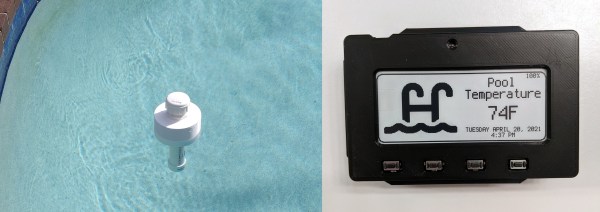
Who needs the city pool when you can party in the private pool over at Grandma and Grandpa’s house? No need to wait until Memorial Day weekend when it hits 90° F in the first week of May. But how can you placate grandchildren who want to know each and every day if it’s finally time to go swimming, and the pool itself is miles away? Although grandparents probably love to hear from you more often there’s no need to bother them with hourly phone calls. You just have to build a floating, remote pool temperature monitor which broadcasts every 30 minutes to an Adafruit MagTag sitting at kid’s eye level on the refrigerator.

Between the cost of commercial pool temperature monitors and all the reviews that mention iffy Wi-Fi connections, it sounds like [Blake] is better off rolling his own solution. Inside the floating part is an ESP32, a DS18B temperature sensor, and a 18650 cell. Most of the body is PVC, except for the 3D-printed torus that holds some foam for buoyancy. A handful of BBs in the bottom keep the thing pointed upright. For now, it shows the water temperature, but [Blake]’s ultimate goal is to show the air temperature as well.

Maybe it’s still too cold to swim, but the sun shines brightly most days. Why not harness its energy to heat up the water?