Monochrome LCD Video Hacks Galore!

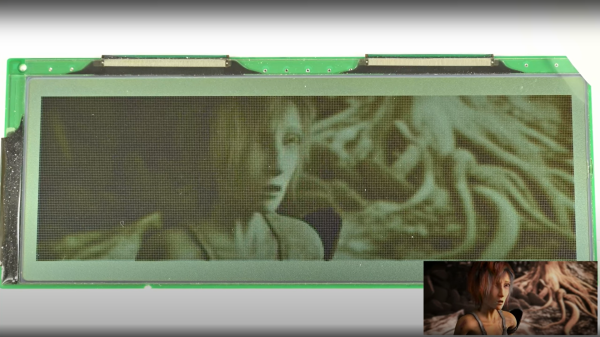
[Wenting Zhang] is clearly a fan of old school STN LCD displays, and was wondering how various older portable devices managed to drive monochrome LCDs panels with multiple grey levels. If the display controller supports multiple bits per pixel, it can use various techniques, such as PWM, in order to produce a pseudo-grayscale image. But, what if you have a monochrome-only display controller? With a sufficiently high pixel clock, can you use software on the application side of things to flip those pixels in such a manner as to give a reasonable looking grayscale image?

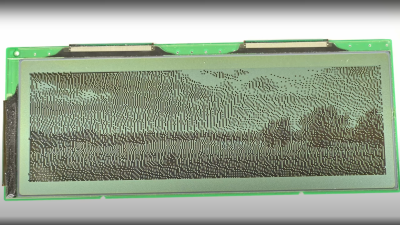
Simple dithering – don’t look too close!
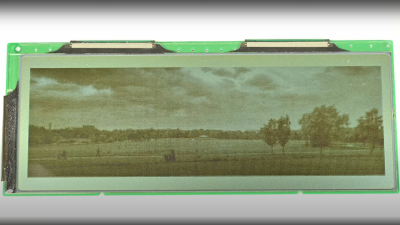
PDM greyscale approximation in a 1-bit display

[Wenting] goes through multiple techniques, showing the resulting image quality in a clear, systematic manner. The first idea is to use a traditional dithering technique. For each pixel, it is set to black if the grey value is below some threshold. The resulting error value, is then propagated to neighbouring pixels. This error diffusion process smears the error out over the whole display, so spatially speaking, on average the pixel values correspond roughly to the original gray values. But, the pixels themselves are still either on or off. This isn’t quite enough. The next idea is to PWM the individual pixels over multiple frames, to approximate different grey levels. But, that gives a worst case effective refresh rate of 8 Hz with a PWM period of 15 frames, at 120 fps, and that flickers. Badly. One way to mitigate that is to switch to PDM (pulse density modulation) which selects different length sequences to give the same duty cycle but at higher frequency, at least for some grey values. Slightly better, but there’s more that can be done. Continue reading “Monochrome LCD Video Hacks Galore!”

3D Print Finishing By Spraying Glazing Putty

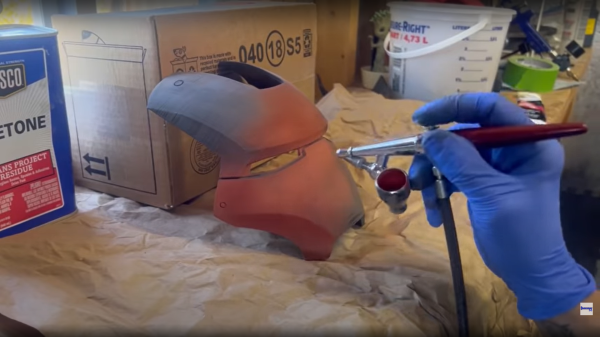
Finishing off 3D prints is a labour-intensive process, and getting a good looking, smooth surface suitable for painting takes a lot of time and plenty of practice. Deeper printing layer lines or minor surface defects can be smoother over with a variety of materials, from putties to resins, but the deeper the defect, the thicker the filler and that takes it toll on the surface details – smoothing those out and making fine details less distinct. [Darkwing dad] has another solution that looks pretty easy to achieve, by mixing acetone with glazing putty it can be airbrushed over the print surface in one go. After a little experimentation with the ratio of putty to acetone, a wide open nozzle and a low pressure, it was found that a nice even spray could be achieved. Importantly it dries in just a few minutes, enabling multiple coats to be applied in a short space of time.

Once sufficient thickness has been applied, the coating can easily sanded to get a smooth result with the worst of the gaps filled, and the layer lines nicely hidden. The final part of the filling process is more typical, with a few coats of filler primer applied straight from a rattle can, followed by a light sand and you’re good for painting.

We’ve covered smoothing 3D prints practically as long as we’ve been covering 3D printing itself, and there are multiple ways to do this, depending on the filament material, your budget and you tolerance for noxious fumes. Here’s a guide for smoothing using UV curable resins, using a special smoothable filament with IPA, and finally if this is just too fancy, smelly or expensive, just whip out the old butane torch and smooth those prints with good old fashioned fire.

Continue reading “3D Print Finishing By Spraying Glazing Putty”

Growing Silver Nanoprisms With Light

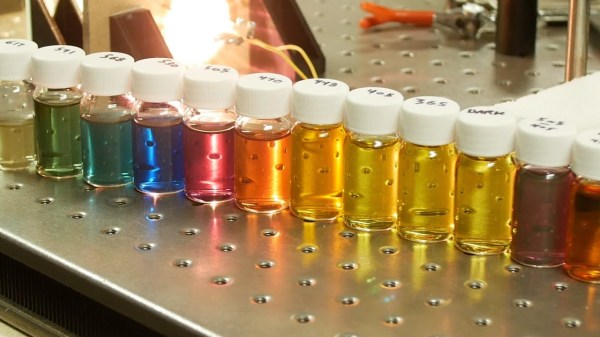
Nanoparticles sound a bit like science fiction to minds of your average hacker — too esoteric and out of reach to be something we might get to work with in our own lairs — but [Ben Krasnow] of [Applied Science] over on YouTube has proven that they most definitely can be made by mere mortals, and importantly they can be tuned. With light. That’s right, nano particle growth appears to be affected very strongly by being illuminated with specific wavelengths, which locks-in their size, and thus defines their light-bending properties. This is the concept of photo mediated synthesis, which causes nanoparticles to clump together into different configurations depending on the wavelength. The idea is to start with a stock solution of Silver Nitrate, which is then reduced to form silver nanospheres which are then converted to larger silver nanoprisms, sized according to the wavelength of the illuminating source.

The process seems simple enough, with a solution of Silver Nitrate and Sodium Citrate being vacuum degassed to remove oxygen, and then purged by bubbling argon or nitrogen. Sodium Borohydride acts as a reducing agent, producing silver metal nanoparticles from the Silver Nitrate solution. The Sodium Citrate coats the silver nanoparticles, as they are produced, preventing them clumping together into a mushy precipitate. PVP (Polyvinylpyrrolidone) is added, acting as a colloiding agent preventing the coated nanoparticles from clumping together, and helping keep the solution stable long enough for the photo mediated synthesis process to complete. Finally, the pH is adjusted up to 11 using sodium hydroxide. The resulting silver nanoparticle stock solution has a pale yellow colour, and is ready for the final particle size selection using the light source.

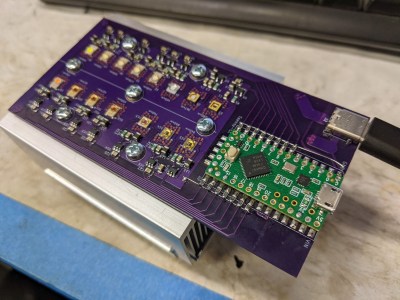
The light source was custom made because [Ben] says he couldn’t find something suitable off the shelf. This is a simple design using a Teensy to drive an array of PAM2804 LED drivers, with each one of those driving its own medium power LED, one for each of the different wavelengths of interest. As [Ben] stresses, the naïve approach of trying to approximate a specific colour with an RGB LED setup would not work, as although the human eye perceives the colour, the actual wavelength peak will be totally wrong, and the reaction will not proceed as intended. The hardware design is available on MultiSpectLED GitHub for your viewing pleasure.

Nanoparticles have all kinds of weird and wonderful properties, such as making the unweldable, weldable, enabling aluminium to be 3D printed, and even enabling the production of one of our favourite liquid toys, ferrofluid.

Continue reading “Growing Silver Nanoprisms With Light”

Free Your Pi With This Bare Metal Programming Environment

[Rene Strange] has graced these fair pages a short while ago with a sweet Raspberry Pi software based poly synth, with a tantalising reference to it being a bare metal application. So now, we’ll look into circle, the bare metal programming environment that it is based upon. The platform consists of a large set of C++ classes to access the hardware as well as perform tasks such as task creation and scheduling in the cooperative multitasking, multicore environment. Supporting all Raspberry Pi boards from version 2 onwards (not including the Pico!) in both 32-bit and 64-bit flavours, the environment is pretty complete. Classes are provided for USB, networking, FatFS, as well as more mundane tasks such as dealing with interrupts. On top of these classes there are a pile of application-specific libraries, covering functions such as display interfacing, GUIs using a variety of frameworks, and some more esoteric applications such as interfacing to a Pico, and even sending the system log to a remote web browser!

Classes and libraries however, don’t always help by themselves, which is where the 42 (yes, we know) code examples come in very handy. They’ve provided example applications for some fun stuff like drawing Mandelbrot fractals to the display, as well as some more mundane tasks that we have to deal with such as getting that pesky DMA controller to play nice with the SPI hardware. All-in-all, this looks like a great set of tools for taking full advantage of some fairly beefy hardware for your next embedded project that needs plenty of resources, but not all that unnecessary operating system stuff.

Perhaps not quite as complete as circle, but we’ve seen a fair few Raspberry Pi Bare metal projects over the years, like the Nerdsynth, based on the PiZero, and this neat little bare metal assembly language clone of starfox.

Thanks [Ruhan] for the tip!

Header: Aryan Patidar, CC BY 4.0/Evan-Amos, Public domain.

Super Tough Resin Is Literally As Tough As Nails

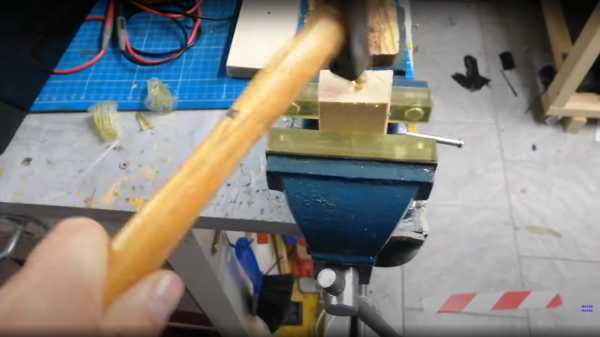
Resin printing still seems to polarize opinions amongst hacker types, with some considering such machines a good tool for the right tasks, and some just plain rejecting them outright. There are many arguments for and against, but like fused deposition modeling (FDM) machines, resin printers are improving in leaps and bounds — and so is the liquid resin itself. Nowadays low-odor resins are common, colors and finishes are varied, and now thanks to some dedicated development work, the brittleness that often characterizes such prints it being addressed. [Mayer Makes] has designed a super tough “engineering resin” that he demonstrates is so tough, you can print a nail and hammer it into a block of wood! (Video, embedded below, if you don’t believe it.)

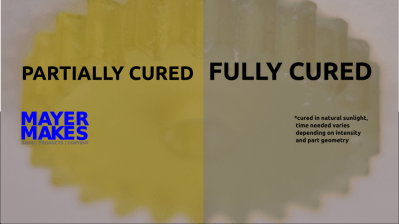
This particular resin is destined for mixing, given its natural cured shade is a kind of greenish-grey, but it does have a neat trick of presenting a definite yellowish hue when not fully cured, which is very helpful. This is particularly useful when removing support structures as you can use the color change during the curing process to judge the right moment to snap off the thicker sections, minimizing the risk of damaging the print. The resulting printed part is also tough enough to withstand subsequent traditional post-processing, such as milling, giving greater final finishing tolerances. Try doing that with an FDM print.
One of the neat things about resin chemistry is that you can simply mix them in their liquid form to tune the resin properties yourself and they can also be colored with specially formulated dyes without affecting the other properties too much, so this new super-tough resin gives prototypers yet another tool in their resin armory.

Thinking of taking the plunge and giving resin printing a try? Checkout our handy guide which may give you a leg up! If that doesn’t swing it for you, you could always use resin to help smooth out your FDM prints. It’ll probably still smell funny, mind.

Continue reading “Super Tough Resin Is Literally As Tough As Nails”

Need A Snack From Across Town? Send Spot!

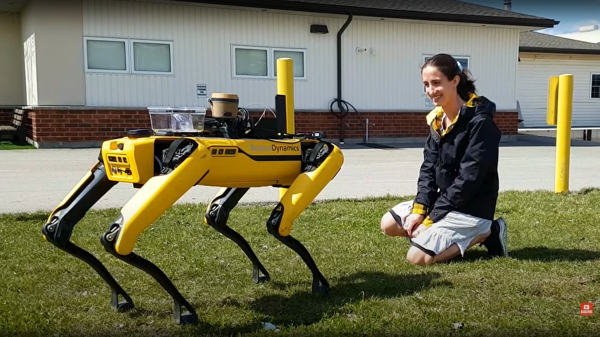
[Dave Niewinski] clearly knows a thing or two about robots, judging from his YouTube channel. Usually the projects involve robot arms mounted on some sort of wheeled platform, but this time it’s the tune of some pretty famous yellow robot legs, in the shape of spot from Boston Dynamics. The premise is simple — tell the robot what snacks you want, entirely by voice command, and off he goes to fetch. But, we’re not talking about navigating to the fridge in the same room. We’re talking about trotting out the front door, down the street and crossing roads to visit favorite restaurant. Spot will order the snacks and bring them back, fully autonomously.

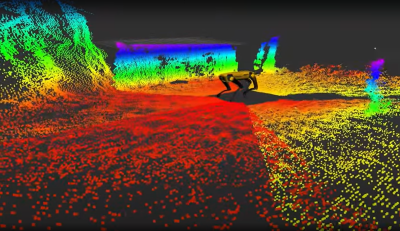
Spot’s depth cameras provide localized navigation and object avoidance information
Local AI vision system handles avoiding those pesky moving objects

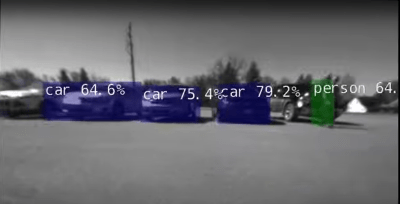
There are multiple things going here, all of which are pretty big computational tasks. Firstly, there is no cloud-based voice control, ala Google voice or Alexa. The robot works on the premise of full autonomy, which means no internet connectivity for any aspect. All voice recognition, voice-to-text, and speech synthesis are performed locally using the NVIDIA Riva GPU-based AI speech SDK, running on the local NVIDIA Jetson AGX Orin carried on Spot’s back. A front-facing webcam supplies the audio feed for this. The voice recognition application listens for the wake phrase, then turns the snack order into text, for later replay when it gets to the destination. Navigation is taken care of with a Microstrain RTK GNSS module, which has all the needed robustness, such as dual antennas, and inertial fallback for those regions with a spotty signal. Navigation is no use out in the real world on its own, which is where Spot’s depth sensor cameras come in. These enable local obstacle avoidance, as per the usual spot behavior we’ve all seen before. But what about crossing the road without getting tens of thousands of dollars of someone else’s hardware crushed by a passing truck? Spot’s onboard streaming cameras are fed into the NVIDIA dash cam net AI platform which enables real-time recognition of moving obstacles such as cars, humans and anything else that might be wandering around and get in the way. All in all a cool project showing the future potential of AI in robotics for important tasks, like fetching me a beer when I most need it, even if it comes from the local corner shop.

We love robots around here. Robots can mow your lawn, navigate inside your house with a little help from invisible QR Codes, even help out with growing your food. The robot-assisted future long promised, may now be looking more like the present.

Continue reading “Need A Snack From Across Town? Send Spot!”

A Great Resource For The Would-Be Pinball Machine Builder

Those of us beyond a certain age will very likely have some fond memories of many an hour spent and pocket money devoured feeding the local arcade pinball machine. At one time they seemed to be pretty much everywhere, but sadly, these days they seem to have largely fallen out of favour and are becoming more of speciality to be specifically sought out. Apart from a few random ones turning up — there’s a fun Frankenstein-themed machine in the Mary Shelley Museum in Bath, England — a trip to a local amusement arcade is often pretty disappointing, with modern arcade machines just not quite scratching that itch anymore, if you ask us. So what’s an old-school hacker to do, but learn how to build a machine from scratch, just the way we want it? A great resource for this is the excellent Pinball Makers site, which shows quite a few different platforms to build upon and a whole ton of resources and guides to help you along the way.

Continue reading “A Great Resource For The Would-Be Pinball Machine Builder”