Brain-Computer Interfaces: Separating Fact From Fiction On Musk’s Brain Implant Claims

When it comes to something as futuristic-sounding as brain-computer interfaces (BCI), our collective minds tend to zip straight to scenes from countless movies, comics, and other works of science-fiction (including more dystopian scenarios). Our mind’s eye fills with everything from the Borg and neural interfaces of Star Trek, to the neural recording devices with parent-controlled blocking features from Black Mirror, and of course the enslavement of the human race by machines in The Matrix.

And now there’s this Elon Musk guy, proclaiming that he’ll be wiring up people’s brains to computers starting next year, as part of this other company of his: Neuralink. Here the promises and imaginings are truly straight from the realm of sci-fi, ranging from ‘reading and writing’ to the brain, curing brain diseases and merging human minds with artificial intelligence. How much of this is just investor speak? Please join us as we take a look at BCIs, neuroprosthetics and what we can expect of these technologies in the coming years.

Continue reading “Brain-Computer Interfaces: Separating Fact From Fiction On Musk’s Brain Implant Claims”

Make Your Own SPL DB Meter With A Microphone And MCU

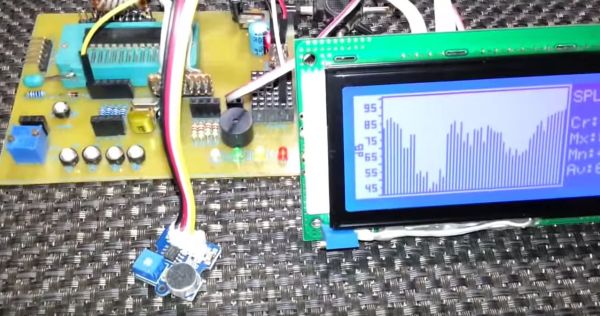
Measuring equipment such as SPL (Sound Pressure Level) decibel meters may seem daunting, but this article by [Shawon M. Shahryiar] shows that making your own need only have two essential ingredients: a microphone and a microcontroller. Obviously the microphone is for measuring the sound pressure level, and its output is then fed into the ADC of the microcontroller which does some math before sending the result to a display.

[Shawon] runs through all of the theory behind the calculations that have to be performed, before showing the C code that runs on the PIC18F242 8-bit MCU targeted by the prototype setup. The display is a graphical LCD type, capable of displaying the text with values as well as bar graphs indicating the measured levels. For the measurements themselves, the RMS value is taken of 16 ADC samples while the algorithm takes into account the specifications of the Seeed-sourced microphone module, specifically its average 50 dB sensitivity rating.

Although a full schematic is not provided, the essentials are all there for anyone to build their own SPL dB meter using virtually any microphone and MCU with built-in ADC. As the article also notes, opting for a higher quality microphone will yield better result and of course a faster MCU will offer more options, including FFT processing. Since the code itself is fairly basic, it should be easy enough to port it to an ARM-based MCU, which would allow one to use for example a TFT LCD.

Take a peek after the break for a video of the article’s SPL dB meter in action.

Continue reading “Make Your Own SPL DB Meter With A Microphone And MCU”

5G Power Usage Is Making Phones Overheat In Warm Weather

As reported by ExtremeTech, the brand new 5G network is running into a major snag with mobile devices as Qualcomm 5G modems literally cannot handle the heat. After just a few minutes of use they’re going into thermal shutdown and falling back to measly 4G data rates. Reports by both PCMag and the Wall Street Journal (paywall) suggest that 5G-enabled phones consistently see problems when used in environments where temperatures hit or exceed 29.5 °C (85.1 °F).

The apparent cause is the increased power draw required by current 5G modems which make heavy use of beam forming and other advanced technologies to increase reception and perform processing on the received data. Unlike 4G and older technologies, 5G needs to have multiple antennas (three or more) to keep a signal, especially when you grab your shiny new smartphone with your millimeter-wave blocking hands.

The spin-off from all of this seems to be that perhaps 5G technology isn’t ready for prime-time, or that perhaps our phones need to have bigger batteries and liquid cooling to keep the 5G modem in it happy. Anyone up for modding a liquid cooling loop and (tiny) radiator into their phone?

Create A Low-Cost, High-Accuracy LCR Meter With An STM32 MCU

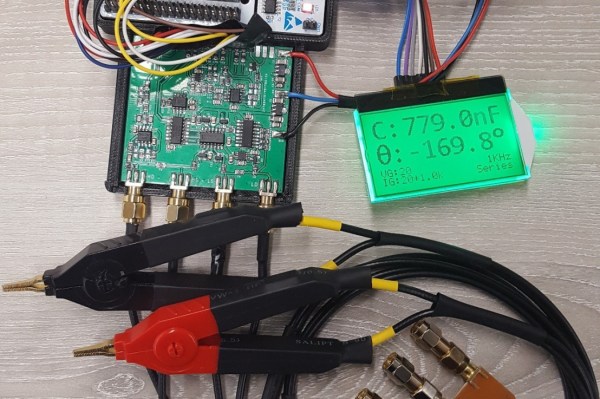
Having a good LCR meter was something which [Adil] had wanted for his personal lab, so as any good university student (and former Hackaday contributor) does, he ended up building his own. Using a Nucleo-F446RE board for the MCU side and a custom PCB for the side that does the actual measuring, he created a meter that reportedly comes pretty close to commercial meters, and for the low price of £55.

Running through some of the theory behind the design as well some design choices, the resulting product is then presented. The choice to not using a standard current shunt, but instead a transimpedance amplifier (TIA) is explained as well. Unfortunately there are no schematics or source code, and the text is somewhat unclear on some points, failing to explain some acronyms that’d make it hard for someone who is not active in this field to understand the full design.

We hope that [Adil] can address those points and provide design files and source code, as it does look like a very interesting project!

Another Take On Harvesting Energy While Walking

Harvesting energy from the human body may sound scary, but fortunately a Matrix-style setup exists only as a cinematic fiction. Instead a typical path lies in external contraptions that use the body’s natural motions to drive a small generator, a bit of flexible piezo material, and so on. A popular target for harvesting the body’s kinetic energy is the knee joint, as this has a comparatively large range of motion and is fairly easy to use.

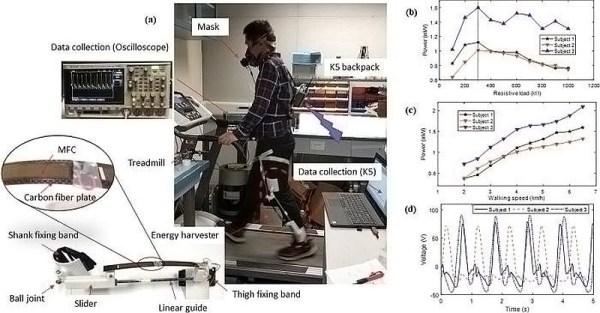
Thus a team from Hong Kong university opted to pick this part of the human anatomy for their experiment as well. While at first glance their results do not seem particularly impressive, with up to 1.6 mW of power generated, a look at their published results in the Applied Physics Letters journal showed their reasoning behind this setup. While one generator-based setup referenced produces on average 4.8 Watt of power, the device itself weighs 1.6 kg and increases the rate at which the person wearing it burns calories by a significant amount.

The goal for this device was to have a way to generate significant amounts of power without having the user exerting themselves more than usual. This led to them using flexible piezoelectric composites, resulting in a weight of just 307 grams, based upon two M8514-P2 pieces (Smart Materials Corp. manufacturer). Tests with volunteers on a treadmill show that users do not burn more calories than without.

As with all piezo materials, they can flex a bit, but not too much, so a lot of time and effort went into calculating the optimal bend radius in different usage scenarios. While around 1 mW of power is not massive, it is a reliable source of power for individuals who do any amount of walking during the day and doesn’t require any effort beyond strapping the device onto one’s legs.

Pushing Pixels To A Display With VGA Without A PC

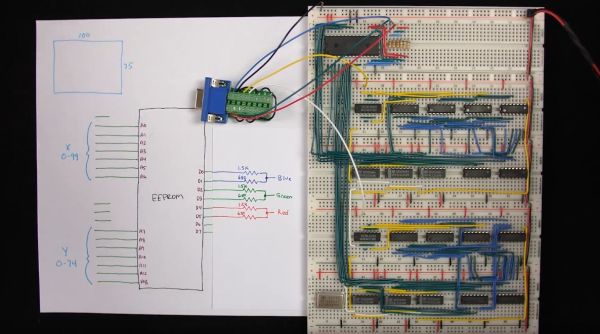
[Ben Eater] is back with the second part of his video series on building a simple video card that can output 200×600 pixels to a display with nothing but a VGA connection, a handful of 74-logic chips and a 10 MHz crystal. In this installment we see how he uses nothing but an EEPROM and a handful of resistors to get an image onto the screen.

The interesting part is in how the image data is encoded into the EEPROM, since it has to be addressable by the same timing circuit as what is being used for the horizontal and vertical timing. By selecting the relevant inputs that’d make a valid address, and by doubling the size of each pixel a few times, a 100 x 75 pixel image can be encoded into the EEPROM and directly addressed using this timing circuit.

The output from the EEPROM itself not fed directly into the monitor, as the VGA interface expects a 0 V to 0.7 V signal on each RGB pin, indicating the brightness. To get more than three colors out of this setup, [Ben] builds up a simple 2-bit DAC that allows for two bits per channel, meaning four brightness levels per color channel or 64 colors effectively.

See the video after the link for the full details. While pretty close to perfect, a small issue remains at the end in the forms of black vertical lines. These are caused by a timing issue in the circuit, with comments on the YouTube video suggesting various other potential fixes. Have you breadboarded your own version yet to debug this issue before [Ben]’s next video comes out?
Continue reading “Pushing Pixels To A Display With VGA Without A PC”

Exploring The Raspberry Pi 4 USB-C Issue In-Depth

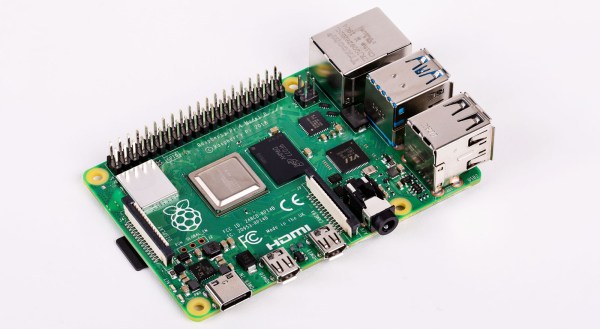
It would be fair to say that the Raspberry Pi team hasn’t been without its share of hardware issues, with the Raspberry Pi 2 being camera shy, the Raspberry Pi PoE HAT suffering from a rather embarrassing USB power issue, and now the all-new Raspberry Pi 4 is the first to have USB-C power delivery, but it doesn’t do USB-C very well unless you go for a ‘dumb’ cable.

Join me below for a brief recap of those previous issues, and an in-depth summary of USB-C, the differences between regular and electronically marked (e-marked) cables, and why detection logic might be making your brand-new Raspberry Pi 4 look like an analogue set of headphones to the power delivery hardware.

Continue reading “Exploring The Raspberry Pi 4 USB-C Issue In-Depth”