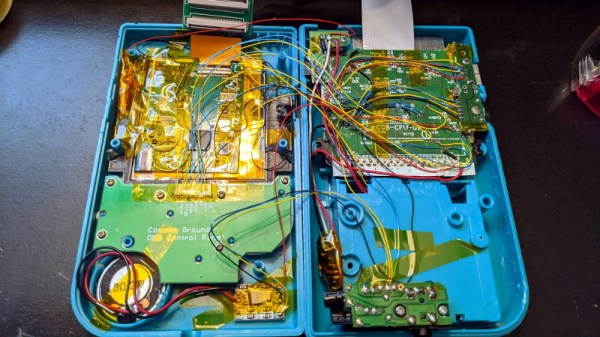
Game Boy Color Makes Itself At Home In A DMG-01

When we last checked in with [Bucket Mouse], he had just finished cramming a Game Boy Advance (GBA) SP motherboard into the body of the iconic Game Boy DMG-01, complete with an aftermarket IPS display. Unfortunately, after a few weeks of using the system, he ran into a few issues that sent him back to the drawing board.

This time, he’s revamped Nintendo’s classic handheld with the internals from its successor, the Game Boy Color (GBC). Obviously that means this new build can’t play any GBA titles, but that was never actually the goal in the first place. It might seem obvious in hindsight, but owing to their general similarity, it ended up being far easier to fit the GBC hardware into the Game Boy’s shell. Though we still wouldn’t call this an “easy” swap by any stretch of the imagination…
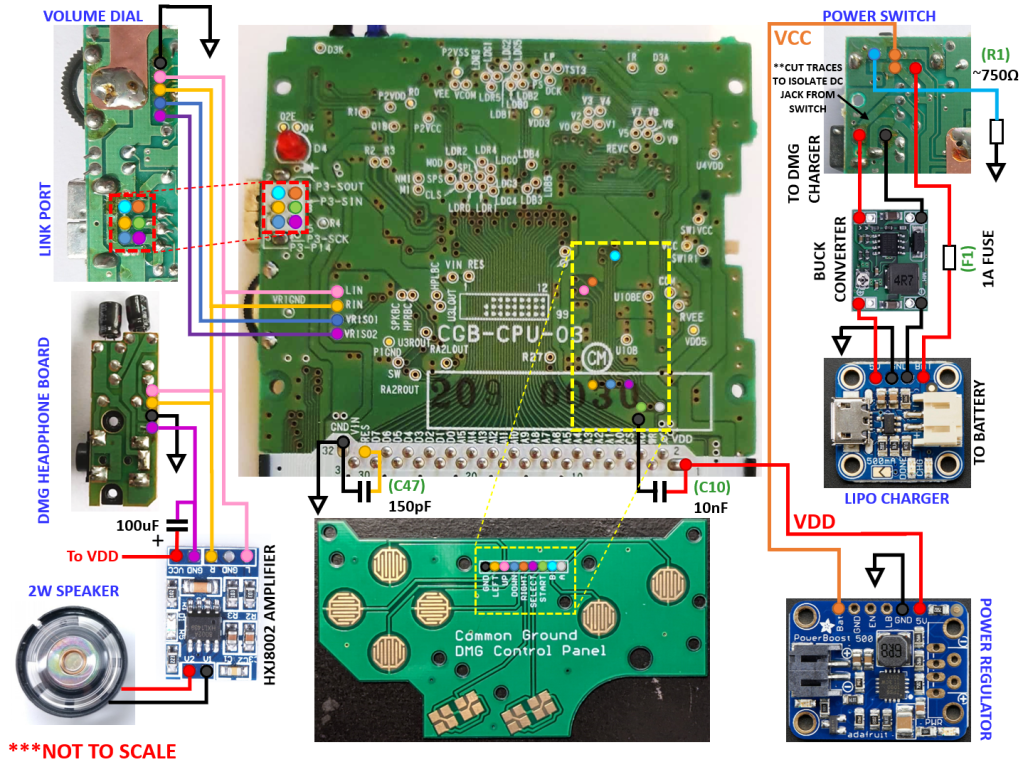
Whether you want to follow his footsteps towards portable gaming bliss or just want to live vicariously through his soldering iron, [Bucket Mouse] has done an absolutely phenomenal job of documenting this build. While he cautions the write-up isn’t designed to be a step by step instructional piece, there’s an incredible wealth of information here for others looking to perform similar modifications.

The build involved removing much of the original Game Boy’s connectors and controls, such as the volume wheel, Link Port, and even headphone jack, and grafting them onto a GBC motherboard that’s been physically trimmed down. At a high level it’s not unlike the trimmed Wii portables we’ve seen, but made much easier due to the fact the GBC only used a two-layer PCB. It also helps that [Bucket Mouse] has once again used an aftermarket IPS display, as that meant he could literally cut off the LCD driver section of the GBC motherboard. Of course there have also been several hardware additions, such as a new audio amplifier, power regulation system, LiPo charger, and 2000 mAh battery.

There’s a lot of fantastic details on this one, so if you’re remotely interested in what made the Game Boy and its successors tick, we’d highly recommend taking the time to read through this handheld hacking tour de force. His previous build is also more than worthy of some close study, even if it ended up being a bit ungainly in practice.
Hands On: DEF CON 29 Badge Embraces The New Normal

To say that 2020 was a transformative year would be something of an understatement. The COVID-19 pandemic completely changed the way we worked, learned, and lived. Despite all those jokes about how much time people spend on their devices rather than interacting face-to-face with other humans, it turns out that when you can’t get more than a few people together in the same room, it throws our entire society into disarray.

Our community had to rethink how we congregated, and major events like HOPE, DEF CON, and even our own Hackaday Supercon, had to be quickly converted into virtual events that tried with varying degrees of success to capture the experience of hundreds or thousands of hackers meeting up in real life. While few would argue that a virtual hacker convention can ever truly replace a physical one, we learned there are undeniable benefits to embracing the advantages offered by cyberspace. If nothing else, the virtual hacker meetups of 2020 saw a far larger and more diverse array of attendees and presenters than ever before.

As we begin seeing the first rays of light at the end of the long, dark, tunnel we’ve been stuck in, it’s clear that some of the changes that COVID-19 forced on our community are here to stay. As eager as we all are to get back to the epic hackfests of old, nobody wants to close the door on all those who would be unable to attend physically now that they’ve gotten to peek behind the curtain.

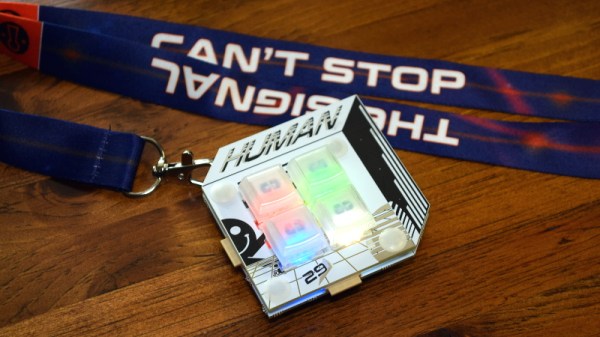
With this in mind, this year’s DEF CON is being presented in both physical and virtual forms simultaneously. If you made to Las Vegas, great. If not, you can follow along through chat rooms and video streams from the comfort of your own home. Following the theme, the DC29 badge is not only a practical tool for virtual attendees, but an electronic puzzle for those who are able to bring a few of them together physically. Let’s take a closer look at this socially distanced badge and the tech that went into it.

Continue reading “Hands On: DEF CON 29 Badge Embraces The New Normal”

WiFiWart Boots Linux, Moves To Next Design Phase

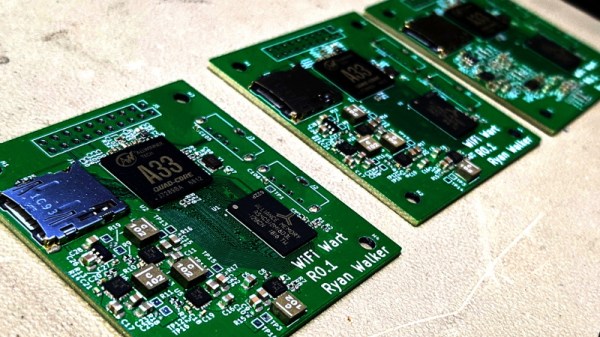
Over the last few months we’ve been keeping an eye on WiFiWart, an ambitious project to develop a Linux single-board computer (SBC) small enough to fit inside a USB wall charger. Developer [Walker] says the goal is to create an easily concealable “drop box” for penetration testing, giving security researchers a valuable foothold inside a target network from which to preform reconnaissance or launch attacks. Of course, we don’t need to tell Hackaday readers that there’s plenty of other things you can do with such a tiny open hardware Linux SBC.

Today we’re happy to report that [Walker] has gotten the first version of the board booted into Linux, though as you might expect given a project of this complexity, there were a few bumps along the way. From the single missing resistor that caused U-Boot to throw up an error to the finer points of compiling the kernel for an embedded board, the latest blog post he’s written up about his progress provides fascinating insight into the little gotchas of bringing up a SBC from scratch.

Once the board was booted into Linux, [Walker] started testing out different aspects of the system. A memory benchmark confirmed the finicky DDR3 RAM was working as expected, and he was able to load the kernel modules for the dual RTL8188 interfaces and connect to a network. While the two WiFi modules are currently hanging off the board’s full-sized USB ports, they will eventually be integrated into the PCB.

Critically, this prototype board is also allowing [Walker] to get an idea of what the energy consumption of the final hardware might be. Even at full tilt, this larger board doesn’t go over 500 mA at 5 VDC; so if he designs the power supply with a maximum output of 1 A, he should have a nice safety margin. As mentioned in the previous post, the plan is currently to put the PSU on its own board, which will allow more effective use of the charger’s internal volume.

With the software and hardware now largely locked in, [Walker] says his attention will be turned towards getting everything small enough to fit into the final form factor. This will certainly be the most challenging aspect of the project, but with a growing community of hackers and engineers lending their expertise to the cause, we’re confident the WiFiWart will soon be a reality.

How To Build With Acrylic Using The Tools You Have

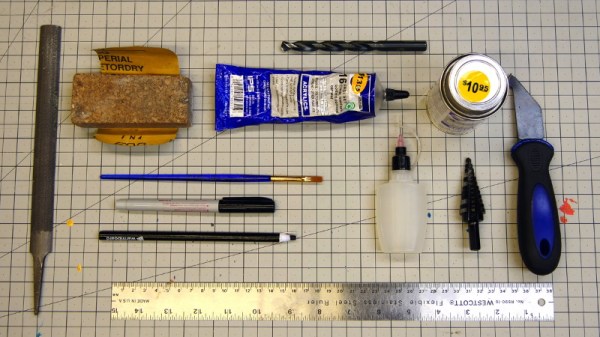
In a perfect world, we’d all have laser cutters and could pop intricate designs out of acrylic sheets with just a few clicks of the mouse. But in reality, most of us have to make do with the pedestrian tools we have at hand. For many, that might even mean everything has to be done by hand. Luckily, [Eric Strebel] has been working on a series of videos that cover how you can make professional looking parts out of acrylic using a wide array of common tools.

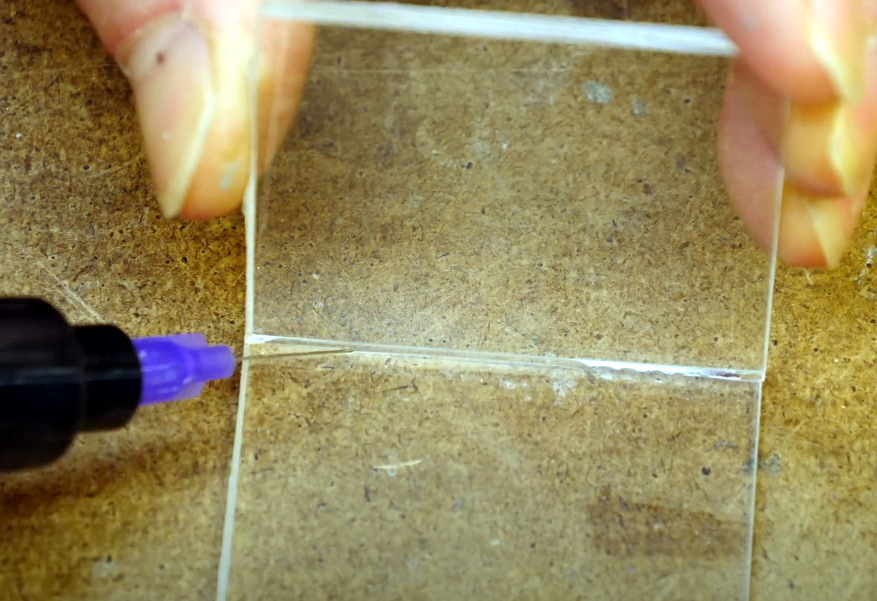
Solvent welding hand-cut pieces of acrylic.

The first video demonstrates how a simple cube can be constructed by a band saw, a table saw, and if need be, with hand tools. You might think the two power saws would have similar results, but as [Eric] explains, the table saw ends up being far more accurate and requires less post-processing to get a smooth edge. Ideally you’d run the cut pieces through a router to bevel them, but that’s a tall order for many home gamers.

As for the hand tool approach, scoring and snapping the sheets ends up making a surprisingly clean break that can actually be cleaner than the edge you’d get with a power tool. No matter how you cut them, [Eric] shows the proper way to apply the water-like solvent to your acrylic pieces to create a strong and visually attractive bond.

The next video in the series covers more advanced techniques that can still be pulled off without a top-of-the-line workshop. Sure the water-cooled acrylic bender he has is pretty slick, but if you can’t afford the $100 USD gadget, he shows you how to get similar results with an old toaster oven that you can pick up from the thrift store or even the side of the road. With some hand-made jigs and molds, you can warp and flex the heated plastic into whatever shape your project needs. Combining the tips from both videos, you might be surprised at what can be created with little more than a ruler, some hot air, and the appropriate techniques.

These are just the latest in a long line of fantastic videos that [Eric Strebel] has produced about at-home design and fabrication. Whether its making a two part silicone mold or creating functional prototypes out of foam board, there’s an excellent chance that he’s covered a topic you’ve wanted to learn more about.

Continue reading “How To Build With Acrylic Using The Tools You Have”

Portable GPS Time Server Powered By The ESP8266

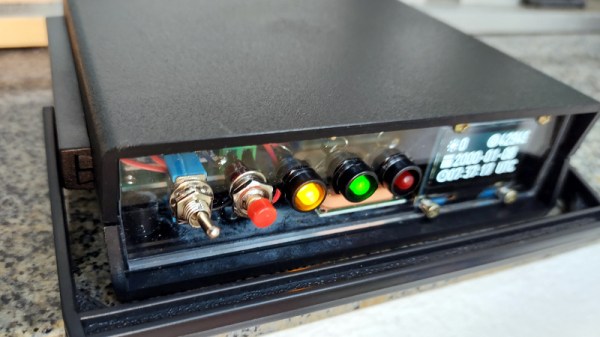
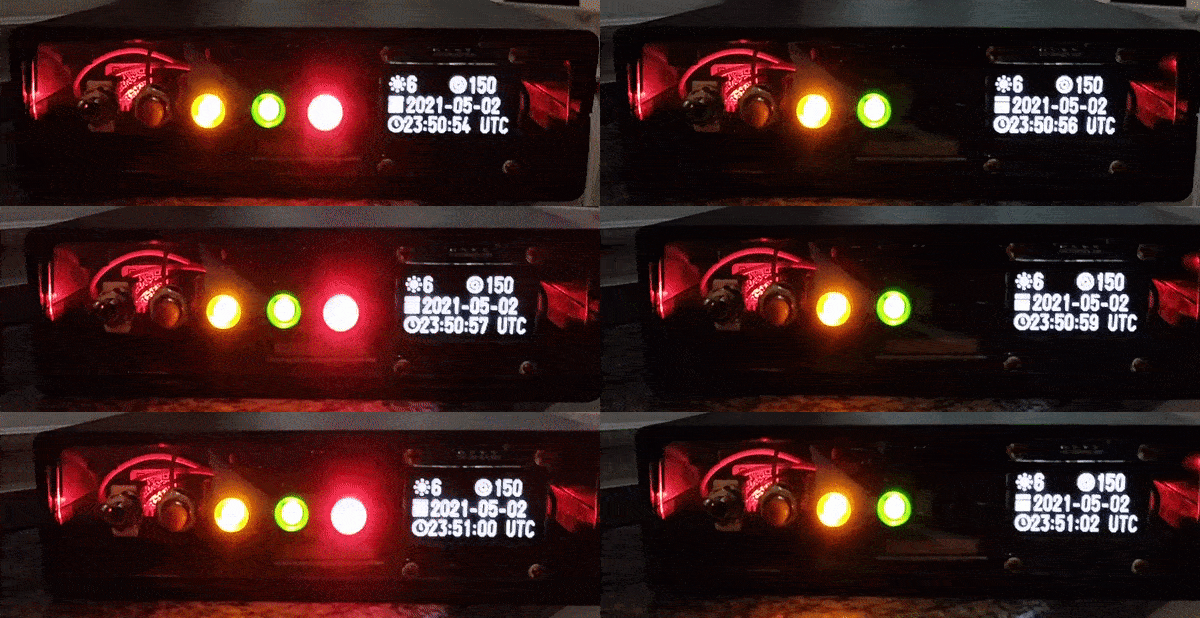
Most Hackaday readers will be familiar with the idea of a network time server; a magical box nestled away in some distant data center that runs the Network Time Protocol (NTP) and allows us to conveniently synchronize the clocks in our computers and gadgets. Particularly eager clock watchers can actually rig up their own NTP server for their personal use, and if you’re a true time aficionado like [Cristiano Monteiro], you might be interested in the portable GPS-controlled time server he recently put together.

The heart of the build is a NEO-6M GPS module which features a dedicated pulse per second (PPS) pin. The ESP8266 combines the timestamp from the GPS messages and the PPS signal to synchronize itself with the atomic clock aboard the orbiting satellite. To prevent the system from drifting too far out of sync when it doesn’t have a lock on the GPS signal, [Cristiano] is using a DS3231 I2C real-time clock module that features a high accuracy temperature-compensated crystal oscillator (TCXO).

Continue reading “Portable GPS Time Server Powered By The ESP8266”

Dominate Video Calls With Game Boy Camera Webcam

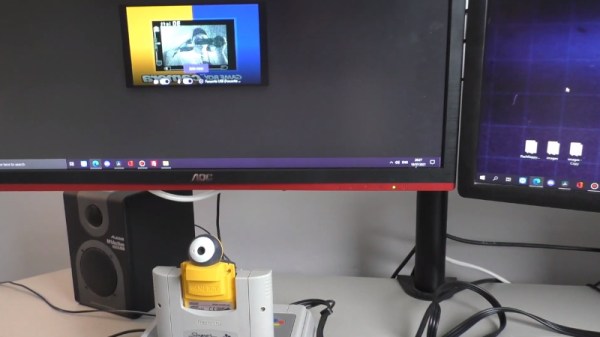
We can’t promise it will all be positive, but there’s no question you’ll be getting plenty of attention when you join a video call using the Game Boy Camera. Assuming they recognize you, anyway. The resolution and video quality of the 1998 toy certainly hasn’t aged very well, and that’s before it gets compressed and sent over the Internet.

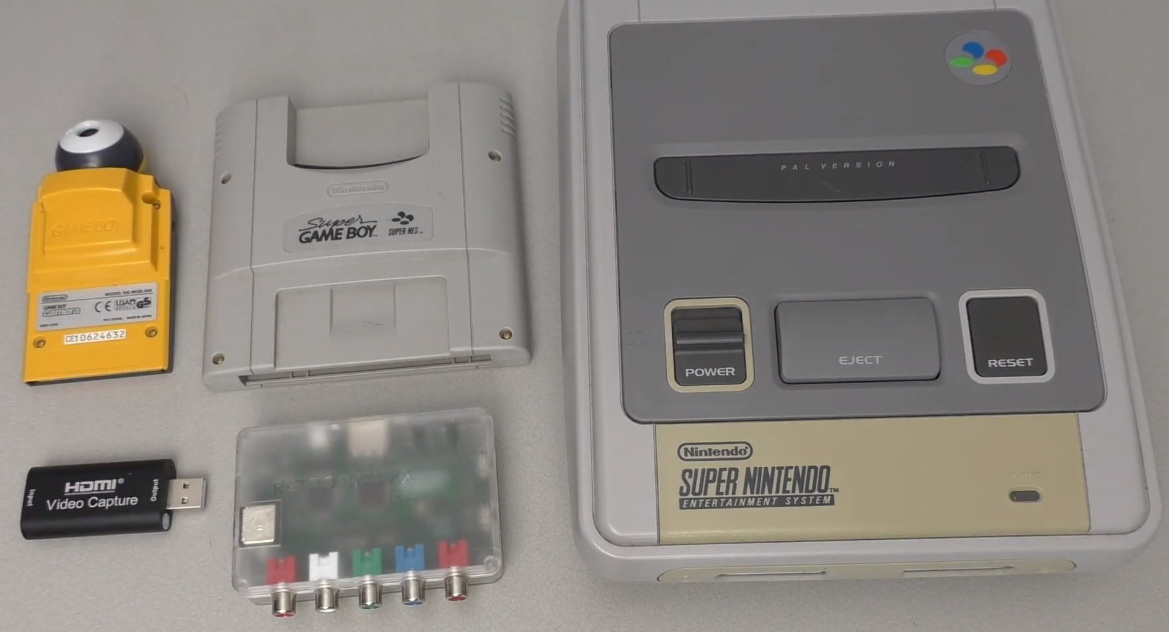
From a technical standpoint, this one is actually pretty simple, if rather convoluted. [RetroGameCouch] hasn’t modified the Game Boy Camera in any way, he’s just connected it to the Super Game Boy, which in turn is slotted into a Super Nintendo. From there the video output of the SNES is passed through an HDMI converter, and finally terminates in a cheap HDMI capture device. His particular SNES has been modified with component video, but on the stock hardware you’ll have to be content with composite.

The end result of all these adapters and cables is that the live feed from the Game Boy Camera, complete with the Super Game Boy’s on-screen border, is available on the computer as a standard USB video device that can be used with whatever program you wish. If you’re more interested in recovering still images, we’ve recently seen a project that lets you pull images from the Game Boy Camera over WiFi.

Continue reading “Dominate Video Calls With Game Boy Camera Webcam”

ESP8266 Adds WiFi Logging To IKEA’s Air Quality Sensor

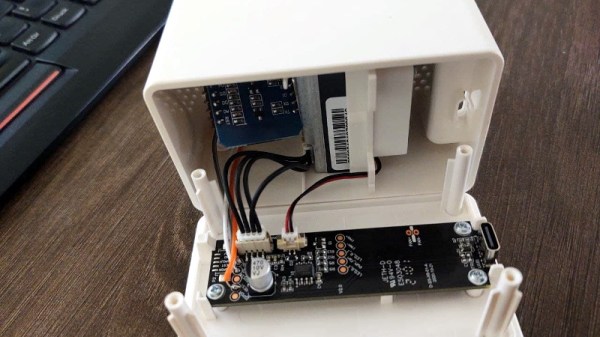
Introduced back in June, the IKEA VINDRIKTNING is a $12 USD sensor that uses colored LEDs to indicate the relative air quality in your home depending on how many particles it sucks up. Looking to improve on this simplistic interface, [Sören Beye] tacked an ESP8266 to the board so it can broadcast sensor readings out over MQTT.

Just three wires link the ESP8266 to the PCB.

While some of us would have been tempted to gut the VINDRIKTNING and attach its particle sensor directly to the ESP8266, the approach [Sören] has used is actually quite elegant. Rather than replacing IKEA’s electronics, the microcontroller is simply listening in on the UART communications between the sensor and the original controller. This not only preserves the stock functionality of the VINDRIKTNING, but simplifies the code as the ESP doesn’t need to do nearly as much.

All you need to do if you want to perform this modification is solder a couple wires to convenient test pads on the VINDRIKTNING board, then flash the firmware (or write your own version), and you’re good to go. There’s plenty of room inside the case for the ESP8266, though you may want to tape it down so it doesn’t impact air flow.

While not required, [Sören] also recommends making a small modification to the VINDRIKTNING which makes it a bit quieter. Apparently the 5 V fan inside the sensor is occasionally revved up by the original controller, rather than kept at a continuous level that you can mentally tune out. But by attaching the sensor’s fan to the ESP8266’s 3.3 V pin, it will run continuously at a lower speed.

We’ve seen custom firmware for IKEA products before, but this approach, which keeps the device’s functionality intact regardless of what’s been flashed to the secondary microcontroller, is particularly appealing for those of us who can’t seem to keep the gremlins out of our code.

[Thanks to nexgensri for the tip.]