ESP32 Hash Monster Fills Pockets With Packets

Unless you’re reading this from the middle of the ocean or deep in the forest, it’s a pretty safe bet there’s WiFi packets zipping all around you right now. Capturing them is just a matter of having the right hardware and software, and from there, you can get to work on cracking the key used to encrypt them. While such things can obviously have nefarious connotations, there are certainly legitimate reasons for auditing the strength of the wireless networks in the area.

It might not have the computational horsepower to crack any encryption itself, but the ESP32 M5Stack is more than up to the task of capturing WiFi packets if you install the Hash Monster firmware developed by [G4lile0]. Even if you don’t intend on taking things farther, this project makes finding WiFi access points and grabbing their packets a fascinating diversion with the addition of a few graphs and an animated character (the eponymous monster itself) that feeds on all those invisible 1s and 0s in the air.

There’s some excellent documentation floating around that shows you the start to finish process of popping open a WiFi network with the help of Hash Monster, but that’s only the beginning of what’s possible with this gadget. A quick search uncovers a number of software projects that make use of the specific advantages of the M5Stack compared to more traditional ESP32 boards, namely the built-in screen, buttons, and battery. We’ve even seen it used in a few builds here on Hackaday, such as this DIY thermal camera and custom shipboard computer system.

[Thanks to Manuel for the tip.]

Miniature Faux Floppy For 8-Bit Atari Looks The Part

There’s plenty of fun to be had with retrocomputers of yesteryear, but for modern users, it can be something of a culture shock. Going back to floppy disks after all these years is a reminder of just how far storage technology has come in terms of speed, reliability, and of course, capacity. Luckily, there are ways to combine the best of both worlds.

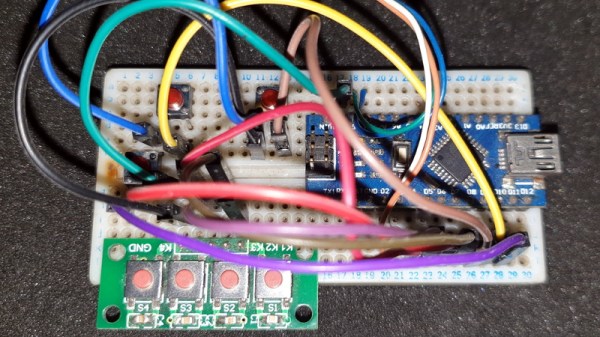
Floppy drive emulators for classic computers are of course nothing new, but we think this one [c0pperdragon] has put together is worthy of a closer look. Not only does the ATmega32U4 based emulator have an exceptionally low part count, but the code has been written in the Arduino IDE. Both features make it easy for new players to duplicate and revise the design should they feel so inclined. In a pinch you could even implement it on a breadboard with a garden variety Arduino.

The emulator is housed in a 3D printed enclosure designed to look like an era-appropriate Atari 1050 Disk Drive, except you’re using SD cards instead of floppies. The firmware can mimic two physical drives and supports up to 100 disk images on each SD card. The user interface is about as simple as it gets, with two push buttons and a pair of seven-segment LEDs to indicate which disk image is currently loaded up.

We’ve seen some very elaborate disk emulators over the years, but there’s something compelling about how straightforward this version is. If it helps a few more people experience the unique joys of retrocomputing, it’s a win in our book.

Restoring An Unusual Piece Of Computing History

Trawling classified ads or sites like Craigslist for interesting hardware is a pastime enjoyed by many a hacker. At a minimum, you can find good deals on used tools and equipment. But if you’re very lucky, you might just stumble upon something really special.

Which is exactly how [John] came into possession of the TRANSBINIAC. Included in a collection of gear that may have once belonged to a silent key, the device is a custom-built solid-state computer that appears to have been assembled in the early 1960s. Featuring a large see-through window not unlike what you might find on a modern gaming computer and a kickstand that tilts it back at a roughly 45° angle, it was obviously built to be shown off. Perhaps it was a teaching aid or even a science fair entry.

After some digging, it looks like the design of the TRANSBINIAC was based on plans published in the January 1960 issue of Electronics Illustrated. Though there are some significant differences. This computer uses eight bistable flip-flip modules instead of the original six, deletes the multiplication circuit, and employs somewhat simplified wiring. Whoever built this machine clearly knew what they were doing, which for the time, is really saying something. This truly unique machine may well have been one of the first privately owned digital computers in the world.

Which is why we’re glad to see [John] trying to restore the device to its former glory. Naturally it’s a little tricky since the computer came with no documentation and its design doesn’t exactly match anything out there. But with the help of other Hackaday.io users, he’s hoping to get everything figured out. It sounds like the first step is to try and diagnose the 2N554 germanium transistor flip-flop modules, as they appear to be behaving erratically. If you have experience with this sort of hardware, feel free to chime in.

We’re supremely proud of the fact that so many of these early computer examples (and the people that are fascinated by them) have recently found their way to Hackaday.io. They’re literally the building blocks on which so much of our modern technology is based on, and the knowledge of how they were designed and operated deserves to live on for future generations to learn from. If it wasn’t for 1960s machines like the TRANSBINIAC or the so-called “Paperclip Computer”, Hackaday might not even exist. It seems like the least we can do is return the favor and make sure they aren’t forgotten.

[Thanks to Yann for the tip.]

Pocket-sized Device Sniffs Out Damp Masks

The realities of wearing a mask when you go out, from forgetting the thing in the car to dealing with fogged up glasses, have certainly taken some getting used to for most of us. But not every issue is immediately obvious. For example, experts say that as a mask gets damp from exhalation or perspiration it becomes less effective. Which is precisely why [Rick Pannen] has designed the Mask Moisture Meter.

As deep as we are into the Microcontroller Era, we really appreciate the simplicity of this design. It’s just a 555 timer, a buzzer, some LEDs, and a handful of passive components to get them all talking to each other. There’s no firmware or programming required; just put a fresh battery in the holder and away you go. The traces of the PCB serve as a moisture detector, so when the board is pushed against something wet enough, the red LED and buzzer will go off to warn the user.

Now admittedly, there’s a point where you certainly won’t need an electronic gizmo to tell you a mask is wet. But as [Rick] demonstrates in the video after the break, the circuit is sensitive enough to indicate when there’s moisture in the material that might not be immediately obvious to the eye.

Continue reading “Pocket-sized Device Sniffs Out Damp Masks”

A Free Software OS For The ReMarkable E-Paper Tablet

If you’re looking to rid your day to day life of dead trees, there’s a good chance you’ve already heard of the reMarkable tablet. The sleek device aims to replace the traditional notebook. To that end, remarkable was designed to mimic the feeling of writing on actual paper as closely as possible. But like so many modern gadgets, it’s unfortunately encumbered by proprietary code with a dash of vendor lock-in. Or at least, it was.

[Davis Remmel] has been hard at work porting Parabola, a completely free and open source GNU/Linux distribution, to the reMarkable. Developers will appreciate the opportunity to audit and modify the OS, but even from an end-user perspective, Parabola greatly opens up what you can do on the device. Before you were limited to a tablet UI and a select number of applications, but with this replacement OS installed, you’ll have a full-blown Linux desktop to play with.

You still won’t be watching videos or gaming on the reMarkable (though technically, you would be able to), but you could certainly use it to read and edit documents the original OS didn’t support. You could even use it for light software development. Since USB serial adapters are supported, microcontroller work isn’t out of the question either. All while reaping the considerable benefits of electronic paper.

The only downside is that the WiFi hardware is not currently supported as it requires proprietary firmware to operate. No word on whether or not [Davis] is willing to make some concession there for users who aren’t quite so strict about their software freedoms.

We’ve been waiting patiently for the electronic paper revolution to do more than replace paperbacks with Kindles, and devices like the reMarkable seem to be finally moving us in the right direction. Thankfully, projects that aim to bring free and open source software to these devices mean we won’t necessarily have to let Big Brother snoop through our files in the process.

Turning The Raspberry Pi Into A MCU Programmer

Once you graduate beyond development boards like the Arduino or Wemos D1, you’ll find yourself in the market for a dedicated programmer. In most cases, your needs can be met with a cheap USB to serial adapter that’s not much bigger than a flash drive. The only downside is that you’ve got to manually wire it up to your microcontroller of choice.

Unless you’re [Roey Benamotz], that is. He’s recently created the LEan Mean Programming mAchine (LEMPA), an add-on board for the Raspberry Pi that includes all the sockets, jumpers, and indicator LEDs you need to successfully flash a whole suite of popular MCUs. What’s more, he’s written a Python tool that handles all the nuances of getting the firmware written out.

After you’ve configured the JSON file with the information about your hardware targets and firmware files, they can easily be called up again by providing a user-defined ID name. This might seem overkill if you’re just burning the occasional hex, but if you’re doing small scale production and need to flash dozens of chips, you’ll quickly appreciate a little automation in your process.

Of course, if you’re just trying to flash some code in a pinch, there are some more expedient options out there. We’re particularly fond of using a development board to program the bare MCU.

Continue reading “Turning The Raspberry Pi Into A MCU Programmer”

Incredible Soldering In The Name Of Hardware Support

If you’re developing a performant IP-KVM based on the Raspberry Pi, an HDMI capture device that plugs into the board’s CSI port would certainly be pretty high on your list of dream peripherals. Turns out such devices actually exist, and somewhat surprisingly, are being sold for reasonable prices. Unfortunately the documentation for the chipset they use is a bit lacking, which is a problem if you’re trying to wring as much performance out of them as possible.

As the creator of Pi-KVM, [Maxim Devaev] needed to truly understand how the Toshiba TC358743 chip used in these capture devices worked, so he decided to build his own version from scratch. In the name of expediency, he didn’t have a proper breakout board made and instead decided to hand-solder the tiny BGA chip directly to some parts bin finds. The resulting perfboard capture device is equal parts art and madness, but more importantly, actually works as expected even with 1080p video signals.

Ultimately, the lessons learned during this experiment will lead to a dedicated KVM board that will plug into the Pi’s expansion header and provide all the necessary hardware in one shot. As [Maxim] explains in the Pi-KVM docs, the move to the CSI connected Toshiba TC358743 cuts latency in half compared to using a USB capture device. That said, USB capture devices will remain fully supported for anyone who just needs a quick way to get things working.

This DIY capture card is a perfect example of how the skills demonstrated while working on a project can be just as impressive as the end result. [Maxim] didn’t set out to hand-solder a BGA HDMI capture chip, it was merely one step in the process towards creating something better. Those intermediary achievements are often lost in the rush to document the final project, so we’re always glad when folks take the time to share them.

[Thanks to Eric for the tip.]