Keep The Kids Entertained With A Time Machine

We often hear it said that today’s kids don’t go out and play as much as they did in the past, but honestly, it’s hard to really blame them. Have you seen some of the games they have now? It’s going to take something a little more exciting than a game of stickball to get them off the couch when they’ve got 4K and VR game systems to play with.

Circuit to control ATX PSU

Which is exactly why [Bobek] is building his kids a time machine. Not a literal one, of course. The Flux Capacitor technology required has yet to be mastered. But it does allow the player to “travel” through time through videos which are played by punching in specific codes they have to unlock by solving puzzles in the real world. Then again, keeping keeping kids active and mentally engaged might as well be “going back in time” in some people’s eyes.

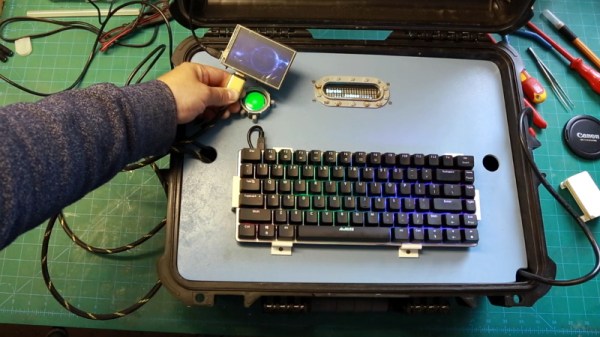
By the looks of things, [Bobek] still has a little work to do on the project, but it’s far enough along that we can get an idea. Inside the bottom of the heavy duty plastic case he’s installed an ATX power supply and a Raspberry Pi 3, and an top of that, there’s a metal plate that holds the power button, an RGB backlit keyboard, and a Vacuum Florescent Display.

After powering on the system, the kids punch in the codes they’ve earned on the keyboard. If accepted, it starts the corresponding presentation which goes over the sights and sounds of the time period they’ve unlocked. In the video after the break you can see [Bobek] test the device with a small display hanging off the end of an HDMI cable, but presumably the system will eventually get an integrated display. The kids could also plug it into the TV, but at that point you might be going full circle.

We’ve seen several examples of hackers creating their own electronic gadgets to keep their children entertained. The line might be a little blurry, but we’d rather see kids use their imagination to “fly” a spaceship in their bedroom than play Roblox on their phone.

Continue reading “Keep The Kids Entertained With A Time Machine”
One Arduino Handheld To Rule Them All

There’s nothing quite as annoying as duplicated effort. Having to jump through the same hoops over and over again is a perfect way to burn yourself out, and might even keep you from tackling the project that’s been floating around in the back of your mind. [Alain Mauer] found that he’d build enough Arduino gadgets that were similar enough he could save himself some time by creating a standardized piece of hardware that he can load his code du jour on.

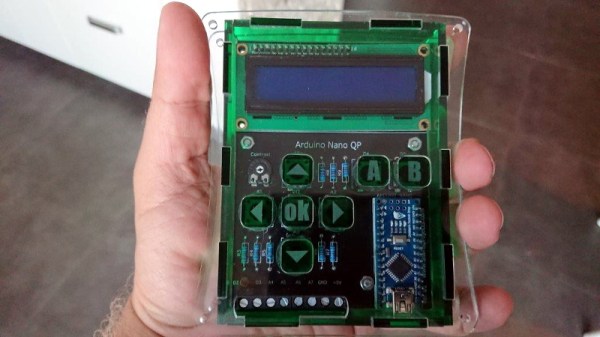
He’s come to call this device the Arduino Nano QP (which stands for Quick Project), and now it’s part of the 2019 Hackaday Prize. [Alain] doesn’t promise that it’s the perfect fit for everything, but estimates around 85% of the simple Arduino projects that he’s come up with could be realized on QP. This is thanks to the screw terminals on the bottom of the device which let you easily hook up any hardware that’s not already on the board.

The QP board itself has the ubiquitous 16×2 character LCD display (complete with contrast control trimmer), seven tactile buttons arranged in a vaguely Game Boy style layout, and of course a spot to solder on your Arduino Nano. All of which is protected by a very slick laser cut acrylic case, complete with retained buttons and etched labels.

We’ve seen no shortage of handheld Arduino devices, but we have to admit, something about the utilitarian nature of this one has us intrigued. We wouldn’t mind having one of these laying around the lab next time we want to do a quick test.

Continue reading “One Arduino Handheld To Rule Them All”

There And Back Again: A Falcon 9 Launch Story

It’s true that I’m not known for keeping particularly regular hours, but even I had my doubts about this plan. We’d go to sleep around midnight, wake up at 3 AM, drive up the coast aimlessly, then turn around and attend a full-day event where we’d have to maintain at least some semblance of professionalism. It was a bad idea, terrible even. But there I was at 11:30 PM sitting in a Waffle House with Thomas, the Supplyframe videographer, getting dangerously close to signing off on it.

Officially we were there to cover the Cornell Cup Finals being held at Kennedy Space Center, but as it so happens, our arrival in Florida perfectly coincided with the launch of CRS-17, SpaceX’s latest International Space Station resupply mission. Technically this was not part of our assignment. But really, what choice did we have?

Even if our respective bosses didn’t see it as a wasted opportunity, we had to consider the locals. In the few hours we’d been here, it seemed the launch was all anyone wanted to talk about. Everyone from the airport shuttle driver to the waitress who brought us our hash browns reminded us a rocket would be lifting off soon. If we didn’t go, then come Friday afternoon we’d be the only people in Cape Canaveral who didn’t have a personal account of the event. By all indications, an unforgivable cultural faux pas in central Florida.

Of course, the truth of the matter is that we didn’t actually need any convincing to go on this adventure. We had the supreme good fortune of finding ourselves in the vicinity of Kennedy Space Center a few hours before they were going to send a rocket thundering off into the black, and there was no way we could just sleep through it. No, there was never any choice in the matter. We were going.

Continue reading “There And Back Again: A Falcon 9 Launch Story”

ESP8266 Upgrade Gives IKEA LEDs UDP Superpowers

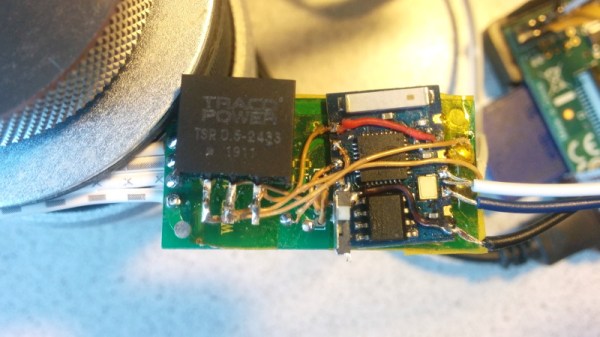
It can be difficult to resist the impulse buy. You see something interesting, the price is right, and even though you know you should do your research first, you end up putting it in your cart anyway. That’s how [Tobias Girstmair] ended up being the not-so proud owner of a LEDBERG RGB LED strip from IKEA, and what eventually pushed him to replace wimpy original controller with an ESP8266.

So what was the problem with the original controller? If you can believe it, it was incapable of producing white light. When IKEA says an LED is multi-color, they apparently mean it’s only multi-color. A quick check of the reviews online seem to indicate that the white version is sold as a different SKU that apparently looks the same externally and has confused more than a few purchasers.

Rather than having to pick one or the other, [Tobias] decided he would replace the original controller with an ESP-03, hoping that would give him granular enough control over the LEDs to coax a suitably white light out of them. He didn’t want to completely start from scratch, so one of the first decisions he made was to reuse the existing PCB and MOSFETs. Some handy test points on the PCB allowed him to hook the digital pins of the ESP right to the red, blue, and green LED channels.

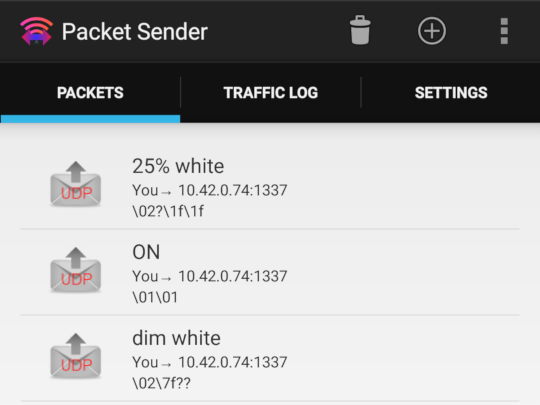
Then it was just a matter of coming up with the software. To keep things simple, [Tobias] decided to create a “dumb” controller that simply sets the LED color and intensity according to commands it receives over a simplified UDP protocol. Anything beyond that, such as randomized colors or special effects, is done with scripts that run on his computer and fire off the appropriate UDP commands. This also means he can manually control his newly upgraded LEDBERG strips from basically anything that can generate UDP packets, such as an application on his Android phone.

It might not be the most robust implementation we’ve ever seen, but all things considered, it looks as though this modification could be a pretty good way to get some cheap network controlled RGB lighting in your life.

The Augmented Reality Breadboard Of The Future

You’d be hard pressed to find a carpenter who didn’t own a hammer, or a painter that didn’t have a couple of brushes kicking around. Some tools are simply so fundamental to their respective craft that their ownership is essentially a given. The same could be said of the breadboard: if you’re working with electronics on the hobby or even professional level, you’ve certainly spent a decent amount of time poking components and wires into one of these quintessential prototyping tools.

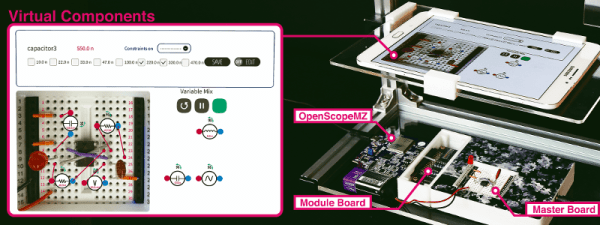
There’s little danger that the breadboard will loose its relevance going forward, but if [Andrea Bianchi] and her team have anything to say about it, it might learn some impressive new tricks. Developed at the Korean Advanced Institute of Science and Technology, VirtualComponent uses augmented reality and some very clever electronics to transform the classic breadboard into a powerful mixed-reality tool for testing and simulating circuits. It’s not going to replace the $3 breadboard you’ve got hiding at the bottom of your tool bag, but one day it might be standard equipment in electronics classrooms.

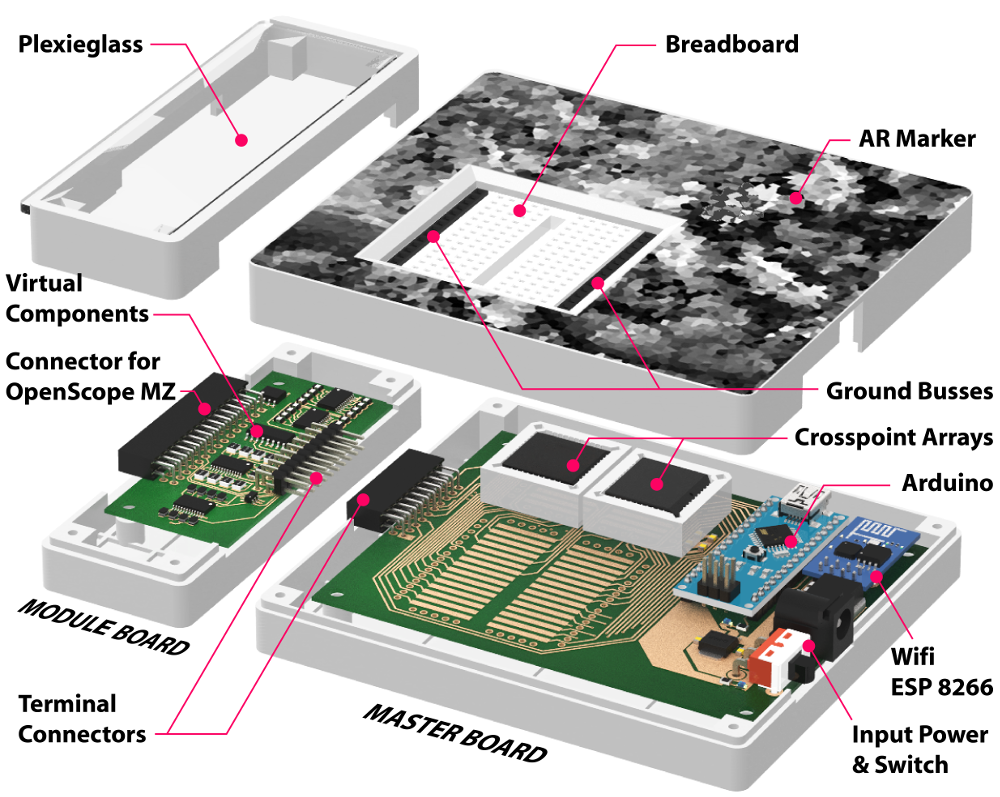
The short version is that VirtualComponent is essentially a dynamic breadboard. Holes in the same row are still electrically linked like in the classic breadboard, but with two AD75019 cross-point switch arrays and an Arduino in the base, it has the ability to virtually “plug in” components at arbitrary locations as selected by the user. So rather than having to physically insert a resistor, the user can simply tell the software to connect a resistor between two selected holes and the cross-point array will do the rest.

What’s more, many of those components can be either simulated or at least augmented in software. For example, by using AD5241 digital potentiometers, VirtualComponent can adjust the value of the virtual resistor. To provide variable capacitance, a similar trick can be pulled off using an array of real capacitors and a ADG715 digital switch to connect them together; essentially automating what the classic “Decade Box” does. In the demonstration video after the break, this capability is extended all the way out to connecting a virtual function generator to the circuit.

The whole system is controlled by way of an Android tablet suspended over the breadboard. Using the tablet’s camera, the software provides an augmented reality view of both the physical and virtual components of the circuit. With a few taps the user can add or edit their virtual hardware and immediately see how it changes the behavior of the physical circuit on the bench.

People have been trying to improve the breadboard for years, but so far it seems like nothing has really stuck around. Given how complex VirtualComponent is, they’ll likely have an even harder time gaining traction. That said, we can’t help but be excited about the potential augmented reality has for hardware development.

Continue reading “The Augmented Reality Breadboard Of The Future”

A Laser Aiming Module For First Person Hacking

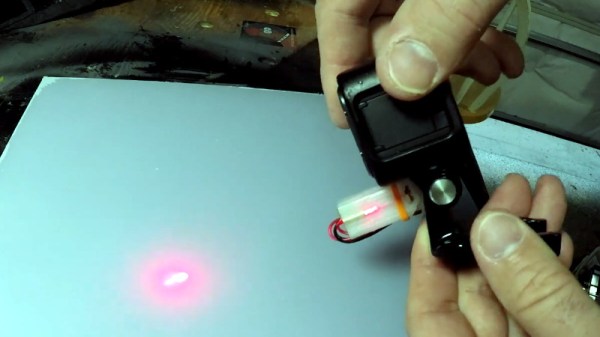
You’ve perhaps noticed that [Jeremy Cook] is rather prolific on YouTube, regularly putting out videos on his latest and greatest creations. He wanted to add a head-mounted GoPro to his video production bag of tricks, but found it was a little trickier than expected to get the camera to point where he was actually looking. The solution? A 3D printed laser “sight” for the GoPro that let’s him zero it in while creating videos.

The idea here is very simple: put a small laser module on the same mount as the GoPro itself so you’ll have a handy red dot showing more or less where the camera is looking. The position of the red dot relative to the center-point of the camera’s field of view is going to vary slightly with range, but with something like a GoPro that’s shooting a very wide area to begin with, it’s not really a problem in practice.

Sounds like a good idea, but won’t that leave a weird red dot in all the videos? [Jeremy] is already ahead of you there, and added a small push button switch to the front of the module so he can quickly and easily turn the laser on and off. The idea is that he turns the laser on, gets the dot roughly where he wants the camera pointed, and then turns it back off.

[Jeremy] has put the STL files for the single-piece 3D printed module up on his GitHub for anyone who might find them useful. Besides the printed part, you just need to provide a suitably sized 3.7 V LiPo battery and the laser diode itself. If you need to find a good supply of cheap lasers, you might want to check the clearance rack at the big box store.

Continue reading “A Laser Aiming Module For First Person Hacking”

3D Printering: The Past And Future Of Prusa’s Slicer

If you own a desktop 3D printer, you’re almost certainly familiar with Slic3r. Even if the name doesn’t ring a bell, there’s an excellent chance that a program you’ve used to convert STLs into the G-code your printer can understand was using Slic3r behind the scenes in some capacity. While there have been the occasional challengers, Slic3r has remained one of the most widely used open source slicers for the better part of a decade. While some might argue that proprietary slicers have pulled ahead in some respects, it’s hard to beat free.

So when Josef Prusa announced his team’s fork of Slic3r back in 2016, it wasn’t exactly a shock. The company wanted to offer a slicer optimized for their line of 3D printers, and being big proponents of open source, it made sense they would lean heavily on what was already available in the community. The result was the aptly named “Slic3r Prusa Edition”, or as it came to be known, Slic3r PE.

Ostensibly the fork enabled Prusa to fine tune print parameters for their particular machines and implement support for products such as their Multi-Material Upgrade, but it didn’t take long for Prusa’s developers to start fixing and improving core Slic3r functionality. As both projects were released under the GNU Affero General Public License v3.0, any and all of these improvements could be backported to the original Slic3r; but doing so would take considerable time and effort, something that’s always in short supply with community developed projects.

Since Slic3r PE still produced standard G-code that any 3D printer could use, soon people started using it with their non-Prusa printers simply because it had more features. But this served only to further blur the line between the two projects, especially for new users. When issues arose, it could be hard to determine who should take responsibility for it. All the while, the gap between the two projects continued to widen.

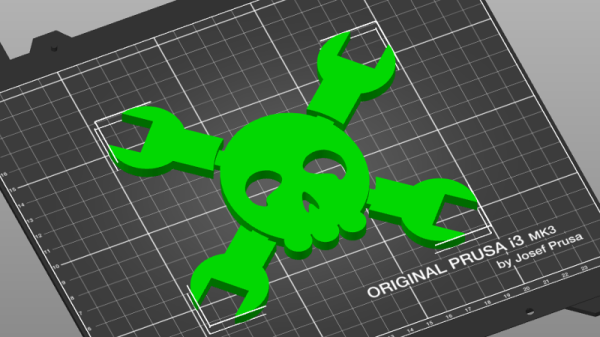
With a new release on the horizon that promised to bring massive changes to Slic3r PE, Josef Prusa decided things had reached a tipping point. In a recent blog post, he announced that as of version 2.0, their slicer would henceforth be known as PrusaSlicer. Let’s take a look at this new slicer, and find out what it took to finally separate these two projects.

Continue reading “3D Printering: The Past And Future Of Prusa’s Slicer”