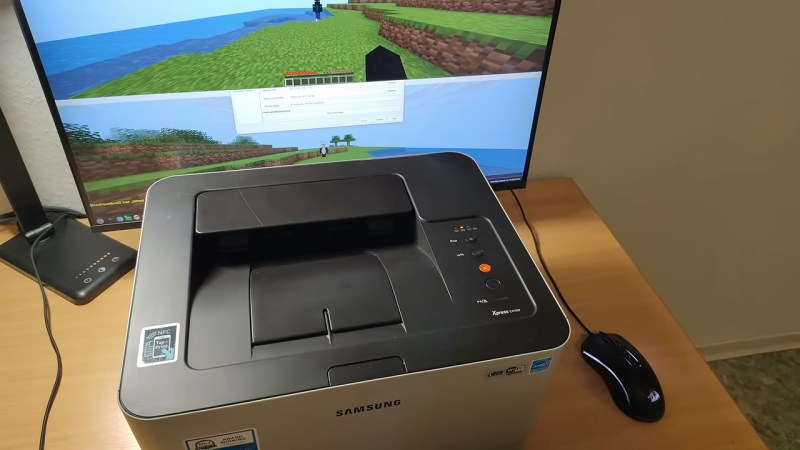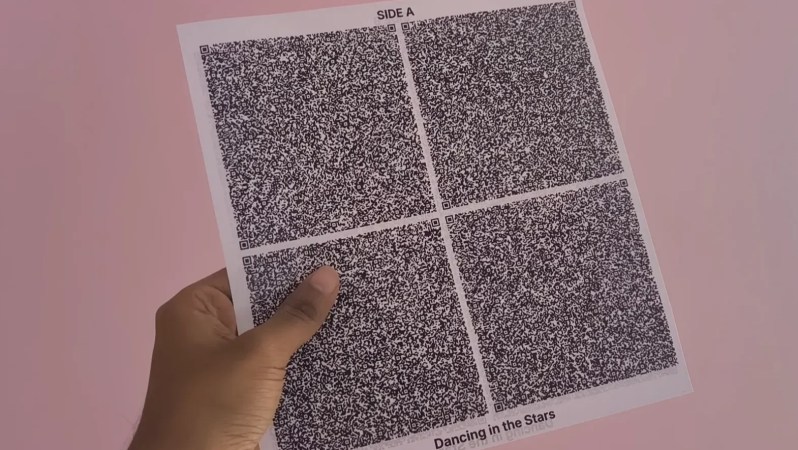
Figure 1 from the paper: the apparatus and a disintegration fingerprint.

IDing Counterfeit Drugs Might Be Easier Than You Think

Odds are, you’ve taken pills before; it’s a statistical certainty that some of you reading this took several this morning. Whenever you do, you’re at the mercy of the manufacturer: you’re trusting that they’ve put in the specific active ingredients in the dosage listed on the package. Alas, given the world we live in, that doesn’t always happen. Double-checking actual concentrations requires expensive lab equipment like gas chromatography. It turns out checking for counterfeit pills is easier than you’d think, thanks to a technique called Disintegration Fingerprinting.

Continue reading “IDing Counterfeit Drugs Might Be Easier Than You Think”

Arduino Code? On My 8051? It’s More Likely Than You Think

The 8051 was an 8-bit Harvard-architecture microcontroller first put out by Intel in 1980.  They’ve since discontinued that line, but it lives on in the low-cost STC8 family of chips, which is especially popular in Asia. They’re cheap as, well, chips — under 1$ — but lack compatibility with modern toolchains. If you’re happy with C, then you’re fine, but if you want to plus-plus it up and use all those handy-dandy shortcuts provided by the Arduino ecosystem, you’re out of luck. Or rather, you were, until [Bùi Trịnh Thế Viên] aka [thevien257] came up with a workaround.

The workaround is delightfully Hack-y. One could, conceivably, port a compiler for Arduino’s  Wiring to the 8051, but that’s not what [Viên] did, probably because that would be a lot of work. There isn’t even a truly modern toolchain to put plain C on this chip. Instead, [Viên] started with rv51, a RISC-V emulator written in 8051 assembly language by [cryozap]. RISC-V is a lot easier to work with and, frankly, a more useful skill to build up.

Continue reading “Arduino Code? On My 8051? It’s More Likely Than You Think”

Resin Injection CRT Cataract Surgery On Macintosh Monitor

Nothing lasts forever, but you’d think the leaded-glass face of a CRT would not be a place you’re likely to see Father Time causing failures. Alas, the particle accelerators we all lovingly stared at were very often not unitary pieces of glass: in case of implosion, safety glass was glued onto the front of the CRT. That glue will inevitably fail, as happened to the 20″ Mac-branded Triniton [Epictronics] had with a PowerPC 6100 that needed a few other repairs.

His version of cataract surgery was the most interesting. Usually cataracts are an issue for much older CRTs than the 90s-era Macintosh display featured here, but this particular display was literally pulled out of the trash and not stored well before that, so that’s probably what accounts for its accelerated aging. Usually what people do with CRT Cataracts is use heat to remove the safety glass and failing adhesive. [Epictronics] has a safer technique, however: inject fresh adhesive into the gap that’s forming around the edge of the display.

With a syringe and UV cure resin, he slowly and laboriously goes around the edge of the display to fill in the bubbles that can be reached. Luckily, the delamination on this CRT doesn’t extend very far beyond the edges, so a standard syringe tip could reach all the problem areas.

It looks good now, but if it doesn’t hold, [Epictronics] points out he can still remove the glass with the traditional hot-air technique. We hope it holds up; this is a nice technique to try if you have a CRT with the early stages of cataract delamination. For future reference, it took about one milliliter of resin to fill each square centimeter of affected area, which implies the cataract gap is quite small indeed.

Having repaired the monitor by about fifteen minutes into the video, [Epictronics] spends the remaining seventeen minutes getting the Mac running with its original CD-ROM drive (that needed recapped) and a DOS compatibility card.

We’ve featured [Epictronics] repairs here before, like when he tore down and rebuilt an IBM Model F keyboard. 

Continue reading “Resin Injection CRT Cataract Surgery On Macintosh Monitor”

A Candle-Powered Game Boy For Post-Apocalyptic Tetris

We’re not exactly worried about Armageddon here at Hackaday, but should we end up facing the end of the world as we know it, having something to pass the time would be nice. That’s why we were intrigued by [Janus Cycle]’s latest video where he both plays and powers a Game Boy by candlelight.

You’ve probably figured out the trick already: he’s using a Peltier module as a thermoelectric generator. Candles, after all, release a lot more energy as heat than light, and all that high-quality heat is just begging to be put to use somehow. It’s hardly a new idea; [Janus] references space-age radioisotope thermoelectric generators (RTGs) in the video, but back in the day the Soviets had a thermoelectric collar that fit around a kerosene lantern to power their tube radios.

In [Janus]’s case, he’s using a commercial module sandwiched between two heatsinks with the rather-questionable choice of a cardboard box reinforced with wooden skewers to hold it over the candle. Sure, as long as the flame doesn’t touch the cardboard, it should be fine, but you will not be at all surprised to see the contraption catch fire in the video’s intro. For all that, he doesn’t get enough power for the Game Boy — one module gets him only 2 V with tea light, but he has a second module and a second candle.

Doubling the energy more than doubles the fun, since a working Game Boy is way more than twice as fun as an un-powered one. But one candle should be more than enough power, so [Janus] goes back and optimizes his single-Peltier setup with a tall candle and actual thermal grease, and gets the Game Boy going again. Any fire marshals in the audience should look away, though, as he never gives up on keeping a candle in a cardboard box.

The “power something with a Peltier module” project is probably a right of passage for electronics enthusiasts, but most are more likely to play with the irony of candle-powered LEDs, or fans to cool the cold-side heatsink. We did see a phone charger one time, and that didn’t even involve open flames, which seems much safer than this. Remember — no matter how much you want to game after the end of the world, it’s not worth burning down your fallout shelter.

Continue reading “A Candle-Powered Game Boy For Post-Apocalyptic Tetris

This is an image that would have been difficult to chroma key by hand.

CorridorKey Is What You Get When Artists Make AI Tools

You may not have noticed, but so-called “artificial intelligence” is slightly controversial in the arts world. Illustrators, graphics artists, visual effects (VFX) professionals — anybody who pushes pixels around are the sort of people you’d expect to hate and fear the machines that trained on stolen work to replace them. So, when we heard in a recent video that [Niko] of Corridor Digital had released an AI VFX tool, we were interested. What does it look like when the artist is the one coding the AI?

It looks amazing, both visually and conceptually. Conceptually, because it takes one of the most annoying parts of the VFX pipeline — cleaning up chroma key footage — and automates it so the artists in front of the screen can get to the fun parts of the job. That’s exactly what a tool should do: not do the job for them, but enable them to enjoy doing it, or do it better. It looks amazing visually, because as you can see in the embedded video, it works very, very well.

Continue reading “CorridorKey Is What You Get When Artists Make AI Tools”

Zip-Drive Emulator Puts Big Disks Back On LPT

Iomega’s Zip drives filled an interesting niche back in the 1990s. A magnetic disk that was physically floppy-sized, but much larger in capacity– starting at 100 MB, and reaching 750 MB by the end–they never quite had universal appeal, but never really went away until flash memory chased them out of the marketplace in the early 2000s. While not everyone is going to miss them, some of us still think it’s a better form factor than having a USB stick awkwardly protruding from a computer, or microSD cards that are barely large enough to see with the naked eye. [Minh Danh] is one of those who still has affection for Zip drives, and when his parallel port Zip 100 drive started to give up the ghost last year, he decided to do something bold: reverse engineer it, and produce an emulator. First software, and then in hardware.

It’s not the prettiest-ever prototype, but lots of great things start with a mess of wires.

The first was to create a virtual zip drive that could run on a virtual machine and be accessed with DOS or Windows up to XP. The next task was to move that functionality onto a microcontroller to create something like a GoTek floppy emulator for LPT Zip drives that he’s calling the LPT100. Yes, Zip drives were built for ATAPI, SCSI, FireWire and USB, too, but [Minh]’s was on the parallel port and that’s what he wanted to replace, so the LPT interface is what set out to recreate.

It works, too, though took more guts than was expected– the 8-bit PIC18F4680 he started with just wasn’t up to the task. He moved up to a 32-bit PIC, the PIC32MZ2048EFH144 to be specific, which proved adaquate when testing with his Book 8088, a new DOS PC from 2023. Iomega’s official driver won’t run on an 8088, but the PALMZIP utility does and was able to transfer files, though only at the slow nibble rate due to limitations with the Book8088’s LPT hardware. Watch it in action below.

Alas, moving up to the Pocket386, it seemed the PIC just could not keep up. [Minh] says he’s thinking of moving to the faster Teensy 4.1, which sounds like a good idea. Considering the Teensy can be configured to serve as a drop-in replacement for a 68000, bit-banging the bus at 7.8 MHz, we’d think it should handle anything a parallel port can throw at it.

Thanks to [Minh Danh] for the tip!

Continue reading “Zip-Drive Emulator Puts Big Disks Back On LPT”

Two test towers, showing the palette potential of three (R, B, Y) filaments.

FullSpectrum Is Like HueForge For 3D Models, But Bring Your Toolchanger

Full-color 3D printing is something of a holy grail, if nothing else, just because of how much it impresses the normies. We’ve seen a lot of multi-material units in the past few years, and with Snapmaker’s U1 and the Prusa XL, it looks like tool changers are coming back into vogue. Just in time, [Ratdoux] has a fork of OrcaSlicer called FullSpectrum that brings HueForge-like color mixing to tool-changing printers.

The hook behind FullSpectrum is very simple: stacking thin layers of colors, preferably with semi-translucent filament, allows for a surprising degree of mixing. The towers in the image above have only three colors: red, blue, and yellow. It’s not literally full-spectrum, but you can generate surprisingly large palettes this way. You aren’t limited to single-layer mixes, either: A-A-B repeats, and even arbitrary patterns of four colors are possible, assuming you have a four-head tool-changing printer like the Snapmaker U1 this is being developed for.

FullSpectrum is, in fact, a fork of Snapmaker’s fork of OrcaSlicer, which is itself forked from Bambu Slicer, which forked off of PrusaSlicer, which originated as a fork of Slic3r. Some complain about the open-source chaos of endless forking, but you can see in that chain how much innovation it gets us — including this technique of color mixing by alternating layers.

Continue reading “FullSpectrum Is Like HueForge For 3D Models, But Bring Your Toolchanger”