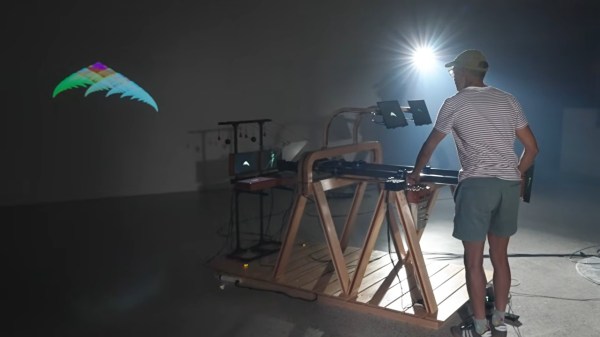
RGB image from the projector, with human for scale.

RGB Laser Projector Does Colorful Asteroids And Much More

Have you thought about building a galvonometer-based laser projector, but don’t know where to start? There are a lot of resources out there, but you could do worse than to check out [Breq] and [Mia]’s laser vector project, which provides a very well-documented and low-cost starting point. They boast that the most expensive part of the project was the ANSI-certified safety glasses, which shows a dedication to safety we wish more people would show when playing with coherent light.

The rest of the parts — from the galvos to the RGB lasers module with dichoric mirrors to keep everything on the same beamline, to the ESP32 module driving everything — was ordered from AliExpress, and not from the most expensive vendors, either. Considering that, it works remarkably well.

If you’re not playing Asteroids on your vector display, why even bother?

Like all DIY laser projectors, this one does vector graphics, sweeping the beam fast enough that the human eye registers crisp, clean lines. Galvonometers, or galvos for short, take analog input, so a DAC is needed — fortunately the ESP32-S2 comes with a pair built in. The custom PCB of course has audio-in for the usual Lissajous lightshow or oscilloscope music, but with an ESP32 as the brains, you can do a lot just inside the projector.

Like what? Well, play Asteroids, for instance, using Wiimote controllers. Project a lovely clock. Render text input in various single-stroke fonts. More to the point, since this is a projector, take arbitrary SVG data and project literally any image you’d like — as long as it doesn’t have too many lines, at least. The galvos in this project are rated at 20,000 points per second, which is not exceedingly fast: they were chosen to meet the budget, not the greatest-possible speed.

More to the point is that this is one of the better-documented projects of this type we’ve seen. [Breq] doesn’t just tell us how to build the projector, but why they designed it that way. We really encourage you to give it a read if you’ve been thinking of getting into this sort of display.

We’ve seen plenty of laser projectors before, most of them producing vector images like this one. If you really must have a raster display, though, that’s also an option. Don’t count out vector images, though — they could even replace your Christmas lights.

Thanks to [CapinRedBeard] for the tip! Remember to send any bright ideas you see to our tips line, coherently lit or no.

3D reconstruction of x-rayed worms. X-ray absorbing particles in the guts are shown in white.

Earthworms Don’t Bio-Accumulate Microplastics, So There May Be Hope For Us

Microplastics absolutely saturate the Earth’s environment, and that’s probably not a good thing unless you’re looking for a sediment marker for the Anthropocene period. On the other hand, environmental contamination only becomes a really big problem if it bioaccumulates– that is, builds up in the tissues of plants and animals. At least when it comes to worms, that’s not the case with microplastics, according to new research from the Canadian Light Source at the University of Saskatchewan.

Pictured: Not an Igloo.
Credit: David Stobbe / Stobbe Photography, via University of Saskatchewan

The Canadian Light Source isn’t just some hoseheads in an igloo with a flashlight– it’s a 2.9 GeV Synchrotron tuned to produce high-energy photons. Back when Synchrotrons were used for particle physics, Synchrotron radiation was a very annoying energy sink, but nobody cares about 2.9 GeV electrons anymore. So rather than slam them into each other or a static target, the electrons just whip about endlessly, giving off both soft- and hard X-rays for material science studies– or, in this case, to observe the passage of polyethelyne microplastic particles through the guts of some very confused earth worms. To make them detectable by x-ray, the polyethylene was bonded to barium sulfate, an x-ray absorber. Equally opaque barium titanite glass microspheres were used with different worms, as a control.

Despite being fed soil enriched with far more plastic than you’ll find outside of a 3D print farm, it seems the worm’s digestive system was able to reject the particles, even those as fine as 5 microns. That’s a good thing, because if the worms were absorbing plastic from the soil, it’s likely their predators would absorb it from the flesh of the worms, so and so forth up the food chain in the sort of cascade that made DDT a problem and makes mercury compounds so serious. If the worms are rejecting these compounds, there’s a chance other creatures can too– and at the very least, it means they aren’t building up on this bottom rung of the foot chain. If you’re looking for a more technical read, the full paper is available here.

It’s too early to say what this means for how microplastics get into humans and other animals, but it’s hopeful. Equally hopeful was the recent finding that studies that don’t rely on football-field sized X-ray machines might be picking up on microplastics from lab gloves, skewing results.

Header image: the digestive systems of earth worms as imaged by the Canadian Light Source. Credit Letwin, et al,
Environmental Toxicology and Chemistry, vgag072, https://doi.org/10.1093/etojnl/vgag072

LightInk, A Solar Powered ESP32 Smartwatch

There’s something about the ESP32 family of microcontrollers and timekeeping. We probably see it in clocks as often as we do anything else; we also probably see more clocks with one as the beating heart than any of the many other possible timekeeping options.

[Daniel Ansorregui]’s LightInk watch is no different in that regard — but it is very different in one important detail, because unlike most other smartwatch designs, you won’t have to worry about battery life. Outside of gloomiest Gotham, its built-in solar panel should be able to keep it charged.

That’s for a few reasons. The obvious one is the e-ink display, which only takes a sip of power during updates. That’s hardly unique to [Daniel]’s projec t– he quite explicitly calls out the Watchy project, which we featured previously, as where he got the idea of putting e-ink and an ESP32-PICO together on his wrist. What is unique is the delightful hack [Daniel] is using to minimize power usage, which is our favorite part.

Continue reading “LightInk, A Solar Powered ESP32 Smartwatch”

Sunlight Powered, Sunlight Readable: Solar Case For Nook Simple Touch

When life gives you lemons, you make lemonade. What if life gives you a pile of old e-book readers? Well, when [spiritplumber] got box of old Nook Simple Touch devices, he decided to design solar-powered cases to help boost the old batteries. It makes perfect sense to us: sunlight readable screen, sunlight chargeable battery.

It looks like he’s got a pair of panels built into the 3D printed case. He recommends using any TP4056-based charger, and tying into the battery test points, not the 5 V supply. It won’t hurt anything if you do, apparently, but the device will think it’s plugged in an refuse to turn off the WiFi. That’s no big deal when you’ve got a continental power grid on the other end of the cable, but charging from a small panel on the back of the case doesn’t always give you enough juice to waste on unneeded radio activity. Especially indoors — these panels are apparently big enough to trickle-charge the device under artificial light, which is a nice, if doubtless slow feature.

The design is open source, and includes SketchUp design files as well as the exported .STL, so if you’ve got a hankering to edit this to fit a different e-book reader, you can. He also provides a handy-dandy guide to root this model of Nook, and if you’re on Hackaday we probably don’t need to explain why you might want to.

We’ve seen the Nook Simple Touch go some interesting places — like into the clouds as a glider computer — but solar power is a new hack for this device, at least on this site. We don’t know if [spiritplumber] has a green thumb, but he’s evidently got some environmental bones in his body: his last featured project was about improving quadcopter efficiency with a wing and a prayer.

ESP32 Hosts SolarPunk Message Board

Solarpunk is sometimes thought of as the “good ending” to cyberpunk– there’s technology, but it’s community-focused instead of in the hands of evil conglomerates, and– if the name doesn’t give it away– renewably powered. [Victor Frost] found that image of the future inspiring enough to create this ESP32-hosted community hub. Yes, it looks like a lantern, but it’s actually a very-local webserver.

It looks like a lantern, but it’s got a server inside. Plus two 18650 cells to charge from a solar panel that’s presumably off-camera.

Local webserver sounds like an oxymoron, but this device does serve a page over HTTP… just, not on the world-wide web. Instead the only way to access it is via its own Wireless Network– he’s using the ‘captive portal’ that forces you to log into public wifi to direct people to a community message board.

It’s unmoderated, and unfiltered– users can post what they like, but given that they have to be within a few meters of the device, it’s not exactly anonymous. It’s a lot like the community center corkboard brought into the 21st centruy, which is very in keeping with the solarpunk ethos.

For ease of updates, he’s subdivided the ESP32’s flash into three partitions: one for the data, and two for the software, using LittleFS. This allows live updates and keeping a known-good backup for the quickest possible turnaround and/or rollback. One interesting thing is that his who UI– the actual web site, HTML, CSS, and JS– is all crammed into a single string in PROGMEM rather than files on the little file system. It’s an interesting choice, and makes for quick updates, firmware and UI in one go. Not everyone will like it, but it works for [Victor]. The code is, of course, on GitHub under the GPL— there’s a lot of overlap between the open source and solarpunk ethos, after all.

It’s a bit of a pity that he missed our Green Powered Challenge, as this project would have fit right in to the PV category, considering it runs on a 6W panel. For all the cyberpunk and solar power you see on this website, you’d think the “solarpunk” tag would be more popular, but no– all we have is this stained-glass robot.

Thanks to [Victor] for the tip! If you missed our contest, too, no worries– we take projects of all colours, green or otherwise, all the time. Just drop us a tip. 

Pushing As Many Pixels As Possible To A CRT: Interlaced 4K

Some people love CRTs to a degree that the uninitiated may find obsessive. We all have our thing, and for [Found Tech], it’s absolutely pointing particle accelerators at his face to play video games. He likes modern games, with modern resolutions– none of this 1080p nonsense. Today’s gamers demand 4K! Can a CRT keep up? The answer is a resounding “No, but actually, yes!”

[Found Tech] has an IBM P275 monitor, which is one of the last generation of CRTs.  Officially, the resolution maxes out at 1920 dots by 1440 lines. While one might (inaccurately) call that UHD output “2K”, you certainly cannot claim it is 4K. So, what’s the secret? Interlacing. Yes, interlacing, like old analog TV signals.

Apparently, in spite of what the manual says, getting the screen to absorb the 2880×2160 interlaced signal wasn’t the hard part, but generating it was. NVIDIA and AMD graphics cards are absolutely unable to create an interlaced signal, but Intel integrated GPUs are– if you get the right combo of chip and old driver. Sadly, the video doesn’t list exactly what he used. Of course an iGPU isn’t going to give you a very good gaming experience at this high resolution, so [Found Tech] has his games do their rendering on the discrete card before piping that over to the iGPU for display on the CRT.

Technically, you still can’t call the 2880×2160 picture “4K”, as that trademark refers to 2160p at 16:9, and this is both interlaced and 4:3. Still, close enough. In spite of the artifacting that turned us all against interlaced signals back in the day, this apparently has [Found Tech]’s eyes fooled– he says it’s as good as 2160p on his OLED, plus the extra magic that comes with glowing phosphors.

It certainly looks great in a recording, but the monitor in the recording isn’t displayed at a high enough resolution to say for sure if it’s 4K. Still, if you’re into CRT gaming, maybe give this high-res interlacing a try. If you still don’t get what’s so great about CRTs, check here, and remember it could be worse– at least we’re not going on about Plasma TVs. Continue reading “Pushing As Many Pixels As Possible To A CRT: Interlaced 4K”

Building An X86 Gaming PC Without Intel, NVIDIA Or AMD Parts

This is an interesting challenge from the “why not?” files — [GPUSpecs] over on YouTube built a gaming PC without using a single component from NVIDIA, Intel, or AMD. That immediately makes us think of the high-power ARM workstations or perhaps even perhaps the new “AI workstations” coming available with RISC V architecture, but the challenge here was specifically “gaming PC,” not workstation. A gaming PC, without a GPU by one of those three? To make it even more interesting, the x86 CPU isn’t Intel or AMD either.

If you’re of a certain vintage, you may remember Cyrix. Cyrix reverse-engineered the x86 ISA and made their own compatible chips in the 90s, before being bought out by National Semiconductor, and then VIA Technologies. VIA partnered with the Government of Shanghai to found Zhaoxin, and it is from Zhaoxin that the KaiXian KX 7000 CPU hails — an x86-64 device, that isn’t Intel or AMD. We’ve actually covered the company before. This particular chip benchmarks like an old i5, so not spectacular, but usable. 

Continue reading “Building An X86 Gaming PC Without Intel, NVIDIA Or AMD Parts”