Small, Quiet Air Compressor Puts 3D-Printed Parts To Best Use

When the only tool you’ve got is a hammer, every problem starts to look like a nail. Similarly, while a 3D printer is a fantastic tool to have, it can make you think it’s possible to build all the things with printed parts. Knowing when to print ’em and when to machine ’em is important, a lesson that [Diffraction Limited] has taken to heart with this semi-printed silent air compressor.

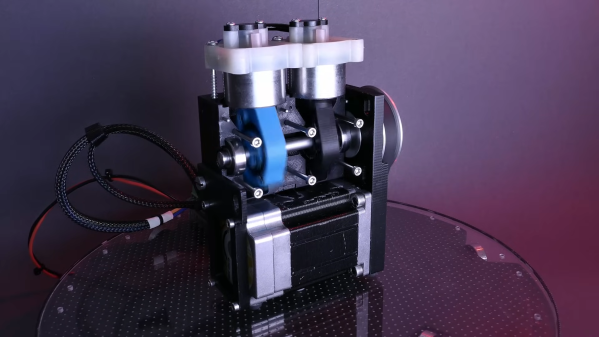
The key to this compressor’s quiet operation is a combination of its small overall size. its relatively low output, and its strategic use of plastic components, which tend to dampen vibrations. The body of the compressor and the piston arms are the largest 3D-printed parts; the design calls for keeping printed parts in compression for longer life, while the parts of the load path in tension travel through fasteners and other non-printed parts. The piston design is interesting — rather than being attached to connecting rods via wrist pins, the machined Delrin pistons are solidly attached to the piston arms. This means they have to swivel within the cylinders, which are made from short pieces of metal tubing, with piston seals designed to move up and down in grooves on the pistons to allow air to move past them. The valve bodies atop each cylinder are salvaged from another compressor.

When powered by a NEMA23-frame BLDC motor via a belt drive, the compressor is remarkably quiet; not quite silent perhaps, but still impressively smooth, and capable of 150 PSI at low speeds. And as a bonus, the split crankcase makes it easy to open up and service, or just show off how it works. We’ve seen a variety of 3D-printed compressors, from screw-type to Wankel, but this one really takes the prize for fit and finish. Continue reading “Small, Quiet Air Compressor Puts 3D-Printed Parts To Best Use”
Emergency DIP Pin Repair For Anyone

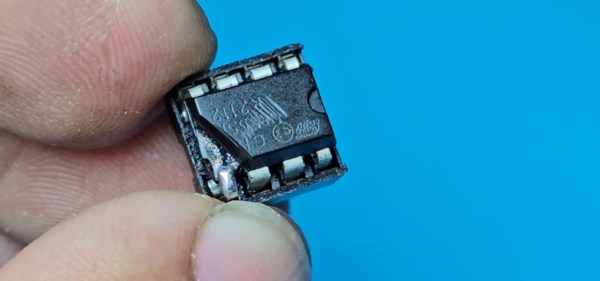
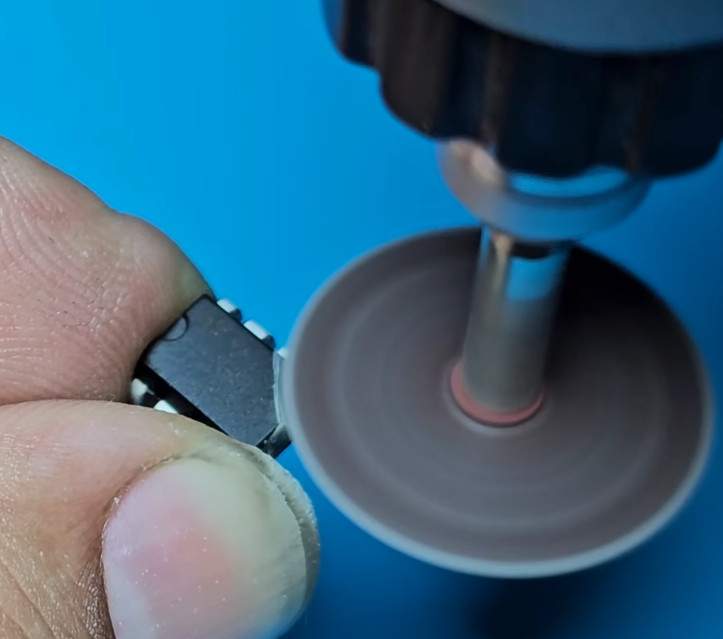
Who has not at some point in their lives experienced the horror of a pin on a DIP package breaking off? It’s generally game over, but what if you don’t have another chip handy to substitute? It’s time to carefully grind away some of the epoxy and solder on a new pin, as [Zafer Yildiz] has done in the video below the break.

The technique relies on the pins continuing horizontally inside the package , such that they provide a flat surface. He’s grinding with the disk on a rotary tool, we have to say we’d use one of the more delicate grinding heads for something more akin to a miniature die grinder.

Once the flat metal surface is exposed, the chip is placed in a socket, and a new pin is cut from the leg of a TO-220 power device. This is carefully bent over, inserted in the socket, and soldered into place. The whole socket and chip arrangement is then used in place of the chip, making for something a little bulky but one infinitely preferable to having to junk the device.

There are many useful skills to be learned when it comes to reworking, and we’ve covered a few in our time. Most recently we saw a guide to lifting SMD pins.

Continue reading “Emergency DIP Pin Repair For Anyone”

Inside A Hisense TV Repair Attempt

Many of us misspent our youth fixing televisions. But fixing a 1970s TV is a lot different than today — the parts were big and tubes were made to be replaced. Have you torn into a big flat screen lately? It is a different world, as [The Fixologist] shows us in the video below.

The TV in question was rescued from a neighbor who was about to throw it away. If you are like us, you’ll watch the first few minutes and see it powers up, but the screen is very dark. Back light problem, right? No problem. But it turned out to be more than we thought.

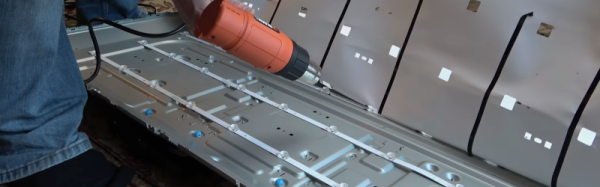
Honestly, we assumed it might be the power supply, and we would have put a power supply on the LED leads to test that first. That would have been smart because taking the panel off to reveal the LEDs was very difficult! There were two bad LEDs, though, so in the end you’d have had to do it anyway.

We were disappointed that after fixing the LED, he cracked the LCD panel during the reinstallation. So, in the end, this was more of a teardown video and not a repair video. He seemed to think a lot of the tape in the unit was to thwart repairs. That could be, but we wondered if it made manufacturing the TV easier which, after all, is mostly what they care about.

This isn’t the first time we’ve heard people tearing into a TV and wondering if the factory was against them. We’ve considered it, but we are pretty sure it isn’t the case.

Continue reading “Inside A Hisense TV Repair Attempt”

This Air Particulate Sensor Can Also Check Your Pulse Rate

The MAX30105 is an optical sensor capable of a great many things. It can sense particulate matter in the air, or pick up the blinking of an eye. Or, you can use it as a rudimentary way to measure your heart rate and blood oxygen levels. It’s by no means a medical grade tool, but this build from [Taste The Code] is still quite impressive.

The MAX30105 contains red, green, and infrared LEDs, and a very sensitive light detector. The way it works is by turning on its different LEDs, and then carefully measuring what gets reflected back. In this way it can measure particles in the air,  such as smoke, which is actually what it was designed for originally. Or, if you press your finger up against it, it can measure the light coming back from your blood and determine its oxygenation level. By detecting the variation in the light over time, it’s possible to pick up your pulse, too.

Getting this data out of the sensor is remarkably easy. One need only hook it up to a suitable microcontroller like the ESP8266 and use the MAX3010X library to talk to it. [Taste The Code] did exactly that, and also hooked up a screen for displaying the captured data. Alternatively, if you want the raw data from the sensor, you can get that too.

It should be noted that this build was done for educational purposes only. You shouldn’t rely on a simple DIY device for gathering useful medical data; there are reasons the real gear is so expensive, after all. We’ve looked at this sensor before, too, not long after it first hit the market. Continue reading “This Air Particulate Sensor Can Also Check Your Pulse Rate”

Retrotechtacular: Right To Repair 1987

In 1987, your portable Osborne computer had a problem. Who you gonna call? Well, maybe the company that made “The Osborne Survival Kit,” a video from Witt Services acquired by the Computer History Museum. The narrator, [Mark Witt], tells us that they’ve been fixing these computers for more than three years, and they want to help you fix it yourself. Those days seem long gone, don’t they?

Of course, one thing you need to know is how to clean your floppy drives. The procedure is easy; even a 10-year-old can do it. At least, we think [William Witt] is about 10 in the video. He did a fine job, and we wonder what he’s up to these days.

The next step was taking the machine apart, but that required adult supervision. In some cases, it also took a soldering iron. As a byproduct, the video inadvertently is a nice tear-down video, too.

Continue reading “Retrotechtacular: Right To Repair 1987”

Repairing A Gear With A Candle (and Some Epoxy)

You have a broken gear you need to fix, but there’s no equivalent part available. That’s the issue [Well Done Tips] faced with a plastic gear from a lawnmower. While we’d be tempted to scan the gear, repair the damage in CAD and then 3D print a new one, we enjoyed hearing about his low-tech solution. In addition to the write up, there’s a video showing the process you can watch below.

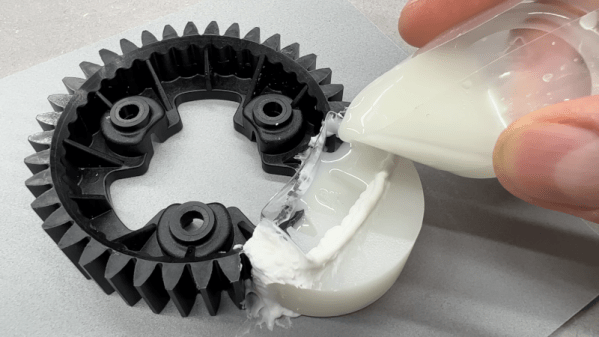
The idea is pretty simple. Using a piece of pipe and melted candle wax, he prepared a mold of an undamaged section of the gear. Then he cast epoxy resin in place to recreate the missing pieces. There are a few tricks, like putting holes in the remaining part of the gear so the epoxy flows into the existing part. Depending on the gear’s purpose and original material, you might be able to just use it as-is. However, you could also use the repaired gear as a template to create another mold and then cast an entire gear from resin or even metal if you can cast metal.

You can argue whether resin is better or worse than PLA, but of course, it depends on the kind of resin—photopolymers are different from epoxy resins you’d use for this sort of thing. If you think you might like to make your new gear out of aluminum, you might find some inspiration in a previous post.

Continue reading “Repairing A Gear With A Candle (and Some Epoxy)”

Photoresistors Provide Air Gap Data Transfer, Slowly

One of the simplest ways of keeping a computer system secure is by using an air gap — that is, never actually connecting the system to the network. This can often include other peripherals like USB drives and other removable storage as well, so getting information to and from secure (or compromised) systems behind air gaps can often present a challenge. But assuming you have local access to the computer and your parts bin handy, these optical solutions from [Nikolay] can allow  data transfer to or from such off-line computers.

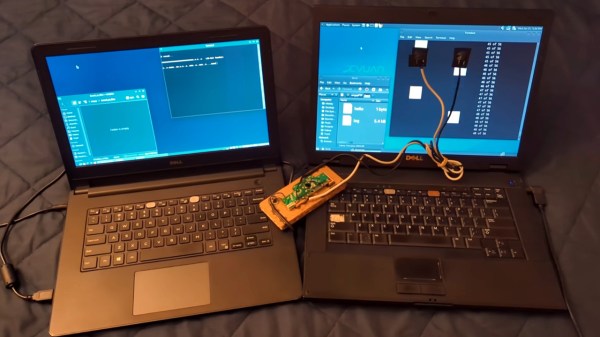
[Nikolay]’s specific use case for this project is to transfer small amounts of information to or from computers that may be compromised in some way, or computers that might otherwise be dangerous to connect to other equipment. There’s actually several methods described in the project, the first involves temporarily attaching a photoresistor to the computer’s screen which has been wired into the remains of a USB keyboard. A script running on the compromised machine translates data into a series of white and black squares. The sensors can detect these patterns much like playing Duck Hunt on an old CRT television and transmit the data across the air gap with reasonable certainty nothing harmful crossed with it.

Continue reading “Photoresistors Provide Air Gap Data Transfer, Slowly”