DefCAD Triggers HTTP 451

Depending on where you live, pointing your browser to Defcad.com yesterday may have shown you something you’d never seen before. It certainly did for me. That’s because I live in one of the two states (as of this writing) in the United States which have scrambled to block access to the online repository of firearm CAD files after they were approved for release by the US State Department.

Anyone using the internet in those states was presented with HTTP status code 451: “Unavailable For Legal Reasons”. This code was named for Ray Bradbury’s dystopian novel “Fahrenheit 451″, in which books are burned to censor the information they contain. Rather than simply returning the traditional 403 error, 451 can be used to signal that the server is willing to serve the user the information, but is being prevented from doing so by court order.

Whatever your personal feelings are on the public having unfettered access to technical information on firearms, this is still a worrying development. The First Amendment covers more than literal speech: source code and technical data is a form of expression just as much as a poem or song, and are equally protected. If the federal government believes the files that Cody Wilson’s Defense Distributed offers up are not restricted by International Traffic in Arms Regulations (ITAR), then how can a citizen of the United States not view them? The question remains unanswered and overnight a federal judge granted a restraining order to restrict the website for the remaining states.

Continue reading “DefCAD Triggers HTTP 451”

Find Your Level – Extracting NES Game Data Using Python

Just this summer, the Nintendo Entertainment System had its 35th release anniversary, and even after years of discontinuation, it is still going strong in the hacker community. Exhibit A: [Matthew Earl]. For one of his upcoming projects, [Matthew] needed to get his hands on the background images of the NES classic Super Mario Bros. Instead of just getting some ready-rendered images and stitching them together, he decided to take care of the rendering himself, once he extracts the raw game data.

Since there is no official source code available for Super Mario Bros, [Matthew] used a disassembled version to get started looking for the image data. To avoid reading through thousands of lines of assembly code, and to also see what actually happens during execution, he wrapped the game’s ROM data into py65emu, a Python library emulating the 6502, the CPU that drives the NES. By adding a simple wrapper around the emulator’s memory handler that tracks reads on uninitialized data, [Matthew] managed to find out which parameters he needs to feed to the parser routine in order to get the image tile data. After an excursion into the Picture Processing Unit (PPU) and its memory arrangements, [Matthew] had everything he needed to create the Python script that will render the game background straight from its ROM data.

Even if extracting NES game data is not your thing, the emulator concept [Matthew] uses might be still worth a read. On the other hand, if you want to dig deeper into the NES, you should definitely have a look at emulating an SNES game on a NES, presented on the NES itself.

Kindle Tells The Time By Quoting Literature

People love books, and if you’re anything like [tjaap]’s girlfriend, you may easily devour your eighty books and more a year. Maybe to keep better track of time during her reading sessions, her wish was to get a clock for the living room, so [tjaap] stepped up. Being a maker at heart, he decided to skip the ready-made options, and instead build one in the most fitting way imaginable: by displaying the time as literary quotes on a jailbroken Kindle.

Unlike your average word clock, [tjaap]’s literary clock displays (almost) every minute a different sentence that, in one form or another, contains the current time. Thanks to the internet, he didn’t have to compile the whole list of book quotes for each and every minute of the day by himself, but it still required some work to put it all in the form he needed. Eventually he had a script that converted each quote into an image, and a shell script on the Kindle to display them according to the time. As a bonus, the origin of the quote is displayed only optionally, turning the clock into a simple trivia quiz along the way.

It shows that themed, personalized clocks are always a great subject for a gift, just like the one made from analog meters we saw around Father’s Day.

Homebuilt CNC Software, Brewed To Taste

Mainstream productivity software from the big companies is usually pretty tight, these days. Large open source projects are also to a similar standard when it comes to look and feel, as well as functionality. It’s when you dive into more niche applications that you start finding ugly, buggy software, and CNC machining can be one of those niches. MillDroid is a CNC software platform designed by someone who had simply had enough, and decided to strike out on their own.

The build began with the developer sourcing some KFLOP motion control boards from Dynomotion. These boards aren’t cheap, but pack 16MB of RAM, a 100-gate FPGA, and a microcontroller with DSP hardware that allows the boards to control a variety of types of motor in real time. These boards have the capability to read GCODE and take the load off of the computer delivering the instructions. With the developer wanting to build something robust that moved beyond the ’90s style of parallel port control, these boards were the key to the whole show, also bringing the benefit of being USB compatible and readily usable with modern programming languages.

To keep things manageable and to speed development, the program was split into modules and coded using the author’s existing “Skeleton Framework” for windowed applications. These modules include a digital readout, a jogging control panel, as well as a tool for editing G-code inside the application.

For the beginner, it’s likely quite dense, and for the professional machinist, industry standard tools may well surpass what’s being done here. But for the home CNC builder who is sick of mucking around with buggy, unmaintained software from here and there, it’s a project that shows it doesn’t have to be that bad. We look forward to seeing what comes next!

Want to see what else is out there? We’ve done a run down of DIY-appropriate CNC software, too.

Object Detection, With TensorFlow

Getting computers to recognize objects has been a historically difficult problem in computer science, but with the rise of machine learning it is becoming easier to solve. One of the tools that can be put to work in object recognition is an open source library called TensorFlow, which [Evan] aka [Edje Electronics] has put to work for exactly this purpose.

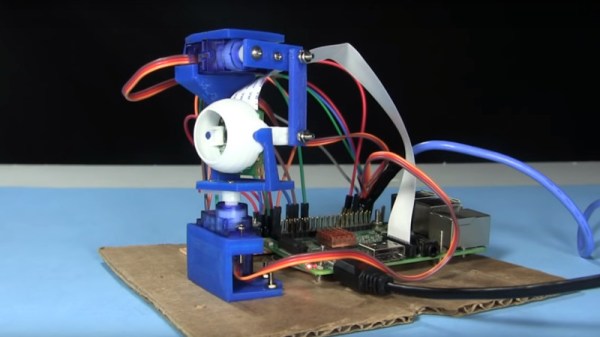
His object recognition software runs on a Raspberry Pi equipped with a webcam, and also makes use of Open CV. [Evan] notes that this opens up a lot of creative low-cost detection applications for the Pi, such as setting up a camera that detects when a pet is waiting at the door to be let inside or outside, counting the number of bees entering and exiting a beehive, or monitoring parking spaces at an office.

This project uses a number of other toolkits as well, including Protobuf. It also makes extensive use of Python scripts, but if you’re comfortable with that and you have an application for computer vision, [Evan]’s tutorial will get you started.

Continue reading “Object Detection, With TensorFlow”

A Custom Keyboard At Maximum Effort

No one loves hacked keyboards more than Hackaday. We spend most of our workday pressing different combinations of the same 104 buttons. Investing time in that tool is time well spent. [Max] feels the same and wants some personality in his input device.

In the first of three videos, he steps us through the design and materials, starting with a layer to hold the keys. FR4 is the layer of fiberglass substrate used for most circuit boards. Protoboards with no copper are just bare FR4 with holes. Homemade CNC machines can glide through FR4, achieving clean lines, and the material comes in different mask colors so customizing an already custom piece is simple. We see a couple of useful online tools for making a homemade keyboard throughout the videos. The first is a keypad layout tool which allows you to start with popular configurations and tweak them to suit your weirdest desires. Missing finger? Forget one key column. Extra digit? Add a new key column. Huge hands? More spaces between the keys. [Max] copied the Iris keyboard design but named his Arke, after the fraternal sister to Iris which is fitting since his wrist rests are removable. Continue reading “A Custom Keyboard At Maximum Effort”

Need A Tiny CRT? Karaoke Might Just Help

[Brett] is working on a video installation, and for the past few months, has been trying to get his hands on tiny CRTs any way he can. After initially coming up short, he happened across a karaoke machine from 2005, and got down to work.

Karaoke machines of this vintage are typically fairly low-rent affairs, built cheaply on simple PCBs. [Brett] found that the unit in question was easy to disassemble, having various modules on separate PCBs joined together with ribbon cables and headers. However, such machines rarely have video inputs, as they’re really only designed to display low-res graphics from CD-G format discs.

While investigating the machine, initial research online proved fruitless. In the end, a close look at the board revealed just what [Brett] was looking for – a pin labeled video in! After throwing in a Raspberry Pi Zero and soldering up the composite output to the karaoke machine’s input pin, the screen sprung to life first time! This initial success was followed by installing a Raspberry Pi 3 for more grunt, combined with a Screenly install – and a TRS adapter the likes of which we’ve never seen before. This allows video to be easily pushed to the device remotely over WiFi. [Brett] promises us there is more to come.

Karaoke is a sparse topic in the Hackaday archives, but we’ve seen a couple builds, like this vocal processor. If you’ve got the hacks, though? You know where to send ’em.