Ask Hackaday Answered: The Tale Of The Top-Octave Generator

We got a question from [DC Darsen], who apparently has a broken electronic organ from the mid-70s that needs a new top-octave generator. A top-octave generator is essentially an IC with twelve or thirteen logic counters or dividers on-board that produces an octave’s worth of notes for the cheesy organ in question, and then a string of divide-by-two logic counters divide these down to cover the rest of the keyboard. With the sound board making every pitch all the time, the keyboard is just a simple set of switches that let the sound through or not. Easy-peasy, as long as you have a working TOG.

I bravely, and/or naïvely, said that I could whip one up on an AVR-based Arduino, tried, and failed. The timing requirements were just too tight for the obvious approach, so I turned it over to the Hackaday community because I had this nagging feeling that surely someone could rise to the challenge.

The community delivered! Or, particularly, [Ag Primatic]. With a clever approach to the problem, some assembly language programming, and an optional Arduino crystalectomy, [AP]’s solution is rock-solid and glitch-free, and you could build one right now if you wanted to. We expect a proliferation of cheesy synth sounds will result. This is some tight code. Hat tip!

Squeezing Cycles Out of a Microcontroller

Let’s take a look at [AP]’s code. The approach that [AP] used is tremendously useful whenever you have a microcontroller that has to do many things at once, on a rigid schedule, and there’s not enough CPU time between the smallest time increments to do much. Maybe you’d like to control twelve servo motors with no glitching? Or drive many LEDs with binary code modulation instead of primitive pulse-width modulation? Then you’re going to want to read on.

There are two additional tricks that [AP] uses: one to fake cycles with a non-integer number of counts, and one to make the AVR’s ISR timing absolutely jitter-free. Finally, [Ag] ended up writing everything in AVR assembly language to make the timing work out, but was nice enough to also include a C listing. So if you’d like to get your feet wet with assembly, this is a good start.

In short, if you’re doing anything with hard timing requirements on limited microcontroller resources, especially an AVR, read on!

Continue reading “Ask Hackaday Answered: The Tale Of The Top-Octave Generator”
Giant 3D Printed Lock Helps Teach Picking

Despite what the media might tell you, picking locks isn’t just for spies and guys wearing balaclavas. Those who pick as a hobby, or even competitively, think of locks as logic puzzles. Each lock is a unique challenge, and defeating it requires patience, dexterity, and perhaps most importantly the experience that comes from regular practice. But where does one start if they want to get into the world of recreational lock picking, also known as locksport?

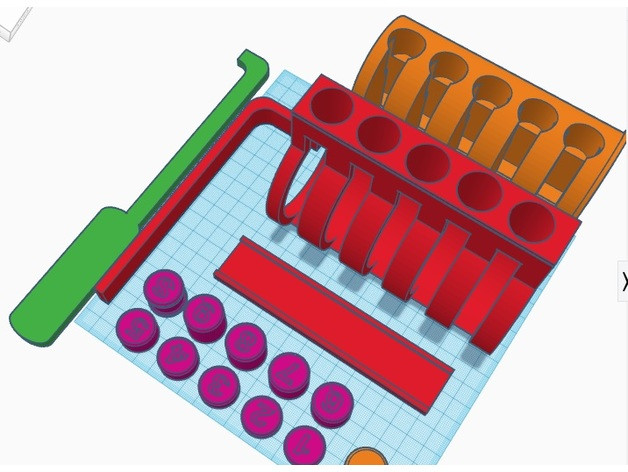
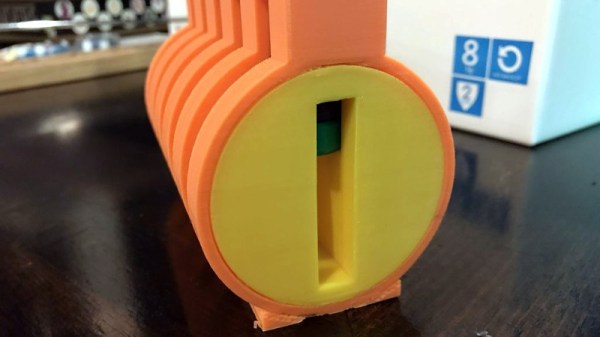
Many people begin their journey on a practice lock, usually made of clear plastic so you can see its inner-workings. That’s fine for the individual, but what if you’re trying to demonstrate lock picking to a group? [John Biggs] may have the solution for you, assuming you’ve got the time and material. His huge 3D printed cutaway lock, and appropriately sized tools, allow even the folks in the back of the room to see how basic picking techniques work.

A print of this size is nothing to sneeze at; a quick peek on the reference printer here at the Hackaday Chamber of Secrets indicates you’re probably looking at the better part of 20 hours to print everything out. Once printed you’ll likely need to take a file and some sandpaper to all the surfaces to make sure things operate smoothly. It doesn’t appear to be a terribly challenging print all things considered, but we wouldn’t call it a beginner’s project either.

The only non-printed part in this design is the springs, which [John] mentions he hasn’t quite found the solution for yet. They need to be fairly weak or else the lock is too hard to pick, but springs large enough to work with the pins are usually pretty strong. This might be a perfect application for some custom wound springs.

After you’ve mastered the PLA lock, it might be time to make your own picks and see if anyone is giving free lock picking workshops in your area.

FCC Filing Reveals Tasty Hardware McSecrets

If you’ve visited a McDonald’s recently, you might have noticed something of a tonal shift. Rather than relying on angsty human teenagers to take customer orders, an increasing number of McDonald’s locations are now using self-serve kiosks. You walk up, enter your order on a giant touch screen, and then take an electronic marker with you to an open table. In mere minutes your tray of nutritious delicious cheap food is brought to you by… well that’s still probably going to be an angsty teenager.

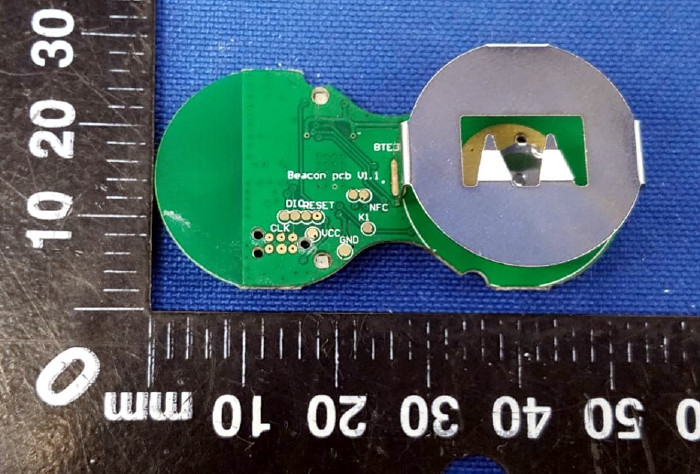
Thanks to a recent FCC filing pointed out to us by an anonymous tipster, we now know what kind of tech Ronald has packed into the electronic table markers (referred to as “tents” in McDonald’s parlance). It turns out they are Bluetooth Low Energy beacons powered by the Nordic nRF52832 chipset, and include some unexpected features such as an accelerometer to detect falls.

The Nordic nRF52832 features a 32-bit ARM Cortex M4F processor at 64 MHz with 512 KB flash and 64 KB SRAM. Quite a bit of punch for a table marker. Incidentally, this is the same chip used in the Adafruit Feather nRF52 Pro, so there’s already an easily obtainable development toolchain.

A image of the backside of the PCB shows a wealth of labeled test points, and we imagine figuring out how to get one of these table markers doing your own bidding wouldn’t be too difficult. Not that we condone you swiping one of these things along with your Quarter Pounder with Cheese. Though we are curious to know just why they need so much hardware to indicate which table to take a particular order to; it seems the number printed on the body of the device would be enough to do that.

This isn’t the first time we’ve taken a peek behind the Golden Arches. From reverse engineering their famous fries to hacking the toys they give out with Happy Meals, there’s more to do at the local McDonald’s than get thrown out of the ball pit again.

Hardware Store White Balance Reference

We live in a time in which taking pictures is preposterously easy: take out your phone (assuming it wasn’t already in your hands), point it at something, and tap the screen. The camera hardware and software in even basic smartphones today is good enough that you don’t need to give it much more thought than that to get decent pictures. But what if you want to do better than just decent?

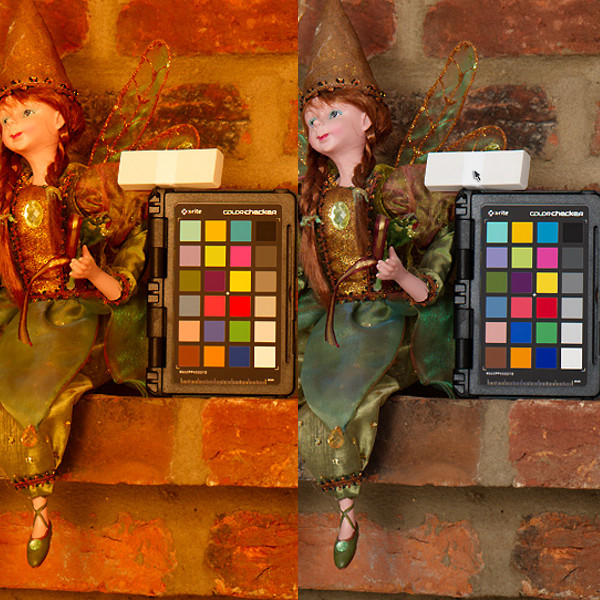
Ideally you’d take photos lit by high temperature lights, but failing that, you might need to compensate by adjusting the white balance during post-processing. But to accurately adjust white balance you need a pure white reference point in the image. Thanks to some diligent research by the folks at the FastRawViewer blog, we now have a cheap and widely available source for a pure white reference material: PTFE pipe tape.

Alright, we know what you’re thinking: how hard could it be to find a white object? Well, if you’re talking about really white, it can actually be quite difficult. Take a walk down the paint aisle of your local hardware store and see just how many “whites” there actually are. Think the shirt your subject is wearing is really white? Think you can use the glossy white smartphone in their hand as a reference? Think again.

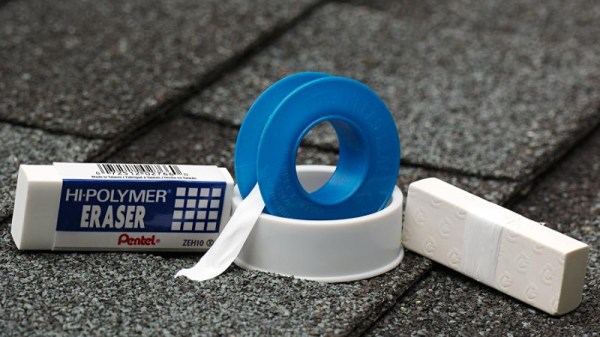
By taking a rubber eraser and wrapping it with a few layers of the PTFE tape, you can create a white reference that’s so cheap it’s effectively disposable. Which is good, because protecting your white reference object and keeping it clean can be a challenge in itself. But with a PTFE tape reference, you can just chuck the thing when the photo shoot is done.

Combine this cheap white reference with some of the DIY photography lighting setups we’ve covered in the past, and you’ll be well on the way to getting better images to document all your projects. Just remember to submit them to us when you’re done.

[Thanks to Keith Olson for the tip.]

If You Are Planning On Building Your Own Space Shuttle…

One of the most complicated machines ever built was the US space shuttle (technically, the STS or Space Transportation System). Despite the title, we doubt anyone is going to duplicate it. However, one of the most interesting things about the shuttle’s avionics — the electronics that operate the machine — is that being a government project there is a ridiculous amount of material available about how it works. NASA has a page that gathers up a description of the vehicle’s avionics. If you are more interested in the actual rocket science, just back up a few levels.

We will warn you, though, that if you’ve never worked on space hardware, some of the design choices will seem strange. There are two reasons for that. First, the environment is very strange. You have to deal with high acceleration, shock, vibration, and radiation, among other things. The other reason is that the amount of time between design and deployment is so long due to testing and just plain red tape that you will almost certainly be deploying with technology that is nearly out of date if not obsolete.

Continue reading “If You Are Planning On Building Your Own Space Shuttle…”

Plasma Etching In A Microwave

Deep inside your smartphone are a handful of interesting miniature electromechanical devices. The accelerometer is a MEMS device, and was produced with some of the most impressive industrial processes on the planet. Sometimes, these nanoscale devices are produced with plasma etching, which sounds about as cool as it actually is. Once the domain of impossibly expensive industrial processes, you can now plasma etch materials in a microwave.

Of course, making plasma in this way is nothing new. If you cut a grape in half and plop it in a microwave, some really cool stuff happens. This is just the 6th grade science class demonstration of what a plasma is, and really it’s only a few dissociated water, oxygen, and nitrogen molecules poofing in a microwave. To do something useful with this plasma, you need a slightly more controlled environment.

The researchers behind this paper used a small flask with an evacuated atmosphere (about 300 mTorr) placed into a microwave for a few seconds. The experiments consisted of reducing graphene oxide to graphene, with the successful production of small squares of graphene bonded to PET film. Other experiments changed the optical properties of a zinc oxide film deposited onto a glass microscope slide and changing a PDMS film from being hydroscopic to hydrophobic.

While the results speak for themselves — you can use a microwave to generate plasma, and that plasma can change the properties of any exposed material — this is far from a real industrial process. That said, it’s good enough for an experiment and another neat technique in the home lab’s bag of tricks.

Automated Turntable For 3D Scanning

Those just starting out in 3D printing often believe that their next major purchase after the printer will be a 3D scanner. If you’re going to get something that can print a three dimensional model, why not get something that can create said models from real-world objects? But the reality is that only a small percentage ever follow through with buying the scanner; primarily because they are notoriously expensive, but also because the scanned models often require a lot of cleanup work to be usable anyway.

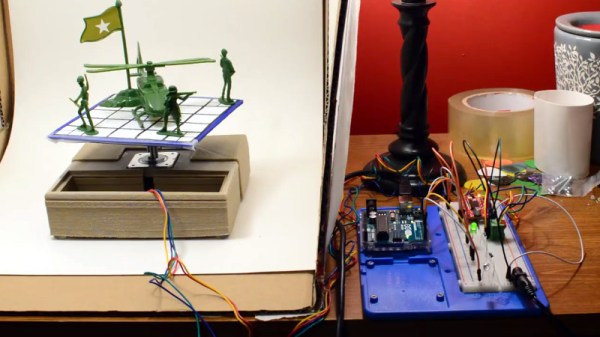
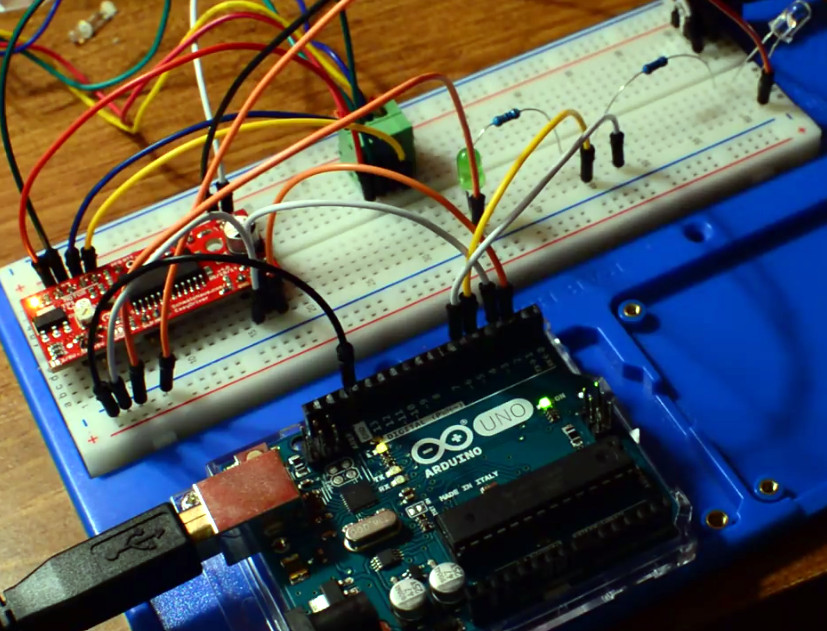
While this project by [Travis Antoniello] won’t make it any easier to utilize scanned 3D models, it definitely makes them cheaper to acquire. So at least that’s half the battle. Consisting primarily of a stepper motor, an Arduino, and a EasyDriver controller, this is a project you might be able to assemble from the parts bin. Assuming you’ve got a pretty decent camera in there, anyway…

The general idea is to place a platform on the stepper motor, and have the Arduino rotate it 10 degrees at a time in front of a camera on a tripod. The camera is triggered by an IR LED on one of the Arduino’s digital pins, so that it takes a picture each time the platform rotates. There are configurable values to give the object time to settle down after rotation, and a delay to give the camera time to take the picture and get ready for the next one.

Once all the pictures have been taken, they are loaded into special software to perform what’s known as photogrammetry. By compiling all of the images together, the software is able to generate a fairly accurate 3D image. It might not have the resolution to make a 1:1 copy of a broken part, but it can help shave some modeling time when working with complex objects.

We’ve previously covered the use of photogrammetry to design 3D printed accessories, as well as a slightly different take on an automated turntable a few years ago. The process is still not too common, but the barriers to giving it a try on your own are at least getting lower.

Continue reading “Automated Turntable For 3D Scanning”