Circuit VR: Oscillating Bridges

Circuit VR is where we talk about a circuit and examine how it works in simulation with LT Spice. This time we are looking at a common low-frequency oscillator known as the Wien bridge oscillator.

What makes an oscillator oscillate? A circuit with amplification that gets the same amount of the output signal fed back into its input, in phase, will oscillate. This is the Barkhausen criterion. Here, we’re going to look into what makes an oscillator work in simulation, and gain some insight into what happens when there’s too much feedback and too little.

In particular, we’ll look at the Wien bridge oscillator, a very simple design that originated as a way to measure impedance back in 1891. Modern versions add some additional features, but let’s start with the most simple implementation and work our way up.

Continue reading “Circuit VR: Oscillating Bridges”

Unlocking Drones With Go

Looking for a first project in a relatively new language that’ll stretch your abilities? [Ron] was, so he hacked a commercially available drone and opened up a lot of its functionality, while writing the client software in Go.

The drone is a DJI Tello, which has some impressive hardware like a 14-core Intel processor and excellent video processing abilities. There’s also a vibrant community and a lot of support, making it the ideal platform for a project like this. It communicates to a base station via WiFi, and using some tools like the Wireshark [Rob] was able to decipher a lot of the communications and create a whole new driver for the drone. While the drone can be controlled in the traditional way, users can also write programs to control the drone as well.

The project is both an impressive feat in reverse engineering an inexpensive drone, and a fun example of programming in the Go language. Because of the fun and excitement of drones, they have become a popular platform on which to hack, from increasing their range to becoming a platform for developing AI.

A Low Cost, Dead Tree Touch Screen

Remember the “paperless office”? Neither do we, because despite the hype of end-to-end digital documents, it never really happened. The workplace is still a death-trap for trees, and with good reason: paper is cheap, literally growing on trees, and it’s the quickest and easiest medium for universal communication and collaboration. Trouble is, once you’re done scribbling your notes on a legal pad or designing the Next Big Thing on a napkin, what do you do with it?

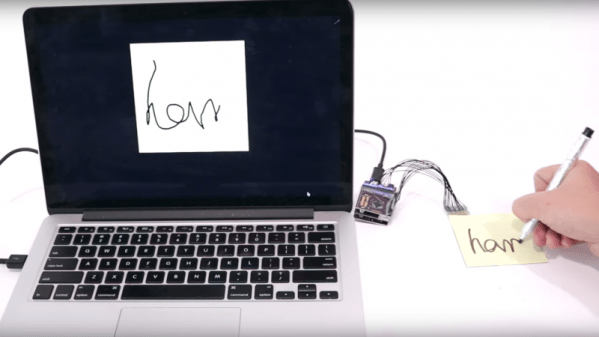
If you’re anything like us, the answer to that question is misplacing or destroying the paper before getting a chance to procrastinate transcribing it into some useful digital form. Wouldn’t paper that automatically digitizes what you draw or write on it be so much better? That’s where this low-cost touch-sensitive paper (PDF link) is headed, and it looks like it has a lot of promise. Carnegie-Mellon researchers [Chris Harrison] and [Yang Zhang] have come up with cheap and easy methods of applying conductive elements to sheets of ordinary paper, and importantly, the methods can scale well to the paper mill to take advantage of economies of scale at the point of production. Based on silk-screened conductive paints, the digitizer uses electrical field tomography to locate touches and quantify their pressure through a connected microcontroller. The video below shows a prototype in action.

Current cost is 30 cents a sheet, and if it can be made even cheaper, the potential applications range from interactive educational worksheets to IoT newspapers. And maybe if it gets really cheap, you can make a touch-sensitive paper airplane when you’re done with it.

Continue reading “A Low Cost, Dead Tree Touch Screen”

Catch A Rising Star With Arduino

Space is big. Really big. Yet on TV and movies, enemy spacecraft routinely wind up meeting at roughly the same spot and, miraculously, in the same orientation. If you’ve ever tried to find something smaller than the moon in a telescope, you’ll appreciate that it isn’t that easy. There are plenty of tricks for locating objects ranging from expensive computerized scopes with motors to mounting a phone with Google Sky or a similar program to your telescope. [DentDentArthurDent] didn’t use a phone. He used an Arduino with an outboard GPS module.

You still have to move the scope yourself, but the GPS means you know your location and the time to a high degree of accuracy. Before you start an observing session, you simply point the telescope at Polaris to calibrate the algorithm, a process which in the northern hemisphere is pretty easy.

Continue reading “Catch A Rising Star With Arduino”

Google Lowers The Artificial Intelligence Bar With Complete DIY Kits

Last year, Google released an artificial intelligence kit aimed at makers, with two different flavors: Vision to recognize people and objections, and Voice to create a smart speaker. Now, Google is back with a new version to make it even easier to get started.

The main difference in this year’s (v1.1) kits is that they include some basic hardware, such as a Raspberry Pi and an SD card. While this might not be very useful to most Hackaday readers, who probably have a spare Pi (or 5) lying around, this is invaluable for novice makers or the educational market. These audiences now have access to an all-in-one solution to build projects and learn more about artificial intelligence.

We’ve previously seen toys, phones, and intercoms get upgrades with an AIY kit, but would love to see more! [Mike Rigsby] has used one in his robot dog project to detect when people are smiling. These updated kits are available at Target (Voice, Vision). If the kit is too expensive, our own [Inderpreet Singh] can show you how to build your own.

Via [BGR].

Synthbike Rolls To The Beat

Modular synthesizers are some of the ultimate creative tools for the electronic musician. By experimenting with patch leads, knobs and switches, all manner of rhythmic madness can be conjured out of the æther. While they may overflow with creative potential, modular synths tend to fall down in portability. Typically built into studio racks and composed of many disparate modules, it’s not the sort of thing you can just take down the skate park for a jam session. If only there was a solution – enter the madness that is Synth Bike.

Synth Bike, here seen in the 2.0 revision, impresses from the get go, being built upon a sturdy Raleigh Chopper chassis. The way we see it, if you’re going to build a synth into a bicycle, why not do it with some style? From there, the build ratchets up in intensity. There’s a series of sequencer modules, most of which run individual Arduino Nanos. These get their clock from either a master source, an external jack, or from a magnetic sensor which picks up the rotation of the front wheel. Your pace dictates the tempo, so you’ll want to work those calves for extended raves at the park.

The features don’t stop there – there are drums courtesy of a SparkFun WAV Trigger, an arcade button keyboard, and a filter board running the venerable PT2399 digital delay chip. It’s all assembled on a series of panels with wires going everywhere, just like a true modular should be.

The best thing is, despite the perplexing controls and arcane interface, it actually puts out some hot tunes. It’s  not the first modular we’ve seen around these parts, either.


Reverse Engineering Nintendo Labo Waveform Cards

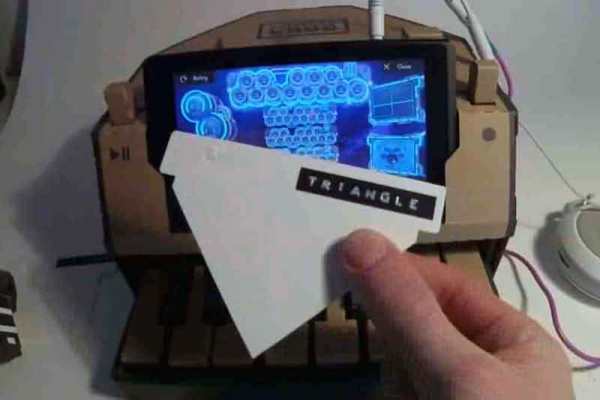
The Nintendo Switch portable gaming system is heavily locked down to prevent hacking, but the Labo add-on looks like it might be a different matter. The Labo is a series of add-on devices made of cardboard that does things like turn the Switch into a musical keyboard that plays a waveform on a card that you slot in. [Hunter Irving] decided to try a bit of reverse engineering on these cards to see if he could 3D print his own. Spoilers: he could.

[Hunter] started by taking one of the cards that come with the Labo and looking at the layout. These cards are, like the rest of the Labo, very simple: they are just shaped pieces of card that fit into the back of the keyboard add-on. When you press a button, the Switch camera reads the card to create the waveform. So, the process involved figuring out the required dimensions of the card to create a template. [Hunter] then created simple waveforms (square, sine, sawtooth) in Inkscape, and used this to create a 3D printable waveform card. A quick bit of 3D printing later, he had several cards ready, and these worked without problems. As well as the synthetic waveforms, he tried real ones, such as an organ, taking the waveform shape from the zoomed-in sample and using that to print. This post describes the process nicely and offers downloads of 9 sample cards and a template to create your own.

We suspect that this is only scratching the surface of what can be done with the Switch, Labo, and some ingenuity. Unlike the Switch itself, the Labo seems to be built for hacking, using simple, easy to use components to create surprisingly complex mechanisms that could be adapted for any number of purposes.

We’re sure this isn’t the only Labo hack we’ll be covering over the coming year. Not sure what all the fuss is about? Read our reporting on its arrival.