The Future Of Artificial Intelligence

Last week we covered the past and current state of artificial intelligence — what modern AI looks like, the differences between weak and strong AI, AGI, and some of the philosophical ideas about what constitutes consciousness. Weak AI is already all around us, in the form of software dedicated to performing specific tasks intelligently. Strong AI is the ultimate goal, and a true strong AI would resemble what most of us have grown familiar with through popular fiction.

Artificial General Intelligence (AGI) is a modern goal many AI researchers are currently devoting their careers to in an effort to bridge that gap. While AGI wouldn’t necessarily possess any kind of consciousness, it would be able to handle any data-related task put before it. Of course, as humans, it’s in our nature to try to forecast the future, and that’s what we’ll be talking about in this article. What are some of our best guesses about what we can expect from AI in the future (near and far)? What possible ethical and practical concerns are there if a conscious AI were to be created? In this speculative future, should an AI have rights, or should it be feared?

Continue reading “The Future Of Artificial Intelligence”

CheetahBeam: More Proof That Cats Are Your Overlord

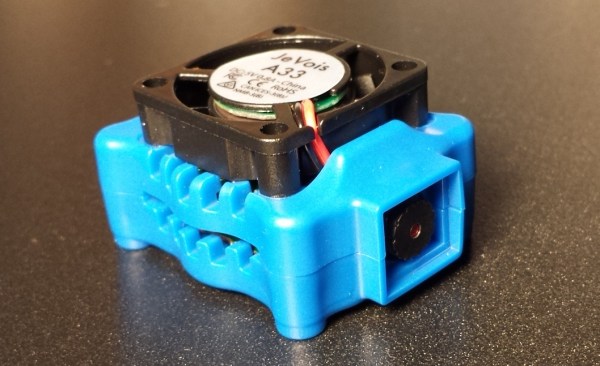
We don’t know what cats see when they see a red laser beam, but we know it isn’t what we see. The reaction, at least for many cats — is instant and extreme. Of course, your cat expects you to quit your job and play with it on demand. While [fluxaxiom] wanted to comply, he also knew that no job would lead to no cat food. To resolve the dilemma, he built an automated cat laser. In addition to the laser module, the device uses a few servos and a microcontroller in a 3D printed case. You can see a video, below. Dogs apparently like it too, but of course they aren’t the reason it was built.

If you don’t have a 3D printer, you can still cobble something together. The microcontroller is an Adafruit Pro Trinket, which is essentially an Arduino Pro Mini with some extra pins and a USB port.

Continue reading “CheetahBeam: More Proof That Cats Are Your Overlord”

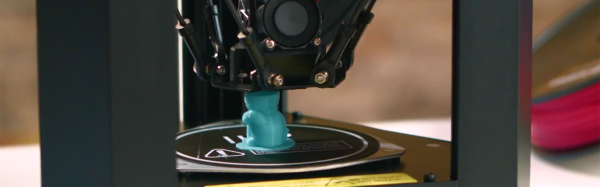
Ingenious Use Of 3D Printer Gives Simba The Mane He Deserves

Here at Hackaday, we love clever 3D prints. This amazing lion statue remixed by [ _primoz_], makes us feel no different. It is no secret that FDM 3D printers have come a long way, propelled by the enthusiastic support from the open source community.

However, FDM 3D printers have some inherent limitations; some of which arise from a finite print nozzle diameter, tracing out the 3D object layer by layer. Simply put, some print geometries and dimensions are just unattainable. We discussed the solution to traditional FDM techniques being confined to Planer layers only in a previous article.

The case in point here is a 3D printed lion whose original version did not fully capture its majestic mane. [_primoz_] solution was to construct a support cylinder around the head and form the actual hair as a series of planar bristles, which were one extrusion wide.

6d2b2c7253516ff7b54ee1d3be0aa6a7_display_large

This was followed by some simple post processing, where a heat gun was used to form the bristles into a dapper mane.

The result is rather glorious and we can’t wait for someone to fire up a dual extruder and bring out the flexible filament for this print!

[via Thingiverse]

Wood And Rubber Band Pinball

As pinball has evolved, it has gone from a simple gravity based game to an electromechanical one.  As the 20th century came to a close, pinball games added digital elements as well, matrix displays replaced electromechanical scoreboards, and LEDs replaced incandescent bulbs. While the game got more creative as new technologies became available, the basics of the pinball never changed – keep the ball alive using your skill with the flippers (and the occasional nudge.) [Garagem Fab Lab] has taken the basics of the pinball machine and, with some wood and elastic bands, has created a very nice desktop pinball machine.

The plans for the game require getting the wood cut by a CNC mill, but they could probably be easily created using a jigsaw. Instead of electrical buttons and solenoids, pieces of wood push the flippers out and elastics reset them when released. The bumpers, too, are simple dowels with rubber bands wrapped around them. The launching mechanism is a bit of bungee cord tied onto a piece of wood and used like a flipper to speed the ball into the play area.

The build is a throwback to the earliest pinball machines. Sure, there’s no reaction from the bumpers when they’re hit, they’re just passive, but the game looks fun. It would be a great base to add in some sensors, a microcontroller, and a display to keep track of scores if one was so inclined. Other DIY pinball machines we’ve seen are this pinball game built with Meccano and lasers, as well as this completely 3D-printed machine.

Tying Knots With Industrial Robots

We’re not ashamed to admit that we desperately want a pair of high-end industrial robot arms to play around with. We don’t know where we’d put them — maybe the living room? — but we know that we’d figure something out.
This demo aims to get Boy Scouts interested in robotics by applying the beastly arms to something that all kids love, learning to tie knots. (If you ask us, they’ve got it backwards.) Anyway, there are two videos embedded below for you to peek at.

Continue reading “Tying Knots With Industrial Robots”

Hackaday Links Column Banner

Hackaday Links: February 12, 2017

Taking small LCD screens, a tiny computer running Linux, and a 3D printed enclosure to build miniature versions of old computers is a thing now. Here’s [Cupcakus]’s tiny little Apple II, complete with Oregon Trail. This Apple II is running on a C.H.I.P., uses a 3s lithium battery from a drone, and works with a Bluetooth keyboard and joystick. Yes, the power button on the monitor works.

At Hackaday, we get a lot of emails from people asking the most important question ever: “how do you become a hardware hacker?” [Tex Projects] lays it all out on the line. All you need to do is to buy five of something every time you need one. Need some header pins? Buy five. A sensor? five. Come to the realization that anything you build could be bought for less money.

Are we still doing low-poly Pokemon? [davedarko] has an idea for the Sci-Fi contest we’re running. He’s going to give children seizures. He’s refreshing a project of mine by putting lights, blinkies, and noisy things in a 3D printed Porygon, the original 3D printed Pokemon. Porygon was the subject of that one episode of the Pokemon cartoon that sent 635 Japanese children to the hospital. The episode was banned in America, but it was actually Pikachu that caused the flashing lights.

‘Member Clickspring? He’s the guy who made a fantastic mechanical clock using nothing except a few bits of brass, a blowtorch, a tiny mill and lathe, and a lot of patience. Now he’s building the Antikythera mechanism. The Antikythera mechanism is a 2000-year-old device designed to calculate the phases of the moon, the motion of the planets, and other local astronomical phenomena. This is going to be a masterpiece, and will eventually end up in a museum, so be sure to subscribe to his YouTube channel.

Raspberry Pi Laptop Uses The Official Touchscreen

We’ve seen a variety of home-made laptops using the Raspberry Pi and other single board computers over the years. Usually, they combine off-the-shelf USB keyboards and trackpads with HDMI monitor panels, and cases made from layered laser cut sheet, or 3D printed plastic.

[Surferboy]’s Raspberry Pi laptop is the latest effort to come before us, and its claim to fame is the use of the official Raspberry Pi 7″ touchscreen as a display. Full instructions and 3D printer files are available on Thingiverse so you can have a go at replicating it if a portable Pi is your thing.

He’s taken the bold step of not attempting to place all the Pi’s interfaces next to the outside of the case. Instead, he’s desoldered the Ethernet and USB ports. The USB connections were wired directly to the keyboard, display, and a couple of external ports on the right-hand side of his case. This leaves the finished laptop with no Ethernet. However, losing ethernet is a worthy tradeoff for the thinner package.

[Surferboy] also brought the GPIO header to a female socket on the rear of the unit. It’s unclear exactly what battery he uses except for a reference to the battery from his keyboard. Since a keyboard battery will be too small for Pi and display we are guessing a larger pack will be necessary.

Though the Ethernet port and battery issue would probably be a dealbreaker here this has the makings of a useful and compact laptop, it will be interesting to see if it is picked up and refined by the community.

Quite a few early Pi laptops used the Motorola Lapdock, a mobile-phone-into-netbook peripheral. Some others we’ve featured have been a bit chunky, but sometimes they can be objects of beauty.

Via Recantha.co.uk.