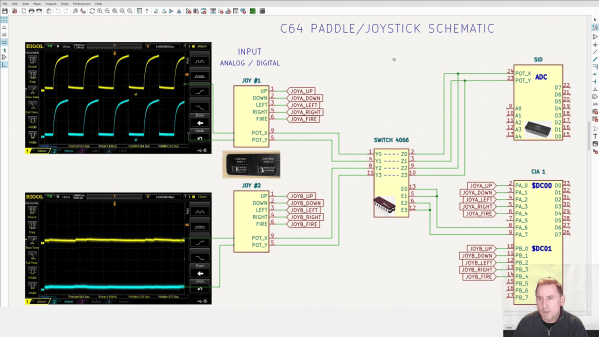
A schematic explaining the workings of the Commodore 64's joystick port

Bluetooth Interface Adds Rumble Feedback To Commodore 64 Games

Nothing says “1980s gaming” like a black joystick with a single red fire button. But if you prefer better ergonomics, you can connect modern gamepads to your retrocomputers thanks to a variety of modern-to-classic interface adapters. These typically support just the directional pad and one or two action buttons, leaving out modern features like motion control and haptic feedback.

That’s a bit of a shame, because we think it would be pretty cool to feel that shock in our hands whenever Pitfall Harry drowns in quicksand or Frogger gets hit by traffic. We’re therefore happy to report that [Ricardo Quesada] has decided to add rumble functionality to the Bluetooth-to-Joystick-port interface that he’s been working on. He demonstrates the feature on his Commodore 64 in the video embedded after the break.
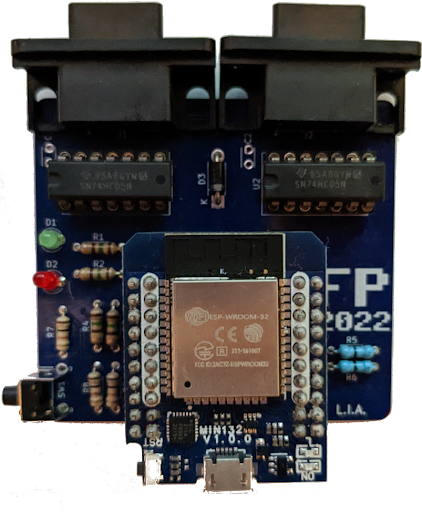
Naturally, any software needs to be adapted to support haptic feedback, but a trickier problem turned out to be the hardware: joystick ports are input-only devices and therefore cannot send “enable rumble” signals to any connected gamepads. [Ricardo] found a clever way around this, using the analog inputs on the joystick port that were typically used for paddle-type controllers.

The analog-to-digital converter inside the computer works by applying a pulse signal to the analog port and measuring the time it takes to discharge a capacitor. The modern gamepad interface simply detects whether these pulses are present; they can be enabled or disabled through software by toggling the analog readout on the joystick port. This way, the joystick port can be used to send a single bit of information to any device connected to it.

[Ricardo] developed patches for Rambo: First Blood part II and Leman to enable rumble functionality. He describes the process in detail in his blog post, which should enable anyone who knows their way around 6502 machine code to add rumble support to their favorite games.

The adapter works with a variety of retro systems that use the Atari-style joystick interface, but if you’re an Apple II user, you might want to look at this Raspberry Pi-based project that interfaces with its nonstandard joystick interface. If you’re into wireless gaming in general, be sure to also check out our history of wireless game controllers.

Continue reading “Bluetooth Interface Adds Rumble Feedback To Commodore 64 Games”
New OS For Commodore 64 Adds Modern Features

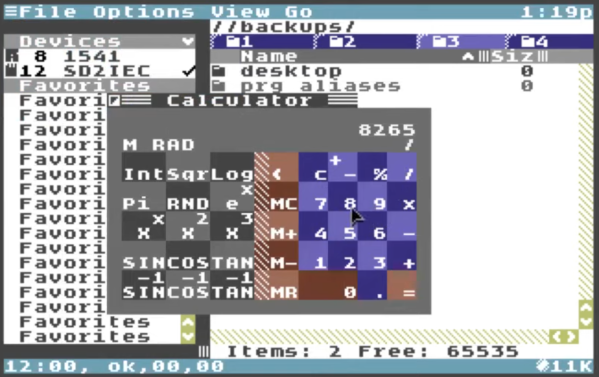
The Commodore 64 was a revolutionary computer for its day and age. After four decades, though, it gets harder and harder to use these computers for anything more than educational or hobby electronics projects. [Gregory Nacu] is fiercly determined to challenge this idea, though, and has gone to great extremes to make this hardware still relevant in the modern age by writing a completely new operating system for the Commodore machines.

Known as C64OS, it squeezes everything it can out of the 8 bit processor and 64 kB of memory. The new OS includes switchable desktop workspaces, a windowing system, draggable icons, a Mac-style menu bar at the top, and drop-down menus for the icons (known as aliases in the demonstrations). The filesystem is largely revamped as well and enables a more modern directory system to be used. There are still some limitations like a screen resolution of 320×200 pixels and a fixed color palette which only allows for a handful of colors, but this OS might give Windows 3.1 a run for its money.

The project is still being actively developed but it has come a long way into a fairly usable state. It can be run on original hardware as well as long as you have a method of getting the image to the antique machine somehow. If not, the OS can likely run on any number of C64 emulators we’ve featured in the past.

Thanks to [Stephen] for the tip!

Continue reading “New OS For Commodore 64 Adds Modern Features”

Hackaday Prize 2022: A Functional Commodore PET Tribute

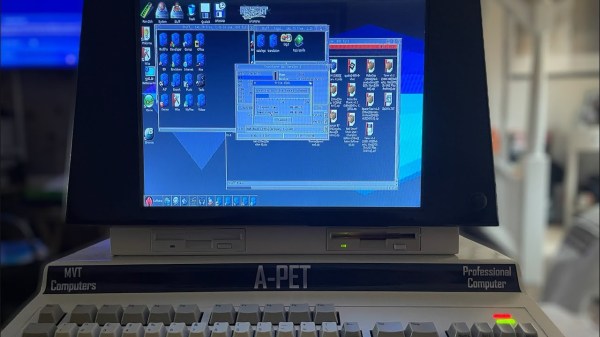
The C64 may be the best-selling computer of all time, but Commodore made several machines before that, too. [Mjnurney] always loved the Commodore PET, and set about building some new machines in the PET’s unique all-in-one form factor.

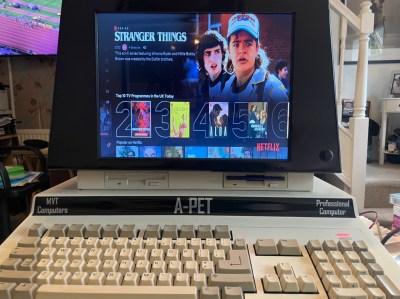
The case design started with measurements taken from an original Commodore PET, of which [Mjnurney] has three. Then, it was modified and extended to make room for a proper keyboard. The case also mounts a 14″ IPS display, two 15W speakers, and a gas strut enabling the case to be propped open for easy maintenance. It’s actually made out of real sheet metal, too!
The primary version mounts an Amiga 500 inside, including its classic keyboard. However, [Mjnurney] has developed a PC version, too. Both look great, and it’s wild to see Netflix displayed on a machine that looks more at home in 1977. Perhaps most of all, though, we love the dual floppy drives just below the screen.

Throwback cases pay tribute to some of our favorite machines. The tiny ones are perhaps the cutest of all.

Continue reading “Hackaday Prize 2022: A Functional Commodore PET Tribute”

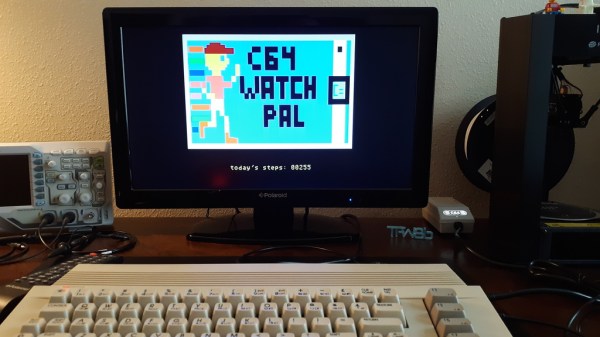
A Commodore 64 running a smartwatch link program

The Commodore 64 Smartwatch Can Now Sync With Your Commodore 64 Desktop

If you’ve got a smartwatch on your wrist, chances are you’ve also got a device nearby that links up with it. Most modern watches will happily sync with Android devices or iPhones, and some will also talk to Windows PCs. But what if you’re running an alternative OS? Something like, say, Commodore BASIC? In that case, you might want to check out [Nick Bild]’s latest project, which lets you to sync your smartwatch to your Commodore 64.

Sadly, you can’t just use any old smartwatch: the project is an extension of [Nick]’s Commodore 64 Smartwatch that we featured earlier. This watch can run Commodore 64 programs thanks to a custom software stack, but like most typical smartwatches also includes an accelerometer that counts your steps. Syncing the step counter to your computer is straightforward: after you come home from your daily run, you simply tap “sync” on the watch, enter LOAD"SYNC.PRG",8,1 on your Commodore 64, and the computer will show your total step count.

The C64 watch communicates with the host computer through a built-in infrared port. The classic Commodore computers don’t have an IR receiver, so [Nick] built one himself using an Arduino Micro hooked up to the C64’s User port. A custom program reads out the data and shows the step count on the screen.

Although the feature set of this app is a bit limited, [Nick]’s project demonstrates how the good old Commodore 64 can still perform useful tasks in today’s world. Not that we needed much reminding: after all, we’ve even seen it run AI applications using TensorFlow Lite.

Continue reading “The Commodore 64 Smartwatch Can Now Sync With Your Commodore 64 Desktop”

TensorFlow Lite – On A Commodore 64

TensorFlow is a machine learning and AI library that has enabled so much and brought AI within the reach of most developers. But it’s fair to say that it’s not for the less powerful computers. For them there’s TensorFlow Lite, in which a model is created on a larger machine and exported to a microcontroller or similarly resource-constrained one. [Nick Bild] has probably taken this to its extreme though, by achieving this feat on a Commodore 64. Not just that, but he’s also done it using Commodore BASIC.

TensorFlow Lite works by the model being created as a C array which is then parsed and run by an interpreter on the microcontroller. This is a little beyond the capabilities of the mighty 64, so he has instead created a Python script that does the job of the interpreter and produces Commodore BASIC code that can run on the 64. The trusty Commodore was one of the more powerful home computers of its day, but we’re fairly certain that its designers never in their wildest dreams expected it to be capable of this!

If you’re interested to know more about TensorFlow Lite, we’ve covered it in the past.

Header: MOS6502, CC BY-SA 3.0.

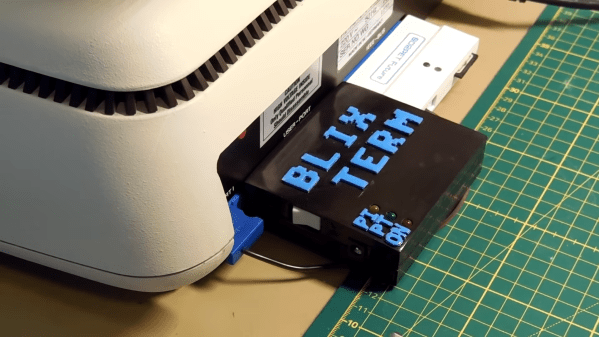
A 3D-printed device labelled "BlixTerm" plugged into the back of a Commodore PET

BlixTerm Brings Full-Speed YouTube Video To The Commodore PET

If you’ve ever used a home computer from the late 1970s or early 1980s, you’ll no doubt be familiar with the slow speed of their user interfaces. Even listing the contents of a BASIC program from RAM could take several seconds, with the screen updating one line at a time. Video games were completely optimized for speed, but could still handle just a few slowly-moving objects at the same time. Clearly, playing anything resembling full-motion video on hardware from that era would be absolutely impossible – or so you might think.

In fact, [Thorbjörn Jemander] has managed to persuade a Commodore PET to play YouTube videos at a completely reasonable 30 frames per second. He describes the process of designing the “BlixTerm” hardware and software in his video (embedded below), along with lots of useful information on how to push digital systems to their absolute limits.

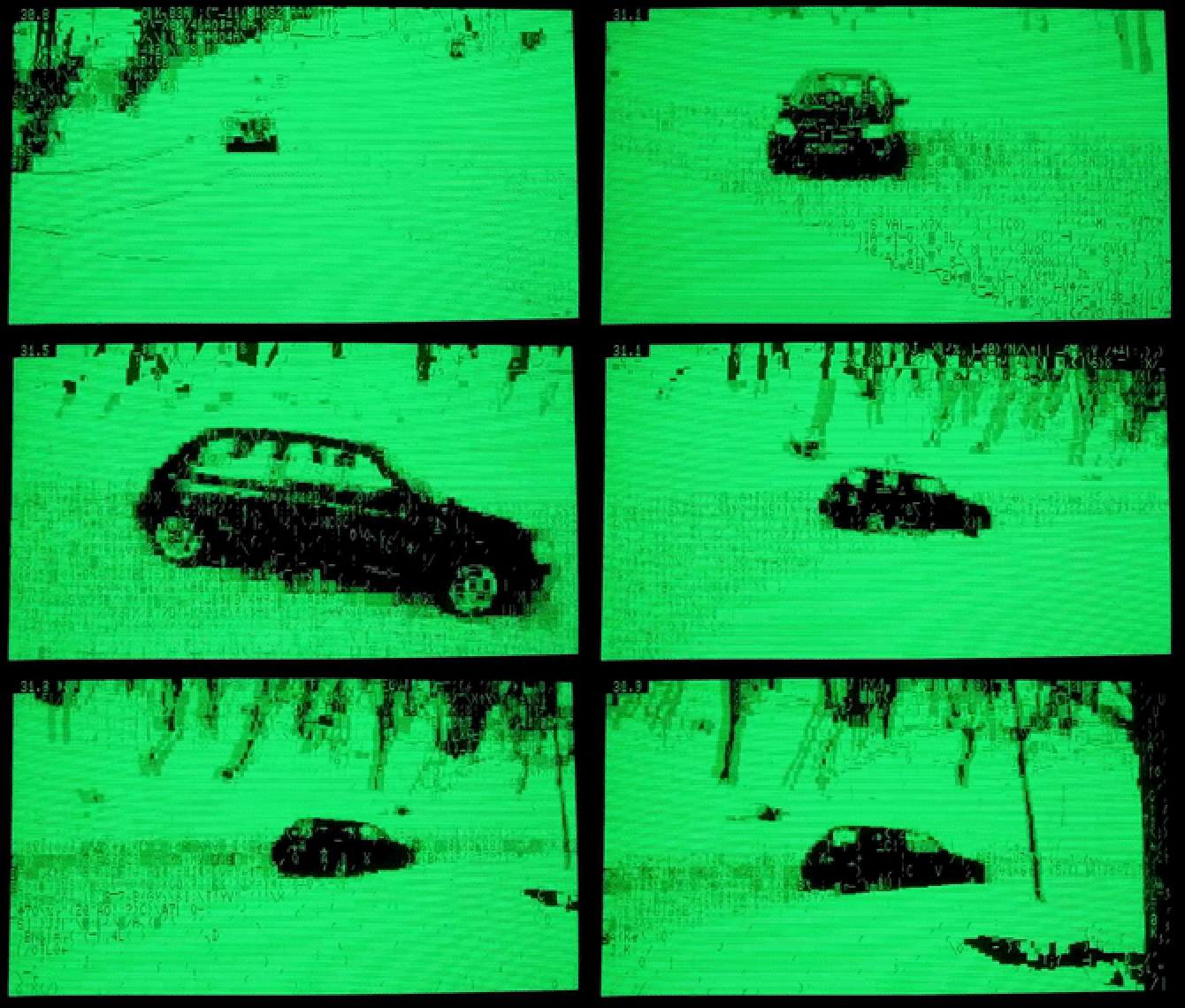
A video of a drifting car, as rendered by a Commodore PET displayNaturally, the PET needs a bit of assistance from modern hardware, in this case a Raspberry Pi Zero 2 W hooked up to the “User” expansion port. The Pi connects to YouTube through WiFi and loads the requested video, then downconverts it to a 640×200 grayscale stream and transforms each frame to an 80×25 grid of characters, using those from the PET’s ROM that most closely resemble the pattern needed.

While it took quite some effort to squeeze enough performance out of the Pi to do all of this in real time, the trickiest bit was getting the resulting character stream into the PET’s video memory fast enough. To do this, [Thorbjörn] designed a special interface card with 2 KB of dual-port SRAM, which enabled the Pi to store its video frames as soon as they were ready on one side, and the PET to load them at its own pace from the other side. With just sixteen microseconds available to process each byte, the PET’s CPU can execute only four or five machine code instructions; barely enough to load and store a single character and jump to the next memory address.

The end result, as you can see in the video, is really impressive. Even within the constraints of the Commodore character set, the resulting image is clearly recognizable, while the frame rate seems to defy the hardware’s limitations.

If you’re a Commodore aficionado and wondering what the hell that weird PET 600 model is all about, [Thorbjörn] made a video about that too; it’s a rebadged 8296 aimed at the Swedish market. We’ve actually seen a project to generate live video on the PET before, although at a much lower frame rate. Thanks for the tip, [Keith Olson]!

Continue reading “BlixTerm Brings Full-Speed YouTube Video To The Commodore PET”

Will The Real Commodore Please Stand Up?

The Commodore 64 is a much-loved 8-bit retro computer that first appeared in 1982 and finally faded away around a decade later. The Commodore company started by [Jack Tramiel] went on to make the Amiga, and eventually ceased trading some time in the late 1990s. All history, now kept alive only by enthusiasts, right? Well, not quite, as the C64 has been the subject of a number of revivals both miniature and full-sized over the years. The latest came in the form of a Kickstarter for the C64x, a seemingly legitimately-branded Commodore 64-shaped PC, but it seems that has now been paused due to a complaint from an Italian company claiming to be the real heirs of Commodore. So will the real Commodore please stand up?

The origin of the Kickstarter C64x breadbin C64 PC is well enough documented, having its roots in a legitimate 2010 offering for which the person behind the C64x appears to have gained the rights. The Italian company is also called Commodore and uses the familiar branding from the glory days to sell some Commodore-themed games, novelties, and a tablet computer, but its website is a little tight-lipped about how it came by the use of that IP. Could it have come upon those rights through the 1990s German owner of the brand, Escom? We’d be fascinated to know.

Continue reading “Will The Real Commodore Please Stand Up?”