Finishing A Mini PS One: SLA Vs Extruded

One of the biggest lessons learned by first time 3D printer users is that not everything can be replicated and a printer is a machine and not a miracle worker. It has limitations in terms of what it can print as well as the quality of the output. For teeny tiny objects, the 0.8 mm nozzle will just not do and with resin printers on the rise, the question is, ‘are extruder printers obsolete?’

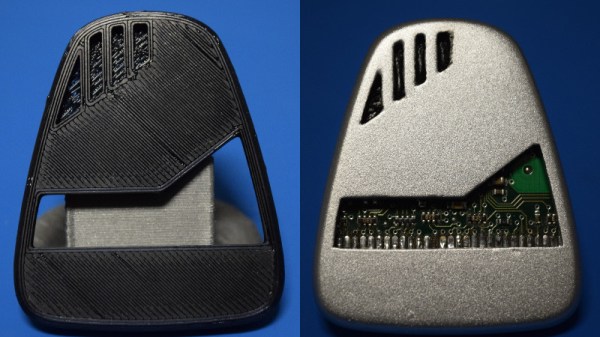
[Dorison Hugo] has made a mini version of the PS One using a Raspberry Pi which you can play games one. The kicker is that in his video, he does a comparison of an SLA printer and a cheaper extruder one for his enclosure. He goes through a laundry-list of steps to print, file, fill, repair, sand paint, sand, paint etc to try to get a good model replica of the original PS One. He then proceeds to print one with an SLA printer and finishes it to compare with the first model. The decals are printed on an inkjet for those who are wondering, and there is a custom cut heatsink in there as well that was salvaged from an old PC.

Spoiler alert! The SLA wins but in our view, just slightly. The idea is that with enough elbow grease and patience, you can get pretty close to making mini models with a cheaper machine. The SLA print needs work too but it is relatively less and for detailed models, it is a much better choice. We really enjoyed watching the process from start to finish including the Dremel work, since it is something that is forgotten when we see a 3D print. Creating something of beauty takes time and effort which stems from a passion to make.

Take a look at the video below of the time lapse and for  SLA printer fans, have a look at the DIY SLA printer which is a Hackaday Prize Entry this year. Continue reading “Finishing A Mini PS One: SLA Vs Extruded”

Mini Delta Gets A Hot End Upgrade

3D printers are now cheaper than ever and Monoprice is at the absolute forefront of that trend. However, some of their printers struggle with flexible filaments, which is no fun if you’ve discovered you have a taste for the material properties of Ninjaflex and its ilk. Fear not, however — the community once again has a solution, in the form of a hot end adapter for the Monoprice Mini Delta.

The Mini Delta is a fantastic low-cost entry into 3D printing but its hot end has a break in the Bowden between the extruder and nozzle. This can lead to flexible filaments not being properly guided through the hot end and a general failure to print. This adapter allows the fitting of the popular E3D V6 hot end, and is similar to modifications out there for other Monoprice printers.

Overall, 3D printing has long benefited from the efforts of the community to bring both incremental improvements and major leaps forward to the technology. We look forward to seeing more hacks on the Monoprice range!

A Detailed Guide For 3D Printing Enclosures

We’ve all have projects that are done, but not complete. They work, but they’re just a few PCBs wired together precariously on our desks. But fear not! A true maker’s blog has gifted us with a detailed step-by-step guide on how to make a project enclosure.

Having purchased an MP Select Mini 3D Printer, there was little to do but find something practical to print. What better than an enclosure for a recently finished Time/Date/Temperature display Arduino based device?

The enclosure in this guide, while quite nice, isn’t the main attraction here. The real feature is the incredibly detailed instructions for how to design, model and print an enclosure for any project. For the veterans out there, it seems simple. Sketch something on the back of a napkin and take a nap on your keyboard with OpenSCAD open. When you wake, BAM: perfect 3D model. However, for newcomers, the process can seem daunting. With incredibly specific instructions (an example is “Open up a new workspace by clicking CREATE NEW DESIGN,” notice the accurate capitalization!), it should ease the barrier of the first enclosure, turning the inexperienced into the kind-of-experienced.

If you’ve been printing enclosures since the dawn of time or plastic simply isn’t your style, boy, do we have you covered. Why not check out FR4 (aka PCB) enclosures? Or what about laser cut enclosures from eagle files? Maybe two-piece boxes are more your thing.

Monoprice Mini Delta Review

For the last year or so, Monoprice has been teasing their follow-up to the fantastic $200 MP Select Mini. This is the $150 mini delta printer. We got a look at it last January at CES, it was on display at the Bay Area Maker Faire last May. Now there’s one on the Hackaday review desk.

Over the last few years, 3D printing has settled down into what most of us expected way back in 2010. No, not everyone wants, or arguably needs, a 3D printer on their desks. This is a far cry from the hype of a few years ago, leaving us with what we have today. 3D printers are just tools, much like a drill press or a laser cutter.

With that said, there still are some fantastic advances in 3D printing coming down from on high. Prusa will be shipping the 4-color multi-extruder add-on for the i3 Mk 2 shortly, and somehow or another we have infinite build volume printers. Still, there’s space to democratize 3D printing, and an opportunity for someone to release a very cheap, very good printer.

Monoprice was kind enough to send me a review unit of the MP Mini Delta before it officially hit their website. This is one of the first off the production line, alongside the few hundred pre ordered on an Indiegogo campaign earlier this year.  Does this printer live up to expectations? It sure does, and that’s not just because it’s a $150 printer.

This would be an excellent printer at three times the price, and evidence enough that 3D printing is changing from a weird hobbyist thing to a proper tool.

Continue reading “Monoprice Mini Delta Review”

Analysing 3D Printer Songs For Hacks

3D printers have become indispensable in industry sectors such as biomedical and manufacturing, and are deployed as what is termed as a 3D print farm. They help reduce production costs as well as time-to-market. However, a hacker with access to these manufacturing banks can introduce defects such as microfractures and holes that are intended to compromise the quality of the printed component.

Researchers at the Rutgers University-New Brunswick and Georgia Institute of Technology have published a study on cyber physical attacks and their detection techniques. By monitoring the movement of the extruder using sensors, monitored sounds made by the printer via microphones and finally using structural imaging, they were able to audit the printing process.

A lot of studies have popped up in the last year or so including papers discussing remote data exfiltration on Makerbots that talk about the type of defects introduced. In a paper by [Belikovetsky, S. et al] titled ‘dr0wned‘, such an attack was documented which allowed a compromised 3D printed propeller to crash a UAV. In a follow-up paper, they demonstrated Digital Audio Signing to thwart Cyber-physical attacks. Check out the video below.

In this new study, the attack is identified by using not only the sound of the stepper motors but also the movement of the extruder. After the part has been manufactured, a CT scan ensures the integrity of the part thereby completing the audit.

Disconnected printers and private networks may be the way to go however automation requires connectivity and is the foundation for a lot of online 3D printing services. The universe of Skynet and Terminators may not be far-fetched either if you consider ambitious projects such as this 3D printed BLDC motor. For now, learn to listen to your 3D printer’s song. She may be telling you a story you should hear.

Thanks for the tip [Qes] Continue reading “Analysing 3D Printer Songs For Hacks”

Print A Flexible Keypad

[Micah Elizabeth Scott] needed a custom USB keyboard that wrapped around a post. She couldn’t find exactly what she wanted so she designed and printed it using flexible Nijaflex filament. You can see the design process and the result in the video below.

The electronics rely on a Teensy, which can emulate a USB keyboard easily. The keys themselves use the old resistor divider trick to allow one analog input on the Teensy to read multiple buttons. This was handy, but also minimized the wiring on the flexible PCB.

The board itself used Pyralux that was milled instead of etched. Most of the PCB artwork was done in KiCAD, other than the outline which was done in a more conventional CAD program.

Continue reading “Print A Flexible Keypad”

DIY Dual Extrusion

Dual extrusion 3D printers are not as uncommon as they used to be, but there are still a lot of single-extruder machines. [Paul Lang] wanted to refit his printer to take two MK8 extruders, and he documented his experience with a blog post that has a few good tips if you want to try it yourself.

[Paul] used Fusion 360 to design a holder for the extruders that would fit his printer. Since he had accidentally ordered a spool of pink PLA, the whole assembly is shocking pink — not subtle at all. He shares a few design tips about using PLA near the hot areas and making everything fit and level.

Continue reading “DIY Dual Extrusion”