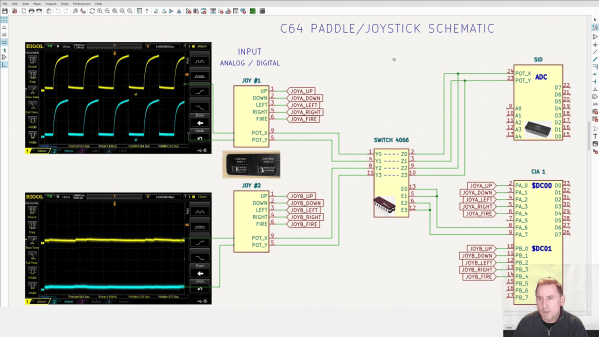
A schematic explaining the workings of the Commodore 64's joystick port

Bluetooth Interface Adds Rumble Feedback To Commodore 64 Games

Nothing says “1980s gaming” like a black joystick with a single red fire button. But if you prefer better ergonomics, you can connect modern gamepads to your retrocomputers thanks to a variety of modern-to-classic interface adapters. These typically support just the directional pad and one or two action buttons, leaving out modern features like motion control and haptic feedback.

That’s a bit of a shame, because we think it would be pretty cool to feel that shock in our hands whenever Pitfall Harry drowns in quicksand or Frogger gets hit by traffic. We’re therefore happy to report that [Ricardo Quesada] has decided to add rumble functionality to the Bluetooth-to-Joystick-port interface that he’s been working on. He demonstrates the feature on his Commodore 64 in the video embedded after the break.
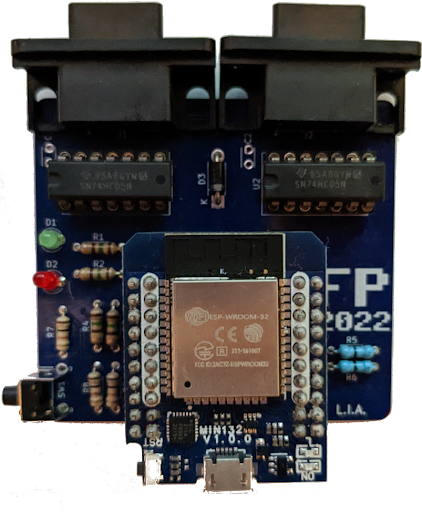
Naturally, any software needs to be adapted to support haptic feedback, but a trickier problem turned out to be the hardware: joystick ports are input-only devices and therefore cannot send “enable rumble” signals to any connected gamepads. [Ricardo] found a clever way around this, using the analog inputs on the joystick port that were typically used for paddle-type controllers.

The analog-to-digital converter inside the computer works by applying a pulse signal to the analog port and measuring the time it takes to discharge a capacitor. The modern gamepad interface simply detects whether these pulses are present; they can be enabled or disabled through software by toggling the analog readout on the joystick port. This way, the joystick port can be used to send a single bit of information to any device connected to it.

[Ricardo] developed patches for Rambo: First Blood part II and Leman to enable rumble functionality. He describes the process in detail in his blog post, which should enable anyone who knows their way around 6502 machine code to add rumble support to their favorite games.

The adapter works with a variety of retro systems that use the Atari-style joystick interface, but if you’re an Apple II user, you might want to look at this Raspberry Pi-based project that interfaces with its nonstandard joystick interface. If you’re into wireless gaming in general, be sure to also check out our history of wireless game controllers.

Continue reading “Bluetooth Interface Adds Rumble Feedback To Commodore 64 Games”
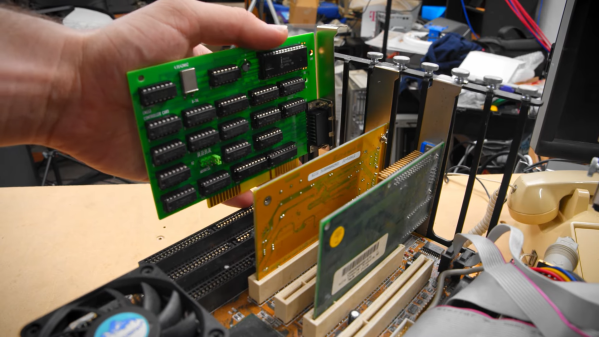
An 8-bit ISA card being plugged into a motherboard

Reverse-Engineering An ISA Card To Revive An Ancient CD-ROM Drive

Being an early adopter is great if you enjoy showing off new gadgets to your friends. But any new technology also brings the risk of ending up at the wrong side of a format war: just ask anyone who committed to HD-DVD fifteen years ago. If, on the other hand, you were among the few who invested in CD-ROM when it was first released in the mid-1980s, you definitely made the right choice when it came to storage media. However, it was a bit of a different story for the interface that hooks up the CD drive to your computer, as [Tech Tangents] found out when he managed to get his hands on a first-generation CM100 drive. (Video, embedded below.)

That wonderful piece of 1985 technology is not much smaller than the IBM PC it was designed to connect to, and it originally came with its own CM153 ISA interface card. But while most eBay sellers recognized the historic value of a pioneering CD-ROM drive, the accompanying PC was typically a dime-a-dozen model and was thrown out with the rare interface card still inside. Even after searching high and low for over a year, the only information [Tech Tangents] could find about the card was a nine year old YouTube video that showed what the thing looked like.

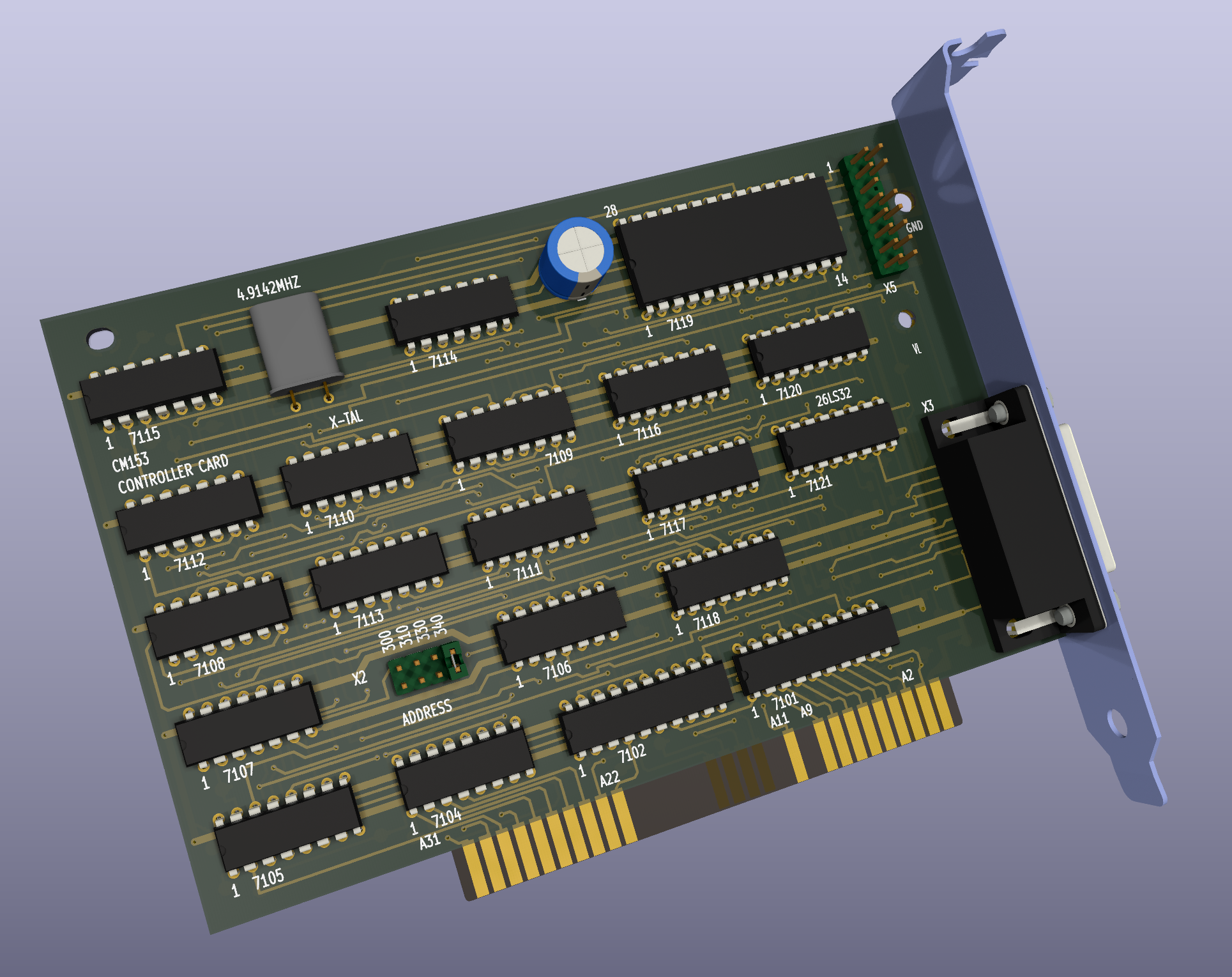
A 3D rendered image of an 8-bit ISA cardLuckily, the maker of that video was willing to take high-resolution pictures of the card, which allowed [Tech Tangents] to figure out how it worked. As it turned out, the card was entirely made from standard 7400 series logic chips as well as an 8251 USART, which meant that it should be possible to design a replacement simply by following all the traces on the board. [Tech Tangents] set to work, and after a few weeks of reverse-engineering he had a complete schematic and layout ready in KiCAD.

After the PCBs were manufactured and populated with components, it was time to test the new card with the old drive. This wasn’t a simple process either: as anyone who’s tried to get obscure hardware to work in MS-DOS will tell you, it involves countless hours of trying different driver versions and setting poorly documented switches in CONFIG.SYS. Eventually however, the driver loaded correctly and the ancient CD-ROM drive duly transferred the files stored on a Wolfenstein 3D disk.

If you’re lucky enough to own a CM100 or a similar drive from that era, you’ll be happy to know that all design files for the CM153 clone are available on GitHub. This isn’t the first time someone has had to re-create an interface board from pictures alone: we’ve seen a similar project involving a SCSI card for a synthesizer. Thanks for the tip, [hackbyte]!

Continue reading “Reverse-Engineering An ISA Card To Revive An Ancient CD-ROM Drive”

Building A Replica Of An Obscure Romanian Computer

We’ve all seen emulated Apple II and Commodore 64 boards about the place. Few of us have heard of the Romanian ZX Spectrum clone known as the Cobra, let alone any efforts to replicate one. However, [Thomas Sowell] has achieved just that, and has shared the tale with us online.

The Cobra was named for its origins in the city of Brasov – hence, COmputer BRasov. The replica project was spawned for a simple reason. Given that sourcing an original Romanian Cobra would be difficult, [Thomas] realized that he could instead build his own, just as many Romanians did in the 1980s. He set about studying the best online resources about the Cobra, and got down to work.

The build started with board images sourced from Cobrasov.com, and these were used to get a PCB made. [Thomas] decided to only use vintage ICs sourced from the Eastern Bloc for authenticity’s sake, too. Most came from the former USSR, though some parts were of East German, Romanian, or Czechoslovakian manufacture. The project took place prior to the Russian invasion of Ukraine, so there weren’t any hassles shipping across borders.

With everything hooked up and the EEPROMs given a real Cobra ROM image, the computer burst into life. There were some hiccups, with an overheating video IC and some memory glitches. However, with some nifty tweaks and replacements subbed in, the computer came good. Other work involved adding a custom keyboard and modifying 3.5″ floppy drives to work with the system.

Overall, the build is a faithful tribute to what was an impressive piece of engineering from behind the Iron Curtain. [Thomas]’s work also embodies the DIY ethos behind many homebrew Cobra computers built back in the day.

If all this talk has got you curious about the full history of the Cobra and Romania’s underground computer movement, we have everything you’re looking for right here!

IBM Made A MIPS Laptop. Will It Make You WinCE?

We’re used to our laptop computers here in 2022 being ultra-portable, super-powerful, and with impressively long battery lives. It’s easy to forget then that there was a time when from those three features the laptop user could usually expect only one of them in their device. Powerful laptops were the size of paving slabs and had battery lives measured in minutes, while anything small usually had disappointing performance or yet again a minuscule power budget.

In the late 1990s manufacturers saw a way out of this in Microsoft’s Windows CE, which would run on modest hardware without drinking power. Several devices made it to market, among them one from IBM which [OldVCR] has taken a look at. It makes for an interesting trip down one of those dead-end side roads in computing history.

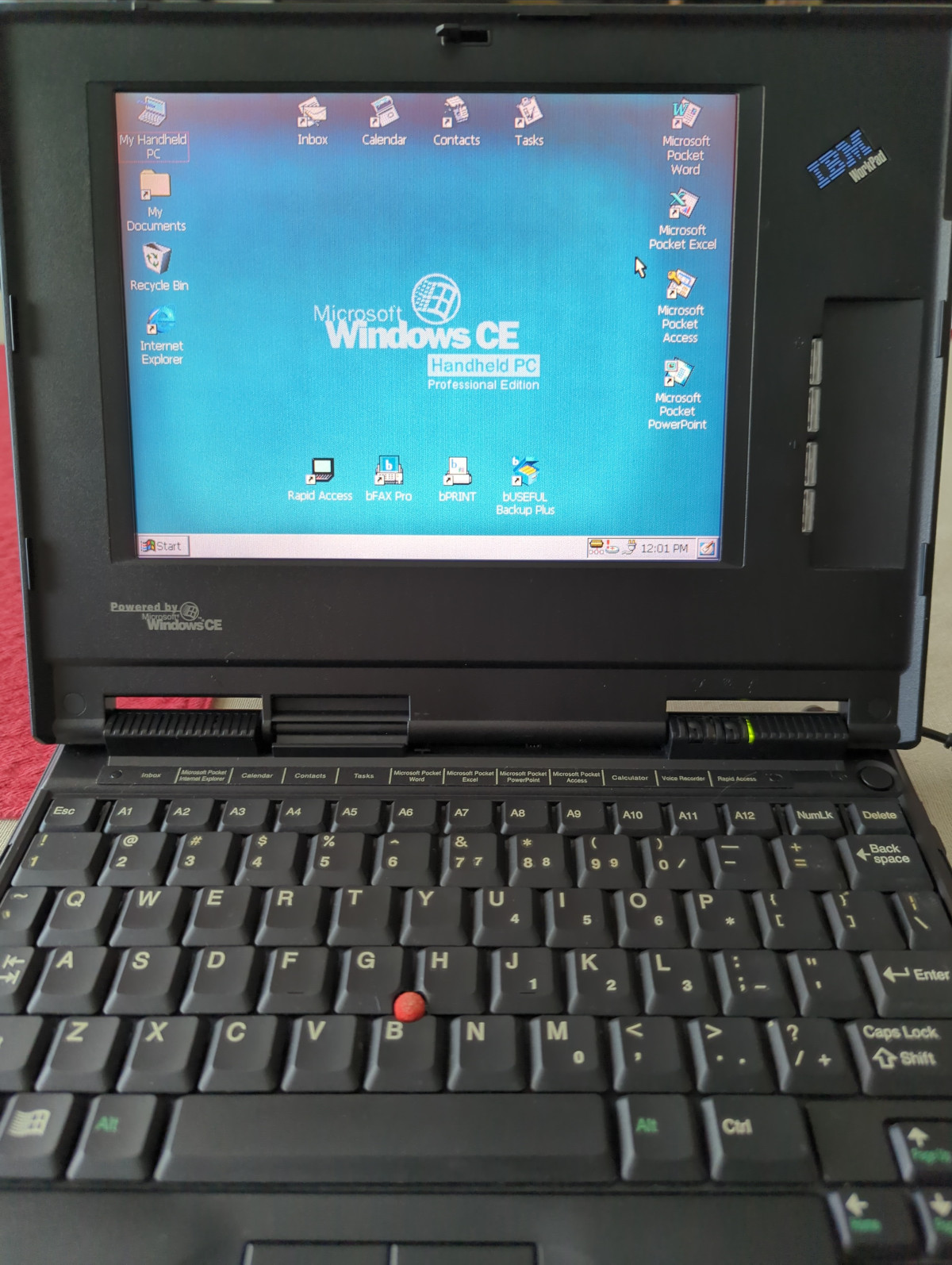
In the box bought through an online auction is a tiny laptop that screams IBM, we’d identify it as a ThinkPad immediately if it wasn’t for that brand being absent. This is an IBM WorkPad, a baby sibling of the ThinkPad line intended as a companion device. This one has a reduced spec screen and an NEC MIPS processor, with Windows CE on a ROM SODIMM accessible through a cover on the underside. For us in 2022 MIPS processors based on the open-sourced MIPS ISA are found in low-end webcams and routers, but back then it was a real contender. The article goes into some detail on the various families of chips from that time, which is worth a read in itself.

We remember these laptops, and while the IBM one was unaffordable there was a COMPAQ competitor which did seem tempting for on-the-road work. They failed to make an impact due to being marketed as a high-end executive’s toy rather than a mass-market computer, and they were seen off as “real” laptops became more affordable. A second-hand HP Omnibook 800 did the ultra-portable job on this bench instead.

The industry had various attempts at cracking this market, most notably with the netbooks which appeared a few years after the WorkPad was produced. It was left to Google to reinvent the ultra-portable non-Intel laptop as an internet appliance with their Chromebooks before they would become a mass-market device, but the WorkPad remains a tantalizing glimpse of what might have been.

Windows CE occasionally makes an appearance here, and yes, it runs DOOM.

The First Microcomputer: The Q1

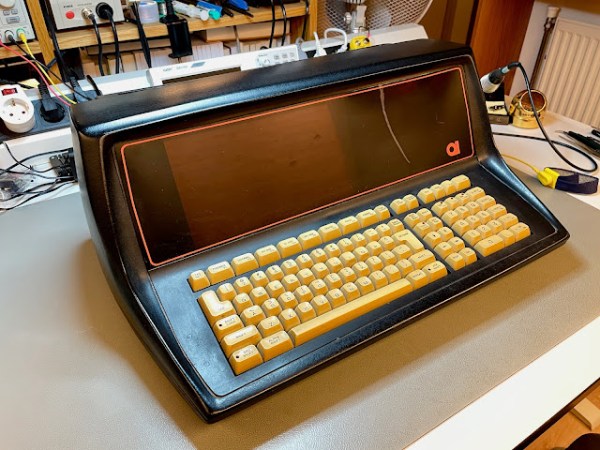
Quiz time, what was the first commercially available microcomputer? The Altair 8800? Something obscure like the SCELBI? The Mark-8 kit? According to [The Byte Attic], it was actually the Q1, based on the Intel 8008 processor. The first Q1 microcomputer was delivered in December of 1972, making it the first, as far as he can tell. Later revisions used the Z80 processor, which is the model pictured above that [The Byte Attic] has in his possession. It’s a beautiful little machine, with a striking orange plasma display.

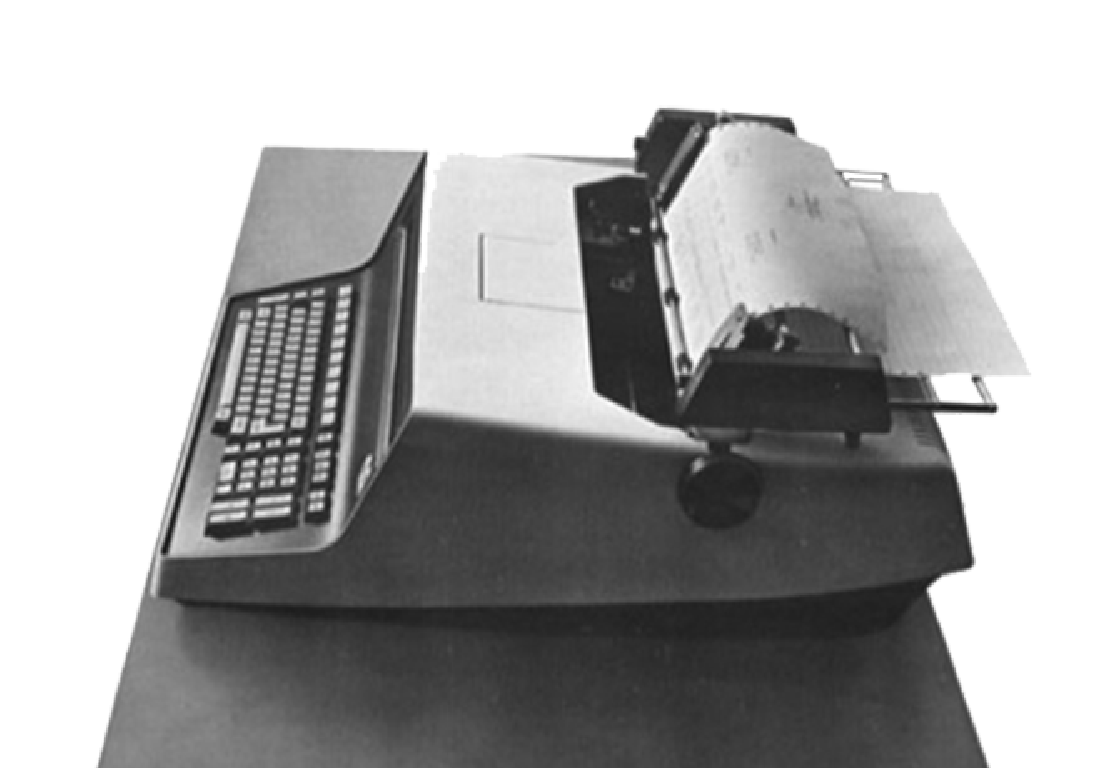
The irony is that this machine is almost entirely forgotten about. The original unit may have looked more like a typewriter, pictured here. If you have any first hand knowledge, or especially software, documentation, or surviving hardware bits, make sure to check in to add to the knowledge pool about this amazing little machine.

It’s an important milestone, and the development of the Q1 may have been a direct cause of Intel developing the more powerful 8080 microprocessor. It seems that Daniel Alroy’s work on this machine literally kicked off the microcomputer revolution, and it’s been missing from our computer lore for too many years. We’re very hopeful to see more of this story come together, and the history of the Q1 fully recovered.

And if retro hardware is your jam, we’ve got you covered, including among others, the parallel story about the first microprocessor.

Continue reading “The First Microcomputer: The Q1”

Tiny Dongle Brings The Hard Drive’s Song Back To Updated Retrocomputers

Back in the “beige box” days of computing, it was pretty easy to tell what your machine was doing just by listening to it, because the hard drive was constantly thrashing the heads back and forth. It was sometimes annoying, but never as annoying as hearing the stream of Geiger counter-like clicks stop when you knew it wasn’t done loading a program yet.

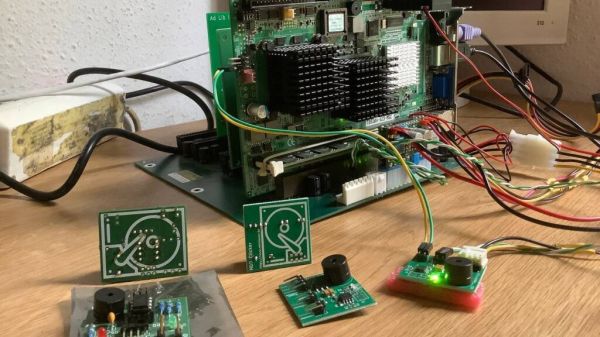
That “happy sound” is getting harder to come by, even on retro machines, which increasingly have had their original thrash-o-matic drives replaced with compact flash and other solid-state drives. This HDD sound simulator aims to fill that diagnostic and nostalgic gap on any machine that isn’t quite clicky enough for you. Sadly, [Matthias Werner] provides no build details for his creation, but between the longish demo video below (by a satisfied customer) and the details of the first version, it’s easy enough to figure out what’s going on here. An ATtiny and a few support components ride on a small PCB along with a piezoelectric speaker. The dongle connects to the hard drive activity light, which triggers a series of clicks from the speaker that sound remarkably like a hard drive heading seeking tracks. A demo starts at 7:09 in the video below; the very brave — or very nostalgic — might want to check out the full defragmentation that starts at 13:11.

Sure, this one is perhaps a bit over-the-top, but in the retrocomputing world, no price is too high to pay in the name of nostalgia. And it’s still far from the most ridiculous hard drive activity indicator we’ve seen.

Continue reading “Tiny Dongle Brings The Hard Drive’s Song Back To Updated Retrocomputers”

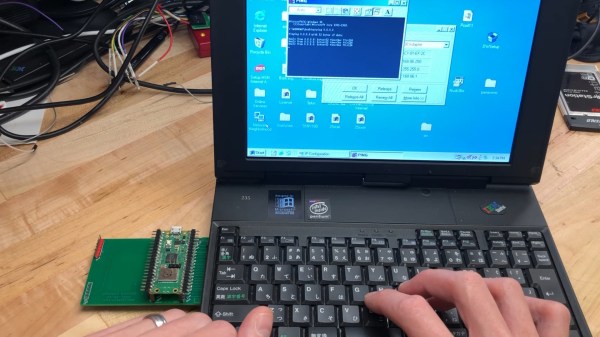
Card's author typing on the IBM PC110's keyboard, with the Pico W-based card plugged into the PCMCIA slot on the left. PC110's screen shows successful ping 8.8.8.8.8.

Pi Pico W Does PCMCIA, Gets This IBM PC110 Online

Bringing modern connectivity to retro computers is an endearing field- with the simplicity of last-century hardware and software being a double-edged sword, often, you bring a powerful and tiny computer of modern age to help its great-grandparent interface with networks of today. [yyzkevin] shows us a PCMCIA WiFi card built using a Pi Pico W, talking PCI ISA. This card brings modern-day WiFi connectivity to his IBM PC110, without requiring a separate router set up for outdated standards that the typical PCMCIA WiFi cards are limited by.

The RP2040 is made to talk PCI ISA using, of course, the PIO engine. A CPLD helps with PCI ISA address decoding, some multiplexing, and level shifting between RP2040’s 3.3V and the PCI 5 V levels. The RP2040 software emulates a NE2000 network card, which means driver support is guaranteed on most OSes of old times, and the software integration seems seamless. The card already works for getting the PC110 online, and [yyzkevin] says he’d like to improve on it – shrink the design so that it resembles a typical PCMCIA WiFi card, tie some useful function into the Pico’s USB port, and perhaps integrate his PCMCIA SoundBlaster project into the whole package while at it.

This is a delightful project in how it achieves its goal, and a pleasant surprise for everyone who’s been observing RP2040’s PIO engine conquer interfaces typically unreachable for run-of-the-mill microcontrollers. We’ve seen Ethernet, CAN and DVI, along many others, and there’s undoubtedly more to come.

We thank [Misel] and [Arti] for sharing this with us!