Retrotechtacular: The Floppy Disk Orphaned By Linux

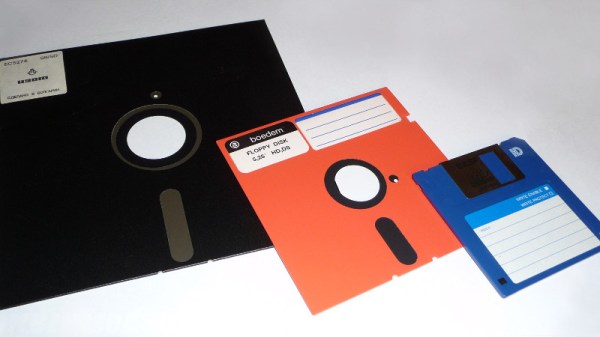
About a week ago, Linus Torvalds made a software commit which has an air about it of the end of an era. The code in question contains a few patches to the driver for native floppy disc controllers. What makes it worthy of note is that he remarks that the floppy driver is now orphaned. Its maintainer no longer has working floppy hardware upon which to test the software, and Linus remarks that “I think the driver can be considered pretty much dead from an actual hardware standpoint“, though he does point out that active support remains for USB floppy drives.

It’s a very reasonable view to have arrived at because outside the realm of retrocomputing the physical rather than virtual floppy disk has all but disappeared. It’s well over a decade since they ceased to be fitted to desktop and laptop computers, and where once they were a staple of any office they now exist only in the “save” icon on your wordprocessor. The floppy is dead, and has been for a long time.
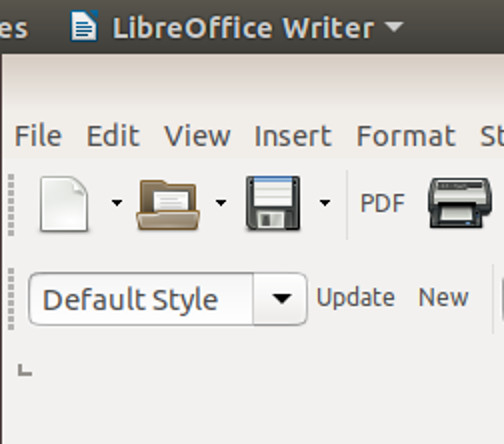
The save icon in LibreOffice and other desktop software is probably the last place the floppy exerts a hold over us.

Still, Linus’ quiet announcement comes as a minor jolt to anyone of A Certain Age for whom the floppy disk and the computer were once inseparable. When your digital life resided not in your phone or on the cloud but in a plastic box of floppies, those disks meant something. There was a social impact to the floppy as well as a technological one, they were a physical token that could contain your treasured ephemeral possessions, a modern-day keepsake locket for the digital age. We may have stopped using them over a decade ago, but somehow they are still a part of our computing DNA.

So while for some of you the Retrotechtacular series is about rare and unusual technology from years past, it’s time to take a look at something ubiquitous that we all think we know. Where did the floppy disk come from, where is it still with us, and aside from that save icon what legacies has it bestowed upon us?

Continue reading “Retrotechtacular: The Floppy Disk Orphaned By Linux”
A New Motherboard For Amiga, The Platform That Refuses To Die

If you go out and buy a computer right now, how many choices do you really have? Generally speaking, there’s PC or Mac. If we were being generous you could consider Chromebook and perhaps even mobile, but let’s be honest, computing is a two-party system with the ability to dump the OS and run Linux as the obvious third-party disruptor. It wasn’t always like this.

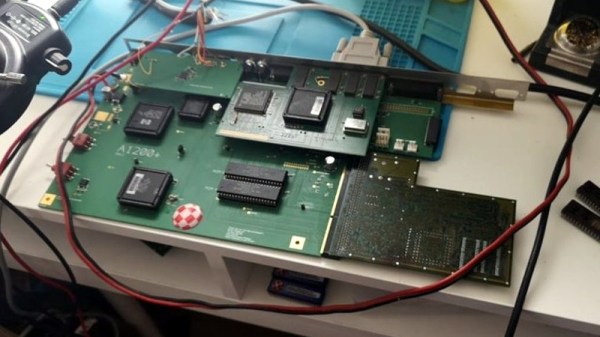
In the early years of personal computing there were a slew of serious contenders. A PC, a Mac, an Atari ST, an Amiga, and several more that all demanded serious consideration on the general purpose desktop computer market. Of all these platforms, the Amiga somehow stubbornly refuses to die. The Amiga 1200+ from [Jeroen Vandezande] is the latest in a long procession of post-Commodore Amigas, and as its name suggests it provides an upgrade for the popular early-1990s all-in-one Amiga model.

It takes the form of a well-executed open-source PCB that’s a drop-in replacement for the original A1200 motherboard. CPU, RAM, and video are broken out onto daughterboards, with PCMCIA replaced by an SD card slot. The catch: it does require all the custom Amiga chips from a donor board.

The original Amiga 1200 was a significant upgrade to the architecture of the 1980s originals, and this certainly provides a much-needed enhancement to its underwhelming 68EC020 processor. It’s fair to say that this is the Amiga upgrade we’d all have loved to see in about 1996 rather than waiting until 2019. It’s still a delight for a retrogaming enthusiast; many of those who keep it alive remember the Amiga was the best multimedia platform that could be had for a few glorious years.

We’ve brought you a host of Amiga projects over the years, including the resurrection of an A500 and of course another A1200 PCB.

Thanks to [Eric Hill] for the tip.

A PDP Laptop, For Various Definitions Of A Laptop

Digital Equipment Corp.’s PDP-11 is one of the most important computers in history. It’s the home of Unix, although that’s arguable, and it’s still being used in every application, from handling nuclear control rods to selling Ed Sheeran tickets on Ticketmaster. As the timeline of PDP-11 machines progressed, the hardware did as well, and by the time the PDP was eclipsed by the VAXxen, there were PDP-11s on a single chip. The Eastern Bloc took notice and produced their own PDP-11 on a chip. This is the 1801-series CPU, and like most soviet electronics from the Cold War, they’re readily available on eBay.

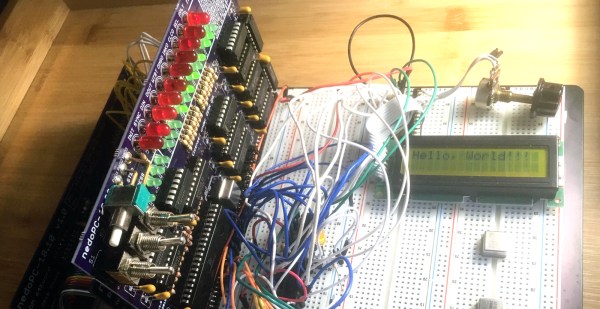
[SHAOS] has an interesting project in mind for this PDP-on-a-chip. It’s a standalone computer built around the Soviet re-implementation of the PDP-11, built into a form factor that could be described as a single board computer.

This project is the outgrowth of [SHAOS]’ project for last year’s Hackaday Prize, the PDPii. This was a computer built around a backplane that replicated the PDP-11 using a KR1801VM2 CPU, the Soviet not-a-clone clone of the PDP-11. This project is basically a PDP-11/03 system, except it was made in this century, and you can put it in any computer case, with bonus points awarded for RGB lighting and liquid cooling.

This year’s project, the PDPjr, eschews standardization to something that is far more unique. This build is more or less a single board computer with a character LCD display and a real keyboard. Think of this as the PDP-11 equivalent of the TRS-80 Model 100, a machine widely regarded as being the first laptop.

There’s still a lot of work to go, but [SHAOS] has written a ‘Hello World’ for this chip, and is getting those words to display on the character LCD. That’s a great first step and we can’t wait to see where this project ends up.

Minivac 601 Replica Gets A Custom Motorized Rotary Switch

One of the joys of electronics as a hobby is how easy it is to get parts. Literally millions of parts are available from thousands of suppliers and hundreds of distributors, and everyone competes with each other to make it as easy as possible to put together an order from a BoM. If you need it, somebody probably has it.

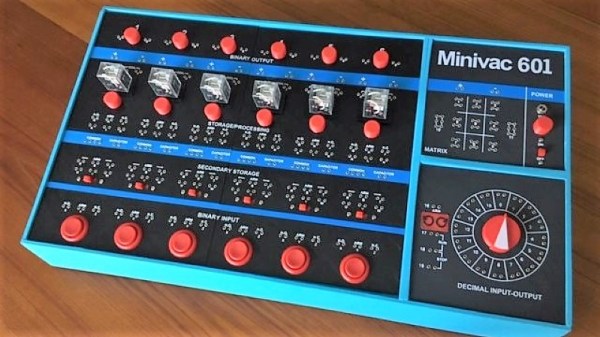
But what do you do when you need a part that doesn’t exist anymore, and even when it did was only produced in small numbers? Easy – you create it yourself. That’s just what [Mike Gardi] did with this unique motorized rotary switch he needed to complete his replica of a 1960s computer trainer. We covered his build of the Minivac 601, a trainer from the early computer age that let experimenters learn the ropes of basic digital logic. It used mostly relays, lamps, and switches connected by jumpers, but it had one critical component – a rotary control that was used for input and, with the help of a motor, as an output indicator.

[Mike]’s version of the switch is as faithful to the original as possible, at least in terms of looks. The parts are mostly 3D-printed, with 16 reed switches embedded in the walls and magnets placed in the rotor. The motor to operate the rotor is a simple gear motor mounted to a hinged bracket; when the rotor needs to move, a solenoid pulls the motor’s friction drive wheel up against the rotor.

The unique control slots right into the Minivac replica and really completes the look and feel. Hats off to [Mike] for a delightful replica of a lost bit of computer history and the dedication to see it through to completion.

Continue reading “Minivac 601 Replica Gets A Custom Motorized Rotary Switch”

Amiga In The MiST Gets Online With An ESP8266

While he couldn’t quite come up with the cash to buy one in their hayday, [Bruno Antunes] has always been fascinated with the Amiga. When PCs got fast enough he used emulators like UAE to get a taste of the experience, but it was never quite the same thing. Not until he found the MiST anyway, which uses an FPGA to implement several retro computers such as the Apple II, Atari, and of course his beloved Amiga.

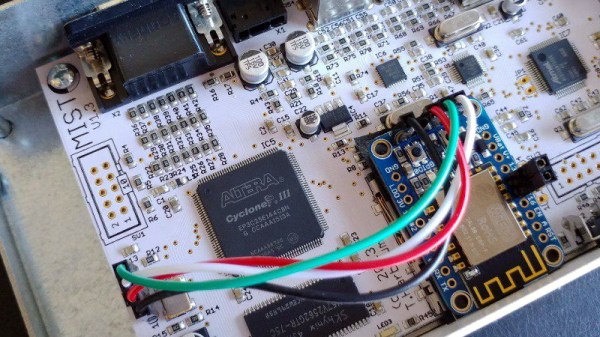
The only downside for [Bruno] was that the MiST has no network interfaces. To get onto the Internet, he had to install an ESP8266 inside the device and spend some quality time tweaking various software settings to get everything talking to each other. The end result is a BBS hosted on an Amiga 1200, that’s running on an FPGA, that’s connected to WiFi via an ESP8266. What a time to be alive.

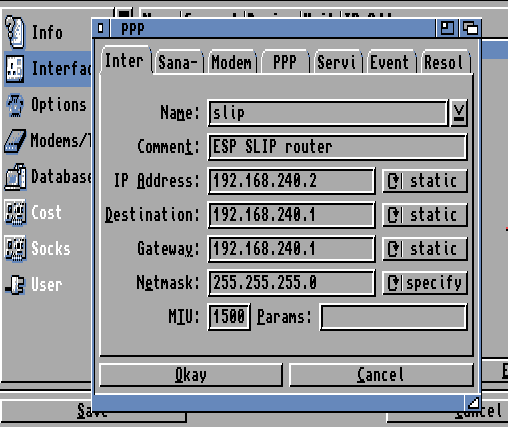
Adding the ESP8266 to the MiST was actually quite straightforward, as there’s an unpopulated serial port header right on the board. Though [Bruno] cautions this header has been removed as of version 1.4 of the device, so if you’re in the market for an FPGA retro box and might want to get it online at some point, that may be a detail to keep in mind. The ESP is running a firmware which implements Serial Line IP (SLIP); which allows you to use TCP/IP over a serial port, albeit very slowly.

The hardware implant went well enough, but unfortunately [Bruno] found the ESP8266 was unable to communicate through the thick metal case of the MiST. He enlisted his girlfriend to make a new papercraft enclosure for the MiST that the ESP could talk though, and it even has the added benefit of glowing thanks to the internal LEDs. We probably would have just got one of the ESP modules that includes an external antenna, but to each their own.

With the hardware taken care of, the rest of the considerable write-up details how he got the Amiga operating system to talk to the Internet through the SLIP connection. He goes over everything from setting the system time with NTP to getting a Telnet daemon installed. As you might expect, this involves installing a number of additional software packages, but [Bruno] is kind enough to provide links for everything you’ll need.

We’ve seen the ESP8266 used to get other retro computers onto the modern Internet before, but it’s usually through the use of an external device. This internal modification is very clean, and seems like a no-brainer for anyone who owns a MiST and a soldering iron.

Continue reading “Amiga In The MiST Gets Online With An ESP8266”

Emulating A 6502 In ROM

The Gigatron TTL microcomputer is an exercise in alternative history. What if, by some bizarre anomaly of invention and technology, the 1970s was not the age of the microprocessor? What if we could have had fast, high density ROM and RAM in the late ’70s, but the ability to put a microprocessor in silicon was beyond our comprehension? Obviously we would figure out a way to compute with this, and the Gigatron is the answer. It’s a computer from that era that’s designed with a CPU that’s entirely made of microcode.

While the Gigatron is a popular product in the world of weird electronics kits, the creator, [Marcel van Kervinck], is going beyond what anyone thought possible. Now the Gigatron is emulating a 6502 processor, the same CPU found in the Apple II and almost every other retrocomputer that isn’t running a Z80.

There’s a thread over on the Gigatron forums for this. Although it’s still very early in development, the Gigatron can now run 6502 machine code,ย  and in doing so the Gigatron is now the only dual-core computer without a CPU. All of the addressing modes have been implemented, along with half of the instructions and most of the status flags. All of this interacts with the Gigatron’s existing video subsystem, and all code can switch in between the Gigatron’s virtual CPU and 6502 code with just a few instructions.

This opens the door to a wide variety of software that’s already written. MicroChess is possible, as is MS Basic. This is great; the biggest downside of the Gigatron is that there was no existing code for the machine when it was first designed. That changed when the Gigatron got a C compiler, but now somehow we’ve got a logic chip implementation of a 6502 in far fewer chips than are found in an Apple II. It’s not fast ( about 1/8th the speed of a 1 MHz 6502), but in the video below you can see a munching squares demo.

Continue reading “Emulating A 6502 In ROM”

Bit Preserve: A Sanctuary For Modern Captures Of Vintage Schematics

Vintage parts may be documented, but that doesn’t mean they’re particularly useful or accessible. If the phrase “eyestrain from unsearchable, badly-scanned PDF datasheets” makes your lower eyelid twitch in sympathy, read on.

While [Bald Engineer] was researching how he might make a portable Apple II, he was delighted to find that the vintage components he needed to examine were documented. However, he became frustrated with the seemingly endless number of poor quality PDF scans and the inability to search effectively. He decided to re-create the entire Apple IIgs schematic in KiCad, and in the process the Bit Preserve project was born. The goal is to act as a safe haven for modern and editable versions of vintage electronic schematics. The GitHub repository can be found here.

[Bald Engineer] talks a bit about his Apple II project, as well as the ideas behind the Bit Preserve project in his KiCon 2019 talk “Preserving History with KiCad”. KiCon was wild, and we have loads of photos of the projects and details so be sure to check it out.