Even if you’re reading this on a piece of paper that was hand-delivered to you in the Siberian wilderness, somewhere someone had to use energy to run a printer and also had to somehow get all of this information from the energy-consuming information superhighway. While we rely on the electric grid for a lot of our daily energy needs like these, it’s often unclear exactly how the energy from nuclear fuel rods, fossil fuels, or wind and solar gets turned into electrons that somehow get into the things that need those electrons. We covered a little bit about the history of the electric grid and how it came to be in the first of this series of posts, but how exactly does energy get delivered to us over the grid? Continue reading “How Energy Gets Where Its Needed”→
Last week we covered the past and current state of artificial intelligence — what modern AI looks like, the differences between weak and strong AI, AGI, and some of the philosophical ideas about what constitutes consciousness. Weak AI is already all around us, in the form of software dedicated to performing specific tasks intelligently. Strong AI is the ultimate goal, and a true strong AI would resemble what most of us have grown familiar with through popular fiction.
Artificial General Intelligence (AGI) is a modern goal many AI researchers are currently devoting their careers to in an effort to bridge that gap. While AGI wouldn’t necessarily possess any kind of consciousness, it would be able to handle any data-related task put before it. Of course, as humans, it’s in our nature to try to forecast the future, and that’s what we’ll be talking about in this article. What are some of our best guesses about what we can expect from AI in the future (near and far)? What possible ethical and practical concerns are there if a conscious AI were to be created? In this speculative future, should an AI have rights, or should it be feared?
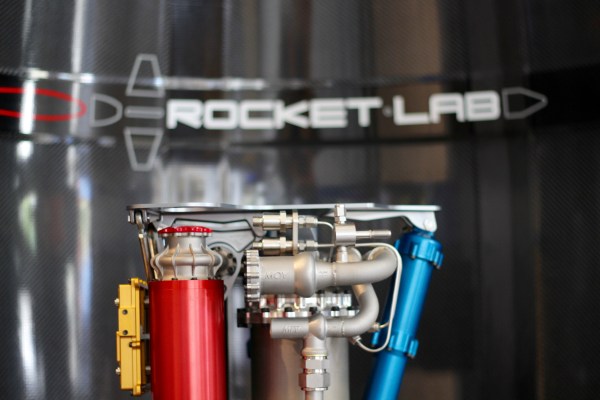
Over the last decade or so the definition of what a ‘small satellite’ is has ballooned beyond the original cubesat design specification to satellites of 50 or 100 kg. Today a ‘smallsat’ is defined far more around the cost, and sometimes the technologies used, than the size and shape of the box that goes into orbit.
There are now more than fifty companies working on launch vehicles dedicated to lifting these small satellites into orbit, and while nobody really expects all of those to survive the next few years, it’s going to be an interesting time in the launcher market. Because I have a sneaking suspicion that Jeff Bezos’ statement that “there’s not that much interesting about cubesats” may well turn out to be the twenty first century’s “nobody needs more than 640kb,” and it’s possible that everybody is wrong about how many of the launcher companies will survive in the long term.
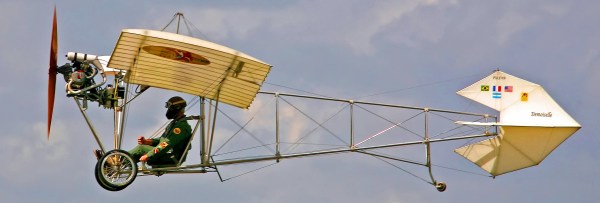
The history of aviation is a fascinating one, spanning more than two thousand years starting from kites and tower jumping. Many hackers are also aviation fans, and the name of Alberto Santos Dumont may be familiar, but if not, here we talk about his role and accomplishments in the field. Santos Dumont is one of the few aviation pioneers that made contributions in both balloons, airships and heavier-than-air aircraft.
Like any Moore’s Law-inspired race, the megapixel race in digital cameras in the late 1990s and into the 2000s was a harsh battleground for every manufacturer. With the development of the smartphone, it became a war on two fronts, with Samsung eventually cramming twenty megapixels into a handheld. Although no clear winner of consumer-grade cameras was ever announced (and Samsung ended up reducing their flagship phone’s cameras to sixteen megapixels for reasons we’ll discuss) it seems as though this race is over, fizzling out into a void where even marketing and advertising groups don’t readily venture. What happened?
The Technology
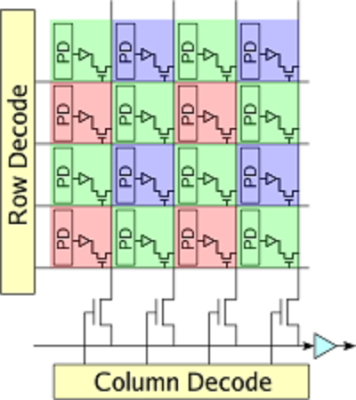
A brief overview of Moore’s Law predicts that transistor density on a given computer chip should double about every two years. A digital camera’s sensor is remarkably similar, using the same silicon to form charge-coupled devices or CMOS sensors (the same CMOS technology used in some RAM and other digital logic technology) to detect photons that hit it. It’s not too far of a leap to realize how Moore’s Law would apply to the number of photo detectors on a digital camera’s image sensor. Like transistor density, however, there’s also a limit to how many photo detectors will fit in a given area before undesirable effects start to appear.
Image sensors have come a long way since video camera tubes. In the ’70s, the charge-coupled device (CCD) replaced the cathode ray tube as the dominant video capturing technology. A CCD works by arranging capacitors into an array and biasing them with a small voltage. When a photon hits one of the capacitors, it is converted into an electrical charge which can then be stored as digital information. While there are still specialty CCD sensors for some niche applications, most image sensors are now of the CMOS variety. CMOS uses photodiodes, rather than capacitors, along with a few other transistors for every pixel. CMOS sensors perform better than CCD sensors because each pixel has an amplifier which results in more accurate capturing of data. They are also faster, scale more readily, use fewer components in general, and use less power than a comparably sized CCD. Despite all of these advantages, however, there are still many limitations to modern sensors when more and more of them get packed onto a single piece of silicon.
While transistor density tends to be limited by quantum effects, image sensor density is limited by what is effectively a “noisy” picture. Noise can be introduced in an image as a result of thermal fluctuations within the material, so if the voltage threshold for a single pixel is so low that it falsely registers a photon when it shouldn’t, the image quality will be greatly reduced. This is more noticeable in CCD sensors (one effect is called “blooming“) but similar defects can happen in CMOS sensors as well. There are a few ways to solve these problems, though.
First, the voltage threshold can be raised so that random thermal fluctuations don’t rise above the threshold to trigger the pixels. In a DSLR, this typically means changing the ISO setting of a camera, where a lower ISO setting means more light is required to trigger a pixel, but that random fluctuations are less likely to happen. From a camera designer’s point-of-view, however, a higher voltage generally implies greater power consumption and some speed considerations, so there are some tradeoffs to make in this area.
Another reason that thermal fluctuations cause noise in image sensors is that the pixels themselves are so close together that they influence their neighbors. The answer here seems obvious: simply increase the area of the sensor, make the pixels of the sensor bigger, or both. This is a good solution if you have unlimited area, but in something like a cell phone this isn’t practical. This gets to the core of the reason that most modern cell phones seem to be practically limited somewhere in the sixteen-to-twenty megapixel range. If the pixels are made too small to increase megapixel count, the noise will start to ruin the images. If the pixels are too big, the picture will have a low resolution.
There are some non-technological ways of increasing megapixel count for an image as well. For example, a panoramic image will have a megapixel count much higher than that of the camera that took the picture simply because each part of the panorama has the full mexapixel count. It’s also possible to reduce noise in a single frame of any picture by using lenses that collect more light (lenses with a lower f-number) which allows the photographer to use a lower ISO setting to reduce the camera’s sensitivity.
Gigapixels!
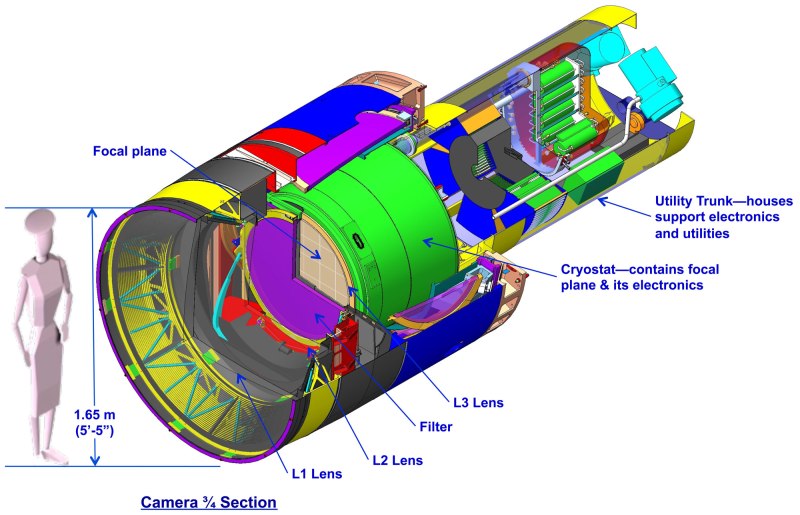
Of course, if you have unlimited area you can make image sensors of virtually any size. There are some extremely large, expensive cameras called gigapixel cameras that can take pictures of unimaginable detail. Their size and cost is a limiting factor for consumer devices, though, and as such are generally used for specialty purposes only. The largest image sensor ever built has a surface of almost five square meters and is the size of a car. The camera will be put to use in 2019 in the Large Synoptic Survey Telescope in South America where it will capture images of the night sky with its 8.4 meter primary mirror. If this was part of the megapixel race in consumer goods, it would certainly be the winner.
With all of this being said, it becomes obvious that there are many more considerations in a digital camera than just the megapixel count. With so many facets of a camera such as physical sensor size, lenses, camera settings, post-processing capabilities, filters, etc., the megapixel number was essentially an easy way for marketers to advertise the claimed superiority of their products until the practical limits of image sensors was reached. Beyond a certain limit, more megapixels doesn’t automatically translate into a better picture. As already mentioned, however, the megapixel count can be important, but there are so many ways to make up for a lower megapixel count if you have to. For example, images with high dynamic range are becoming the norm even in cell phones, which also helps eliminate the need for a flash. Whatever you decide, though, if you want to start taking great pictures don’t worry about specs; just go out and take some photographs!
(Title image: VISTA gigapixel mosaic of the central parts of the Milky Way, produced by European Southern Observatory (ESO) and released under Creative Commons Attribution 4.0 International License. This is a scaled version of the original 108,500 x 81,500, 9-gigapixel image.)
We tend to think that there was a time in America when invention was a solo game. The picture of the lone entrepreneur struggling against the odds to invent the next big thing is an enduring theme, if a bit inaccurate and romanticized. Certainly many great inventions came from independent inventors, but the truth is that corporate R&D has been responsible for most of the innovations from the late nineteenth century onward. But sometimes these outfits are not soulless corporate giants. Some are founded by one inventive soul who drives the business to greatness by the power of imagination and marketing. Thomas Edison’s Menlo Park “Invention Factory” comes to mind as an example, but there was another prolific inventor and relentless promoter who contributed vastly to the early consumer electronics industry in the USA: Powel Crosley, Jr.
The concept of artificial intelligence dates back far before the advent of modern computers — even as far back as Greek mythology. Hephaestus, the Greek god of craftsmen and blacksmiths, was believed to have created automatons to work for him. Another mythological figure, Pygmalion, carved a statue of a beautiful woman from ivory, who he proceeded to fall in love with. Aphrodite then imbued the statue with life as a gift to Pygmalion, who then married the now living woman.
Pygmalion by Jean-Baptiste Regnault, 1786, Musée National du Château et des Trianons
Throughout history, myths and legends of artificial beings that were given intelligence were common. These varied from having simple supernatural origins (such as the Greek myths), to more scientifically-reasoned methods as the idea of alchemy increased in popularity. In fiction, particularly science fiction, artificial intelligence became more and more common beginning in the 19th century.
But, it wasn’t until mathematics, philosophy, and the scientific method advanced enough in the 19th and 20th centuries that artificial intelligence was taken seriously as an actual possibility. It was during this time that mathematicians such as George Boole, Bertrand Russel, and Alfred North Whitehead began presenting theories formalizing logical reasoning. With the development of digital computers in the second half of the 20th century, these concepts were put into practice, and AI research began in earnest.
Over the last 50 years, interest in AI development has waxed and waned with public interest and the successes and failures of the industry. Predictions made by researchers in the field, and by science fiction visionaries, have often fallen short of reality. Generally, this can be chalked up to computing limitations. But, a deeper problem of the understanding of what intelligence actually is has been a source a tremendous debate.
Despite these setbacks, AI research and development has continued. Currently, this research is being conducted by technology corporations who see the economic potential in such advancements, and by academics working at universities around the world. Where does that research currently stand, and what might we expect to see in the future? To answer that, we’ll first need to attempt to define what exactly constitutes artificial intelligence.