Don’t Try This At Home Is Cliché For A Reason

Oh, for cryin’ out loud. That’s the last straw. We’ve seen one dangerous YouTube video too many. Are we honestly cursed with a false feedback system that unequitably rewards dangerous behavior in online videos? Obviously the answer is ‘yes’. Now the real question becomes, can we do anything about it?

Professional Driver on a Closed Course

Marketing is all about putting something in front of a consumer and getting their brain to go “awesome!”. The fast, loud, shiny, burny, and sharp things are all on the table for that task. It’s the primal part of your brain that gives you jolt, as if your amygdala forgot how to run from sabertooths (saberteeth?) and learned how to like and subscribe.

Back in the day, people were hurt and even killed when replicating stunts they saw done on television. To protect from litigation, companies started adding disclaimers — Don’t Try this at Home or my favorite: Professional Driver on a Closed Course.

But the thing is, commercials are big business. If someone gets hurt, there’s money to be had by assigning blame in a court of law. When the ability to produce and distribute video content was democratized by the coming of the Internet we lost those warnings and the common sense that went with them.

Going way back to this remote-control-a-real-car hack in 2009 I haven’t been able to shake the lack of consideration for danger in a project like this. I included it in the title, which ends with “(dangerously)”. While I wasn’t taken to task in the comments for that title, I have been chided for advocating for things as controversial as helmets when strapping your body to a moving object. Do a Ctrl-F on “helmet” in this article to see what I mean.

The people pulling off these hacks were doing it because it felt awesome and they wanted to document how that felt. They weren’t stars, they were hackers and the world mostly ignored them except in places like Hackaday. We might debate the lack of safety measures but most assumed anyone with skills to do this would take a beat to consider the risks. This was probably a false assumption.

It’s All About the Subs

Things have gotten worse since then. I can’t blame all of this on YouTube, but I’m going to try. One day, YouTube changed everything. They put together a perfect mix of easy uploading, great discoverability, and (most importantly) advertising revenue sharing. For some people, this became a business and not just a way to connect with the rest of the hacker community.

This is the rise of the subscriber base. It’s a vicious cycle — you need more people to like and subscribe so that their influence will push your channel to more people to like and subscribe. The problem is, the fastest way to this is that tricky amygdala again. For some, this is being funny, but for others this is speed, fireballs, and loud bangs, with no regard for life, limb, or eyeball.

We’re Far From Blameless

I like fireballs and fast cars as much as the next person. And we’ve certainly run a lot of articles on the escalatingly dangerous hacks out there for all to see. For instance, we’ve covered several hacks from [kreosan], like microwaving things outside of a microwave and then building a microwave gun.

Pyro Build
Short sleeves and flamethrowers. What could go wrong?

But even the more mainstream content appears to be getting more and more dangerous. Our beloved [Colin Furze] is guilty of dangerous behavior. Not only did he burn himself testing a jet engine out without any safety gear, but turned the aftermath into another ad-supported video.

Which brings me to the straw that broke the camel’s back. Here’s a hack that’s based on the idea of hurting people. It’s what is (luckily) a crappy robot designed to recognize faces and shine lasers into any eyes it detects. Literally it’s conceived to shoot your eyes out. It’s using a red laser that likely won’t cause eye damage unless you intentionally stare into it without blinking, but that’s not discussed in the video, and someone who doesn’t know better replicating this with a different laser could easily cause irreparable damage to their sight.

Rocket Scientists Use Common Sense and So Should You

I was going to use the heading “This Isn’t Rocket Science”, but you don’t see rocket scientists testing new engine designs by lighting a fuse as they run away giggling in short sleeves and flip-flops. Those brilliantly intelligent people are tucked safely in a bunker at a safe distance with their hands hovering over the emergency kill switch as fire fighting equipment hangs out at arms reach. Rocket scientists know a lot about safety and so should you.

This is simple. We don’t have to invent anything to add safety to our hacks. Use common sense. Dress appropriately for your demo — as the situation dictates use reasonable fire-resistant clothing, helmet, etc. Wear protective glasses, laser spec’d goggles, and ear plugs; each whenever called for. Take fumes and particulates seriously and wear respiratory gear. Keep a fire extinguisher around. And if you’re making a video or posting images about it — which you should definitely do — snap a picture or give us a quick video cut to the safety precautions you’ve chosen.

I still want to see awesome projects on YouTube. But I also want to see the trend towards danger for clicks stopped. Let’s do dangerous stuff safely. And let’s be conspicuous about those safety measures. That combination is truly awesome.

Now get off my lawn, and wear your seat belt while doing so.

Call For Hack Chat Hosts

Every week Hackaday.io features an AMA of sorts. This is the Hack Chat, a chatroom where we sit down with the best in the business to talk about manufacturing techniques, engineering, and how to build the best hardware around. Over the last few months, we’ve hosted a few hardware celebrities, from [Sprite_TM] talking about the ESP32, [Lady Ada] and MicroPython, [Roger Thornton] of Raspberry Pi discussing how to build everyone’s favorite Linux computer, [Samy Kamkar] talking about reverse engineering, and heard [bunnie’s] take on making and breaking hardware.

Now we’re looking for new co-hosts to lead a discussion and be the expert in the room. If you have the skills, we want to hear from you.

We’re looking for experts to lead a discussion on what they’re doing. If you have a new hardware product and want to share the story of taking it to production while getting some feedback from the Hackaday community, this is the place to do it. We’re looking for a wide range of people who will allow us to pick their brains. If you’ve ever designed a 16-layer PCB, we want to know how (and why) you did it. If you’re into building robotics, we want to hear from you. If you’re an embedded systems wizard, this is your time to shine.

If you want to get in on this, send us an email. We’re doing one Hack Chat a week, every Friday, sometime around noon, Pacific time. This is a great opportunity for you to share what you know with one of the best hardware communities on the Internet. It’s also great practice if you’re thinking about presenting at the Hackaday SuperConference in November.

This Week: How do Magnets Work Anyway?

Do you know how magnets work? Of course you don’t, nobody does. But one of the people with the deepest knowledge on the topic is Jeremy Chan who is a Prototype Engineer at Nano Magnetics Ltd. This Friday at noon PST Jeremy leads a Hack Chat on magnetism.

What is there to talk about? Jeremy will cover how magnets are manufactured and magnetized. He’ll cover the different grades of magnets, and the different magnetic sensing mechanisms. He’ll also go into some of the most interesting magnetic phenomenon. How often do you get to hang out with a magnet expert? See you this Friday!

Networking: Pin The Tail On The Headless Raspberry Pi

Eager to get deeper into robotics after dipping my toe in the water with my BB-8 droid, I purchased a Raspberry Pi 3 Model B. The first step was to connect to it. But while it has built-in 802.11n wireless, I at first didn’t have a wireless access point, though I eventually did get one. That meant I went through different ways of finding it and connecting to it with my desktop computer. Surely there are others seeking to do the same so let’s take a look at the secret incantations used to connect a Pi to a computer directly, and indirectly.

Continue reading “Networking: Pin The Tail On The Headless Raspberry Pi”

A Touchscreen From 1982, That Could Kill With A Single Finger Press

Over the pond here in the UK we used to have a TV show called Tomorrow’s World, It was on once a week showing all the tech we would have been using in 10 years time (or so they said). In 1982 they ran with a story about a touch screen computer. Perhaps not what you would recognize today as a touchscreen but given the date and limited technology someone had come up with a novel idea for a touchscreen that worked sort of.

It was a normal CRT screen but around the edges where photodiodes pointing inwards as if to make an invisible infrared touch interface just half an inch in front of the screen. Quite impressive technology giving the times. As they go through the video showing us how it works a more sinister use of this new-fangled touch screen computer rears its ugly head, They turned it into a pretty cool remote-controlled gun turret complete with a motorized horizontal and vertical axis upon which an air pistol was placed along with a camera. You could see an image back from the camera on the screen, move the gun around to aim the weapon, then with a single finger press on the screen, your target has been hit.

Continue reading “A Touchscreen From 1982, That Could Kill With A Single Finger Press”

Hackaday Links: April 16, 2017

Guess what’s going on at the end of the month? The Vintage Computer Festival Southeast is happening April 29th and 30th. The event is being held at the Computer Museum of America and is, by all accounts, a really cool show.

Walk into any package sorting facility or Amazon fulfillment center and you’ll find a maze of conveyor belts, slides, and ramps that move boxes from one point to another. Conveyor belts are so last century, so here’s a fleet of robots.

In 2017, the CITES treaty — an international treaty for the protection of endangered species — changed a lot. While the original treaty protected individual species, in 2017, enforcement of this treaty on tropical hardwoods changed to an entire genus. This is a problem when it comes to rosewood; previously only Dalbergia nigra was covered under CITES, now the entire Dalbergia genus is covered. This sucks for guitar makers, but a Dutch guy is making guitars out of newspaper. We’re probably looking at some sort of micarta thing here, but it sounds acceptable.

Where did Apple’s Spinning Beach Ball of Death come from? 1984, or thereabouts. The ubiquitous Apple ‘wait’ cursor is from the first versions of the Macintosh Toolbox, and it has remained mostly unchanged all this time. This is Apple Wait, a demonstration of this first spinny ball of death. It’s a Raspberry Pi connected to an Apple monochrome monitor that just displays a spinny wait logo. Check out the video.

How do you make strips of RGB LEDs turn a corner? Wire, usually. Here are some corner pieces for WS2812B LED strips. It looks very handy if you’re building a gigantic RGB LED matrix.

SHA2017 is an outdoor hacker conference that’s happening this summer. They’re working on a badge, but they need some help. They’re looking for some funding for their ESP32-powered, touch controller, sunlight-readable ePaper badge. If you have a job that likes to sponsor stuff like this, it’s a worthy cause.

Ask Hackaday: How Do You Python?

Python is the Arduino of software projects. It has a critical mass of libraries for anything from facial recognition and neural networks to robotics and remote sensing. And just like Arduino, I have yet to find the killer IDE for Python. Perhaps I just haven’t tried the right one yet, but it could be that I’m just doing Python wrong.

For Years I’ve Been IDLE

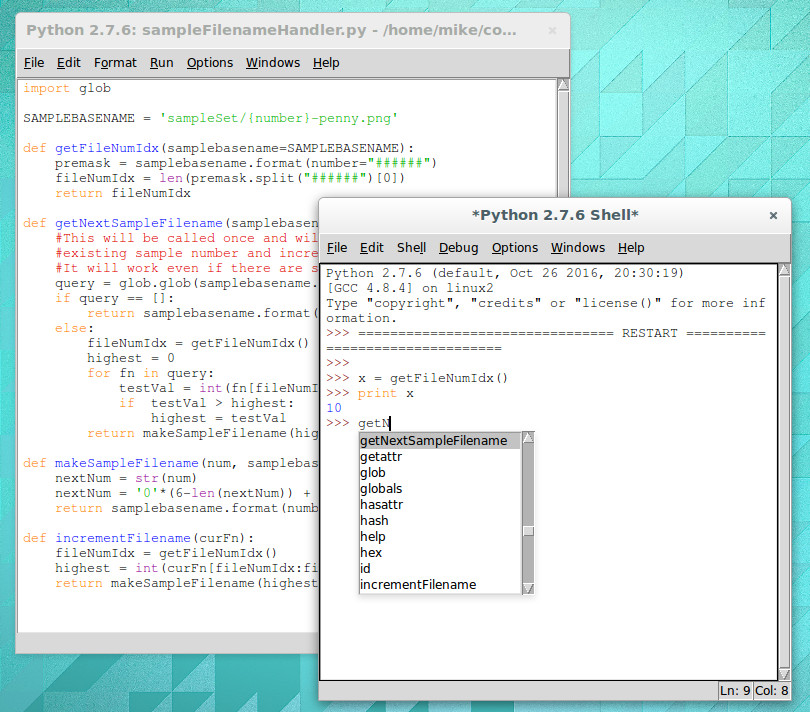
IDLE with interactive shell that has highlighting and code completion

I’m a Linux-only type of a guy so using IDLE for Python is a natural fit. It’s in the repositories for super quick and easy install and there’s basically zero configuration to be done. Generally speaking my preferred development environment is text editor and command line compiler. IDLE is just one step above that. You get a separate window for the shell and each Python file you’re working on. Have IDLE run your code and it saves the file, then launches it in the shell window.

For me, there are two important features of IDLE’s shell. The first is that it keeps an interactive session open after you run your Python code. This means that any globals that your script uses are still available, and that you can experiment with your code by calling functions (and classes, etc) in real time. The second desirable feature is that while using this interactive shell, IDLE supports code completion and docstring support (it gives you hints for what parameters a function accepts/requires).

But simplicity has a tough time scaling. I’m working on larger and larger projects spread over many files and the individual nature of IDLE editor windows and lack of robust navigation has me looking to move forward.

The Contenders

I’ve tried perhaps a half-dozen different Python IDEs now, spending the most time on two of them: Geany and Atom. Both are easy to install on Linux and provide the more advanced features I want for larger projects: better navigation, cross-file code completion (and warnings), variable type and scope indication.

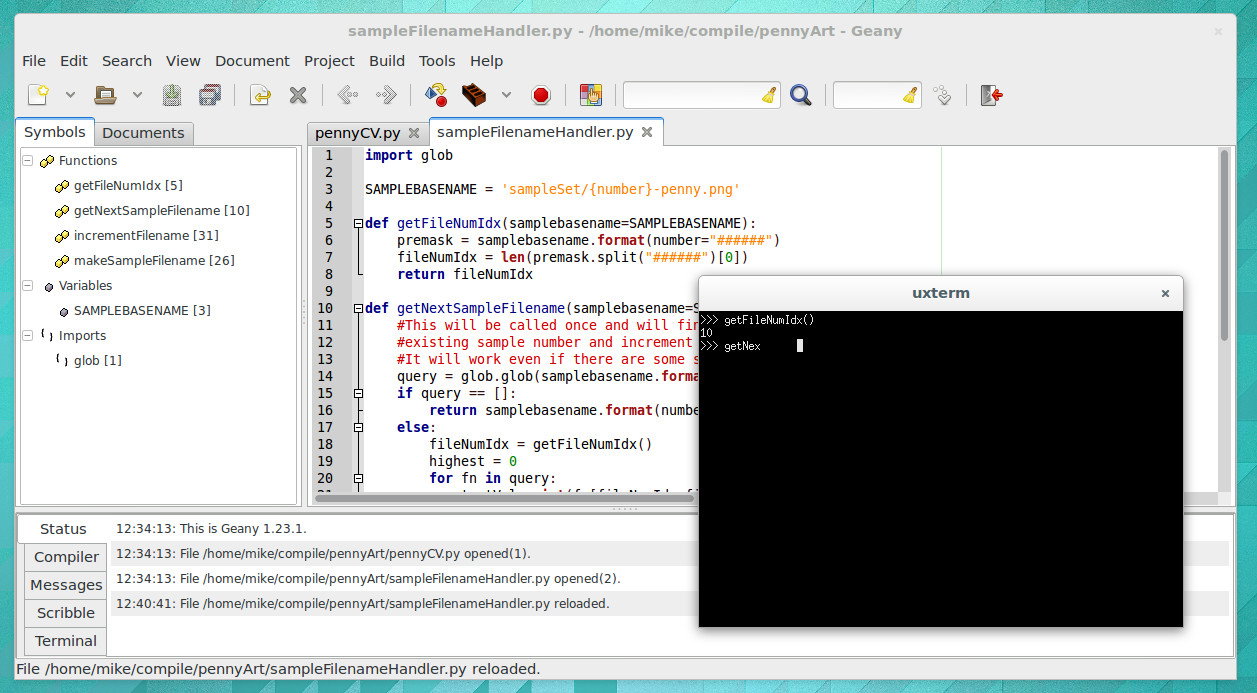
The look of Geany brings to mind an “IDE 1.0” layout style and theme. It’s the familiar three-pane layout that places symbols to the left, code to the right, and status along the bottom. When you run your program it launches in an interactive terminal, which I like, but you lose all IDE features at this point, which I despise. There is no code completion, and no syntax highlighting.

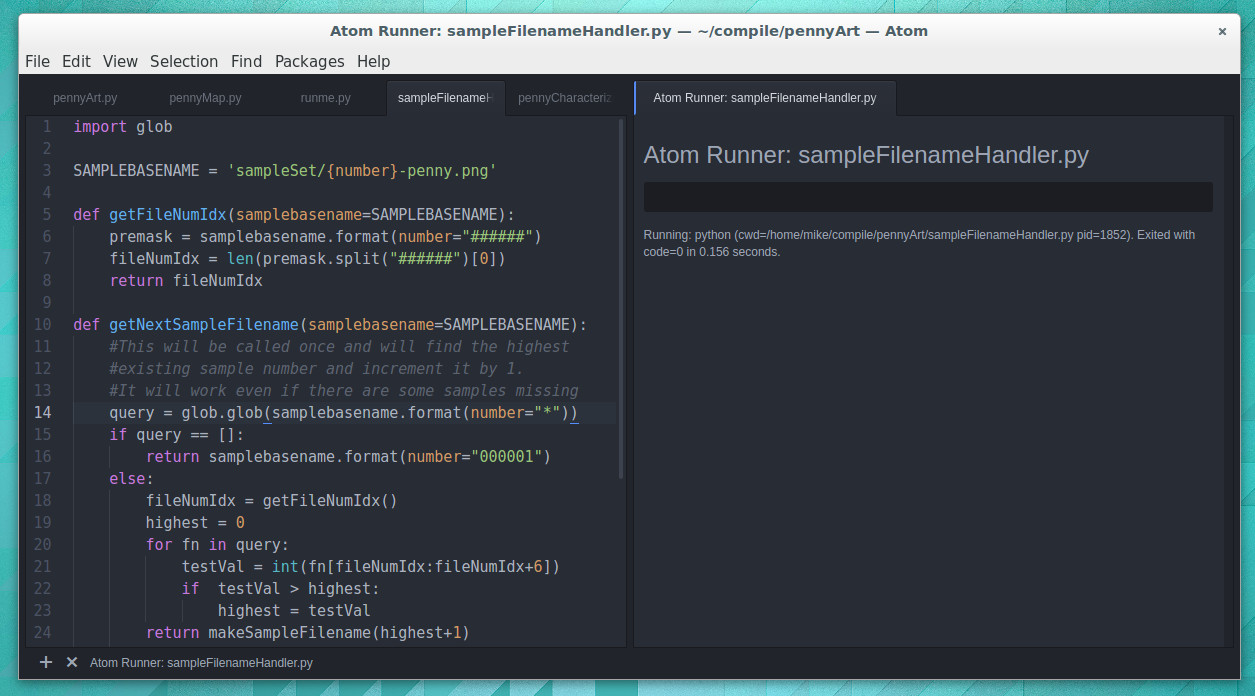
I have been using Atom much more than Geany and have grown to like it enough to stick with it for now. I’d call Atom the “IDE 2.0” layout. It launches with a dark theme and everything is a tab.

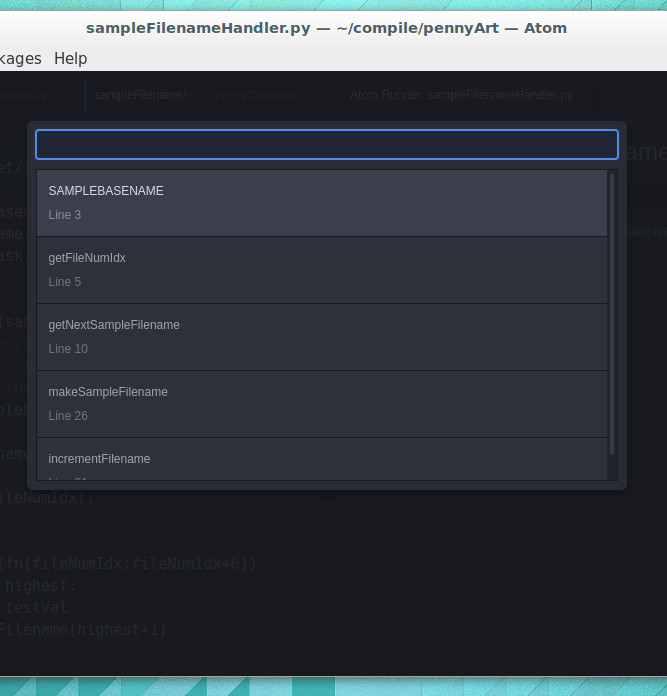
Atom has symbol view that isn’t shown all the time. CTRL-R brings it up and it uses a search style but you can also scroll through all symbols

Atom depends heavily on packages (plugins that anyone may write). The package management is good, and the packages I’ve tried have been superb. I’m using autocomplete-python and tabs-to-spaces, but again I come up short when it comes to running Python files. I’ve tried platformio-ide-terminal, script, and runner plugins.  The first brings up a terminal as a bottom pane but doesn’t automatically run the file in that terminal. Script also uses a bottom pane but I can’t get it to run interactively. I’m currently using runner which has an okay display but is not interactive. I’ve resorted to using a “fake” python file in my projects as a workaround for commands and tests I would normally run in the interactive shell.

Tell Us How You Python

It’s entirely possible I’ve just been using Python wrong all these years and that tinkering with your code in an interactive shell is a poor choose of development processes.

What do you prefer for your Python development? Does an interactive shell matter to you? Did you start with IDLE and move to a more mature IDE. Which IDE did you end up with and what kind of compromises did you make during that change. Let us know in the comments below.

Say It With Me: Root-Mean-Square

If you measure a DC voltage, and want to get some idea of how “big” it is over time, it’s pretty easy: just take a number of measurements and take the average. If you’re interested in the average power over the same timeframe, it’s likely to be pretty close (though not identical) to the same answer you’d get if you calculated the power using the average voltage instead of calculating instantaneous power and averaging. DC voltages don’t move around that much.

Try the same trick with an AC voltage, and you get zero, or something nearby. Why? With an AC waveform, the positive voltage excursions cancel out the negative ones. You’d get the same result if the flip were switched off. Clearly, a simple average isn’t capturing what we think of as “size” in an AC waveform; we need a new concept of “size”. Enter root-mean-square (RMS) voltage.

To calculate the RMS voltage, you take a number of voltage readings, square them, add them all together, and then divide by the number of entries in the average before taking the square root: \sqrt{\frac{1}{n} \left(v_1^2 + v_2^2 +...+ v_n^2\right)} . The rationale behind this strange averaging procedure is that the resulting number can be used in calculating average power for AC waveforms through simple multiplication as you would for DC voltages. If that answer isn’t entirely satisfying to you, read on. Hopefully we’ll help it make a little more sense.



Continue reading “Say It With Me: Root-Mean-Square”