These 20 Projects Won $1000 For Assistive Technologies

For the last seven months, Hackaday has been hosting the greatest hardware competition on Earth. The Hackaday Prize is a challenge to Build Something That Matters, asking hardware creators around the world to focus their skills to change the world.

The results have been spectacular. In five rounds of design challenges, we’ve seen more than 1000 entries and so far eighty of them have won $1000 and a chance to win the Grand Prize: $150,000 and a residency at the Supplyframe DesignLab in Pasadena.

Last week, we wrapped up the last challenge for the Hackaday Prize: Assistive Technologies. We’re now happy to announce twenty of those entries that have been selected to move to the final round and have been awarded a $1000 cash prize. Congratulations to the winners for the Assistive Technologies portion of the Hackaday Prize:


Who Will win the 2016 Hackaday Prize?

The finalists from each round are now being sent to our fantastic panel of judges. One of them will be awarded the Hackaday Prize. In addition to the prestige, they will win $150,000 and a residency at the Supplyframe DesignLab in Pasadena. Four more of the finalists will receive the other cash prizes of $25k, $10k, $10k, and $5.

Find out who will win live at the Hackaday Superconference on November 5th. The greatest hardware conference on the planet — the two-day hardware spectacular with an awesome speaker lineup, great workshops, and a fantastic community — includes the Hackaday Prize part. There’s still time to get a ticket to participate in this hardware spectacular and witness the crowning of the winner of The Hackaday Prize.

Hackaday Links Column Banner

Hackaday Links: October 9, 2016

Atari is back! That’s what some dude says. There are no real details in that post, other than ‘Atari is Back!’

The ESP32 is coming, and it’s going to be awesome. Espressif has just released an Arduino core for the ESP32 WiFi chip. The digitalRead, digitalWrite, SPI, Serial, Wire, and WiFi “should” work. If you’re looking for ESP32 hardware, they’re infrequently available and frequently out of stock. Thankfully, stock levels won’t be the Raspberry Pi Zero all over again until someone figures out how to run an NES emulator on the ESP32.

Tiny, cheap ARM boards would make for great home servers if they had SATA or multiple network interfaces. Here’s a Kickstarter for a board with both. It’s based on an ARM A53 with multiple Ethernets, mini PCIe, enough RAM, and SATA. It’s a board for niche use cases, but those uses could be really cool.

You’re not cool or ‘with it’ until you have a PCB ruler. That’s what all the hip kids are doing. For wizards and dark mages out there, a simple PCB ruler isn’t enough. These rare beasts demand RF rulers. There’s some weird stuff on these rulers, like Archemedian spiral antennas and spark gaps. Black magic stuff, here.

Some dude with a camera in the woods did something. Primitive Technology, the best example of experimental archaeology you’ve ever seen, built a spear thrower. You can throw a ball faster with a lacrosse stick than you can with just your hands, and this is the idea behind this device, commonly referred to as an atlatl. You can hunt with an atlatl in some states, but I have yet to see a video of anyone taking down a deer with one of these.

Think we’re done spamming the Hackaday Superconference yet? YOU’RE WRONG. The Hackaday Superconference is the greatest hardware conference of all time until we do this whole thing again next year. Get your tickets, look at the incredible list of speakers, book your flights, and be in Pasadena November 5-6.

Retrotechtacular: Head Start On Tomorrow

In the 1950s and 1960s, the prospects for a future powered by nuclear energy were bright. There had been accidents at nuclear reactors, but they had not penetrated the public consciousness, or had conveniently happened far away. This was the age of “Too cheap to meter“, and The Jetsons, in which a future driven by technologies as yet undreamed of would free mankind from its problems. Names like Three Mile Island, Chernobyl, and Fukushima were unheard of, and it seemed that nuclear reactors would become the miracle power source for the second half of the twentieth century and beyond.

The first generation of nuclear power stations were thus accompanied by extremely optimistic public relations and news coverage. At the opening of the world’s first industrial-scale nuclear power station at Calder Hall, UK in 1956, the [Queen] gave a speech in which she praised it as for the common good of the community, and on the other side of the Atlantic the American nuclear industry commissioned slick public relations films to promote their work. Such a film is the subject of this piece, and though unlike the British they could not muster a monarch, had they but known it at the time they did employ the services of a President.

The Big Rock Point nuclear power plant was completed in 1962 on the shores of Lake Michigan. Its owners, Consumers Power Company, were proud of their new facility, and commissioned a short film about it. The reactor had been supplied by General Electric, and fronting the film was General Electric’s established spokesman and host of their General Electric Theater TV show, the Hollywood actor and future President [Ronald Reagan].

The film below the break starts by explaining nuclear power as a new heat source powering a conventional steam-driven generator, and stresses the safety aspect of reactor control rods. We are then treated to a fascinating view of the assembly of an early-1960s nuclear reactor, starting with the arrival of the pressure vessel and showing the assemblies within it that held the fuel and control rods. Fuel rods are shown at their factory in California, and being loaded onto a truck to be shipped across the continent, seemingly without the massive security that would nowadays accompany such an undertaking. The rods are loaded and the reactor is started, as [Reagan] puts it: “The atom has been put to work, on schedule”.

Continue reading “Retrotechtacular: Head Start On Tomorrow” →

Fail Of The Week: Power Wheels Racing Series

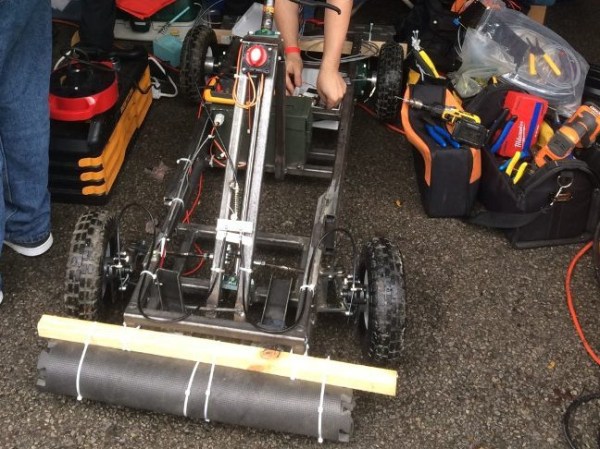
[ITMAN496] and his local HAM radio group entered the Power Wheels Racing Series with great intentions, a feeling of unlimited power, and the universal spirit of procrastination all hackers share.

It wasn’t the first time his group had worked together on something a little different, such as a robot that can deploy an antenna by climbing poles. However, this one had a time limit and they ended up trying to fit it all in the week before the race.

They had a pretty good design. [ITMAN496] had modeled the entire frame in SketchUp and even did physics simulations to get the steering just right. However, the best laid plans of mice and men often don’t fully take into account just how hard it is to get the motor drivers they bought working.

In the end, what they really needed was time to test. The setscrews couldn’t hold the motor on the shaft, the electronics needed debugging, and one of the belts was too long. The design was solid, but without time to percussively maintain the last bugs out of the system, it just wasn’t going to run.

[ITMAN496] is taking this lesson properly; he’s already planning for next year’s run, but this time he’ll have time to test. We must commend him — the build under these time constraints was still impressive. Even more so that he took the time to document everything while it was happening, and to share the story of shortfall after the fact. We’re always on the hunt for documented fails (the best way to really learn something).

Maybe Your Next Robot Should Be A Cyclocrane

At my university, we were all forced to take a class called Engineering 101. Weirdly, we could take it at any point in our careers at the school. So I put it off for more interesting classes until I was forced to take it in one of my final years. It was a mess of a class and never quite seemed to build up to a theme or a message. However, every third class or so they’d dredge up a veritable fossil from their ranks of graduates. These greybeards would sit at the front of the class and tell us about incredible things. It was worth the other two days of nondescript rambling by whichever engineering professor drew the short straw for one of their TAs.

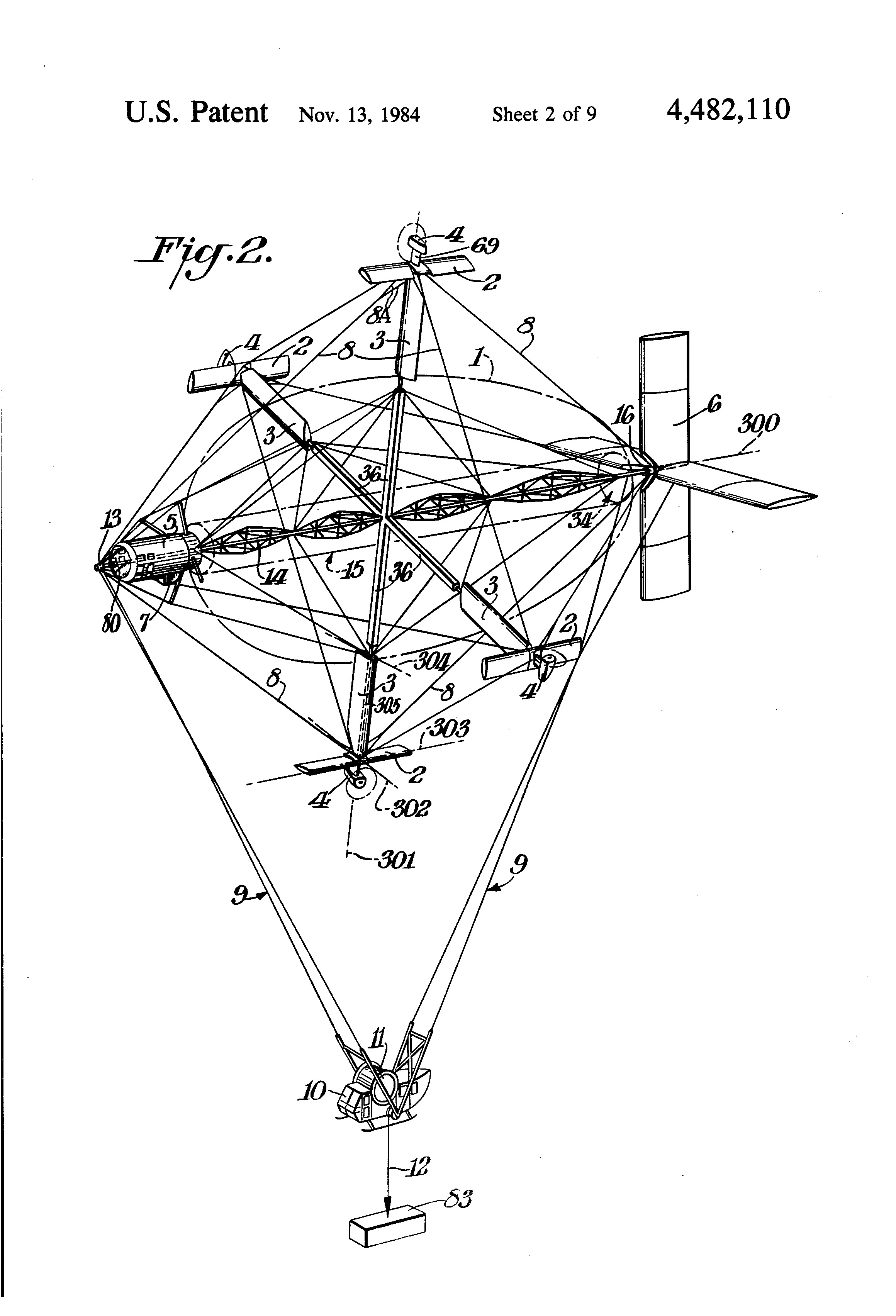
The patent drawing.
The patent drawing.

One greybeard in particular had a long career in America’s unending string of, “Build cool stuff to help us make bad guys more deader,” projects. He worked on stealth boats, airplanes with wings that flex, and all sorts of incredibly cool stuff. I forgot about the details of those, but the one that stuck with me was the Cyclocrane. It had a ton of issues, and as the final verdict from a DARPA higher-up with a military rank was that it, “looked dumb as shit” (or so the greybeard informed us).

A Cyclo-What?

The Cyclocrane was a hybrid airship. Part aerodynamic and part aerostatic, or more simply put, a big balloon with an airplane glued on.  Airships are great because they have a constant static lift, in nearly all cases this is buoyancy from a gas that is lighter than air. The ship doesn’t “weigh” anything, so the only energy that needs to be expended is the energy needed to move it through the air to wherever it needs to go. Airplanes are also great, but need to spend fuel to lift themselves off the ground as well as point in the right direction. Helicopters are cool because they make so much noise that the earth can’t stand to be near them, providing lift. Now, there’s a huge list of pros and cons for each and there’s certainly a reason we use airplanes and not dirigibles for most tasks. The Cyclocrane was designed to fit an interesting use case somewhere in the middle.

In the logging industry they often use helicopters to lift machinery in and out of remote areas. However, lifting two tons with a helicopter is not the most efficient way to go about it. Airplanes are way more efficient but there’s an obvious problem with that. They only reach their peak efficiency at the speed and direction for which their various aerodynamic surfaces have been tuned. Also worth noting that they’re fairly bad at hovering. It’s really hard to lift a basket of chainsaws out of the woods safely when the vehicle doing it is moving at 120mph.

The cyclocrane wanted all the efficiency of a dirigible with the maneuverability of a helicopter. It wanted to be able to use the effective lifting design of an airplane wing too. It wanted to have and eat three cakes. It nearly did.

A Spinning Balloon with Wings

Four wings stick out of a rotating balloon. The balloon provides half of the aerostatic lift needed to hold the plane and the cargo up in the air. The weight is tied to the static ends of the balloon and hang via cables below the construction. The clever part is the four equidistant wings sticking out at right angles from the center of the ship. At the tip of each wing is a construction made up of a propellor and a second wing. Using this array of aerofoils and engines it was possible for the cyclocrane to spin its core at 13 revolutions per minute. This produced an airspeed of 60 mph for the wings. Which resulted in a ton of lift when the wings were angled back and forth in a cyclical pattern. All the while, the ship remaining perfectly stationary.

sdsafd
There’s a really great description of its operation in the article this photo came from.


It really didn't like strong winds.
It really didn’t like strong winds.

Now the ship had lots of problems. It was too heavy. It needed bigger engines. It was slow. It looked goofy. It didn’t like strong winds. The biggest problem was a lack of funding. It’s possible that the cyclocrane could have changed a few industries if its designers had been able to keep testing it. In the end it had a mere seven hours of flying time logged with its only commercial contract before the money was gone.

However! There may be some opportunity for hackers here. If you want to make the quadcopter nerds feel a slight sting of jealousy, a cyclocrane is the project for you. A heavy lift robot that’s potentially more efficient than a balloon with fans on it is pretty neat. There’s a bit of reverse engineering to be done before a true performance statement can be made. If nothing else. It’s just a cool piece of aerospace history that reminds us of the comforting fact that we haven’t even come close to inventing it all yet.

If you’d like to learn more there’s a ton of information and pictures on one of the engineer’s website. Naturally wikipedia has a bit to say. There’s also decent documentary on youtube, viewable below.

Photo Credits: Rob Crimmins and Hal Denison

Choosing A ‘Scope: Examining Bandwidth

A few weeks ago I asked the Hackaday community for some help and advice in buying a new budget oscilloscope. Thank you very much to those of you who responded both here online and in person among my friends closer to home. I followed the overwhelming trend in the advice I received, and bought myself a Rigol DS1054z, an instrument with which I am very happy. It’s a nominally a 50 MHz scope, but there’s a software hack that can bring it up to 100 MHz. How fast can it go?

My trusty Cossor, its 2 MHz bandwidth as yet unverified.

This question became a mini scope-shootout after a conversation with my Hackaday colleague [Elliot] about measuring oscilloscope bandwidth, and then my fellow Oxford Hackspace members producing more than one scope for comparison. You know who you are, thank you. I found myself with ready access to several roughly equivalent models and one very high-end one in specification terms representing different strata of test equipment manufacture, and with the means to examine their performance.

Continue reading “Choosing A ‘Scope: Examining Bandwidth” →

Raspberry Pi, Send Me A Letter

The abundance of small networked boards running Linux — like the Raspberry Pi — is a boon for developers. It is easy enough to put a small cheap computer on the network. The fact that Linux has a lot of software is a double-edged sword. On the one hand, it is a good bet that anything you want to do has been done. On the other hand, some of the solutions are a bit large for a tiny embedded system.

Take, for example, e-mail. Historically, Linux hosts operate as mail transfer agents that can send and receive mail for all their users and possibly even relay mail to others. In today’s world, that’s usually overkill, but the capability is there. It is possible to install big mail transfer agents into a Raspberry Pi. The question is: should you?

What Do You Want?

The answer, of course, depends on what you want to do. If you have a dedicated board sending out text and maybe even files using an external mail server (like, say, Gmail), then the answer is no. You don’t need a piece of software listening for incoming connections, sorting through multiple users, and so on.

Luckily, there are some simple solutions if you know how to set up and configure them. The key is to avoid the big mail programs that do everything you don’t need.

Mail Front Ends

Let’s tackle sending mail first. If you try to grab the mailutils package, you’ll see it drags along a lot of stuff including mysql. Keep in mind, none of this will actually send mail. It just gives you some tools to get mail ready to send.

Luckily, the bsd-mailx package has a lot less overhead and will do the job. Look at the man page to see what options you have with mailx; you can do things like attach files, set a subject, and specify addresses.

It is a little difficult to set up for Gmail, though, thanks to Google’s security. You’ll need the certutil tool from the libnss3-tools package. You’ll need to create a certificate store, import Google’s certificate, and then set up a lot of options to mailx. I don’t suggest it. If you insist, though, you can find directions on the Web.

SSMTP

By default, programs like mailx and other Linux mail commands rely on a backend (often sendmail). Not only does that drag around too much overhead, it is also a full mail system, sending and receiving and relaying–overkill for our little Pi computers.

Luckily, SSMTP is available which only sends mail and is relatively lightweight. You need a configuration file to point it to your mail server. For Gmail, it would look like this:

#
# Config file for sSMTP sendmail
#
# The person who gets all mail for userids < 1000
# Make this empty to disable rewriting.
root=postmaster

# The place where the mail goes. The actual machine name is required no 
# MX records are consulted. Commonly mailhosts are named mail.domain.com
mailhub=smtp.gmail.com:587

# Where will the mail seem to come from?
rewriteDomain=yourdomain.com

# The full hostname
hostname=yourhostname
AuthUser=YourGmailUserID
AuthPass=YourGmailPassword
UseTLS=Yes
UseSTARTTLS=YES
# Are users allowed to set their own From: address?
# YES - Allow the user to specify their own From: address
# NO - Use the system generated From: address
FromLineOverride=YES

You can use a mail agent like mailx or you can just use ssmtp directly:

ssmtp someone@somewhere.com

Enter a message on the standard input and end it with a Control+D (standard end of file for Linux).

Google Authentication

There’s only one catch. If you are using Gmail, you’ll find that Google wants you to use stronger authentication. If you are using two-factor (that is, Google Authenticator), this isn’t going to work at all. You’ll need to generate an app password. Even if you aren’t, you will probably need to relax Google’s fear of spammers on your account. You need to turn on the “Access for less secure apps” setting. If you don’t want to do this on your primary e-mail account, considering making an account that you only use for sending data from the Pi.

Sending Files

Depending on the mail software you use, there are a few ways you can attach a file. However, the mpack program makes it very easy:

mpack -a -s 'Data File' datafile.csv me@hackaday.com

The above command will send datafile.csv as an attachment with the subject “Data File.” Pretty simple.

Receiving Mail

What if you want to reverse the process and receive mail on the Pi? There is a program called fetchmail that can grab e-mails from an IMAP or POP3 server. It is possible to make it only read the first unread message and send it to a script or program of your choosing.

You have to build a configuration file (or use the fetchmailconf program to build it). For example, here’s a simple .fetchmailrc file:

poll imap.gmail.com
protocol IMAP
user "user@gmail.com" with password "yourpassword" mda "/home/pi/mailscript.sh"
folder 'INBOX'
fetchlimit 1
keep
ssl

You can leave the “keep” line out if you don’t mind fetchmail deleting the mail after processing. The file should be in your home directory (unless you specify with the -f option) and it needs to not be readable and writable by other users (e.g., chmod 600 .fetchmailrc). According to the fetchmail FAQ, there are some issues with Gmail, so you might want to consider some of the suggestions provided. However, for simple tasks like this, you should be able to work it all out.

In particular, the mailscript.sh file is where you can process the e-mail. You might, for example, look for certain keyword commands and take some action (perhaps replying using ssmtp).

Special Delivery

You might not think of the Raspberry Pi as an e-mail machine. However, the fact that it is a pretty vanilla Linux setup means you can use all sorts of interesting tools meant for bigger computers. You just have to know they exist.