Breaking Into A Secure Facility: STM32 Flash

In a perfect world, everything would be open source. Our current world, on the other hand, has a lot of malicious actors and people willing to exploit trade secrets if given the opportunity, so chip manufacturers take a lot of measures to protect their customers’ products’ firmware. These methods aren’t perfect, though, as [zapb] shows while taking a deeper look into an STM microcontroller.

The STM32F0 and F1 chips rely on various methods of protecting their firmware. The F0 has its debug interface permanently switched off, but the F1 still allows users access to this interface. It uses flash memory read-out protection instead, which has its own set of vulnerabilities. By generating exceptions and exploiting the intended functions of the chip during those exceptions, memory values can be read out of the processor despite the memory read-out protection.

This is a very detailed breakdown of this specific attack on theses controllers, but it isn’t “perfect”. It requires physical access to the debug interface, plus [zapb] was only able to extract about 94% of the internal memory. That being said, while it would be in STM’s best interests to fix the issue, it’s not the worst attack we’ve ever seen on a piece of hardware.

ESP32-S2 Samples Show Up

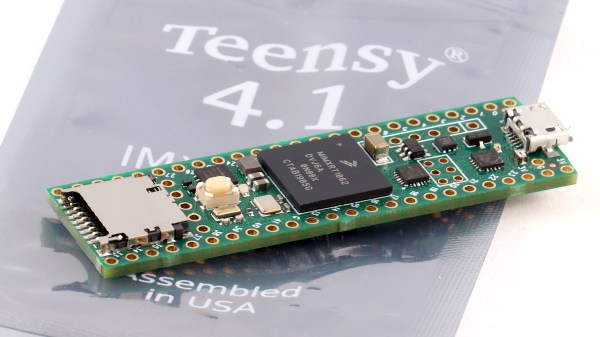
The ESP8266 is about six years old now and the ESP32 is getting more mainstream every day. Unsurprisingly, Espressif is developing even newer product and the ESP32-S2 was in the hands of some beta testers last year. Now it is finally landing as “final silicon” samples in people’s hands. [Unexpected Maker] got a few and a prototype development board for the chip and shared his findings in a recent video.

The ESP32-S2 has a single core LX7 running at 240 MHz along with a RISC-V-based coprocessor. Onboard is 320K of RAM and 128K of ROM. You might notice this is less than the ESP32. However, the device can support up to 128MB of external RAM and up to 1GB of external flash. It also supports USB, although the prototype module appears to have an external USB chip on it.

Continue reading “ESP32-S2 Samples Show Up”

Bee Counter Will Have You Up To Your Nectar In Hive Data

While we admit that free honey sounds pretty good, beekeeping is not some set-it-and-forget-it hobby where you can just put bees in a box and come back in a month to collect the goods. With the world’s bee population in decline, it’s more important than ever to monitor the health of hives.

One way to do that is to count the bees as they leave and reenter the hive. You can use the data to determine how many workers are working, or to compare activity between multiple hives. If you notice the bees are gone for longer and longer periods, it’s probably because their nearby nectar sources are dwindling and they have to travel farther to find flowers.

This open-source bee counter built by [hydronics2] is designed to fit the opening of a standard hive. The bees can only buzz themselves back in by flying through one of 24 little IR break-beam gates. Our favorite thing about this build is the way [hydronics2] created the individual gates by sandwiching two boards together with headers as spacers. It’s such a simple and perfect solution.

It’s also pretty cool that the board is designed to be compatible with any Feather or ItsyBitsy board, so there are a lot of options for data handling. Check out the brief demo we planted after the break, and stick around for the build video. If you’d prefer a more hands-off approach, try computer vision.

Continue reading “Bee Counter Will Have You Up To Your Nectar In Hive Data”

Google’s Pigweed For ARM Development Is A Nice Surprise

Setting up an environment for Embedded Development was traditionally a pain and so vendors provide integrated development environments to help bridge the gap. Google has open-sourced their version of an embedded targeted environment designated as embedded-targeted libraries which they trademarked Pigweed.

Google trademarked Pigweed with the U.S. Patent and Trademark Office in February and it popped up on the Google Open Source Blog along with some details.

The repository contains what Google is calling modules but taking a better look reveals that it a little more than that. Packaged in a Python Virtual Environment is a number of tools including an ARM compiler, the clang-format tool and Python 3.8 interpreter which runs more than a few things. The modules that come with Pigweed assist developers by running micro-automations such as the pw_watch module that monitors files for change and triggers a build, test and even flash and debug on hardware. There is also a module that allows pre-submit checks such as linting and formatting.

Google still does not consider this offering production ready though from what we have seen so far, it is a great place for many to start experimenting with for their embedded development automation needs. Anyone tried it out yet?

If you have been inspired with the amazing powers of automation and want to dive in yourself, have a look at Software Development in BASH and Continuous Integration with Python.


Hearing Plants Giggle Is Just As Creepy As You Think

While best known for Charlie and the Chocolate Factory, Roald Dahl wrote quite a few similarly oddball stories in his time. One of them, The Sound Machine, is about a device that allowed the user to hear the anguished screams of trees as they were cut down. Sounds kind of weird to us, but [Roni Bandini] liked the idea so much he decided to build his own version.

Now to be fair, the device doesn’t only scream in pain. In fact, most of the time it should be emitting laughs and happy noises. Using a moisture sensor driven into the soil of a plant’s pot, the device uses these audio cues to tell you the relative health of your leafy friend. So assuming you’ve got any sort of green thumb at all, things should be fine.

But once the soil gets too dry and the device determines the plant is in “pain”, things take a turn for the worse. We suppose it doesn’t technically scream out so much as grunt like a zombie, but it’s still not a noise we’d want to hear while walking through the house at night. Luckily, it seems you need to hit the button on the front of the 3D printed enclosure to get it to play the appropriate sound track from its DFPlayer module.

Personally we’d rather build something that makes sure the plants are being taken care of automatically than a gadget that cries out in anguish to remind us that we don’t know what we’re doing. But hey, everyone gets inspired in their own way.

Continue reading “Hearing Plants Giggle Is Just As Creepy As You Think”

Open-Source ARM Development Simplified

The ARM series of processors are an industry standard of sorts for a vast array of applications. Virtually anything requiring good power or heat management, or any embedded system which needs more computing power than an 8-bit microcontroller is a place where an ARM is likely found. While they do appear in various personal computers and laptops, [Pieter] felt that their documentation for embedded processors wasn’t quite as straightforward as it could be and created this development board which will hopefully help newbies to ARM learn the environment more easily.

Called the PX-HER0, it’s an ARM development board with an STM32 at its core and a small screen built in. The real work went in to the documentation for this board, though. Since it’s supposed to be a way to become more proficient in the platform, [Pieter] has gone to great lengths to make sure that all the hardware, software, and documentation are easily accessible. It also comes with the Command Line Interpreter (CLI) App which allows a user to operate the device in a Unix-like environment. The Arduino IDE is also available for use with some PX-HER0-specific examples.

[Pieter] has been around before, too. The CLI is based on work he did previously which gave an Arduino a Unix-like shell as well. Moving that to the STM32 is a useful tool to have for this board, and as a bonus everything is open source and available on his site including the hardware schematics and code.

A Smart Controller For Your DIY UV Cure Box

Resin 3D printers are finally cheap enough that peons like us can finally buy them without skipping too many meals, and what means we’re starting to see more and more of them in the hands of hackers. But to get good results you’ll also want a machine to cure the prints with UV light; an added expense compared to more traditional FDM printers. Of course you could always build one yourself to try and save some money.

An earlier prototype build of the interface.

To that end, [sjm4306] is working on a very impressive controller for all your homebrew UV curing needs. The device is designed to work with cheap UV strip lights that can easily be sourced online, and all you need to bring to the table is a suitable enclosure to install them in. Here he’s using a metal paint can with a lid to keep from burning his eyes out, but we imagine the good readers of Hackaday could come up with something slightly more substantial while still taking the necessary precautions to not cook the only set of eyes you’ll ever have.

Of course, the enclosure isn’t what this project is really about. The focus here is on a general purpose controller, and it looks like [sjm4306] has really gone the extra mile with this one. Using a common OLED display module, the controller provides a very concise and professional graphical user interface for setting parameters such as light intensity and cure time. While the part is cooking, there’s even a nice little progress bar which makes it easy to see how much time is left even if you’re across the room.

At this point we’ve seen a number of hacked together UV cure boxes, but many of them skip the controller and just run the lights full time. That’s fine for a quick and dirty build, but we think a controller like this one could help turn a simple hack into a proper tool.

Continue reading “A Smart Controller For Your DIY UV Cure Box”