New Part Day: Ooh, The Things You Can Do With A CLUE

There’s a new development board in town from Adafruit, and it’s called the CLUE. This tiny board can be programmed in Arduino or CircuitPython, and it is absolutely stuffed with sensors and functionality, including Bluetooth. It’s essentially a BBC Micro:bit with more sensors, a screen, and a much beefier processor. Sound interesting? Let’s get out the magnifying glass and take a look, shall we?

(Editor’s note: Adafruit ran out of the first alpha run of the hardware. While we didn’t run into any bugs, the next versions will presumably have even fewer, but will also cost $40 instead of $30. That said, they’re giving out 3,000 of them to attendants of PyCon in April, so you might also get your hands on one that way.)

And Bit:Bot takes the checkered flag! Image via Seeed Studio

First and foremost, there’s the form factor — if that bottom edge looks familiar, that’s because the CLUE is designed to work with micro:bit robot kits and anything else with that edge connector, like the CRICKIT for micro:bit, or the Bit:Bot from Seeed Studios. This is big news for the micro:bit ecosystem, and not just because the CLUE brings tons of sensors and a screen to the scene, although a 1.3″ screen at 240×240 resolution is nothing to sneeze at.

The main brain is a Nordic nRF52840, so you can pair it to your phone and stream your collected data. Or, use it to get two CLUE boards talking to each other. This is a major upgrade from the micro:bit’s nRF51822 — the CLUE is four times faster, has four times the flash memory, and has sixteen times as much RAM. We hope someone can find a way to make them into short-range messaging machines with Q10 keyboards.

Continue reading “New Part Day: Ooh, The Things You Can Do With A CLUE”

DJ Hero Controller Gets A New Gig

Fans of the Guitar Hero etc. franchise may be interested to hear about Spin Rhythm XD, a similar rhythm game which uses a jog wheel for much of the chase-down-the-notes action. Although it can be played with a keyboard and mouse, the ideal input is a professional DJ MIDI controller — imagine two capacitive “turntables” the size of 45s, and a lot of buttons, knobs, and sliders.

Like most of us, [Dave] doesn’t have one of those. But what he does have is an old DJ Hero controller made for the Wii. It’s a lot like the big boy version of a DJ MIDI controller as far as the inputs go, except that the turntable isn’t capacitive.

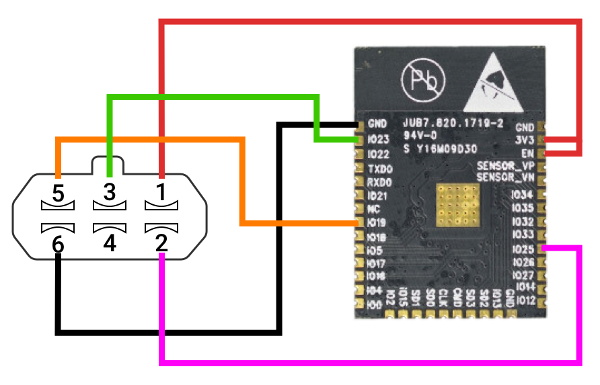
Since the Wii brain is just sending I²C over a funny-looking connector, [Dave] was able to replace the Wiimote with a Teensy LC, and write new firmware for the controller inputs using a breakout board built for another project.

[Dave] tried to use as many of the DJ Hero controller’s inputs as he could, so in addition to mapping the wheel and wheel buttons to the main game controls, he wired up the joystick, effects knob, and buttons to navigate through the game menus. The game’s designers had the forethought to map these to keyboard keys, so it was pretty easy to do. He can even use dual turntables and mix or isolate them with the crossfader. Slide past the break to check out the build video, and stick around for a full-length song demo.

Are these games a little too frantic for you? Turn those ‘tables into an Etch-A-Sketch instead.

Continue reading “DJ Hero Controller Gets A New Gig”

The TMS1000: The First Commercially Available Microcontroller

We use a microcontroller without a second thought, in applications where once we might have resorted to a brace of 74 logic chips. But how many of us have spared a thought for how the microcontroller evolved? It’s time to go back a few decades to look at the first commercially available microcontroller, the Texas Instruments TMS1000.

Imagine A World Without Microcontrollers

The Texas Instruments Speak And Spell from 1978 was a typical use for the TMS1000.
The Texas Instruments Speak & Spell from 1978 was a typical use for the TMS1000. FozzTexx (CC-SA 4.0)

It’s fair to say that without microcontrollers, many of the projects we feature on Hackaday would never be made. Those of us who remember the days before widely available and easy-to-program microcontrollers will tell you that computer control of a small hardware project was certainly possible, but instead of dropping in a single chip it would have involved constructing an entire computer system. I remember Z80 systems on stripboard, with the Z80 itself alongside an EPROM, RAM chips, 74-series decoder logic, and peripheral chips such as the 6402 UART or the 8255 I/O port. Flashing an LED or keeping an eye on a microswitch or two became a major undertaking in both construction and cost, so we’d only go to those lengths if the application really demanded it. This changed for me in the early 1990s when the first affordable microcontrollers with on-board EEPROM came to market, but by then these chips had already been with us for a couple of decades.

It seems strange to modern ears, but for an engineer around 1970 a desktop calculator was a more exciting prospect than a desktop computer. Yet many of the first microcomputers were designed with calculators in mind, as was for example the Intel 4004. Calculator manufacturers each drove advances in processor silicon, and at Texas Instruments this led to the first all-in-one single-chip microcontrollers being developed in 1971 as pre-programmed CPUs designed to provide a calculator on a chip. It would take a few more years until 1974 before they produced the TMS1000, a single-chip microcontroller intended for general purpose use, and the first such part to go on sale. Continue reading “The TMS1000: The First Commercially Available Microcontroller”

Sherbet Custom Game Pad Is Smooth And Sweet

When [Billiam]’s beloved Logitech G13 game pad went to that great spectate room in the sky, he decided to pay homage by designing a custom, more ergonomic replacement from the desk up. Grab a spoon and dig into the story of [Billiam]’s journey toward Sherbet, because it’s a sweet ride.

Here’s the scoop: like a lot of DIY game pads and keyboards, Sherbet is based on the Teensy. We often see the micro USB coming straight off the Teensy, especially in clear acrylic builds, but [Billiam] added a USB breakout board so there’s no direct stress on the Teensy itself.

One of [Billiam]’s design challenges comes from the game pad placement — he has a tall desk and uses a keyboard tray, so it has to fit the space and leave enough room for his hand. Fortunately, there are low-profile mechanical switches out there, although the keycap options are strongly limited. We love that [Billiam] embedded a tiny ceramic bearing into one of them to use as a homing bump, because that’s a great idea.

If you want to take a crack at this project, [Billiam] has all the goodies laid out. [Billiam] wanted to use QMK firmware, but they didn’t have joystick support yet, so he’s got an Arduino sketch running in the meantime.

We love a good custom game pad around here, especially if they can reprogram themselves.

Sort The Rainbow With An Algorithm Machine

When you’re trying to learn how an algorithm works, it’s not always easy to visualize what’s going on. Well, except for maybe binary sort, thanks to the phone book. Professor [thatguyer] is a computer science teacher who wanted a way to help his students visualize the process of algorithms and at the same time, get a grasp on their resource cost.

The Algorithm Machine can demonstrate 8 different search and sort algorithms using two 100-count strips of RGB LEDs — one to represent an array of integers, and one to create indicators pointing to the integers under scrutiny.

This functional beauty is totally interactive, too. Once the user chooses the values and the algorithm and starts the process, they can speed it up or slow it down with the rotary encoder, or pause to discuss and start again with that slick triangular play button. We particularly like the control button wiring harness [thatguyer] created to keep everything neat and hot-swappable.

This iteration uses 3D printed face plates to give the LEDs shape, but in an early version, [thatguyer] cut and sanded a ton of circles out of brass tubing, and folded as many triangles cut from disposable baking pans. The world could use more teachers as committed as [thatguyer]. This really seems like a handy teaching aid for these concepts, and we wish we’d had one in class to play around with. Here’s your algorithm for watching the demo: click break, press play, enjoy.

If you’re still confused, there are other ways to understand algorithms through visualization. Failing all that, just watch these Hungarian folk dancers work out various algo-rhythms.

Continue reading “Sort The Rainbow With An Algorithm Machine”

This PIC Is A Squarewave Generator

When we use a microcontroller to flip a few GPIOs or talk SPI to a peripheral chip, we are often overlooking that it will usually contain an array of built-in peripherals that were once the preserve of extra hardware. Analogue ports, timers, UARTs, and clock generators, to name just a few. [Giovanni Bernardo] has been experimenting with one of these, the internal frequency synthesiser on many PIC microcontrollers, and he’s  produced a handy square wave generator for which he’s placed code on GitHub and produced a write-up (Italian language, Google translate link).

The board used is a PIC16F375 Curiosity Nano, and code takes input from a rotary encoder to set the frequency, with a button to select different step sizes and an alphanumeric LCD display to show the current settings. Frequencies from 1 Hz to 15 MHz are possible, with a clever switch between two of the PICs internal clocks to be used as the reference frequency. Stability depends upon whatever source the PIC uses for its own clock, and while we suspect that will be enough for most users it’s not inconceivable that the PIC could be clocked from a GPS-disciplined source or similar were there a requirement for it.

There are plenty of ways to generate square waves from a microcontroller. Most projects use waveform generator ICs.

Old Rotary Phone Gets Called Into Action

The more glass we punch with our fingertips, the more we miss fun physical interfaces like the rotary phone. Sure, they took forever to dial, and you did not want to be one of those kids stuck with one during the transition to DTMF, especially if you were trying to be the 9th caller to a radio station, but the solidly electromechanical experience of it all was just cool, okay? The sound and the heft made them seem so adult.

[Tal O] gets it. He’s all but finished bringing this old girl into the 21st century without giving anything away on her surface. Inside are some things you’d expect, like a SIM800 GSM module for the telephony part, and an ESP32 to count the pulses from the dialer and communicate between it and the GSM module. But it also has a few things we haven’t seen before. The entire journey is outlined in a five-part video series, and we’ve got part one dialed in for you after the break.

Although [Tal] got the ringer working to prove it could be done, he didn’t want to have a separate 12V circuit just to run the bells. Also, the bells and their electromagnets take up a lot of space, so he compromised with an mp3 of a rotary ringer. [Tal] also wanted a way to have dialed-number feedback without cutting up the phone to add a screen, so he found a text-to-speech library and made the phone speak each number aloud as soon as it’s dialed. It uses the same internal speaker as the ringer, but we think it would be neat if the feedback came through the handset speaker.

If [Tal] is looking for another modern convenience to add to this phone, how about speed dial?

Continue reading “Old Rotary Phone Gets Called Into Action”