NES On RISC-V

RISC architecture might change the world, but it runs an NES emulator right now. That’s thanks to MaixPy, the new MicroPython for the K210, the recently released RISC-V microcontroller that’s making waves in the community. [Robot Zero One] has the tutorial and [Other Dave] of EEVBlog has a video of the thing in action.

The Sipeed K210 came to the English-speaking world in the form of a weird pre-order thing on Taobao last October promising a dual-core RISC-V CPU for just a few bucks. Seeed, the same people who brought the ESP8266 into mass distribution quickly latched on and started selling modules last February. Now, Seeed is looking at a Raspberry Pi hat using a Sipeed module, and the future for RISC-V microcontrollers is looking great. Now someone just needs to write some software. That’s exactly what the engineers at Sipeed did, and somewhere in one of the released binaries there’s an NES emulator.

The parallel to the question of if something can run Doom is if something can run an NES emulator, so with the release of MicroPython support for the K210, the obvious thing to do is to release an NES emulator. The hardware required is a Maix M1w Dock, available from Seeed and Banggood.

The new support for MicroPython is great, and an NES emulator is amazing, but this should really come as no surprise. From our first hands on with the first Open Source microcontroller two years ago, RISC-V was obviously faster. Now it’s cheap, and we can’t wait to see what’ll come next.

Continue reading “NES On RISC-V”

ESP8266 Gets Its Game On With Open Source Engine

This is likely not to come as much of a shock to you, but the ESP8266 is pretty popular. At this point, we’re more surprised when a project that hits the tip line doesn’t utilize this incredibly cheap WiFi-enabled microcontroller. If you’re making a gadget that needs to connect to the Internet, there’s a good chance some member of the ESP family is going to be a good choice. But is it a one-trick MCU?

ESP Little Game Engine Logo

Well, judging by software frameworks like the “Little Game Engine” created by [Igor], it looks like the ESP is expanding its reach into offline projects as well. While it might not turn the ESP8266 into a next-gen gaming powerhouse, we’ve got to admit that the demos shown off so far are pretty impressive. When paired with a couple of buttons and a TFT display such as the ILI9341, the ESP could make for a particularly pocket-friendly game system.

The game engine that [Igor] has developed provides the programmer with a virtual screen resolution of 128×128, a background layer, and 32 sprites which offer built-in tricks like collision detection and rotation. All while running at a respectable 20 frames per second. This environment is ideal for the sort of 2D scrolling games that dominated the 8 and 16-bit era of gaming, and as seen in the video after the break, it can even pull off a fairly decent clone of “Flappy Bird”.

In addition, [Igor] created an online emulator and compiler which allows you to develop games using his engine right in your web browser. You can load up a selection of example programs and execute them to see what the engine is capable of, then try your hand at developing your own game before ever having to put the hardware together. Incidentally, the performance of this online development environment is fantastic; with even the fairly complex “Flappy Bird” example code compiling and starting in the emulator nearly instantaneously.

This isn’t the first handheld game we’ve seen powered by the ESP8266, but it would be fair to say this one is a generational leap over its predecessors. Of course, if you really want to start throwing around some pixels, you might want to make the leap to the ESP32; which is the heart of the incredibly awesome (and tiny) PocketSprite.

Continue reading “ESP8266 Gets Its Game On With Open Source Engine”

RGB Word Clock Doesn’t Skimp On The Features

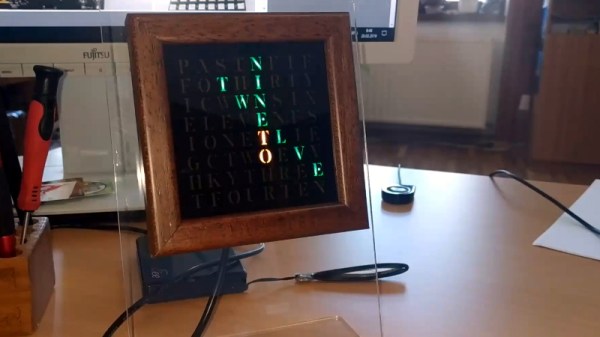
Like most pieces of technology, word clocks seem to be getting better and better every year. As hackers get their hands on better microcontrollers and more capable LED controllers, these builds not only look more polished, but get improved features and functions. Luckily for us, the rise of these advanced modular components means they’re getting easier to build too. For an example of these parallel traits, look no further than VERBIS by [Andrei Erdei].

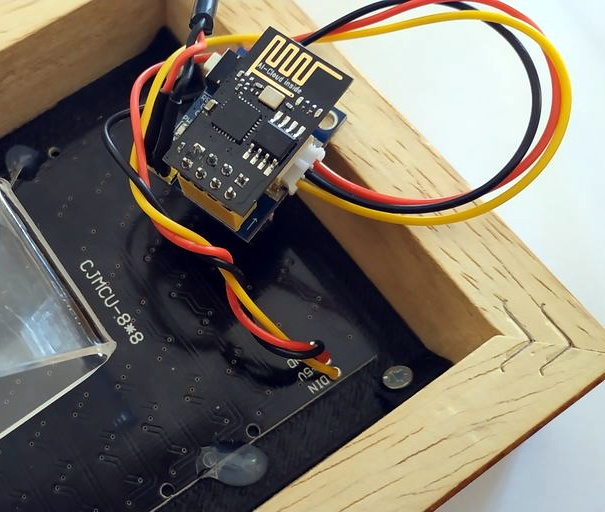
This colorful word clock is powered by an ESP8266, a 8×8 RGB LED matrix, and a WS2812 RGB LED controller module. [Andrei] used the diminutive ESP-01 which can plug right into the LED controller, and just needs a 3.3 VDC regulator board to complete the very compact electronics package.

To keep the LEDs from interfering with each other, [Andrei] has designed a 3D printed grid which fits over the matrix board. On top of that goes a piece of paper that has the letters printed on it. He mentions that he was able to get good results printing this “stencil” out on an inkjet printer by simply running the same piece of paper through a few times; picking up more black ink each time it went through. Judging by the sharp characters seen in the video after the break, the trick worked well.

With his hardware put together, [Andrei] turned his attention to the software. We really think the project shines here, as his clock not only supports NTP for automatically setting the time over the Internet, but offers a full web interface to control various functions such as the LED colors. You can even change the NTP server and network configuration right from the UI, which is a nice touch compared to just hard coding the values into the code. Even if you don’t use the same hardware, the open source control software is definitely something you should look into if you’re building your own word clock.

We recently covered another easy to build word clock that used an LED matrix and not a whole lot else, but it was quite tiny. This build is a much more reasonable size for a desk, but you’ll probably need to break out the laser cutter if you want to get much bigger.

Continue reading “RGB Word Clock Doesn’t Skimp On The Features”

The Heat Is On With This ESP8266 Controlled Sauna

We’ll be perfectly honest: sitting inside a heated box sounds just a bit too much like torture for our tastes. But if we did somehow find ourselves in possession of a fancy new sauna, we’d more than likely follow in the footsteps of [Al Betschart] and make the thing controllable with the ESP8266. After all, if you’re going to be cooked alive, you might as well do it on your own terms.

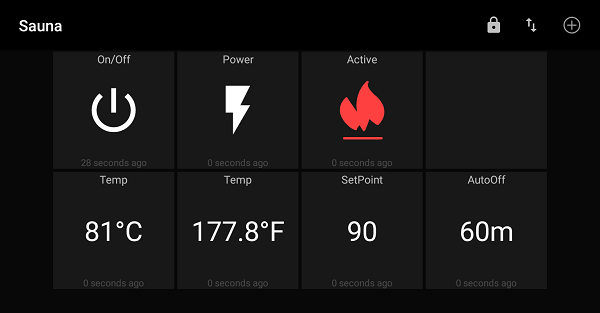
The sauna itself was purchased as a kit, and included an electric heater controlled by a thermostat. As explained in his detailed documentation, [Al] integrated a Sonoff TH16 into the original heater circuit so he could control power to the coils remotely. The TH16 also includes support for a thermal sensor, which allowed him to get a reading on the sauna’s internal temperature. The new electronics were mounted in a weather-proof box on the back of the sauna, complete with an external WiFi antenna to help get a good signal back to the house.

At this point the project could technically be done if all you wanted was remote control, but [Al] wanted to create a replacement firmware for the Sonoff that was specifically geared towards the sauna. So he came up with some code that uses MQTT to connect the heater to his home automation system, and allows configuring things like the maximum temperature and how long the sauna will run before turning itself off.

Interestingly, the company who makes these saunas thought the work [Al] did to integrate their product into his home automation system was so impressive they actually interviewed him about it and put it up on their site for others who might be inspired by his work. We’ve covered a lot of hacks to consumer devices here at Hackaday, and it’s exceedingly rare for a company to be so supportive of customers fiddling around with their products (especially in a case like this where there’s a real chance of burning your house down), so credit where credit is due.

The last time we brought you a sauna hack it was quite literally in a van down by the river, so the addition of an ESP8266 certainly brings this more into our comfort zone. Figuratively, if not literally.

[Thanks to Jon for the tip.]

Jaromir Sukuba: The Supercon 2018 Badge Firmware

If you missed it, the Hackaday Supercon 2018 badge was a complete retro-minicomputer with a screen, keyboard, memory, speaker, and expansion ports that would make a TRS-80 blush. Only instead of taking up half of your desk, everyone at the conference had one around their neck, when they weren’t soldering to it, that is.

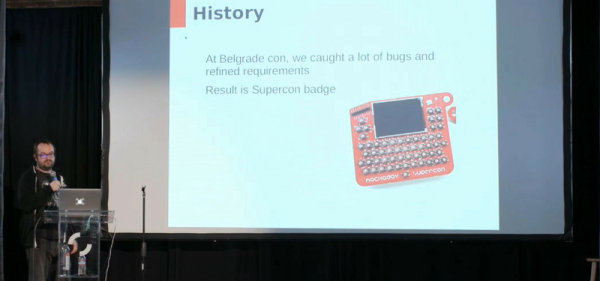
The killer feature of the badge was its accessibility and hackability — and a large part of that was due to the onboard BASIC interpreter. And that’s where Jaromir comes in. Once Voja Antonic had finalized the design of the badge hardware for our conference in Belgrade in the spring of 2018, as Jaromir puts it, “all we needed was a little bit of programming”. That would of course take three months. The badge was battle-tested in Belgrade, and various feature requests, speed ups, and bugfixes were implemented (during the con!) by Jaromir and others.

Firmware work proceeded over the summer. Ziggurat29 helped out greatly by finding ways to speed up the badge’s BASIC interpreter (that story is told on his UBASIC and the Need for Speed project page) and rolled into the code base by Jaromir. More bugs were fixed, keywords were added, and the three-month project grew to more like nine. The result: the badge was in great shape for the Supercon in the fall.

Jaromir’s talk about the badge is supremely short, so if you’re interested in hacking a retrocomputer into a PIC, or if you’ve got a badge and you still want to dig deeper into it, you should really give it a look. We don’t think that anyone fully exploited the CP/M machine emulator that lies inside — there’s tons of software written for that machine that is just begging to be run after all these years — but we’re pretty sure nearly everyone got at least into the basement in Zork. Dive in!

Continue reading “Jaromir Sukuba: The Supercon 2018 Badge Firmware”

Programmable Ruler Keeps 1970’s Computing Alive

A ruler seems like a pretty simple device; just a nice straight piece of material with some marks on it. There are some improvements out there to the basic design, like making it out of something flexible or printing a few useful crib notes and formulas on it so you have a handy reference. But for the most part, we can all agree that ruler technology has pretty much plateaued.

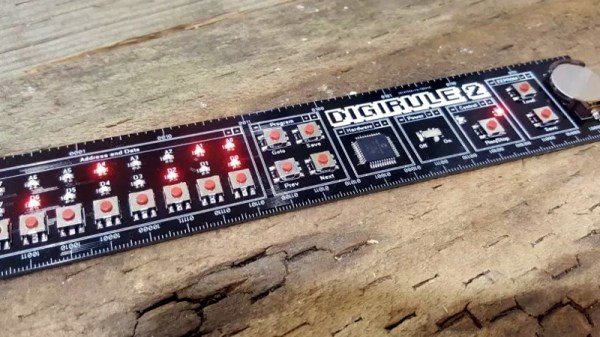
Well, not if [Brad] has anything to say about it. His latest creation, the Digirule2, is essentially an 8-bit computer like those of the 1970’s that just so happens to be a functional ruler as well. Forget lugging out the Altair 8800 next time you’re in the mood for some old school software development, now you can get the same experience with a piece of hardware that lives in your pencil cup.

Even if you’ve never commanded one of the blinkenlight behemoths that inspired the Digirule2, this is an excellent way to get some hands-on experience with early computer technology. Available for about the cost of a large pizza on Tindie, it represents one of the easiest and most cost-effective ways to tell your friends that as a matter of fact you have programmed a computer in binary.

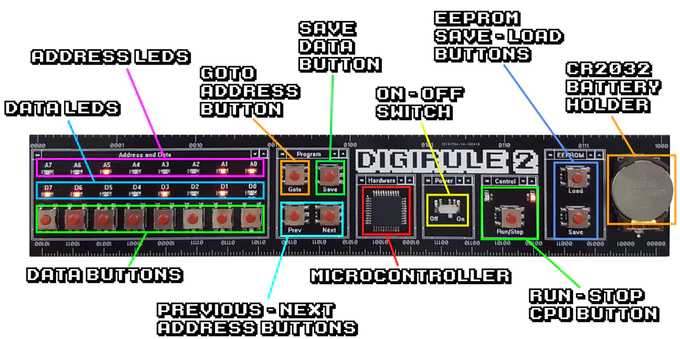
The Digirule2 is powered by a Microchip PIC18F43K20, and is programmed by punching binary in one byte at a time with a bank of eight tactile switches. To make things a little easier, programs can be saved to the internal EEPROM and loaded back up just as easily thanks to the handy buttons next to the power switch. Now all you’ve got to do is figure out what all those blinking LEDs mean, and you’ll be in business.

The original Digirule was a logic gate simulator that we first covered back in 2015. We’re always happy to see projects grow and evolve over time, and think this new retro-computer themed variant is going to be quite popular with those who still love toggle switches and blinking lights.

Continue reading “Programmable Ruler Keeps 1970’s Computing Alive”

Live Hacking And A MIDI Keytar

We can’t think of where you’d buy a new, cheap, MIDI keytar that’s just a keyboard and a handle with some pitch and mod wheels or ribbon controllers. This is a format that died in the 90s or thereabouts. Yes, the Rock Band controller exists, but my point stands. In fact, the closest you can get to a cheap, simple MIDI keytar is the Alesis Vortex Wireless 2 Keytar, but the buttons on the handle don’t make any sense. [marcan] of Wii and Kinect hacking fame took note. (YouTube, embedded below.)

Reverse engineering is a research project, and all research projects begin with looking at the docs. When it comes to consumer electronics, the best resource is the documents a company is required to submit to the FCC (shout out to FCC.io), which gave [marcan] the user manual, and photos of the guts of the keytar. The ‘system update download’ files are living on the Alesis servers, and that’s really all you need to reverse engineer a keytar.

The first step is extracting the actual device firmware from whatever software package appears on the desktop when you download the software update. This is a simple job for 7zip, and after looking at a binary dump of the firmware, [marcan] discovered this was for an STM chip. With the datasheet of the chip, [marcan] got the entry point for the firmware, some values, and the real hardware hacking began. All of this was done with IDA.

This is a five-hour hacking session of cross-referencing the MIDI spec and a microcontroller built thirty years after this spec was developed. It’s an amazing bit of work just to find the bit of code than handled the buttons on the keytar grip, and it gets even better when the patched firmware is uploaded. If you want to ‘learn hacking’, as so many submitters on our tip line want to do, this is what you need to watch. Thanks [hmn] for the tip.

Continue reading “Live Hacking And A MIDI Keytar”