Software USB On The ESP8266

A while back, [cnlohr] needed a USB keyboard and mouse. His box ‘o junk didn’t hold this particular treasure, and instead of hopping on Amazon like a normal geek or venturing into the outside realm on a mid-level ‘store’ quest like a normal person, [cnlohr] decided to turn an ESP8266 into a USB keyboard and mouse. How hard could it be? The ESP doesn’t support USB, but bitbanging hasn’t stopped him before. The end result is a USB stack running on the ESP8266 WiFI module.

[cnlohr] has been working for about a month on this USB implementation for the ESP, beginning with a logic analyzer, Wireshark, Xtensa assembly, and a lot of iteration. The end result of this hardware hacking is a board based on the ESP8285 – an 8286 with integrated Flash – that fits snugly inside a USB socket.

This tiny board emulates low-speed USB (1.5 Mbps), and isn’t really fast enough for storage, serial, or any of the fancier things USB does, but it is good enough for a keyboard and mouse. Right now, [cnlohr]’s ESP USB device is hosting a webpage, and by loading this webpage on his phone, he has a virtual keyboard and mouse on a handheld touchscreen.

If you’re keeping track, [cnlohr] has now brought Ethernet and USB to a tiny microcontroller that can be bought for a few bucks through the usual online outlets. If you’d like to build your own ESP USB stick, all the files are over on the Gits.

Thanks [lageos] for the tip.
Continue reading “Software USB On The ESP8266”

Filtering Noisy Data With An Arduino

One of the first frustrating situations a beginning microcontroller programmer will come across is the issue of debouncing switches. Microcontrollers are faster than switches, and the switch has yet to be built that can change state in zero time like they can on paper. This hurdle is easily overcome, but soon we are all faced with another issue: filtering noise from an analog signal. Luckily [Paul Martinsen] has put together a primer of three different ways to use an Arduino to filter signals.

The first (and fastest, simplest, etc.) way to filter an analog signal is to sample a bunch of times and then average all of the samples together. This will eliminate most outliers and chatter without losing much of the information. From there, the tutorial moves on to programming a running average to help increase the sample time (but consume much more memory). Finally, [Paul] takes a look at exponential filters, which are recursive, use less memory, and can be tweaked to respond to changes in different ways.

[Paul] discusses all of the perks and downsides of each method and provides examples for each as well. It’s worth checking out, whether you’re a seasoned veteran who might glean some nuance or you’re a beginner who hasn’t even encountered this problem yet. And if you’re still working on debouncing a digital input, we have you covered there, too.

[Ken Shirriff] Demystifies BeagleBone I/O

If you have ever spent a while delving into the bare metal of talking to the I/O pins on a contemporary microprocessor or microcontroller you will know that it is not always an exercise for the faint-hearted. A host of different functions can be multiplexed behind a physical pin, and once you are looking at the hardware through the cloak of an operating system your careful timing can be derailed in an instant. For these reasons most of us will take advantage of other people’s work and use the abstraction provided by a library or a virtual filesystem path.

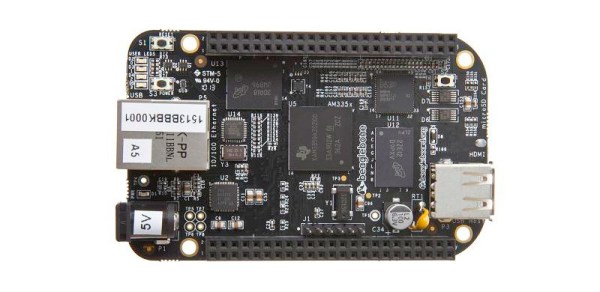
If you have ever been curious enough to peer under the hood of your board’s I/O then you may find [Ken Shirriff]’s latest blog post in which he explores the software stack behind the pins on a BeagleBone Black to be of interest. Though its specifics are those of one device, the points it makes have relevance to many other similar boards.

He first takes a look at the simplest way to access a Beagle Bone’s I/O lines, through virtual filesystem paths. He then explains why relying so heavily on the operating system in this way causes significant timing issues, and goes on to explore the physical registers that lie behind the pins. He then discusses the multiplexing of different pin functions before explaining the role of the Linux device tree in keeping operating system in touch with hardware.

For some Hackaday readers this will all be old news, but it’s safe to say that many users of boards like the BeagleBone Black will never have taken a look beyond the safely abstracted ways to use the I/O pins. This piece should therefore provide an interesting education to the chip-hardware novice, and should probably still contain a few nuggets for more advanced users.

We’ve seen a lot of [Ken]’s work here at Hackaday over the years, mostly in the field of reverse engineering. A few picks are his explanation of the TL431 voltage reference, a complete examination of the 741 op-amp, and his reverse engineering of the 1970s Sinclair Scientific calculator.

We appreciate [Fustini]’s tip on this story.

BeagleBone Black image: BeagleBoard.org Foundation [CC BY-SA 3.0], via Wikimedia Commons.

Introducing The Teensy 3.5 And 3.6

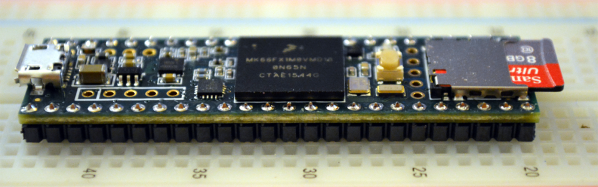
Paul Stoffregen has built a new Teensy. The latest in the line of very powerful, USB-capable microcontrollers is the Teensy 3.5 and 3.6 development boards. It’s faster, more capable, and bigger putting even more pins on a solderless breadboard.

The first Teensy was one of the first Arduino compatible boards with native USB. The Teensy 2.0 was even better with support for USB keyboards, mice, and MIDI. Even today, the Teensy 2.0 is the de facto board to use if you want to build anything like a USB keyboard. The Teensy 2.0 was followed by the exceptionally powerful Teensy 3.0, the first 32-bit Arduino compatible board, and thanks to Paul’s contributions of a pile of Arduino libraries, doing cool stuff faster has never been easier. Since the launch of the Teensy 3.0, its successors, the 3.1 and 3.2 have launched. If you want the power of an ARM microcontroller with the deepest Arduino library support, there’s only one board you should consider.

Like the launch of the Teensy 3.0, Paul is Kickstarting the launch of the latest Teensys with a crowdfunding campaign. Let’s dig into everything these new boards have to offer.

Continue reading “Introducing The Teensy 3.5 And 3.6”

Etching A PCB In Ten Minutes.

Most circuit boards any maker could need for their projects can be acquired online at modest cost, but what if you need something specific? [Giorgos Lazaridis] of pcbheaven.com has designed his own etching bath complete with a heater and agitator to sped up the process of creating your own custom circuit boards.

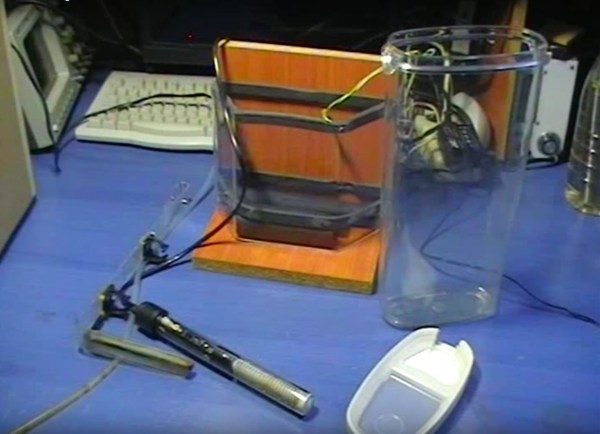
[Lazaridis] started by building a circuit to control — in a display of resourcefulness — a fish tank heater he would later modify. The circuit uses a PIC 16F526 microcontroller and two thermristors to keep the temperature of the etching bath between 38 and 41 degrees Celsius. The fish tank heater was gingerly pried from its glass housing, and its bimetallic strip thermostat removed and replaced with a wire to prevent it shutting off at its default 32 degrees. All of it is mounted on a small portable stand and once heated up, can etch a board in less than 10 minutes.

Continue reading “Etching A PCB In Ten Minutes.”

Bluetooth HID Gamepad And HC-05 Serial Hack

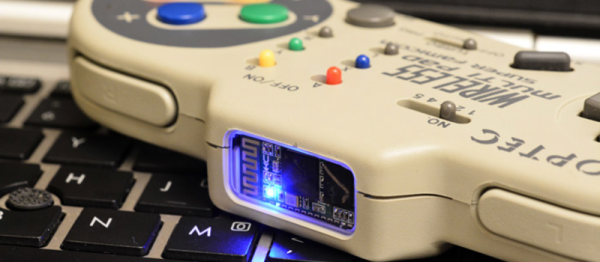
“Which came first, the chicken or the egg?” Don’t bother us with stupid questions, they both co-evolved into the forms that we now serve up in tasty sandwiches or omelets, respectively. “Which came first, the HC-05 serial-flash-hack, or the wireless Bluetooth Gamepad?” Our guess is that [mitxela] wanted to play around with the dirt-cheap Bluetooth modules, and that building the wireless controller was an afterthought. But for that, it’s a well-done afterthought! (Video below the break.)

It all starts with the HC-05 Bluetooth module, which is meant to transfer serial data, but which can be converted into a general-purpose device costing ten times as much with a simple Flash ROM replacement. The usual way around this requires bit-banging over a parallel port, but hackers have worked out a way to do the same thing in bit-bang mode using a normal USB/Serial adapter. The first part of [mitxela]’s post describes this odyssey.

Continue reading “Bluetooth HID Gamepad And HC-05 Serial Hack”

Electroshock Timer Will Speed Up Every Game Of Settlers Of Catan

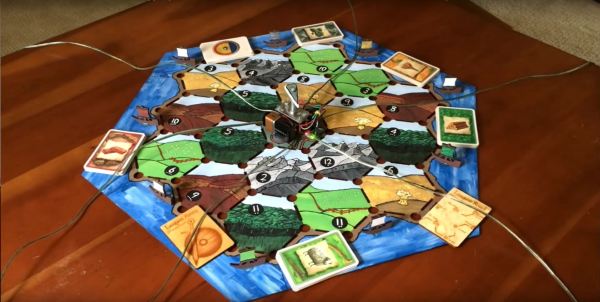
The fun of playing Settlers of Catan is only matched by the desire to punch your friend when their turn drags on with endless deliberating. [Alpha Phoenix] has solved that quandary of inefficient play by building the Settlers of Catan: Electroshock Therapy Expansion.

[Alpha Phoenix] is holding back on the details of the device to forestall someone trying this at home and injuring themselves or others, but there’s plenty to glean from his breakdown of how the device works. An Adafruit Trinket microcontroller connects to a single pole 12 throw switch — modified from a double pole six throw rotary switch — to select up to six different players (with the other six positions alternated in as pause spaces) and the shocks are delivered through a simple electrode made from a wire hot glued to HDPE plastic from a milk jug. The power supply is capable of delivering up to 1100V, but the actual output is much less than that, thanks to its built-in impedance of about 2.5M Ohms, as well as added resistance by [Alpha Phoenix].

To define what constitutes a ‘long turn,’ the Trinket calculates the mean of up to the first 100 turn lengths (instead of a static timer to accommodate for the relative skills of the players in each game) and zaps any offending player — and then repeatedly at a set time afterwards — to remind them that they need to pick up the pace.

Continue reading “Electroshock Timer Will Speed Up Every Game Of Settlers Of Catan”