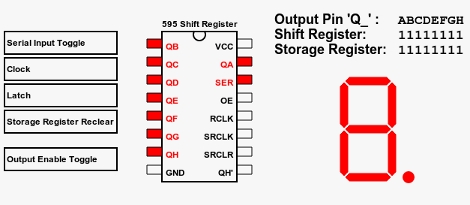
Beginner Concepts: 595 Shift Register Simulator

[Aaron] just finished building an online 595 shift register simulator. These inexpensive chips let you extend the number of devices that can be controlled by a single microcontroller. You see them in quite a few LED multiplexing projects, included the Ping Pong Clock that we recently built. But they can be a bit tricky to fully grasp if you’re not familiar with the hardware.

This simulator gives you a point-and-click interface for the five possible control lines on a 595 shift register. There are three pins that must be manipulated to use the device; the serial in, clock, and latch pins. The other two are for clearing the register, and enabling output and can be considered optional. You can choose to control these with a microcontroller in your own projects for more flexibility, but often they are tied to either VCC or GND (depending on the chip) when these features are unnecessary. Give this simulator a try and then take what you learned over to a solderless breadboard and see if you can write some firmware to produce the same results. If you’re still having trouble you can take a look at this 595 tutorial for further information.
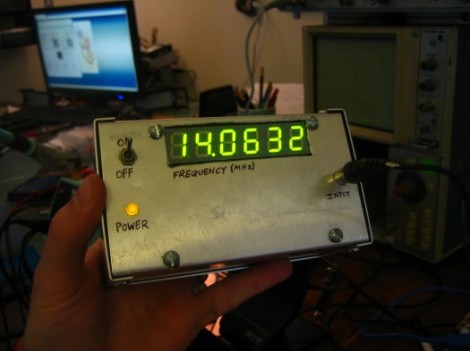

Frequency Counter For $10 Worth Of Parts

[Scott] built this frequency counter using less than $10 in parts. It’s set up to meter frequencies in megahertz which is fitting since he’s planning to use it with his radio hardware experimentation. But we would find it useful too because our cheap multimeter only reads up to around 4 MHz.

He’s using an ATmega16 that he had on hand but it has features way beyond the specs for the device. He speculates that an ATtiny2313 would easily work in its place. The microcontroller is mostly used to drive the multiplexed 7-segment display after reading the frequency values from the 74LV8154 counter chip that he is using. He doesn’t have a full schematic for the device, but there is a hand drawn diagram for using the frequency counter; the rest should be easy to piece together. Looking at that circuit we don’t think it would be too hard to make this a manual-ranging frequency counter to give you more use out of the dedicated device. Check out [Scott’s] demonstration video which is embedded below the fold.

Continue reading “Frequency Counter For $10 Worth Of Parts”

Reverse Engineering The Playstation Move

playstation_move

[Kenn] is working on building a quadrocopter from the ground up for a university project. Currently, his main focus is building an Inertial Measurement Unit, or rather re-purposing a PS3 Move controller as the IMU for his copter. He previously considered using a Wiimote Motion Plus, but the Move has a three-axis magnetometer, which the Wii controller does not.

The ultimate goal for this portion of his project is building custom firmware to run on the Move’s STM32-Cortex microcontroller, allowing him to obtain data from each of the controller’s sensors. Through the course of his research, he has thoroughly documented each sensor on his site, and dumped a full working firmware image from the Cortex chip as well. Recently, he was even able to run arbitrary code on the controller itself, which is a huge step forward.

[Kenn’s] project is coming along very nicely, and will undoubtedly be a great resource to others as he continues to dig through the inner workings of the Move. Be sure to swing by his site if you are looking for information, or if you have something to contribute.

Sleek Numitron Clock Tells The Time And Temperature

numitron_clock

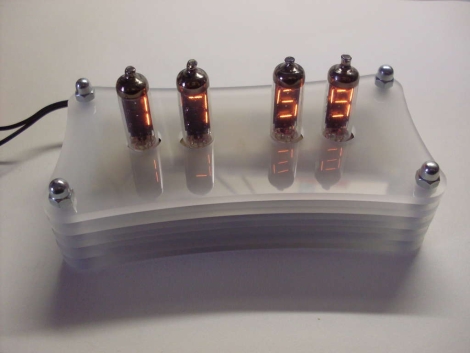
Instructables user [janw] is a big fan of nixie clocks, but he had never built one before. He decided he would rather start small and build a clock using numitron tubes first, before moving to nixies. He preferred the simpler tubes due to their much lower voltage requirements and the fact that he would not have to use any specialized power supply for his project.

His clock serves double-duty, functioning as a thermometer as well. Timekeeping is regulated with a DS12307, and temperature is monitored using a DS18B20 single wire sensor – both of which are pretty common in these sorts of projects. Both are wired to an Atmega48 MCU which serves as the brain of the clock.

The numitrons were mounted in a handsome 5-layer milled acrylate stand with a pair of buttons mounted on the bottom which allow him to set the time. It really is a spectacular looking timepiece, and a great first effort on [janw’s] part.

Be sure to stick around to see a video of the clock in action.

Continue reading “Sleek Numitron Clock Tells The Time And Temperature”

Zigbee-powered Wireless Scale

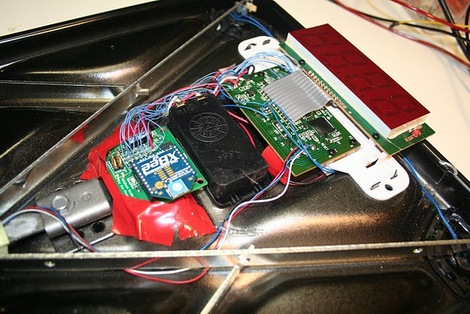
[joe] wanted to make it easy to record his weight every day, and added a few bits to decode the weight and send it to his computer. The end result is a ZigBee-powered wireless scale. Additionally, his scale can track more than one person’s data simply by knowing whose previous weight the new measurement is closest to. Now [joe] and his family can spend more time working out, and less time messing with spreadsheets and data entry.

[joe]’s build is not only elegant, but well-documented, too. He walks through the reasons he chose this specific floor scale, reverse engineering it to decode the weight, then provides links to his schematics, source code, and pretty much everything else you would need to play along at home.

Header File Brings Arduino Sketches To The TI Launchpad

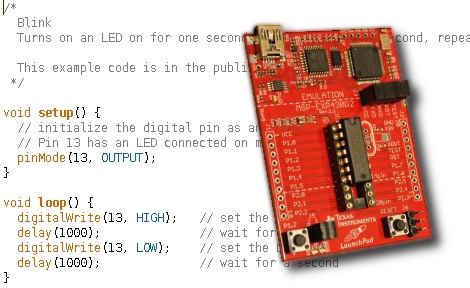
[Chris Hulbert] is making it easy for Arduino users to program MSP430 chips with a header file that allows you to compile Arduino sketches for the Launchpad. This makes sense, as the growing number of Arduino sketches available, and the low cost of the TI Launchpad make for a good bedfellows. It’s really wasn’t that hard to make this happen, although you’re not going to find support for all of the Arduino functions just yet.

At the time of writing, [Chris] has just 51 lines of code committed to the project. It provides macros for setup(), loop(), delay(), pinMode(), pinBit(), digitalWrite(), and digitalRead(). You’ll notice that one of the most important parts of the header file is that it disables the watchdog timer for the user (a stumbling block for many MSP430 beginners). It’s an interesting solution, but to be truly useful we’d want to see hardware integration with the Arduino IDE. That, as well as the rest of the Arduino functions are at the tips of your fingers. Get coding and submit your push requests to [Chris] for inclusion in his repository.

[Thanks Chris]

CAN Sniffing For Steering Wheel Button Presses

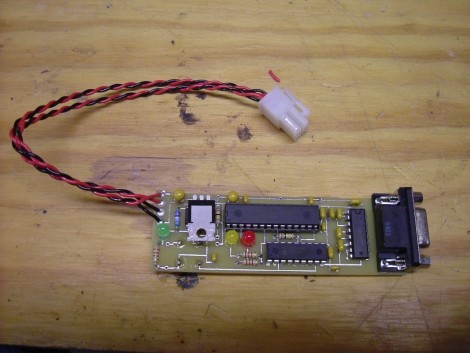
You can make those buttons on your steering wheel much more functional if you have a way of monitoring them. Don’t even think of cracking open the factory finish to get to the solder points, just tap into the CAN bus and monitor the data traffic.

The small board seen above is the result of a project [Peter Shabino] calls the CAN sniffer. The connector on the left will plug into the Control Area Network system on your car, giving the chips on board something to do. There’s an MCP2551 CAN transceiver (hidden under that linear regulator) and an SPI controlled MCP2515 CAN controller which take care of the particulars of the CAN protocol. The big chip in the middle is a PIC 16F876, responsible for making sense out of the data. From there a MAX232 chip is used to provide a serial interface to connect the device to a computer.

This really isn’t tied down to one particular function. Once you have access to the bus for a microcontroller you’ll only be limited by your firmware writing skills. [Peter] has posted an archive with all of the open source files, as well as an illustrated step-by-step board assembly. We’ve embedded the schematic from that archive after the break. Continue reading “CAN Sniffing For Steering Wheel Button Presses”