AVR Programming 03: Reading And Compiling Code

In the last installment of our tutorial series we built a simple circuit on a breadboard and programmed an ATmega168 to make it run. That proves that you know how to follow directions, but the eureka moments of doing everything yourself are on the way. This time around you will get down and dirty with the datasheet, learning where each line of the sample code came from, and give your recently installed compiler a test drive. We will:

  • Talk about bitwise operators and how they work when coding for microcontrollers
  • Discuss C code shorthand
  • Review the sample code from Part 2 and talk about what each line of code does
  • Learn to compile code

If this is the first you’ve heard about our AVR Programming series, head back to Part 1 and start from the beginning. Otherwise, take a deep breath and we’ll being after the break.

Series roadmap:

Continue reading “AVR Programming 03: Reading And Compiling Code”
Test Beds And Jigs With Pogo Pins

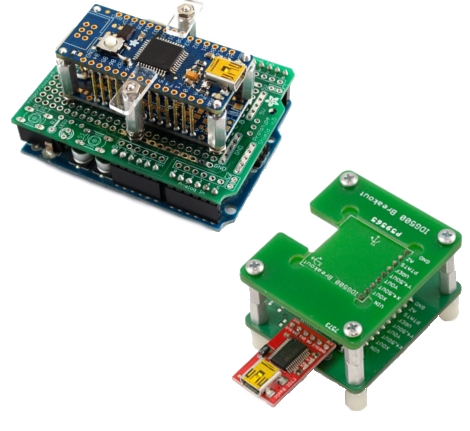
Pogo pins – spring-loaded pin contacts are pretty fun to play with and even cooler when they get used in electronic devices like Adafruit and SparkFun’s test jigs. Check after the break for how these two companies have created their own production hacks. Continue reading “Test Beds And Jigs With Pogo Pins”

How-to: Program PICs Using Linux

Arguably, Microchip’s PIC microcontrollers do not get enough posts here. One of the drawbacks for some of us is that Linux support for PICs is not very well known. The information is out there, but no one has laid out the process of going from writing C code to programming a chip. Written for Linux users that are familiar with microcontrollers, basic circuits, the C programming language, and can read a datasheet, this how-to should get you up and programming a PIC quickly with Linux.

Continue reading “How-to: Program PICs Using Linux”

Hacking A Hack: Disassembly And Sniffing Of IM-ME Binary

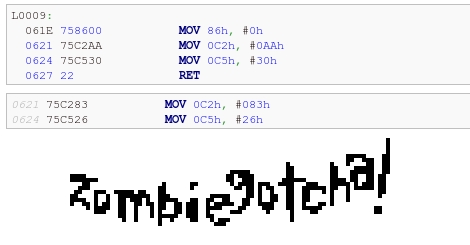
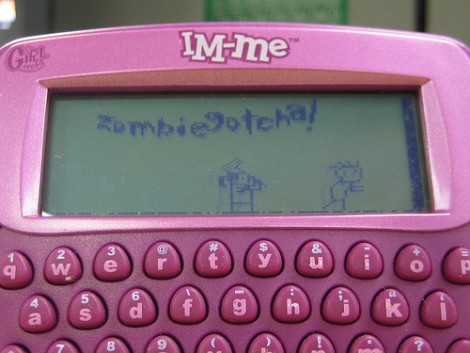
It’s fun to pick apart code, but it gets more difficult when you’re talking about binaries. [Joby Taffey] opened up the secrets to one of [Travis Goodspeed’s] hacks by disassembling and sniffing the data from a Zombie Gotcha game binary.

We looked in on [Travis’] work yesterday at creating a game using sprites on the IM-ME. He challenged readers to extract the 1-bit sprites from an iHex binary and that’s what got [Joby] started. He first tried to sniff the LCD data traces using a Bus Pirate but soon found the clock signal was much too fast for the device to reliably capture the signals. After looking into available source code from other IM-ME hacks [Joby] found how the SPI baud rate is set, then went to work searching for that in a disassembly of [Travis’] binary. Once found, he worked through the math necessary to slow down communication from 2.7 Mbit/s to 2400 bps and altered the binary data to match that change. This slower speed is more amenable to the Bus Pirate’s capabilities and allowed him to dump the sprite data as it was sent to the LCD screen.

[Thanks Travis]

IM-ME Graphic Manipulation Using Sprites

Here’s a study in sprite animations that [Travis Goodspeed] put together. He’s working with one of his favorites, the pink IM-ME device that he’s been hacking on for a while now. But if you don’t have this hardware that shouldn’t discourage you. There’s a lot to be learned from his methods which will translate to any microcontroller working with a graphic LCD.

He starts with a 24-bit PNM sprite that includes three frames of his desired animation. From there he needs a way to store the data for use with 8-bit microcontrollers. He chose to write a Perl script that will translate the image format into a 1-bit map. Each frame of the animation takes up a column width that is a multiple of 8 for easy retrieval by the processor. This translation into a C array, and the accompanying code that translates it into data for the frame buffer is the key to the animation process. What is he shooting for? A sprite-based video game on the handheld.

Tiny USB Business Card

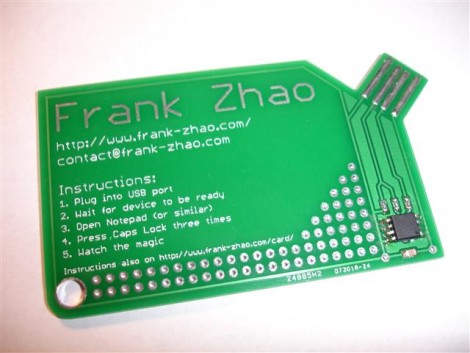
[Frank Zhao] put together a USB business card. It’s even got the instructions printed right on the silk screen of the PCB explaining how it should be used. He based the design around an AVR ATtiny85 microcontroller. It runs the V-USB package that handles USB identification and communication protocols. The rest of the hardware is pretty standard, the uC draws power from the 5V USB rail, with a couple of 3.6V Zener diodes to drop the two data lines down to the proper level.

Once plugged in it waits until it detects three caps lock keypresses in a row, then spews a string of its own keypresses that type out [Frank’s] contact information in a text editor window (video after the break). It’s not as reusable as the mass storage business card because [Frank] didn’t breakout the pins on controller. But we still enjoy seeing business cards that make you stand out.

This is a great project to tackle with your newly acquired AVR programming skills.

Continue reading “Tiny USB Business Card”

Smallest Gaming Console Ever. EVER!

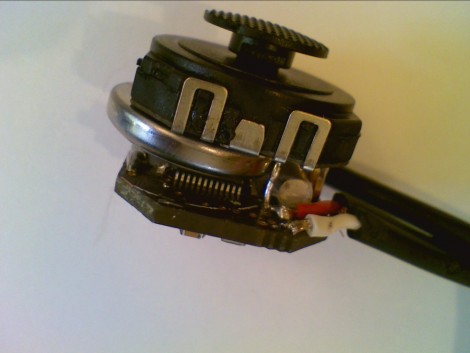
That’s it… the controller and the video game system all in one. This is the standalone version of [Rossum’s] RBox. We looked in on the prototype in June but that was using a bulky development board. You can see the CR1632 button battery, which powers the device for about four hours, sandwiched in between the joystick and the mainboard. Exiting the image on the right are cables used to connect mono-audio and video to a TV via RCA connectors. There’s no port for interchangeable cartridges which means that all game data must be programmed into the ARM Cortex M0 processors. See [Rossum’s] demo video after the break.

Continue reading “Smallest Gaming Console Ever. EVER!”