Closeup of an Apple ][ terminal program. The background is blue and the text white. The prompt says, "how are you today?" and the ChatGPT response says, "As an AI language model, I don't have feelings, but I am functioning optimally. Thank you for asking. How may I assist you?"

Apple II – Now With ChatGPT

Hackers are finding no shortage of new things to teach old retrocomputers, and [Evan Michael] has taught his Apple II how to communicate with ChatGPT.

Written in Python, iiAI lets an Apple II access everyone’s favorite large language model (LLM) through the terminal. The program lives on a more modern computer and is accessed over a serial connection. OpenAI API credentials are stored in a file invoked by iiAI when you launch it by typing python3 openai_apple.py. The program should work on any device that supports TTY serial, but so far testing has only happened on [Michael]’s Apple IIGS.

For a really clean setup, you might try running iiAI internally on an Apple II Pi. ChatGPT has also found its way onto Commodore 64 and MS-DOS, and look here if you’d like some more info on how these AI chat bots work anyway.

Continue reading “Apple II – Now With ChatGPT”

Crafting Ribbon Cables For Retro Hardware

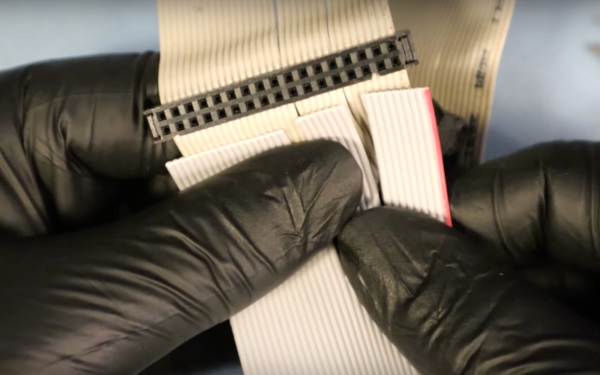
Building a modern computer is something plenty of us have done, and with various tools available to ensure that essentially the only thing required of the end user is to select parts and have them delivered via one’s favorite (or least expensive) online retailer. Not so with retro hardware, though. While some parts can be found used on reselling sites like eBay, often the only other option is to rebuild parts from scratch. This is sometimes the best option too, as things like ribbon cables age poorly and invisible problems with them can cause knock-on effects that feel like wild goose chases when troubleshooting. Here’s how to build your own ribbon cables for your retro machines.

[Mike] is leading us on this build because he’s been working on an old tower desktop he’s calling Rosetta which he wants to be able to use to host five different floppy disk types and convert files from one type to another. Of course the old hardware and software being used won’t support five floppy disk drives at the same time so he has a few switches involved as well. To get everything buttoned up neatly in the case he’s building his own ribbon cables to save space, especially since with his custom cables he won’t have the extraneous extra connectors that these cables are famous for.

Even though, as [Mike] notes, you can’t really buy these cables directly anymore thanks to the technology’s obsolescence, you can still find the tools and parts you’d need to create them from scratch including the ribbon, connectors, and crimping tools. Even the strain relief for these wide, fragile connectors is available and possible to build into these projects. It ends up cleaning up the build quite nicely, and he won’t be chasing down any gremlins caused by decades-old degraded multi-conductor cables. And, even though [Mike] demonstrated the floppy disk drive cables in this build, ribbon cable can be used for all kinds of things including IDE drive connectors and even GPIO cables for modern electronics projects.

Continue reading “Crafting Ribbon Cables For Retro Hardware”

Magnetic Bubble Memory Brought To Life On Heathkit

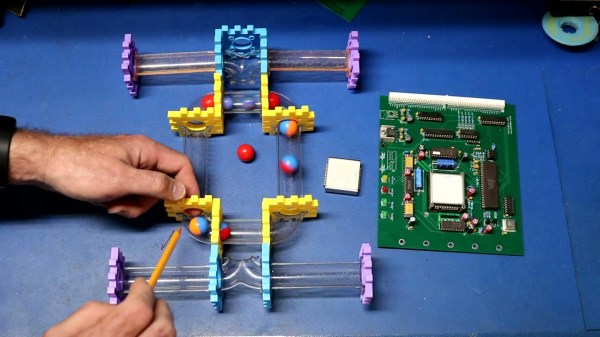
There are all kinds of technology that appear through the ages that find immediate success, promise to revolutionize the world, but fade to obscurity almost as quickly. Things like the ZIP disk, RDRAM, the digital compact cassette, or even Nintendo’s VirtualBoy. Going even further back in time [smbaker] is taking a look a bubble memory, a technology that was so fast and cost-effective for its time that it could have been used as “universal” memory, combining storage and random-access memory into a single unit, but eventually other technological developments overshadowed its quirks.

[smbaker] is placing his magnetic bubble memory module to work in a Heathkit H8, an Intel 8080-based microcomputer from the the late 70s. The video goes into great detail on the theory of how these devices used moving “bubbles” of magnetism to store information and how these specific devices work before demonstrating the design and construction of a dedicated support card which hosts the module itself along with all of the necessary circuitry to allow it to communicate with the computer. From there he demonstrates booting the device using the bubble memory and performs several write and read actions using the module as a demonstration.

Eventually other technologies such as solid-state RAM and various hard disk drives caused the obsolescence of this technology, but it did hang on for a bit longer in industrial settings due to its ability to handle high vibrations and mechanical shocks, mostly thanks to the fact that they had no moving parts. Eventually things like Flash memory came around to put the final nail in the coffin for these types of memory modules, though. The Heathkit H8 is still a popular computer for retrocomputing enthusiasts nonetheless, and we’ve seen all kinds of different memory modules put to work in computers like these.

Continue reading “Magnetic Bubble Memory Brought To Life On Heathkit”

The PDP8 That Never Was: Hollow State Logic

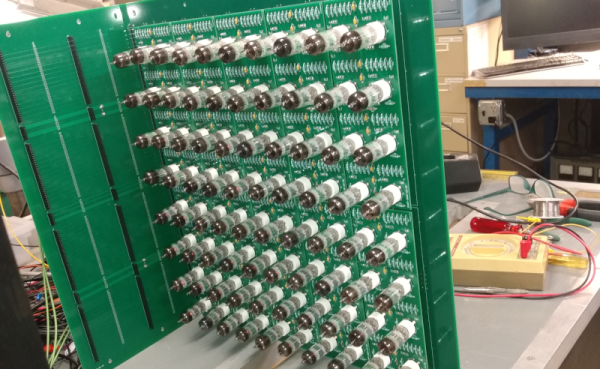
[Outer World Apps] noted that there was no PDP-8/V made by DEC — a variant that used vacuum tubes. So he’s decided to make one using about 320 6J6A tubes. He’s got a plan and a few boards completed — we can’t wait to see it finished.

The logic is actually done by crystal rectifiers, but the tubes do inversion. To make an and/or/invert gate requires a single triode or half of a 6J6A. A D flip flop requires three tubes or two tubes for a latch. In addition to the “crystal diodes,” the memory and I/O are a Raspberry Pi, and there are transistors to do level conversion between the tube logic and the Pi.

Continue reading “The PDP8 That Never Was: Hollow State Logic”

This Weekend: VCF Swap Meet In Wall, NJ

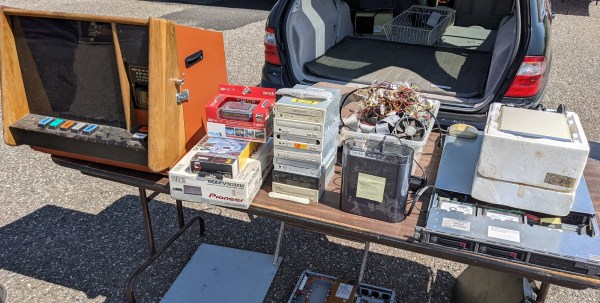
There was a time where you could regularly find local swap meets to pick up computer hardware, ham radios, and other tech gear at the sort of cut-rate prices so often produced by a sense of camaraderie. But with the rise of websites like Craigslist and eBay, meeting up in person to buy and sell used hardware started to fall out of style. The fact that the prices had to go up due to the considerable cost of shipping such large and heavy objects was an unfortunate side-effect, but it wasn’t enough to stem the tide.

It’s unlikely that we’ll ever truly return to those early days. But if you’re within driving distance of Wall, New Jersey, you can take a step back in time on Saturday and experience a proper swap meet in all its glory. Hosted by the Vintage Computer Federation, the modest $5 entry fee goes to help support their worthy goal of preserving vintage computing history. After the swap meet officially wraps up at 2 PM, a short walk will take you over to their permanent exhibit located within the sprawling InfoAge Science and History Museum.

Continue reading “This Weekend: VCF Swap Meet In Wall, NJ”

Using Excel To Manage A Commodore 64

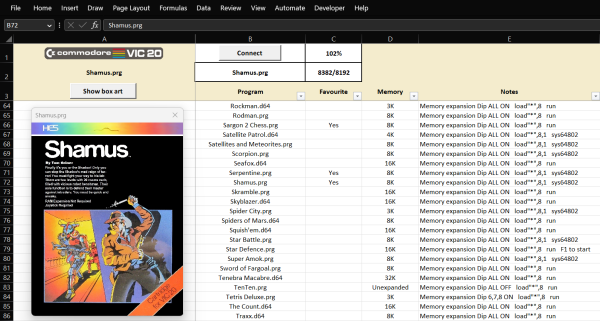
The “save” icon for plenty of modern computer programs, including Microsoft Office, still looks like a floppy disk, despite the fact that these have been effectively obsolete for well over a decade. As fewer and fewer people recognize what this icon represents, a challenge is growing for retrocomputing enthusiasts that rely on floppy disk technology to load any programs into their machines. For some older computers that often didn’t have hard disk drives at all, like the Commodore 64, it’s one of the few ways to load programs into computer memory. And, rather than maintaining an enormous collection of floppy discs, [RaspberryPioneer] built a way to load programs on a Commodore using Microsoft Excel instead.

The Excel sheet that manages this task uses Visual Basic for Applications (VBA), an event-driven programming language built into Office, to handle the library of applications for the Commodore (or Commodore-compatible clone) including D64, PRG, and T64 files. This also includes details about the software including original cover art and any notes the user needs to make about them. Using VBA, it also communicates to an attached Arduino, which is itself programmed to act as a disk drive for the Commodore. The neceessary configuration needed to interface with the Arduino is handled within the spreadsheet as well. Some additional hardware is needed to interface the Arduino to the Commodore’s communications port but as long as the Arduino is a 5V version and not a 3.3V one, this is fairly straightforward and the code for it can be found on its GitHub project page.

With all of that built right into Excel, and with an Arduino acting as the hard drive, this is one of the easiest ways we’ve seen to manage a large software library for a retrocomputer like the Commodore 64. Of course, emulating disk drives for older machines is not uncommon, but we like that this one can be much more dynamic and simplifies the transfer of files from a modern computer to a functionally obsolete one. One of the things we like about builds like this, or this custom Game Boy cartridge, is how easy it can be to get huge amounts of storage that the original users of these machines could have only dreamed of in their time.

Well Documented Code Helps Revive Decades-Old Commodore Project

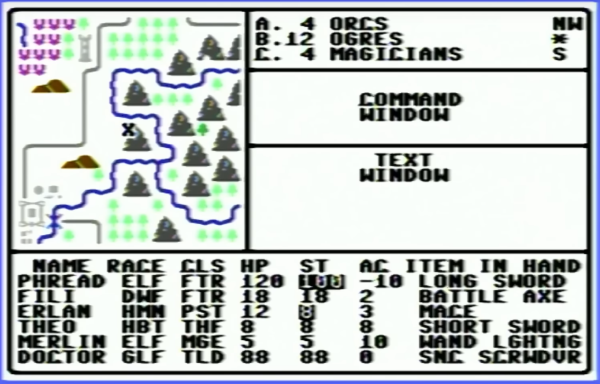
In the 1980s, [Mike] was working on his own RPG for the Commodore 64, inspired by dungeon crawlers of the era like Ultima IV and Telengard, both some of his favorites. The mechanics and gameplay were fairly revolutionary for the time, and [Mike] wanted to develop some of these ideas, especially the idea of line-of-sight, even further with his own game. But an illness, a stint in the military, and the rest of life since the 80s got in the way of finishing this project. This always nagged at him, so he finally dug out his decades-old project, dusted out his old Commodore and other antique equipment, and is hoping to finish it by 2024.

Luckily [Mike’s] younger self went to some extremes documenting the project, starting with a map he created which was inspired by Dungeons and Dragons. There are printed notes from a Commodore 64 printer, including all of the assembly instructions, augmented with his handwritten notes to explain how everything worked. He also has handwritten notes, including character set plans, disk sector use plans, menus, player commands, character stats, and equipment, all saved on paper. The early code was written using a machine language monitor since [Mike] didn’t know about the existence of assemblers at the time. Eventually, he discovered them and attempted to rebuild the code on a Commodore 128 and then an Amiga, but never got everything working together. There is some working code still on a floppy disk, but a lot of it doesn’t work together either.

While not quite finished yet, [Mike] has a well-thought-out plan for completing the build, involving aggregating all of the commented source code and doing quarterly sprints from here on out to attempt to get the project finished. We’re all excited to see how this project fares in the future. Beyond the huge scope of this pet project, we’d also suggest that this is an excellent example of thoroughly commenting one’s code to avoid having to solve mysteries or reinvent wheels when revisiting projects months (or decades) later. After all, self-documenting code doesn’t exist.

Continue reading “Well Documented Code Helps Revive Decades-Old Commodore Project”