Ski Pole Persistence Of Vision

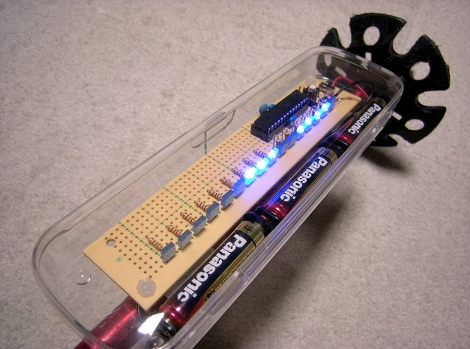
[Powder4u] wanted to make a persistence of vision display for his bicycle but with 50 cm of snow on the ground it’s hard to get out and ride right now. Instead he made this persistence of vision ski-pole accessory. We asked him to share some details and he obliged. It’s made using an Arduino compatible ATmega168, LEDs with resistors, and installed on some protoboard. The enclosure is a clear pencil case, which isn’t water tight but he’s tried to bolster that with some creative scotch tape placement. There’s no sensor to detect which direction the board is moving in so displaying alpha-numeric messages will have some issues, but as you can see he managed to display image data without issue.

We’re used to night skiing with floodlights along the slopes. This would be a fun little thing to have along with you on those dark lift rides.

Nimbus, The Wall-following Robot

nimbus_wall_following_robot

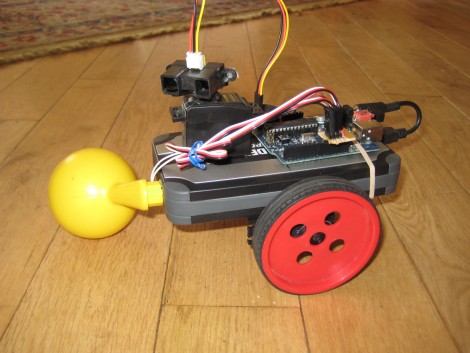
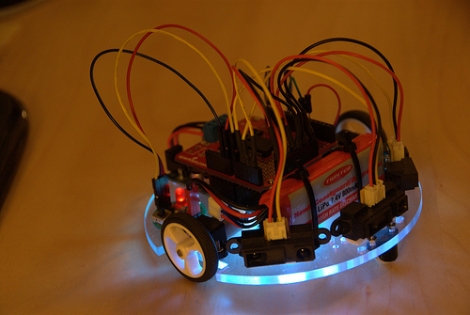
[Johannes] sent in the latest iteration of an ongoing project – Nimbus, the wall-follwing robot. Originally operating on a cardboard frame, the robot has undergone several revisions as you can see by reading through his blog. Nimbus started out as a simple, Arduino-powered robot, but the project has progressed nicely over time. The last revision simply avoided walls, using a Sharp IR proximity sensor to detect, then avoid obstacles. The most recent model sports a nice polycarbonate frame as well as two additional IR proximity sensors, allowing Nimbus to navigate quite well, following walls and avoiding obstacles with ease. It does get caught up from time to time on carpets and wires, but overall Nimbus is a great little robot. [Johannes] even added a small RGB status LED for the bottom of the bot, communicating its navigation status to the operator at all times. This is done by flashing various colors when objects have been discovered or have moved out of sight – it’s a really novel addition.

Keep reading for a video of Nimbus navigating his way around, and don’t forget to check out the Nimbus photo stream.

Continue reading “Nimbus, The Wall-following Robot”

What Development Board To Use? (Part Two)

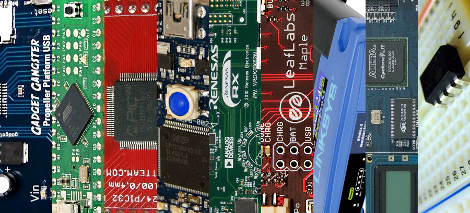
We asked for responses to our last Development Board post, and you all followed through. We got comments, forum posts, and emails filled with your opinions. Like last time, there is no way we could cover every board, so here are a few more that seemed to be popular crowd choices. Feel free to keep sending us your favorite boards, we may end up featuring them at a later date!

Continue reading “What Development Board To Use? (Part Two)”

Valentine’s Day Love Song Machine

tellart_bell_ensemble

Just in time for Valentine’s day, [Adam Meyer] and the folks over at tellart.com have put together a little project they call the “Love Song Machine“. Using a web-based form, anyone can submit a song, which will then be played on a system of bells that they have set up in their office. You can choose from several pre-defined love songs, or you can create your own unique arrangement with which to serenade them. Once you are ready to go, your song will be queued up, and you can watch a video of your creation as it is being played.

The system is comprised of 8 solenoid-actuated bells which are all controlled by the Arduino they have hooked up to their web server. It’s a pretty fun idea, and there are sure to be plenty of people submitting songs, so get yours in before things get too busy!

Keep reading to see a video preview of their system in action.

Continue reading “Valentine’s Day Love Song Machine”

Radio-controlled LED Light Show

HL1606_radio_controlled_light_show

[Alan] was commissioned to make some wearable, radio-controlled LED strips for the Travelling Light Circus. It has taken some time, but he has recently finished some prototypes, and thought it was a good time to do a writeup on the project. The system is managed by a single controller unit, which communicates with any number of LED driver units, each controlling 4 HL1606 LED strips. The light displays are synchronized across all of the LED driver units via a 2.4 GHz radio, with each driver falling into synch almost immediately after being powered on. While some might be turned off to the fact that he uses Arduino Pro Minis to control the LEDs, this is far from a simple project.

[Alan’s] blog contains several posts about this project, with everything documented in detail. He spends quite a bit of time talking about the project’s software, as well as hardware issues he ran into along the way.

His blog is a must read, but even more so, it is a must see. The lighting effects are mesmerizing, as there are a ton of different light patterns these units can generate, so be sure to check out the following video of the lights in action.

Continue reading “Radio-controlled LED Light Show”

Range Finder Musical Toy

parallax_arduino_ping_organ

Instructables user [sketchsk3tch] was looking to make a fun toy for his kids using things he had around the house and came up with the Ping Organ. The organ is played by standing in front of the Parallax Ping range sensor, and moving around any which way you please. He interfaced the range sensor with an Arduino, scavenging a small speaker from an old toy for audio output.

The code for the project is fairly straightforward, borrowing most of it from the demo software that shipped with the Ping and the Arduino. He made a few small tweaks in order to get the organ to play frequencies of actual notes, as well as to allow for some flexibility when calculating the specific note to play.

While not the most complex project we have ever featured, [sketchsk3tch] reports that his kids love to spend time flailing around wildly in front of the organ, which is exactly what he intended.
Video of the organ being tested after the break.

Continue reading “Range Finder Musical Toy”

SMS Controlled Irrigation

[Mhkabir] built an irrigation system that communicates by text message. The concept is simple, sending a text message to the system will cause it to switch on the water pump.

Many times we see text message manipulation via the Internet, or using a GSM module. But in this case an inexpensive cellphone is used as the communication interface. The vibration motor has been removed and those connections are monitored to signal incoming messages. Wire leads were soldered to the keypad contacts which allow an Arduino to send out text messages when there is a problem with watering. This isn’t an iron-clad system, as any incoming message will trigger the system and outgoing messages are limited to saved drafts. But a bit of creative programming and we’re sure more functionality could be squeezed out of this hardware.