Debian Officially Adds RISC-V Support

As time goes on, more and more computer manufacturers are moving towards the ARM architecture and away from the bloated and outdated x86 instruction set. Apple is the most prominent producer to take this step, but plenty others are using ARM for its flexibility and efficiency. The only problem with ARM is that it’s licensed, so if you want to go even further down the open-source path the RISC-V instruction set is the next logical step. Now at least one mainline Linux distribution will officially support this architecture.

While Debian did have some support for RISC-V before this as a Debian port, which was not officially part of Debian. However, the official support will begin with the release of Debian 13, which is currently in the testing phase and hasn’t seen a stable release yet. To that end, the current state of this official version is extremely limited, being described as “almost empty” but with planned support for an initial 90 packages in the coming days. Most users working on a RISC-V platform will most likely to continue to use their Debian ports version.

It might be a little while before the RISC-V version is as full-featured as the ARM or x86 versions of this Linux distribution, but we are happy to see it move in this direction at all. And don’t think that RISC-V is limited to embedded systems or otherwise limited computing platforms, either. We’ve seen full Linux desktops with RISC-V processors since at least 2019.

MicroLisp: Lisp For Microcontrollers Now Has Lisp-Based ARM Assembler

In a way it feels somewhat silly to market a version of Lisp as targeting resource-constrained platforms, considering the systems it ran on back in the 1960s, but as time goes on, what would have given 1970s Big Iron a run for its money is now a sub-$5 microcontroller that you can run uLisp (MicroLisp) on. This particular project now even has an ARM assembler that is written in Lisp whose source code (GitHub) fits on a mere two A4-sized pages.

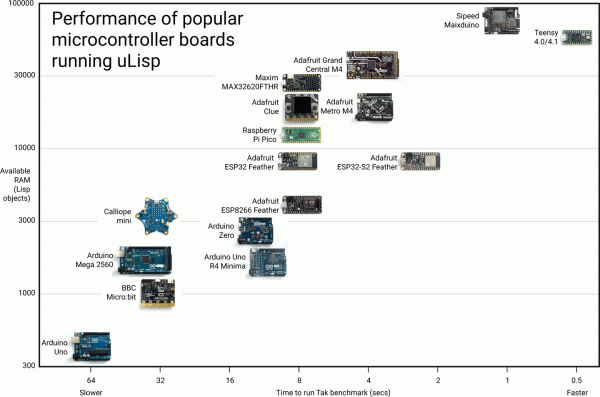
ULisp currently supports five platforms, being AVR-nano (ATmega328 and similar low-cost AVRs), AVR, ARM, ESP (8266 and 32), as well as RISC-V. The purpose of this assembler is to execute native ARM instructions when running on an ARM board, since uLisp itself runs a Lisp interpreter on the platform. When executed natively like this, a considerable speed-up of the task can be expected, as illustrated by a number of ARM assembler examples in the documentation.

Running a Fibonacci sequence that takes 24.6 seconds with the Lisp version on an Adafruit Metro M4 is reduced to a mere 61 ms when ARM assembly is used instead. This shouldn’t be too shocking, since this assembler essentially bypasses the Lisp runtime, coming closer to what would be the performance of firmware written in e.g. C. However, it also demonstrates that with this ARM assembler it is possible to have your Lisp and still get native performance when you want it, all using Lisp code.

MeArm 3.0: The Pocket-Sized Robot Arm

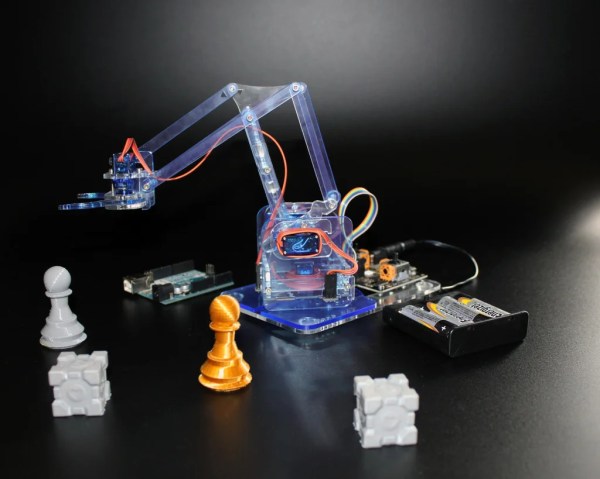
We all might dream of having an industrial robot arm at our disposal, complete with working controller that doesn’t need constant maintenance and replacement parts, and which is able to help us with other projects with only a minimum of coding or instruction. That’s a pipe dream for most of us, as without a large space, sufficient funding, or unlimited amounts of troubleshooting time we’ll almost always have to look for something smaller and simpler. Perhaps something even as small as this pocket-sized robotic arm.

This isn’t actually the first time we’ve seen the MeArm; the small robot has been around since 2014 and has undergone a number of revisions and upgrades. Even this revision has been out for a little while now but this latest in the series is now available with a number of improvements over the older models. The assembly time required has been reduced from two hours to about 30 minutes and the hardware has even been fully open-sourced as well which allows virtually anyone with the prerequisite tools to build this tiny robot for whatever they happen to need it for, due to its very permissive licensing.

The linked Instructable goes into every detail needed for building the robot as well as documenting all of the parts needed, although you will need access to some specialty tools to make a lot of them. We also featured a Friday Hack Chat about these robots back in 2018 that has some interesting details about these robots in it, and although this is a relatively small robot in the grand scheme of things it’s always possible to upgrade to something larger in the future.

Continue reading “MeArm 3.0: The Pocket-Sized Robot Arm”

RetroPie, Without The Pi

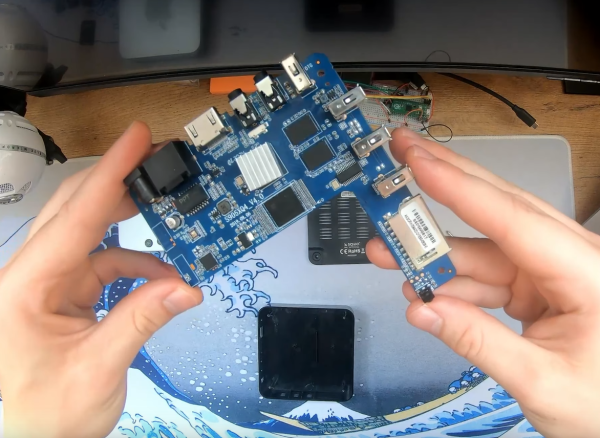
The smart television is an interesting idea in theory. Rather than having the cable or satellite company control all of the content, a small computer is included in the television itself to host and control various streaming clients and other services. Assuming you have control of the software running on the computer, and assuming it isn’t turned into a glorified targeted advertising machine, this can revolutionize the way televisions are used. It’s even possible to turn a standard television into a smart TV with various Android devices, and it turns out there’s a lot more you can do with these smart TV contraptions as well.

With most of these devices, a Linux environment is included running on top of an ARM platform. If that sounds similar to the Raspberry Pi, it turns out that a lot of these old Android TV sets are quite capable of doing almost everything that a Raspberry Pi can do, with the major exception of GPIO. That’s exactly what [Timax] is doing here, but he notes that one of the major hurdles is the vast variety of hardware configurations found on these devices. Essentially you’d have to order one and hope that you can find all the drivers and software to get into a usable Linux environment. But if you get lucky, these devices can be more powerful than a Pi and also be found for a much lower price.

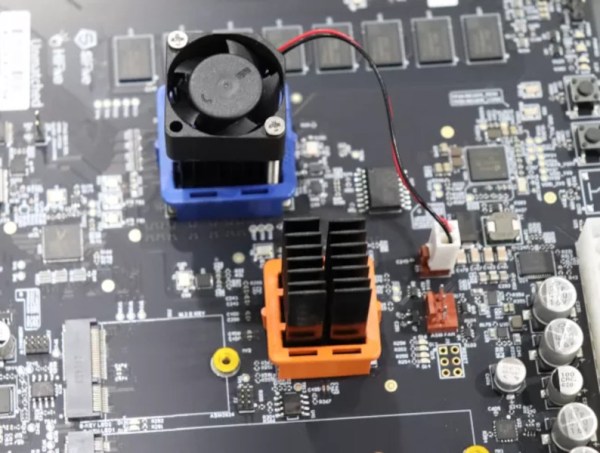
He’s using one of these to run RetroPie, which actually turned out to be much easier than installing a more general-purpose Linux distribution and then running various emulation software piecemeal. It will take some configuration tinkering get everything working properly but with [Timax] providing this documentation it should be a lot easier to find compatible hardware and choose working software from the get-go. He also made some improvements on his hardware to improve cooling, but for older emulation this might not be strictly necessary. As he notes in his video, it’s a great way of making use of a piece of electronics which might otherwise be simply thrown out.

Continue reading “RetroPie, Without The Pi”

The Apple Silicon That Never Was

Over Apple’s decades-long history, they have been quick to adapt to new processor technology when they see an opportunity. Their switch from PowerPC to Intel in the early 2000s made Apple machines more accessible to the wider PC world who was already accustomed to using x86 processors, and a decade earlier they moved from Motorola 68000 processors to take advantage of the scalability, power-per-watt, and performance of the PowerPC platform. They’ve recently made the switch to their own in-house silicon, but, as reported by [The Chip Letter], this wasn’t the first time they attempted to design their own chips from the ground up rather than using chips from other companies like Motorola or Intel.

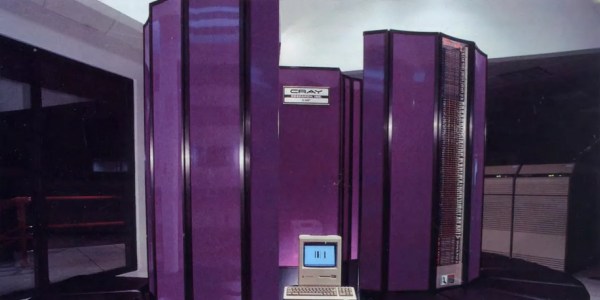
In the mid 1980s, Apple was already looking to move away from the Motorola 68000 for performance reasons, and part of the reason it took so long to make the switch is that in the intervening years they launched Project Aquarius to attempt to design their own silicon. As the article linked above explains, they needed a large amount of computing power to get this done and purchased a Cray X-MP/48 supercomputer to help, as well as assigning a large number of engineers and designers to see the project through to the finish. A critical error was made, though, when they decided to build their design around a stack architecture rather than a RISC. Eventually they switched to a RISC design, though, but the project still had struggled to ever get a prototype working. Eventually the entire project was scrapped and the company eventually moved on to PowerPC, but not without a tremendous loss of time and money.

Interestingly enough, another team were designing their own architecture at about the same time and ended up creating what would eventually become the modern day ARM architecture, which Apple was involved with and currently licenses to build their M1 and M2 chips as well as their mobile processors. It was only by accident that Apple didn’t decide on a RISC design in time for their personal computers. The computing world might look a lot different today if Apple hadn’t languished in the early 00s as the ultimate result of their failure to develop a competitive system in the mid 80s. Apple’s distance from PowerPC now doesn’t mean that architecture has been completely abandoned, though.

Thanks to [Stephen] for the tip!

North Korean Karaoke Machine Teardown

Karaoke is a very popular pastime in Seoul — there are venues where you can sing on a stage, sing in rooms with your friends, and even sing solo in coin-operated karaoke booths on the bullet train. Apparently it is also popular in North Korea as well — [Martyn Williams] of the North Korea Tech blog reported on an interesting teardown by web hacker [Will Scott]. It is the Tianchi v700 machine, a Chinese product tailored for North Korean users, obtained online back in 2020.

Unlike the karaoke machines encountered by this author in South Korea, the v700 form factor is a 19.5-inch Android tablet with touch-screen and all the necessary interfaces you’d expect: external video, speakers, and microphone, as well as WiFi and Ethernet for content upgrade and online payment systems. Not surprisingly, the connectivity aspects of the machine are not used in the North Korean model, but with a large catalog of pre-loaded music, it’s perfectly usable as a stand-alone device.

[Will] dug into the innards of the machine and discovered it was powered by an Allwinner ARM processor (seemingly the H6 V200, a quad-core ARM Cortex-A53). He also found it uses a swappable external disk to hold the songs, but all the files were encrypted. You can read more details in the blog post linked above, but eventually he was successful in decoding the disk and accessing the material.

The V700 consults both “/proc/cpuinfo” to learn the CPU serial number of the device it is on, and a binary file associated with the device file system structure as part of its method for determining its AES (Advanced Encryption Standard) key. It then ignores all of these device-specific items, and reverts back to a static key “87654321” stored in the binary.

All the songs on the disk were posted up on the Internet Archive. Check them out if you’re curious what North Korean karaoke songs sound and look like. One video that caught our attention was about CNC machines (see the video linked below the break). [Martyn] has been covering technology issues related to North Korea since 2011. In 2016, he learned after the fact that his website had been banned by the South Korean authorities. Believing this was in error, he appealed the ban and eventually prevailed in the courts. We wrote about some of [Will]’s research on consumer computing technology back in 2017 if you’re interested in learning more.

Continue reading “North Korean Karaoke Machine Teardown”

Icicle Patterns With Custom Gantry

[Cranktown City] uses a number of custom-built linear rails used as gantries for various tools in the shop. The first is on a plasma cutter, which is precise but difficult to set up or repair. Another is for mounting a camera, and while it is extremely durable, it’s not the most precise tool in the shop. Hoping to bridge the gap between these two, he’s building another gantry with a custom bearing system, and to test it he’ll be using it to create patterns in icicles hanging from an eave at his shop.

While this isn’t the final destination for this gantry, it is an excellent test of it, having to perform well for a long period of time in an extremely cold environment. The bearing system consists of a piece of square steel tubing turned 45° inside another larger square steel tube and held in place with two sets of three bearings with V-shaped notches. To drive the gantry he is using a motor with a belt drive, and for this test a piece of drip irrigation is mounted to it which lets out a predetermined amount of water on top of the roof to create numerous icicles beneath with various programmed lengths.

After a few test runs the gantry system can create some icicles, although they don’t have the exact sine wave shape that [Cranktown City] programmed into it. They are varying lengths though, and with no more cold days in the forecast he’s called it a success. This isn’t the final destination for this robotic linear gantry, though, but it did help him work out some of the kinks with it beforehand. For other sources of inspiration, take a look at this linear rail system also used for driving various robotic tooling.

Continue reading “Icicle Patterns With Custom Gantry”