Kinematic Mount For 3D Printer Bed Shows Practical Design

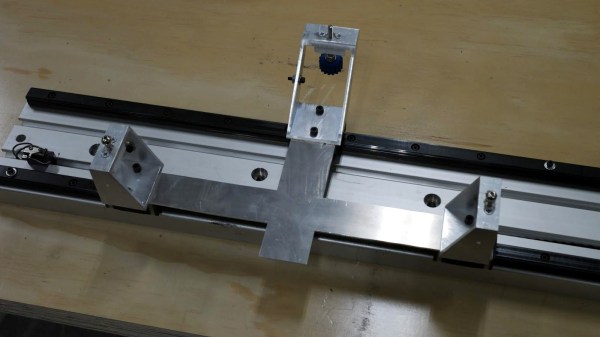
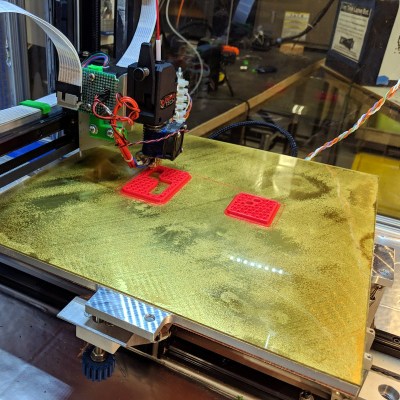
Aluminum bed with new kinematic mount and base on printer Son of Megamax, at the Milwaukee Makerspace

[Mark Rehorst] has been busy designing and building 3D printers, and Son of Megamax — one of his earlier builds — needed a bed heater replacement. He took the opportunity to add a Kelvin-type kinematic mount as well. The kinematic mount and base efficiently constrain the bed in a controlled way while allowing for thermal expansion, providing a stable platform that also allows for removal and repeatable re-positioning.

After a short discussion regarding the heater replacement, [Mark] explains the design and manufacture of his kinematic mount. Of particular note are the practical considerations of the design; [Mark] aimed to use square aluminum tubing as much as possible, with machining requirements that were easily done with the equipment he had available. Time is a resource after all, and design decisions that help one get something working quickly have a value all their own.

If you’re still a bit foggy on kinematic mounts and how they work, you’re not alone. Check out our coverage of this 3D-printed kinematic camera mount which should make the concept a bit clearer.

DIY Vacuum Table Enhances PCB Milling

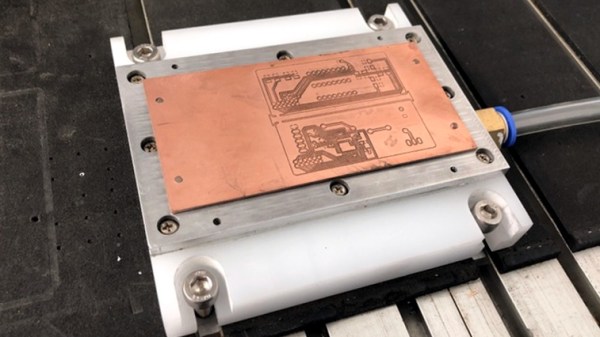
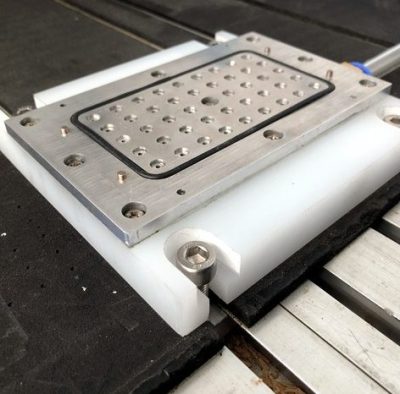
CNC milling a copper-clad board is an effective way to create a PCB by cutting away copper to form traces instead of etching it away chemically, and [loska] has improved that process further with his DIY PCB vacuum table. The small unit will accommodate a 100 x 80 mm board size, which was not chosen by accident. That’s the maximum board size that the free version of Eagle CAD will process.

When it comes to milling PCBs, double-sided tape or toe clamps are easy solutions to holding down a board, but [loska]’s unit has purpose behind its added features. The rigid aluminum base and vacuum help ensure the board is pulled completely flat and held secure without any need for external fasteners or adhesives. It’s even liquid-proof, should cutting fluid be used during the process. Also, the four raised pegs provide a way to reliably make double-sided PCBs. By using a blank with holes to match the pegs, the board’s position can be precisely controlled, ensuring that the back side of the board is cut to match the front. Holes if required are drilled in a separate process by using a thin wasteboard.

Milling copper-clad boards is becoming more accessible every year; if you’re intrigued by the idea our own [Adil Malik] provided an excellent walkthrough of the workflow and requirements for milling instead of etching.

Hold That Cam Belt Pulley In Place With This Neat CNC Work

The modern overhead-cam internal combustion engine is a mechanical masterpiece of hundreds of parts in perfect synchronisation. In many cases it depends for that synchronisation upon a flexible toothed belt, and those of you who have replaced one of these belts will know the exacting requirements for keeping the various pulleys in perfect alignment during the process.

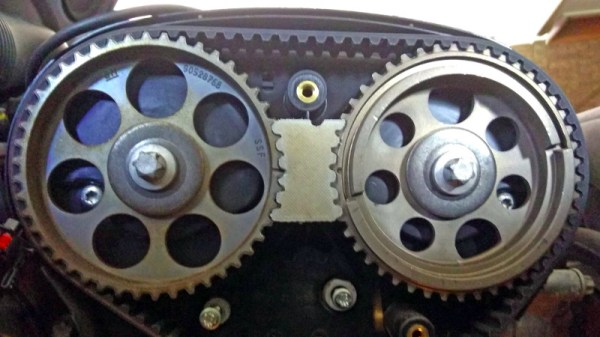
[Greolt] had this problem with a dual overhead-cam engine, particularly that the shafts would spring out of alignment on removal of the belt. The solution was one of those beautifully simple hacks that use high-tech methods to make something that is not high-tech in itself but which solves a problem perfectly. He produced a CNC-machined block of HDPE to sit between the two toothed pulleys that was machined exactly to their profiles and which once inserted kept them securely and exactly in alignment.

It’s likely that the same job could easily be done with a 3D printer, and indeed we’ve seen it done with a small piece of soft wood and a hammer. But there is something very elegant indeed about this particular incarnation that we like, it may not be the most complex of the hacks you’ll see here but we’re sure you’ll agree if you’ve ever changed a cambelt, it’s a pretty useful one.

Of course, once you’ve changed that belt, perhaps you’d like to do something with the old one.

Thanks [Brian Moran] for the tip.

Make An Impression At The Bar With A CNC Coaster Plotter

If you’re anything like us, your success with the opposite sex at the bar wasn’t much to brag about. But imagine if you had only had this compact CNC polar plotter and could have whipped up a few custom coasters for your intended’s drink. Yeah, that definitely would have helped.

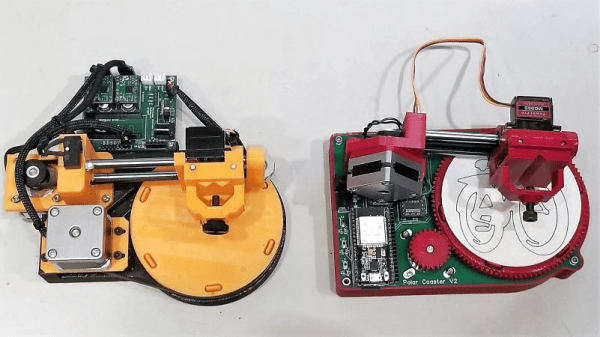
Or not, but at least it would have been fun to play with. This is actually an improved version of [bdring]’s original “Polar Coaster”. Version 2 is really just a more compact and robust version of the original. The new one has a custom controller for the steppers and pen-lift servo, and everything is mounted neatly to the main PCB. Where the original used a timing belt to drive the platter, the new one uses 3D-printed helical gears, and the steppers have been replaced by slimmer motors. It even has an SD card and smartphone UI, and the coasters look pretty good.

There’s no video of the new one, but you can see its predecessor in action below and imagine the possibilities. Snap a picture and have a line art rendition of someone plotted while you’re waiting for drinks? Just remember not to take any laser engraved wooden nickels.

Continue reading “Make An Impression At The Bar With A CNC Coaster Plotter”

Kinetic Wire Animatronics Bend It Like Disney

The House of Mouse has been at the forefront of entertainment technology from its very beginnings in an old orange grove in Anaheim. Disney Imagineers invented the first modern animatronics in the 1960s and they’ve been improving the technology ever since, often to the point of being creepy.

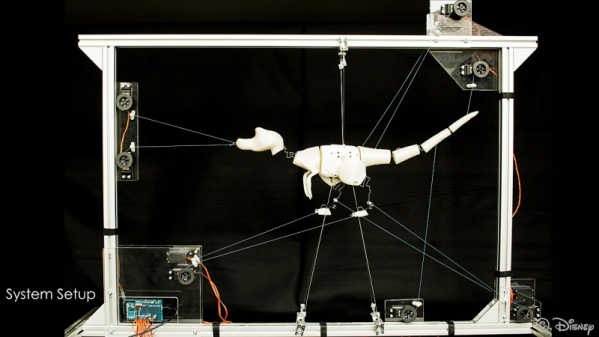
But the complicated guts of an animatronic are sometimes too much for smaller characters, so in the spirit of “cheaper, faster, better”, Disney has developed some interesting techniques for animated characters made from wire. Anyone who has ever played with a [Gumby] or other posable wireframe toys knows that eventually, the wire will break, and even before then will plastically deform so it can’t return to its native state.

Wires used as the skeletons of animated figures can avoid that fate if they are preloaded with special shapes, or “templates,” that redirect the forces of bending. The Disney team came up with a computational model to predict which template shapes could be added to each wire to make it bend to fit the animation needs without deforming. A commercially available CNC wire bender installs the templates that lie in the plane of the wire, while coiled templates are added later with a spring-bending jig.

The results are impressive — the wire skeleton of an animated finger can bend completely back on itself with no deformation, and the legs of an animated ladybug can trace complicated paths and propel the beast with only servos pulling cables on the jointless legs. The video below shows the method and the animated figures; we can imagine that figures animated using this technique will start popping up at Disney properties eventually.

From keeping guests safe from robotic harm to free-flying robotic aerialists, it seems like the Disney Imagineers have a hardware hacker’s paradise at the Happiest Place on Earth.

Continue reading “Kinetic Wire Animatronics Bend It Like Disney”

Advent Calendar – ‘Tis The CNSeason

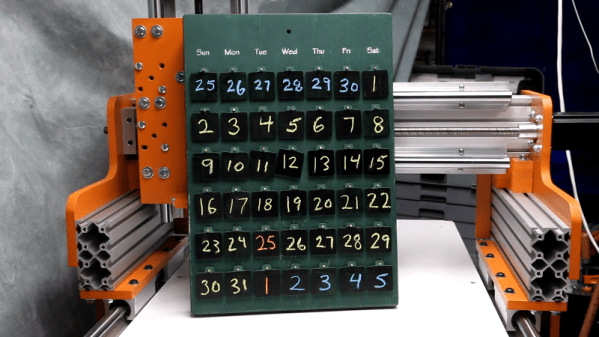
CNC machines are powerful tools when used correctly, but it’s often necessary to test a new machine before getting into serious production work. This advent calendar is a great festive project that was designed to put a CNC through its paces.

The calendar is made primarily from wood. This is an excellent choice for test machining projects, as it is softer and less likely to cause tool or machine damage when compared to steel or aluminum. The calendar base was first milled out using end mills, while a 30-degree V-bit was used to engrave the days of the week. Brass brazing rod was then used to create hangers for the calendar tags.

Thanks to the clever use of chalkboard paint and removable tags, the calendar can be reconfigured to work for any given year and month combination — just in case you wish to have an advent calendar year round. Overall, it’s a good low-intensity machining project that would also be a fun craft project for kids.

As it’s that time of year, you might like this blinky advent calendar, too. Video after the break.

[Thanks to Michael for the tip!]

Continue reading “Advent Calendar – ‘Tis The CNSeason”

The Complete Beginner’s Guide To Building A CNC Machine

Despite appearances, [This Old Tony]’s latest series has little to do with CNC-ifying an Etch A Sketch. Although he certainly achieves that, more or less, automating the classic toy is just the hook for a thorough lesson in CNC machine building starting with the basics.

Fair warning: we said basics, and we mean it. [Old Tony]’s intended audience is those who haven’t made the leap into a CNC build yet and need the big picture. Part one concentrates on the hardware involved – the steppers, drivers, and controller. He starts with one of those all-in-one eBay packages, although he did upgrade the motion controller to a Mach4 compatible board; still, the lessons should apply to most hardware.

By the end of part one, the Etch A Sketch is connected to two of the steppers and everything is wired up and ready to go for part two, the first part of which is all about inputs and outputs. Again, this is basic stuff, like how relays work and why you might need to use them. But that’s the kind of stuff that can baffle beginners and turn them off to the hobby, so kudos to [Old Tony] for the overview. The bulk of the second part is about configuring Mach4 Hobby, with a ton of detail and some great tips and tricks for getting a machine ready to break some end mills.

For someone looking to get into a CNC build, [Old Tony]’s hard-won CNC experience really fills in the gaps left by other tutorials. And it looks like a third part, dealing with making all this into something more than an automated Etch A Sketch, is in the works. We’re looking forward to that.

Continue reading “The Complete Beginner’s Guide To Building A CNC Machine”